

Today we’ve compiled a list of the Top 12 Preamp Pedals. There are tons of options in the market for this category, and of course, pedal manufacturers work hard to make specialist preamp pedals to cater to the needs of your preferred instrument.
Today’s list includes some big names that are all worth mentioning and bring something exceptional to the table. We’re covering pedals from brands like Revv, Tech 21, JHS pedals, Ampeg pedals, Boss, Darkglass Electronics, Dunlop, MXR, EBS, Electro Harmonix, Trace Elliot, and last but not least, Fender.
All the preamp pedals discussed today provide adequate tone-shaping features to the user. However, the demands and expectations of the modern musician are hard to satisfy, so all the preamps are packed with other effects and features to ensure that several of your daily music-related needs are met in one package.
So as we prepare to jump into the topic of the hour, perhaps it’s essential to refresh our memories and get some clarity on a few preamp-related questions to better understand their capabilities, purpose, and positioning.
What is a preamp guitar pedal good for & are they worth it?
All guitar amps have preamplifiers. However, a preamp or preamplifier pedal is a device that can take your weak guitar signal, add voltage gain to it and then adequately tone shape it through an EQ section so it can be understood and amplified by a guitar power amplifier.
Preamps have similar characteristics in that even when the signal from an instrument is amplified, the preamp pedal keeps things crystal clean and free of distortion. Having a pedal with such capabilities is essential for each pedalboard to carve out the sound you want.
Where should a preamp pedal go?
The great thing about music is that there are no limits. You can only be limited by your imagination and creativity. You can add a preamp pedal to your effects chain in different ways. However, ideally, a preamp should be placed after your distortion effects but before amp/cab simulators.
12 Best Preamp Guitar Pedals (On All Budgets)
1. Revv G3 Pedal
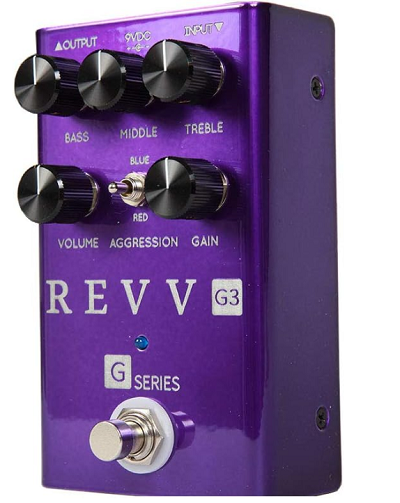
Here’s a pedal that went through a year of research and development and 16 revisions to get it right.
The idea behind all the revisions was to add more versatility to make this pedal well-suited for any type of guitar rig. Over the years, this carefully perfected unit has become a mainstay for heavy metal players because of its thick and deep distorted tone.
The Revv G3 pedal looks good in its ruggedly manufactured deep purple chassis and truly fits the bill if you’re looking for the perfect distortion pedal that brings preamp capabilities to your pedalboard. It’s a pedal that will inspire many new distorted riffs because of how great it sounds.
Key Features:
- Equalizer
Being a preamp pedal, the Revv G3 provides adequate tone shaping before your output signal reaches an amp. For this purpose, you’ll find a three-band equalizer at your disposal. The top row has three knobs labeled “Bass,” Middle,” and “Treble.” The beauty of this is that you have plenty of options to boost or cut from any register of the frequency spectrum directly with this powerful unit. - Volume & Gain
This high-gain pedal is truly a monster. It’s good to get separate knobs for “Volume” and “Gain” on the G3. When setting up the pedal, it’s recommended to have the volume turned down so you don’t damage your amp right from the get-go. Dialing in the volume carefully till you find the sweet spot is the way to go. The gain control adds more thickness or girth to the overall sound. You can fatten up those rhythms and hear your guitar chug when some palm muting is thrown into the mix. - Aggression
If you thought that the Gain knob was the only control you get to dial in some distortion, you’ve got another thing coming. Placed in the center of the pedal is a metallic switch marked “Aggression.” Having three different settings, the switch is aptly labeled and does what it says. In the off position, the pedal relies purely on the Gain control. The other two Aggression settings are called “Red” and “Blue.” The Red setting should be selected if you want the maximum gain this unit can conjure up. The mids in this setting will be more prominent and can be adjusted through the Equalizer knobs on board. Furthermore, if you want to solo, this setting is undoubtedly the way to go. The Blue mode provides more subtle variations of distortion and is much more fat sounding. You can switch between off and Blue settings to fatten up any rhythm guitar work. - Footswitch, Connectivity & Dimensions
The pedal is designed to have a standard single foot switch. Pressing the switch once activates the Revv G3, indicated by the electric blue light on the interface. Pressing it again will bypass the unit. All the input/output jacks on this one are top-mounted. The unit has quarter-inch input and output ports and a power input for the 9V power supply sold separately. Measuring 1.25″ by 2.75″ by “4.76”, the pedal weighs 0.8 lbs.
Pros:
With separate control for boosting the volume and a dedicated gain knob, the G3 does its job remarkably well. What’s more, you get a three-band equalizer to shape the tone to your heart’s content. In addition, with the variations, the built-in Aggression switch can achieve, what’s not to like about this fantastic purple powerhouse?
Cons:
With the amount of distortion this pedal can dish out, like with any metal pedal, you will need a decent noise gate pedal to keep the unwanted noise to a minimum, especially if you’re experimenting with single coils. In addition, everyone has an excellent sound they wish to get close to, but some users have complained that the EQ section on the G4 is a bit average.
2. Tech 21 SansAmp Bass Driver DI
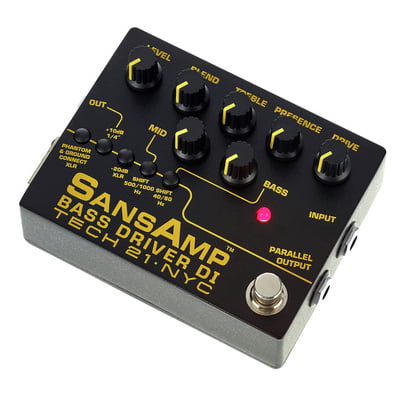
Specially designed for bass players, the SansAmp Bass Driver is loaded with adjustable parameters.
Measuring 2.0″ by 4.75″ by 3.75″, you usually see at least a couple of footswitches on a unit of such dimensions. However, the Tech 21 is sized as such to accommodate the wealth of controls on offer. Carrying forward the legacy of the classic SansAmp bass unit, this V2 model was designed keeping the modern bass player in mind.
Painted all black, the bright yellow colored lettering stands out on the contrasting background. Being a preamp-based unit, you’ll find several equalizer controls on this one, which makes tone shaping a cinch. There are a lot of goodies on this pedal that’ll tickle your fancy if you’re a hardcore bass player.
Key Features:
- Presence & Drive
Starting from the top row of controls, the pedal has a “Drive” knob on the far left that sets the level of overdrive/gain of your bass. The higher the drive value, the more sensitive the pedal becomes toward the style of play. Next to the Drive is the “Presence” knob which focuses on bringing forth the harmonic content of the upper register. You can increase or decrease this value as per preference; however, it is recommended to reduce the presence if you want to play some clean stuff or feel the need for a smoother sound. - EQ Control
Laid out in a triangular formation, the Equalizer section has three knobs: “Treble,” “Bass,” and “Mid.” Deviating from the 12 o’clock unity gain setting in either direction, the pedal offers -12dB to +12dB of boosting and cutting, depending on the requirement. But that’s not all. Under the EQ controls is a row of soft buttons, two of which are designed to deliver shifts in the bass and mid registers. The mid “Shift” button offers a change between 500Hz and 1000Hz. Similarly, with the bass “Shift” button, the frequency shifts between 80Hz and 40Hz. This mode is especially helpful if you play a 5 or 6-string bass. - Blend
The remaining two controls on the unit are “Blend” and “Level.” The Blend knob adjusts the mix between the dry signal and the tube amp simulation. Generally, if you’re working with an instrument with a piezo pickup and need more transparency in your sound, the Blend knob can be adjusted to add more dry signal to the mix. Having the knob set up can also come in handy for some applications. If you want to bypass the tube amplification section, the Blend control can be turned down fully. - Input & Parallel Output
The pedal also has many input/output options you don’t commonly see on other units. On the right side is a single quarter-inch input to connect your bass guitar. Since the Sans Amp is battery-powered, plugging a cable in the input jack automatically powers the unit on, so it’s best to keep the volume down when doing so. Next to the input is a quarter-inch “Parallel Output,” which allows the user to send the audio signal directly to a PA system without being affected. - More Outputs
On the unit’s left, you can find an XLR output with corresponding buttons for turning on phantom power or activating the pad feature that reduces the output by -20dB for high-output instruments. Next to the XLR output is another output jack with an option to boost the output by 10dB.
Pros:
The SansAmp unit from Tech 21 is nicely put together with many options and plenty of input/output options for your every need. The preamp section has a 3-band EQ with a couple of soft buttons to further alter the frequency ranges of the mids and bass frequencies. Being battery-powered, the unit is ready to go even if there isn’t a socket nearby.
Cons:
With all the chaos seen on the user interface, the clutter of controls may be a bit daunting for some. Although it’ll take some time, the pedal is great once you’ve figured it out. A power cable could be included in the package at this price point.
3. JHS Pedals Clover Preamp/EQ
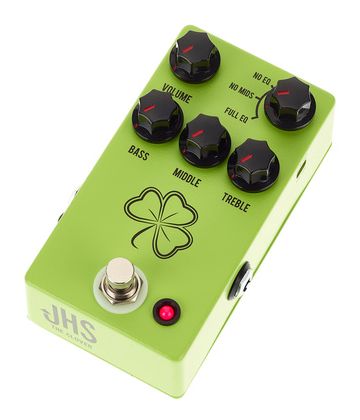
This lime green pedal has been around since 2019 and recreates some sought-after tones from decades ago.
The Clover takes most of its inspiration from the illusive Boss FA-1, a FET Amplifier from the 80s, which was made famous by the Edge. If you look this pedal up on the internet, you’ll notice that even the color scheme and knob design resemble the Boss unit from decades ago.
Having the JHS logo on the pedal gives you the peace of mind that you’re getting all the chunky goodness of the FA-1 with some modern embellishments. So, if you’re into the FET Amplifier sound and commonly employ aggressively profound overdriven sounds in your everyday playing, you need the Clover pedal on your pedalboard.
Key Features:
- EQ Selection & Volume
Before we get into the equalizer section, it’s important to mention that the pedal has a separate EQ selector knob. There are three EQ settings to choose from, which include “No EQ,” “No Mids,” and “Full EQ.” In the first setting, the equalizer controls will not affect your sound. In the second mode, only the treble and bass controls will be active, and there’ll be no tone shaping in the Mids, which is the exact configuration found on the classes FA-1 unit from Boss. Finally, in “Full EQ,” all three EQ controls are active. - Equalizer Control
On the Clover unit is a three-band EQ with separate controls for “Bass,” “Middle,” and “Treble.” The section is ideal for adjusting the tonal characteristics of your sound before the signal reaches an amplifier of the PA system. You boost the corresponding frequencies as you turn these knobs to the right. Conversely, turning in the other direction will result in a significant cutting of frequencies. - Dip Switch
If the three band knobs aren’t enough to satisfactorily shape your sound, a dip switch can be found on the pedal’s right side for further tone manipulation. The “Low-Cut” switch can be set to “On/Off” to provide an instant cut in the lower frequency range to eliminate rumbling noise. - Footswitch and I/Os
You’ll find a standard quarter-inch input on the right and a similar-sized quarter-inch output on the opposite side of the unit. Also next to the output port is an XLR output which can help establish a connection between the pedal and an audio interface or mixer. Another great feature of the pedal is that both outputs can be used simultaneously. Another dipswitch on this side of the pedal labeled “Lift” can help remove any unwanted hum. Finally, the pedal has a top-mounted input for the 9V power supply.
Pros:
The immensely popular Clover from JHS does an exceptional job bringing the Boss FA-1 back to life. The three EQ modes are all beneficial in different situations, and there is more than enough room to shape the Bass, Mids, and Treble frequencies just the way you wish.
Cons:
The JHS Clover Preamp ticks most of the checkboxes of any decent preamp pedal. The one thing to look at, especially when playing an instrument with high-gain pickups, is keeping the volume at a lower level to avoid distortion spikes while playing.
4. Ampeg Pedals SCR-DI

Specifically designed for the bass guitar, the SCR-DI is a creatively engineered preamp pedal.
The unit is excellent at what it does and brings ample controls at your fingertips to get the most out of its capabilities. The quality control on these pedals is also immaculate, as each unit is carefully examined to ensure that all the specifications are met before it is shipped to the market.
This rather large pedal has a dual footswitch design, each used to activate a different section. The footswitch to the unit’s left enables the “Scrambler” section. The second switch on the right, labeled “On/Off,” activates or bypasses the equalizer section of the SCR-DI.
Key Features:
- Inputs
The pedal has a couple of quarter-inch inputs on its right panel. The first is a regular input jack with a pad feature that helps reduce the input signal by 15dB. This feature is useful when using high-output basses or active pickups. The pad options can be activated by flipping the -15dB pad jumper button inside the unit. The second quarter-inch jack works as a “Thru” input. Any effects unit, pedal, or tuner can be connected here as this input is independent of the SCR-DI’s circuitry and will not be affected. There’s yet another pair of aux inputs: a 3.5mm jack and a quarter-inch input, which can accommodate MP3 devices/iPods. Finally, the power input can be found on the top of the unit. - Outputs
The left panel is where all the outputs can be found. You’ll notice here a balanced XLR output and a quarter-inch unbalanced output. Both outputs can be sent to a recorder/mixer. This is simply so there’ll be no need to mic your amp or cabinet, as the outputs from these ports can be directly merged with the main mix. In addition, a nifty little “Ground/Lift” button in this section can be of great service to reduce any hum noise that may be generated at the XLR output. Also next to these outputs is a separate 3.5mm output for a pair of headphones. - Volume & Aux Level
Both these knobs are tasked with adjusting the levels of different inputs and outputs. The “Volume” knob controls the levels of all the available outputs, including the XLR, quarter-inch ports, and the headphone output. The “Aux Level” knob is directly linked to different-sized Aux inputs. - Scrambler Section
The Amped pedal uses bass scrambler technology to transform the sound of your instrument. There are two knob controls in this area. You can choose the amount of overdrive and distortion you need to add to your input signal by manipulating the “Drive” control. As the knob is turned to the right, the signal becomes more overdriven. The second knob in this section is the “Blend” control which can adjust the ratio between the scrambled and dry signal. - Preamp Section – Mid
The preamp section is where all the tone adjustment magic occurs. The section features a three-band EQ, among a few other controls. The “Mid” knob controls the cutting/boosting of the mid frequencies at 500Hz. Rotating the knob can boost 5dB or a cut of 11dB. Moving to the right will help the mids shine through, while there’ll be a more subdued response in the other direction. - Preamp Section – Treble & Bass
Next to the Mids control is the “Treble” knob that works the same way and cuts or boosts the higher register at the 4kHz mark. You can cut the highs by as much as 15dB or boost the higher frequencies by 16dB. Similarly, the “Bass” knob can boost or cut the lower frequencies by +/-14dB. - Ultra Lo & Ultra Hi
While you get plenty of tone adjustment through the Mid, Bass, and Treble controls, the SCR-DI has a couple more tricks up its sleeve. If you want further enhancement in the treble range, you can increase the output at 8kHz by 5dB when the “Ultra Hi” button is pressed. The “Ultra Lo” button works the same way, focusing on adding prominence to the lower frequencies by -10dB and +1dB at 500Hz and 40Hz, respectively.
Pros:
Perhaps the most complete bass preamp pedal on the list thus far, the Ampeg SCR-DI is a force to be reckoned with. There’s a three-band EQ with additional tonal enhancement capabilities thanks to the Ultra Hi and Ultra Lo buttons. The pedal is battery-powered, which is a great feature to have. In addition, you also get additional aux inputs and a headphone output.
Cons:
Being a tremendous all-in-one pedal, little about the SCR-DI can be disliked. However, some users have had trouble using pickups with lower outputs as it gets harder to drive the pedal, and as you crank the volume up, the noise floor is also raised to an annoying level.
5. Boss AD-2 Acoustic Preamp
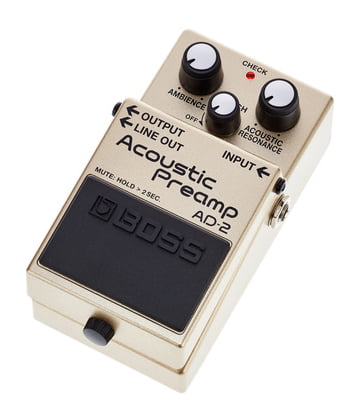
This pedal from Boss has been carefully designed to cater to the needs of the acoustic guitar player.
It’s hard to assemble a list of pedals without throwing some inovatively designed Boss units into the mix. The AD-2 is one such product that employs out-of-the-box thinking that has been the brand’s hallmark since its inception fifty years ago.
What makes Boss such a quality brand is how their pedals are designed. You will likely find sturdy construction on a typical pedal, plenty of cleverly engineered controls, and multiple input/output options. The AD-2 also carries forward the same approach as we’ll discuss in greater detail below.
Key Features:
- Resonance
The pedal’s layout is relatively simple, with just enough going on to arouse the user’s curiosity. There are three control knobs on the AD-2, one of which controls the “Acoustic Resonance.” Just like the acoustic guitar’s sound hole creates resonance, the resonance control on this pedal takes things a step further and adds resonance to the output signal digitally. Turning the knob to the right increases this parameter. - Ambiance
There’s also an “Ambience” knob on the AD-2 that has several tonal advantages. It works as a reverb control which can be altered to create a small room feel or a more prominent hall-type vibe depending on the sound you’re looking for. As the knob is turned clockwise, a wider ambiance is generated. - Notch
The “Notch” control is crucial. Whenever an acoustic guitar is plugged into an amp, you’re bound to hear some feedback. While feedback on a distorted electric guitar signal can be used well, acoustic feedback is unpleasant and a real menace. To battle this problem, the Notch knob can be altered. If there’s no feedback, the recommended setting for the Notch knob is to the far left, which turns the parameter off. But as soon as feedback is noticed, the control can be moved clockwise/counterclockwise to locate the unwanted frequencies and cut them. - Inputs/Outputs
On the pedal’s right is a quarter-inch input knob for your semi-acoustic guitar. To the left, you’ll find a pair of quarter-inch outputs. The first, labeled “Output,” can connect to an acoustic-electric guitar amp. The second output, marked “Line Out,” is designed to establish a connection between the pedal and a mixer or recorder. - Footswitch
The footswitch on the AD-2 has multiple functions. Firstly, it can be used to turn the pedal on or off. Secondly, if you wish to tune your instrument, you can press the switch for a few seconds to mute your sound. The pedal also has a thumbscrew that can be loosened to reveal the battery compartment underneath the pedal switch. The AD-2 can be powered by a 9V battery and turns on automatically when the battery is inserted, and a quarter-inch cable is plugged into the input.
Pros:
You can add much character to your acoustic guitar tone if you have the AD-2 on your pedalboard. You can add subtle nuances to your sound or transform it with separate controls for reverb and resonance. In addition, the Notch control is great for curbing any feedback issues.
Cons:
While the Notch feature is cleverly executed to kill any feedback, it comes at the expense of some tone loss. Perhaps the think tanks at Boss need to revisit the width of the Q and readjust it so that minimum tonal degradation occurs when controlling the feedback.
6. Darkglass Electronics Alpha Omicron Bass Preamp/OD
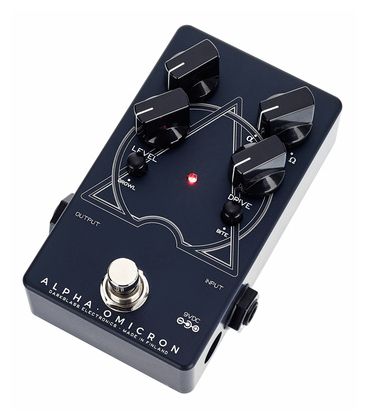
Here’s Darkglass Electronics’ version of a specialist bass preamp unit that performs well.
This dark-painted pedal with the cool Alpha & Omega graphic in the center is uniquely designed, as it has a few hidden goodies under the hood. Dubbed “The beginning and the end,” the Omicron Bass Preamp gives your bass guitar a rich harmonic sound that can easily cut through the mix.
Packaged in a much smaller form factor, the Alpha Omicron delivers the same sound signature made famous by its elder brother, the Alpha Omega but takes hardly any space on your guitar rig. You’ll also spend a lot less while still having access to some analog goodness and multiple distortion modes.
Key Features:
- Blend & Level
The layout seems simple, with four knobs and a couple of soft buttons that perform different functions. Starting from the top left, the “Blend” knob is designed to mix the clean signal with the wet or processed signal. This ratio can be set to enhance one signal over the other depending on the need of the hour. The neighboring “Level” knob comes in handy to add an extra dimension to the wet signal, as you can increase its volume to pierce through the overall mix. - Mod & Drive
The circuitry inside the metallic exterior is designed to offer two distortion modes: Alpha & Omega. As you move the “Mod” knob to the left, you’ll get more Alpha. Go the other way, and the Omega distortion circuit will take over. Both have different tonal characteristics: the Alpha setting is more articulate and tighter, whereas the raw-sounding Omega is a bit harsh and rough. The self-explanatory “Drive” control adds more gain and depth to your bass guitar. - Growl & Bite
If you’re searching for the traditional three-band EQ knobs you’ve come across on most preamp pedals thus far, the Alpha Omicron manages this differently in the form of two soft buttons. If the objective is to get more saturation and girth in the lower echelon of the frequency spectrum, the “Growl” button will help you achieve this sound. The nearby “Bite” button favors the high mids more when pressed and delivers more presence around the 2.8kHz region. - Footswitch and Connectivity
Nothing fancy about the footswitch on this unit, as it simply serves the purpose of activating or bypassing the unit. The LED in the dead center of the pedal lights up when the pedal is on. Apart from this, the Alpha Omicron is flanked by quarter-inch jacks on either side for input and output, and the power input on the right takes power from a 9V power supply sold separately.
Pros:
There’s minimal complication as the layout is kept simple. The two distinct modes of distortion provide various options for rhythm work and bass solos. Frequency boosting and cutting can be managed instantly by pressing the relevant Growl and Bit buttons. All of this is done while keeping things nicely compact and affordable.
Cons:
While the dual distortion feature is great, the tone-shaping aspect of the Alpha Omicron is a bit limited. Most users may find that separated frequency band knobs are more helpful in dialing the right amount of cutting or boosting than buttons with fixed settings.
7. Dunlop EP101 Echoplex Preamp
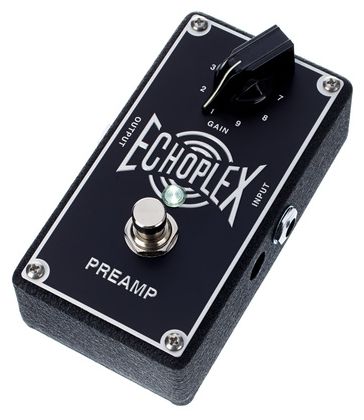
You can toss the user manual out the window, as the EP101 is the most straightforward pedal to use.
The “Echoplex” name may fool you into believing this is just a delay pedal modeled after the classic Echoplex tape delay unit from the 1960s. However, you’ll be surprised to know that the Echoplex Preamp pedal has nothing to do with the delay effect and acts as a preamp boost.
It’s easy to dismiss such an uninteresting-looking single-knob pedal without giving it a chance. However, bear with us as you’ll notice when you read further that this Preamp unit can be a great always-on pedal for your setup. Simply leave it on and see how your signal gets more boost and an enhancement of sustain.
Key Features:
- Gain Knob, Footswitch & Power
The “Gain” knob controls the only parameter on the Echoplex preamp pedal. Labeled 0 – 9, you can add as much as 11dB of Gain to your signal. Also on the pedal is a footswitch that turns the pedal on or bypasses it completely. When the blue LED is illuminated, the pedal is on. In addition, the EP101 can be powered by a 9V battery. Removing the bottom plate underneath the unit can give access to the battery cavity. - Recommended Usage
The cable coming from your guitar must be plugged into the quarter-inch jack on the pedal’s right. The cable plugged into the output jack on the unit’s left can be connected to an amp or the next pedal in the chain. The recommended setting for the gain knob when powering the unit is at the 12 o’clock position. You can then increase the gain by moving the knob clockwise as desired. - The Order
There are many ways that this preamp pedal can be placed in your effects loop. Firstly, you could have it at the end of the effects chain just before the amp so that the tone shaping can be applied to all the pedals before it. The second option is to have it after your distortion pedals but before all modulation effects to achieve a slightly different sound. The third way to position your EP101 can be at the beginning of your effects chain so that the uncolored signal is first boosted and then sent to the rest of the effects chain. This can come in handy for solo work.
Pros:
Extremely simple to use, the EP101 is ready to go right out of the box, as you hardly need any time to get properly acquainted with its controls. The Gain knob has enough range to add an 11 dB increase in the gain level, depending on how profound you want the boosting to be. You can even add a slight overdrive by going past position 7.
Cons:
While the preamp subtly shapes your tone, it is more of a boost pedal than anything else. Most users won’t waste time dismissing this unit as a one-trick pony. However, for those who want more, perhaps a unit with more controls and equalizing options would do the trick.
8. JHS Pedals Color Box V2
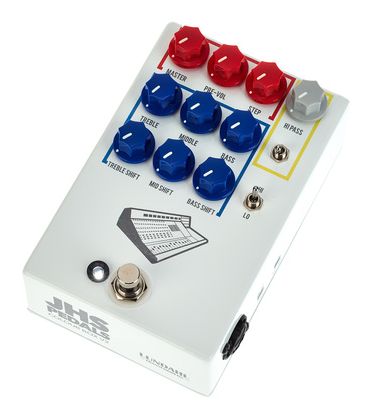
The aptly named Color Box V2 from JHS looks like it comes straight from a children’s coloring book.
The folks at JHS are always up to something creative, and this pedal is an excellent example of that. The unit not only has a comprehensive equalizer section but also adds some analog warmth to your tone. Why shape your tone using an expensive amp when you can do the same by using this deeply versatile preamp pedal?
With its striking red and blue knobs, this rather bulky pedal measures 1.87″ by 3.75″ by 5.7″ and will require a lot of re-arrangement on the pedalboard to make room for it. But hey, having a larger pedal usually means that you have a ton of controls at your disposal, which is precisely the case here.
Key Features:
- Master, Pre-Vol, Step
The “Master” and “Pre-Vol” controls go side by side. The Master knob acts as the master volume for the unit. When the knob is moved clockwise, the volume increases, and the sound remains nice and clean. However, the Pre-Vol works like a gain control, so as the knob is moved to the right, more distortion is added to the tone. The idea is to find the right blend between the volume and distortion to avoid unwanted noise. There are five preamp stages that the Color Box V2 offers. With the “Step” control, the gain on each step can be altered by 18dB, 23dB, 28dB, 33dB, and 39dB, respectively. - Treble, Middle, Bass
The next six knobs on the pedal all contribute towards tone shaping. The top three knobs control the Bass, Mids, and Treble. You can easily adjust any of these frequencies as the controls allow boosting/cutting of 17 dB. Combining the “Shift” knobs with the Bass, Mids, and Treble control will yield the most fruitful results. - Treble Shift, Mid Shift, Bass Shift
These three knobs are engineered in such a way that they set the frequency range each corresponding knob will be able to boost or cut. In other words, the center frequencies can be adjusted here. The treble frequencies can be centered at 10kHz, while the mids and bass are centered at 1kHz and 120Hz, respectively. - Hi-Pass
A separate section on the top right has the “Hi-Pass” knob. As you would’ve guessed, this controls how much of the higher frequency can pass through. The adjustment range here is between 60Hz and 800Hz with a slope of 6dB per octave. The switch below the knob can activate or deactivate the high-pass filtering. - Hi/Lo Switch
The “Hi/Lo” switch becomes very useful if you’re looking for more headroom. Deciding on which setting to activate is fairly simple. It all depends on what you’re playing. The Lo setting is ideal if you want to play cleaner sounds with little or no gain. The Hi mode activates distortion and is perfect for heavy stuff that requires an overdriven, distorted, or fuzz tone. - Connections & Footswitch
The right side of the pedal has a combo XLR/quarter-inch jack. The sky is the limit with this one. You can connect guitars, keyboards, and drum mics to this preamp pedal. On the other side are separate quarter-inch and XLR outputs. The unit has a top-mounted power input and can be powered by a regular 9V battery. Also on the pedal is a single foot switch with an LED that indicates when the Color Box is on or bypassed. - Side Buttons
You’ll find a couple of switches on the right side of the pedal. The “-20dB” pad function is ideal for subduing transient sounds from louder/high output instruments and helps prevent clipping when activated. The feature remains active even when the pedal is turned off. The second “INST/XLR” switch determines which input to activate. In INST mode, the quarter-inch input lets the signal from an instrument pass through. The XLR setting must only be activated when an XLR cable is connected.
Pros:
While some pedals are specifically designed for stringed instruments, the Color Box takes on all kinds of instruments thanks to the combo jack on board. A detailed three-band EQ with three frequency shift knobs to set the center frequency in each band gives you plenty of room to carve out the perfect sound. In addition, the Hi/Lo switch is a Godsend.
Cons:
With so many tone-shaping options, few pedals can do what the Color Box does so effortlessly. That is, if you’re willing to overlook the hefty price tag. In addition, although not too big, the pedal is a bit chunky, so smaller pedalboard owners, beware.
9. MXR Bass Preamp M81
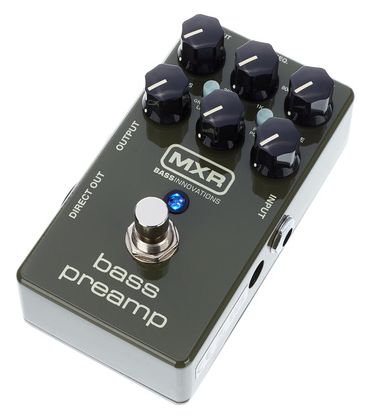
Here’s a worthy member of Dunlop’s MXR pedal range that sounds great and is built like a tank.
An innovative bass preamp, the M81 is powered by CHT or Constant Headroom Technology. This ensures that the pedal delivers studio-quality performance with a bass tone that has immense clarity and pristine sound. All these qualities make it a pedal preferred by bass players worldwide.
Thanks to multiple output options, the pedal can be introduced to your current setup in several ways. You can choose to put the M81 at the beginning of the setup, so the preamp controls affect the signal before it goes to the rest of the effects chain, or you can place it right at the end to give your tone slightly different characteristics.
Key Features:
- Output & Input Knobs
The pedal has two rows of three knobs, each of which contributes in some way toward tone shaping. Much like the controls found on audio interfaces, the pedal features an “Output” and “Input” knob, where the former controls the overall volume of the output signal. The latter, however, is not purely a level knob for the input signal but acts as a pre-equalizer gain control. As the knob is moved to the right, the gain increases. - Three Band EQ
Commonly found on most preamp pedals, the MXR M81 sports a three-band equalizer. The “Bass” and “Treble” knobs help boost or cut the respective frequencies to brighten or darken the overall tone. Both knobs, when turned clockwise, boost the relevant frequencies. - Mid Control
The mid-controls are relatively more detailed. There are two knobs where the “Mid Freq.” sets the frequency at which boosting or cutting occurs. The frequency values range from 250Hz to 1kHz. Once the frequency is set, the “Mid” knob is responsible for setting the amount of boost or cut. - Buttons
Between the two rows of knob controls, two buttons can be found. The “Ground Lift” button comes in handy when you’re facing noise or hum in the lower register. Simply press the button and hear the noise disappear. With the second button labeled “Pre/Post,” the user can decide if the “Direct Out” signal will be affected by the current settings. - Connectivity
Starting from the right, the pedal has a power input for the 9V power supply. The good thing about the M81 is that a 9V battery can also power it. Next to the power port is the quarter-inch input for your guitar. The left side has two output options. Firstly the “Output” jack provides bass amp connectivity. There’s also an XLR “Direct Out” jack on the left panel to connect the unit to a mixer.
Pros:
Clever engineering and innovative execution have become a hallmark of MXR, and the M81 is no different. The pedals host a three-band EQ and dedicated buttons for hum reduction and changing the behavior of the direct output. The middle frequencies can be meticulously adjusted, and the input knob can add plenty of gain to your bass signal.
Cons:
Another great pedal by MXR, the M81, is a handy addition to the pedal collection. Perhaps the only complaint could be how the layout is designed. The buttons would’ve been better off if they were excluded from the vicinity of the nearby controls as you’re bound to disturb the knobs while attempting to press them.
10. EBS MicroBass 3 Professional Outboard Preamp
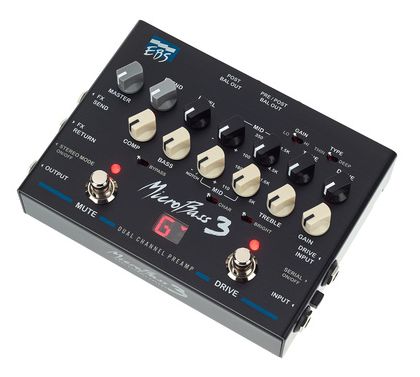
Dubbed the “Dual Channel Preamp,” this preamp pedal from EBS has a lot going on.
Just one look at the MicroBass 3, and you’ll realize that as far as bass preamps go, things don’t get any more comprehensive than this pedal. Control knobs, multiple toggle switches, a dual switch design, you name it, and you’ll find it on this multifunctional dual channel preamp.
The knobs are color-coded to depict their different functionalities. The white ones are associated with the clean channel, and the black ones alter the drive channel. There’s also a set of gray knobs that work on both channels.
Key Features:
- Drive Channel: Drive, Tone & Switches
The first knob marked “Drive” controls the gain of the drive channel. When the knob is turned up, there is an additional gain of 40dB. In addition, you’ll also notice that with the gain value turned up, the signal gets compressed. The nearby “Tone” knob controls the frequency range of the channel. There’s also a “Type” switch that works in conjunction with the Tone knob and toggles between “Thin” or “Deep” tonal modes. A “Gain” switch in this section changes the behavior of the Gain by offering “Hi” gain or “Lo” gain settings. - Drive Channel: Mid Controls & Level
There are two mid-controls in this section. The knob on the right is labeled with values ranging from 100Hz to 4.5kHz. You can set the center frequency anywhere between these values. The knob on the left marked “-/+” is then used to boost or cut according to the situation’s demand. Finally, the last knob in this section is used to set the volume “Level” of the channel. - Clean Channel: Gain
The next section hosts a row of white knobs programmed to work with the clean channel. The first knob here is the “Gain” knob. You can tell when the gain on the clean channel is set just right as the gain led starts flashing. Too much gain will disturb the signal, which may eventually start to clip. - Clean Channel: Treble, Mid, Bass
There are 4 controls in the equalizer section of the clean channel. The “Treble” knob boosts or cuts the higher frequency register. A switch below the knob can be set to “Bright” to ensure noiseless brightness in the treble region with a 10dB gain at 10kHz. The dual “Mid” section works similarly to the drive channel and has a knob that sets the center frequency between 110Hz and 5kHz and another knob used to cut/boost accordingly. Finally, the bass control offers 12dB per octave filtering. Under the Mid knobs is a character switch that enhances the bass and the treble while slightly cutting the mids. In addition, if the EQ section needs to be bypassed, the “Bypass” switch can be toggled. - Clean Channel: Comp
The clean channel has a dedicated “Comp” knob that controls the blend between the dry and compressed signal. When the knob is turned clockwise at higher values, you’ll get more tightness in the sound as the compression level increases compared to the input signal. - Universal Controls: Master & Blend
Apart from the black and white knobs, the gray knobs apply to both signals simultaneously. The “Master” knob is a master volume control for both channels. The “Blend” knob is very useful as it allows merging the clean and the drive channel. This opens doors to lots of fascinating applications. - Connections
The MicroBass 3 has three panels around it that are entirely loaded with inputs and outputs. The pedal has a quarter-inch drive and clean inputs on the right panel. There’s also a “Serial” on/off button to select or deselect the two channels. The left panel has “FX Send” and “FX Return” jacks as well as a quarter-inch output. A “Stereo” on/off button also pairs the FX Return jack with the output jack for stereo operation. The back panel has two XLR outputs and a headphone output. Finally, there’s also an aux input and a power port for the 9V power supply.
Pros:
Shape the bass tone to your heart’s content. You’ll never run out of controls or input/output options on this preamp pedal. Perhaps the only 2-channel unit you’ll ever need, the MicroBass 3 has full-fledged tone-shaping controls for your clean and drive channels. You also have the freedom of merging both channels or isolating them when required.
Cons:
This bass preamp has so much to offer. But even so, you’ll think twice about coughing up the dough if you don’t need every feature the MicroBass preamp offers. Perhaps something simpler and more economical may appeal to most of you. It’s all a matter of preference.
11. Electro Harmonix Analogizer Tone Shaper
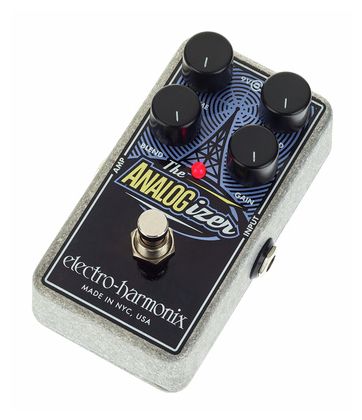
So, what can you expect from Electro Haronix’s version of a preamp pedal?
As the name suggests, you can be sure of one thing. The “Analog” user will add warm analog goodness to your digital guitar signal. Moreover, the pedal sounds equally great regardless of where you place it in your current setup.
You could start with the Analogizer by plugging the guitar directly into it and patching it to an amp or the next pedal in your effects chain. You could also place it at the end of the chain so that all the processed sound passes through it before entering an amp/PA.
Key Features:
- Gain
Contrary to some of the more complex pedals on today’s list, this offering from Electro Harmonix is relatively modest in its controls. However, the pedal has everything to get a decent job done. Starting with the right side, the “Gain” knob adds gain to your input signal when the knob is moved to the right. The gain value can be set anywhere between 0dB and 26dB. - Spread
Being a multitasker, the Analogizer will surely surprise you. Above the Gain control is the “Spread” knob which acts as a delay control. You can set the delay value between a wide range of 3.5 milliseconds to 65 milliseconds. When moved to both extremes, the Spread control also adds subtle variations to your guitar’s tone. - Blend
The “Blend” control is similar to the Mix knob on some reverb pedals. You can set the ratio between the wet and dry signal here. While a 50-50 mix between both signals can be a preference for some situations, you can easily eliminate one or the other by moving the knob entirely to either side. - Volume
Finally, the fourth knob labeled “Volume” controls the level of the pedal’s output. Turning the knob to the right increase the volume of the output signal. If you were to open the pedal up and look inside, you’d notice that the circuit board is put together in a way that places the Volume control after the Blend section. - Connectivity
The pedal’s input/output layout is nothing out of the ordinary. On the right is the usual quarter-inch input with a similar-sized output jack on the left panel. On the top of the pedal is where the power input is placed. If you’re at a gig and left the power supply at home, you can pop in a 9V battery and jam away unhindered. The single footswitch design makes the pedal nice and compact. The switch is responsible for powering the unit on or bypassing it.
Pros:
The simple execution of this pedal is its strength. The Blend knob helps you decide how much of the signal from the guitar will be added to the processed signal. The Analogizer is also somewhat of a multi-effects pedal, as you can add gain or delay to your signal by turning the relevant knobs. In addition, the unit is very affordable for what it does.
Cons:
While there’s a decent tone shaping on offer, the pedal lacks a full-fledged Equalizer section with separate Mid, Treble, and Bass controls. Also, significant noise is added as soon as the gain knob is rotated past the 12 o’clock position. However, being exceptionally affordably, perhaps these flaws can be overlooked.
12. Trace Elliot® Transit™ B Bass Pre-amp & Effects Pedal
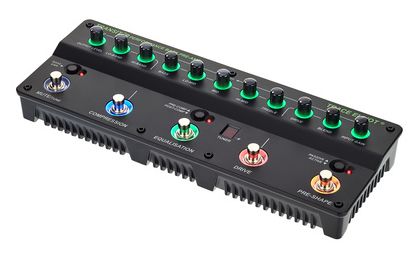
Very unique and equally versatile, the Transit B is a must-have for bass players worldwide.
Being in the bass effects pedals business for the past four decades, the English manufacturer by the name of Trace Elliot has a vast portfolio of pedals, multi-effects units, preamps, amplifiers, and cabinets. The Transit B preamp is excellent if you’re a bass player looking for the utmost control over your sound.
Decorated with terrific ring lights around the knobs and footswitches, the Transit-B looks wicked cool when running on all cylinders. The layout is nicely organized, with similarly functioning controls categorized into sections that can be toggled on or off as required.
Key Features:
- 5-Band Equalizer
The Transit B preamp is a special unit as it has something that no other pedal on the list has…a whopping five-band EQ. The bands are categorized as “Bass,” “Lo-Mid,” “Mid,” “Hi-Mid, and “Treble” and have dedicated controls for boosting and cutting. There’s a footswitch below the EQ section, which can activate or deactivate the equalization. - Input Gain, Blend & Drive
The amount of gain on your guitar signal can be controlled by the “Input Gain” knob. When turned clockwise, more gain is added to the input signal. However, to avoid clipping, it’s best to set the knob between the noon and 2 o’clock position. The second knob in this section is the “Blend” knob, which can merge the drive and clean the signal. Finally, the drive signal’s gain can be altered using the “Drive” control. Below this section is a dedicated footswitch to turn on the drive channel. - Output Level, Lo-Band & Hi-Band
On the far left, the unit has an “Output Level” knob which controls the output volume. However, the knob has no control over the direct XLR outputs. Next, are two knobs marked “Lo-Band” and “Hi-Band.” The preamp pedal has a built-in compressor that can be activated or bypassed by pressing the footswitch below. The Lo-Band and Hi-Band knobs are designed to control the amount of compression on the bass and treble frequencies. - Pre-Shape
The footswitch on the far right is labeled “Pre-Shape” and is the hallmark of the classic Trace Elliot circuitry. Pressing it activates a preset that subdues the mids and enhances the highs and the lows. The result is a crispness in sound and instant clarity. - Misc. Controls
The first footswitch from the left can either mute the pedal or activate the built-in tuner. When activated, the small single-letter display indicates whether the played note is sharp, flat, or in tune. Also on the preamp pedal are three soft buttons with varying functions. If the aim is to hear more of the lower frequencies, the “Bass ENH.” or Bass Enhancement feature can be activated. Another creative way to operate the pedal is to choose whether to apply compression before or after the equalizer. This can be achieved by pressing the “Pre-Comp/Post-Comp” button. Finally, depending on your bass guitar’s pickups, you can activate the active or passive pickup setting for the best results. - Inputs & Outputs
All the connections can be found on the back panel of the unit. There’s a quarter-inch instrument input on the left next to which is a “Dry Out” port. The “Line” and “Inst” (instrument) outputs are also of the quarter-inch variety. You’ll also find pre and post-equalizer XLR outputs for connecting to a power amplifier of a PA system. Finally, the pedal also had an aux input and a headphone output which will surely come in handy at some point. The “Gnd Lift” button instantly removes any unwanted hum/noise.
Pros:
Bass players of today can truly unleash their creativity by employing the Trace Elliot pedal in their live performances and studio recording. Not only does the Transit B preamp pedal offer a 5-band equalizer but you also get one-touch buttons for instant changes in tonality, a built-in tuner with a supporting display, and a plethora of inputs and outputs.
Cons:
This is one heck of a bass preamp, with almost everything executed to perfection. However, the tuner is a bit below average in accuracy, and the Bass enhancement is not as profoundly noticeable as it should be. But if you think you can manage the relatively higher price, this is the bass preamp to get.
Bonus:
Fender MTG:LA Tube Distortion
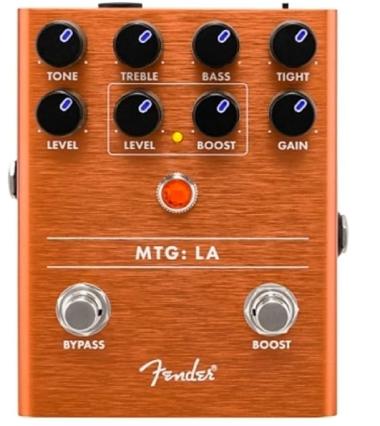
This preamp pedal is the product of a collaboration between Fender and Bruce Egnater of Egnater amps.
Belonging to Fender’s MTG series of pedals, the LA preamp features a vacuum tube that runs at high voltages giving way to amp-like characteristics. This means you can reduce the volume, and the tone will lose its dirt, becoming nice and clean sounding.
The pedal has a true bypass and won’t inadvertently color the tone. The LA has a dual switch-based form factor with illuminating knobs, a common feature of all pedals belonging to the MTG series. Another essential characteristic of the preamp pedal is that it possesses an all-analog circuit.
Key Features:
- Tone, Treble, Bass & Tight
To use the aforementioned high-voltage vacuum tube, the “Tone” knob can be turned to the left to quell treble frequencies and vice versa. Think of this knob as a guitar’s tone control. The “Tight” knob engineered by Bruce Egnater himself can clean up the tone and add clarity in high-gain scenarios. If that’s not enough for you, the LA preamp pedal also has dedicated “Treble” and “Bass” knobs to allow ample room for boosting and cutting. - Level & Boost
Also on the LA pedal is a boost section with “Boost” and “Level” controls. If you’re looking to add saturation more saturation to your sound, the boos knob is your friend. The Level knob can then be used to control the overall output volume. The footswitch on the right activates the boost section when the gem led in the unit’s center lights up. - Gain & Level
The remaining two knobs on the pedal include a “Gain” knob and another “Level” knob. Throw some distortion into the mix by turning the Gain knob up to your heart’s content. Once the intensity of the distortion effect is set, use the level knob to control the output level of the distortion. - Connections
There’s nothing too fancy going on in the inputs/outputs department. The pedal’s right side has a standard quarter-inch input, and the opposite side hosts a quarter-inch output. The top section of the unit has an input jack for the 9V power supply. Also, next to it is a button to turn off the knob lights in case you find them too distracting or just want to save power.
Pros:
The pedal looks great and sounds fantastic. The EQ section has four controllable parameters for shaping your guitar tone, and the boost and distortion section does the rest. You won’t want to put your guitar down once you hear the clarity and articulation the MTG LA Tube Distortion pedal delivers.
Cons:
Fender has done a decent job with this pedal. It sounds great and does a lot. However, the MTG LA does tend to get a bit noisy in some setups. Also, the Treble changes are a bit subtle and need to be a bit more noticeable.
Conclusion
Now that you’ve gone through the post, you must’ve realized how we’ve made a diverse selection of pedals today, ensuring that the list has something for everyone. If you’re an electric guitar player, the preamp pedals you can look into are: Revv G3, Dunlop EP101 Echoplex, Electro Harmonix Analogizer, Fender MTG: LA Tube Distortion, and any one of the two JHS pedals (Clover & Color Box V2)
On the other hand, the bass players reading this post can opt for the SansAmp Bass Driver, the Ampeg SCR-DI, Darkglass’s Alpha Omnicron, MXR M8, the MicroBass 3 from EBS, or the Trace Elliot Transit B unit. The Boss AD-2 is an excellent choice to add an acoustic preamp pedal to your pedal board.
The Echoplex preamp is the simplest pedal on the list and works as well as an always-on pedal in your rig. The most comprehensive preamp pedals include the Sansamp Bass Driver, the EBS MicroBass3, and the Trace Elliot Transit B.
The Fender MTG: LA features a vacuum tube inside running on high voltage to offer warm tonality and more control over tone shaping. The Revv G3 is another killer pedal that combines punchy distortion with a 3-band equalizer.
All the pedals on the list have the same agenda but different execution. It is up to you to pick what works best for you. Head on to your nearest guitar store and see what you can find. Good luck and happy jamming.

The Integraudio Editorial Team consists of experienced music producers, audio engineers, and plugin enthusiasts dedicated to providing in-depth reviews and guides for music production software.