

In this guide, I round up the 8 best noise reduction plugins in 2025, including a few freebies that punch way above their weight.
Clean mixes don’t happen by accident; sometimes they need a little help scrubbing away the hums, hisses, and clicks that sneak into recordings. That’s where noise reduction plugins step in, giving you the power to polish vocals, guitars, podcasts, or even old vinyl samples without losing the life of the performance.
I’ve tested quite a few over the years, and some of them feel like magic when you hear a noisy take suddenly turn smooth and studio-ready. The trick is finding the right balance between cleaning up unwanted noise and keeping the natural character of the recording.
That’s why I put together this list: to highlight the tools that actually deliver without making your audio sound like it’s been run through a robot vacuum. Whether you’re dealing with studio takes, live recordings, or field audio, these tools can help you cut the clutter and keep your sound crisp, clear, and professional!
1. Supertone Clear
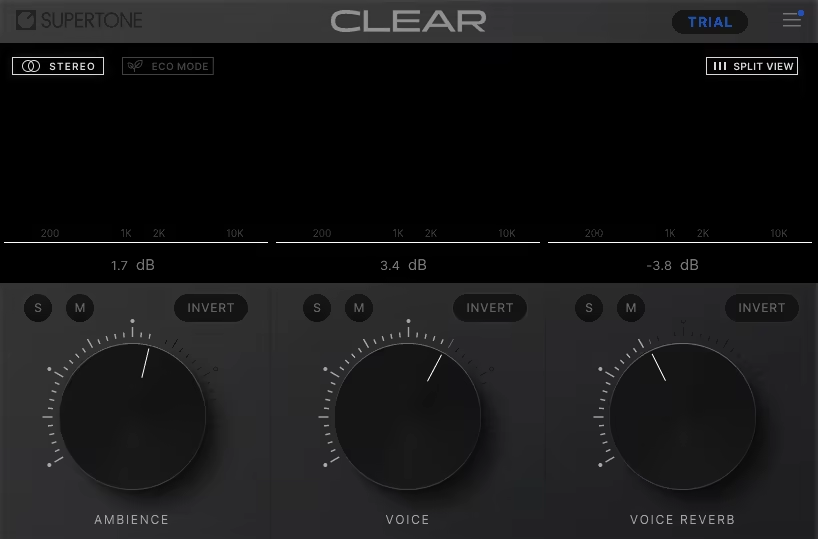
Unlike most noise reduction tools that just quiet the background, Supertone CLEAR feels like it peels away everything you don’t want while leaving the natural voice untouched.
I’ve used it on chaotic podcast recordings, reverb-soaked vocals, and even field recordings, and it’s amazing how it separates voice, ambience, and reverb so cleanly, you get surgical control without sounding robotic.
The interface is brilliantly simple yet powerful. Three knobs control the main channels, and the combined/split visualization shows exactly what’s being processed. I enjoy how quickly I can sculpt clarity and hear results instantly, and the low CPU mode means I can leave it running on heavy sessions without worrying about lag.
- De-Noise & De-Reverb with Minimal Artifacts
CLEAR’s neural network excels at removing background noise and taming room reflections while keeping vocals natural. I’ve compared it to other plugins, and the results are consistently more transparent.
- 3-channel Separation
This is where CLEAR shines. Being able to dial the voice up while controlling ambience and reverb independently opens up creative possibilities I didn’t have with standard noise reduction tools.
- Real-time Processing
Whether streaming live or tracking in the studio, Live Mode gives zero-latency clarity. It’s perfect when you need instant results without freezing your workflow or sacrificing audio quality.
For ultra-dense mixes or high sample rates, bumping the I/O buffer slightly improves smoothness, but other than that, it’s plug-and-play brilliance. I’ve even used it to isolate ambience creatively or remove dialogue for sound design, which makes it feel more like a versatile audio sculpting tool than just a noise reducer.
CLEAR is a great tool for podcasts, music, streaming, and post-production. Whenever I need vocal tracks to feel “present and alive” without background clutter, this plugin gets the job done.
Supertone CLEAR comes in AU, VST3, VST, and AAX formats for macOS and Windows users.
2. Klevgrand Brusfri
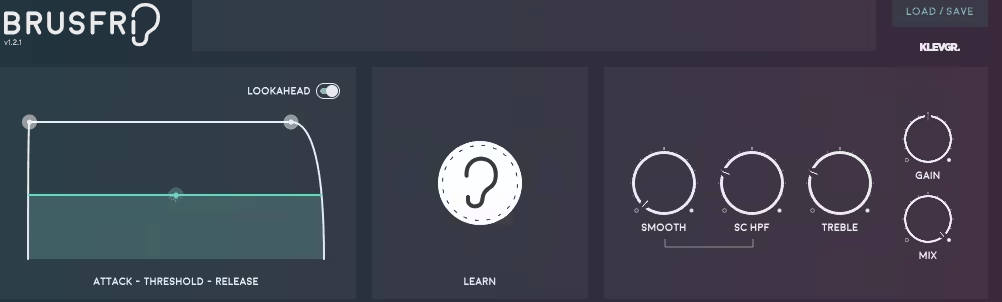
Brusfri stands out because it doesn’t just “quiet” your audio; it feels like it surgically removes unwanted hiss, hum, and fan noise while leaving the original sound intact.
What’s brilliant is how it uses a clever system of multiple narrow-band expanders instead of phase-altering tricks, so your original sound stays vibrant while the noise disappears.
The interface feels more like a sound sculptor’s tool than a typical noise-reduction plugin. Hit Learn for a few seconds on a snippet of your unwanted noise, and Brusfri instantly sets up a tailored set of expanders.
From there, you can finesse Attack, Threshold, and Release, or add sparkle back with Treble, smooth out the noise with Smooth, or cut out rumble with HPF. It’s intuitive, visual, and surprisingly playful; you can almost “hear” the plugin thinking.
- Intelligent Noise Learning
Brusfri only needs a couple of seconds of noise to understand your problem. I fed it an aircon hum from a home studio and watched it quietly erase it without messing with the vocal above it.
- Frequency-Sliced Expanders
Instead of blasting the audio with heavy-handed algorithms, the plugin gently tames each spectral slice individually. The result? Clean audio without the weird artifacts you sometimes get from other noise reducers.
- Tonality Tweaks
Heavy noise can dull the brilliance of instruments like acoustic guitars or pianos. With the Treble and Smooth controls, I can restore harmonic shine while keeping the background quiet, a game-changer for tricky recordings.
Brusfri isn’t flashy or AI-powered, but that’s exactly its charm. It’s a quiet workhorse that does its job efficiently and transparently. I’ve found it ideal for both music and voice work, anywhere you want clarity without overcomplication.
If simplicity and sonic integrity matter to you, Brusfri might just become the plugin you reach for first.
Klevgrand Brusfri comes in AU, VST2, VST3, and AAX formats for macOS and Windows users.
3. Waves Clarity Vx Pro
What sets Waves Clarity VX Pro apart from other noise-reduction plugins is how it doesn’t just remove noise, it actively separates voice from ambience with uncanny precision.
I’ve tried plenty of noise-reduction tools over the years, and most either flatten the sound or leave weird artifacts, but VX Pro feels like it actually “listens” to what’s important. For me, that makes it feel less like a plugin and more like a secret production assistant working behind the scenes.
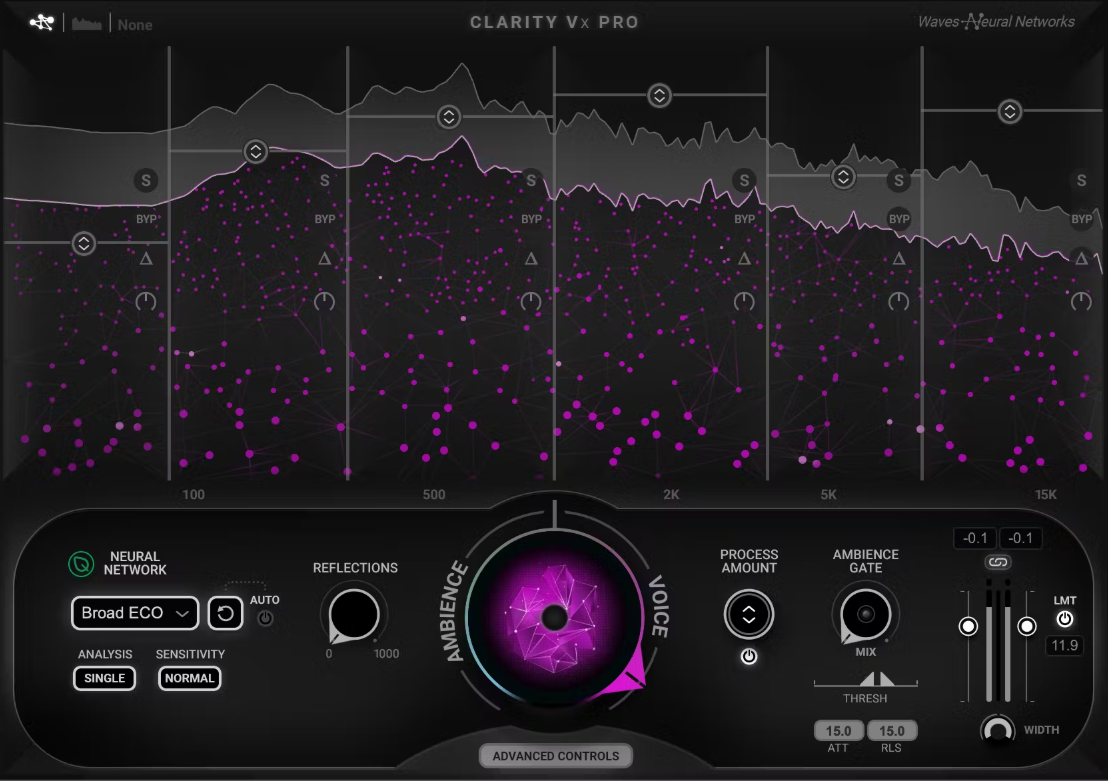
The interface is deceptively simple at first glance, showing just the central Ambience/Voice dial, but when you dive into Advanced Controls, the plugin opens up a world of detailed processing.
The layout is intuitive despite the depth with 6 frequency bands, Reflections and Ambience Gate controls, and even a peak limiter are all accessible without feeling cluttered. I enjoy how switching between Light and Dark skins keeps long editing sessions comfortable for my eyes, which is surprisingly useful during marathon mix days.
- Ambience/Voice Dial
This is the heartbeat of VX Pro and turning it allows me to isolate vocals while keeping just enough background for a natural feel. I often use it on dialogue tracks to remove AC hum or distant chatter while maintaining a sense of space, and it works beautifully in both indoor and outdoor recordings.
- Multiband Processing
The 4-to-6 customizable bands let me target specific frequencies independently. When I’m dealing with rumbling low-end noise or sibilant high-frequency hiss, I can dial in the perfect amount of reduction without affecting the rest of the vocal.
The Delta Mode is my favorite, cause hearing exactly what’s being removed gives me confidence that I’m not over-processing the track.
- Reflections & Ambience Gate
These subtle controls are surprisingly powerful. I use Reflections to retain the natural tails of a room or environment, so the vocal doesn’t sound unnaturally dry, and the Ambience Gate smooths out silent gaps intelligently.
On outdoor location recordings, this combination keeps dialogue crisp while preserving just enough environmental texture.
As for downsides, VX Pro does require a bit more CPU, especially when using multiband and advanced processing, so heavy sessions might need some optimization.
Also, learning the advanced features takes a little time, but once you get the hang of it, the results are worth the learning curve. My tip: start with the central knob for quick cleanups, then gradually explore bands and reflection settings to fine-tune tricky material.
Overall, I reach for Waves Clarity VX Pro whenever I need precision and flexibility, whether it’s dialogue, podcasts, ADR, or noisy vocal tracks.
Waves Clarity VX Pro comes in AAX, VST2/3, and AU formats for macOS and Windows users.
4. Accentize dxRevive Pro
Accentize dxRevive Pro actively restores and enhances dialogue to make it sound like it was recorded in a studio, even when the source is less than ideal.
Well, dxRevive Pro goes beyond simple noise suppression: it identifies missing frequencies, balances spectral content, and brings out clarity in voices that might otherwise sound thin or muffled. It’s like giving every recording a mini makeover.
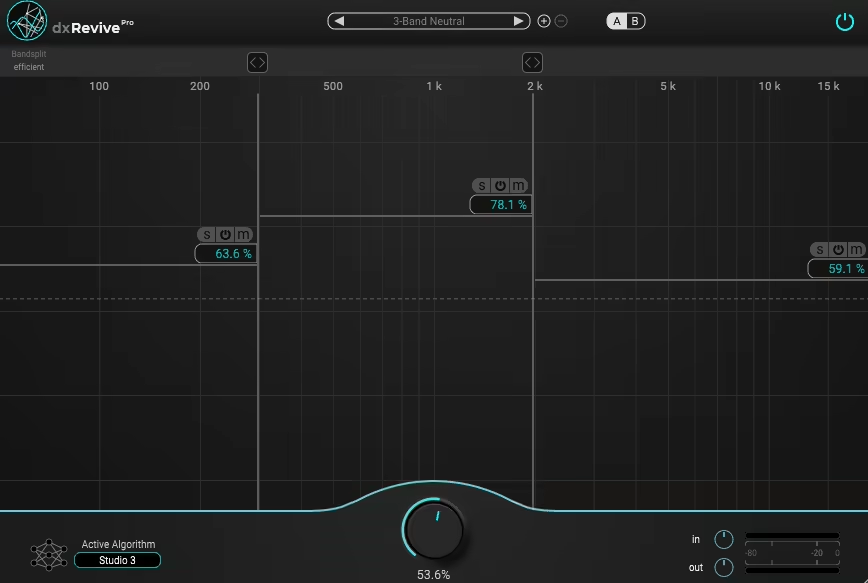
The interface is sleek and minimalistic, which makes working with it a joy. Upon opening, you’re greeted with the main Amount, Gain In, and Gain Out controls, alongside an A/B comparison, algorithm selector, and frequency spectrogram.
I love how intuitive it feels: the color scheme is subtle, so it doesn’t distract, but the visual feedback on the spectrogram helps me see exactly what’s being processed. Creating up to four frequency bands for fine-tuned control feels effortless, and jumping between the Studio and Retain algorithms is smooth and immediate.
- Studio Algorithm
This is my go-to for heavy-duty restoration, cause It handles de-reverb, noise suppression, and spectral enhancement all at once. I’ve used it on Zoom recordings, noisy indoor dialogue, and even chaotic outdoor interviews, and it consistently delivers dry, clear, and intelligible vocals.
The low end and missing frequencies are restored beautifully, giving the audio a full, natural quality without sounding artificial.
- Retain Character Algorithm
This mode is perfect when I want to preserve the essence of the original recording while still cleaning it up. It’s ideal for well-recorded material or subtle fixes, like removing background hiss or reducing compression artefacts.
I often switch to Retain when working alongside DeRoom Pro, as it complements reverb removal with gentle restoration rather than heavy-handed processing.
- Spectral Focus & Multiband Processing
The ability to adjust processing per frequency band is really handy. I often find myself dialing down the high band on VOIP recordings to reduce artefacts or boosting midrange frequencies to improve intelligibility.
Spectral Focus ensures that even tricky dialogue passages are restored without introducing unnatural artifacts, making it a huge time-saver in podcast and video workflows.
The only downside I’ve noticed is a bit of latency, which makes it less ideal for live performance situations, and occasionally very compressed VOIP files reveal high-frequency artefacts that require some tweaking.
Overall, I reach for dxRevive Pro whenever I need dialogue to sound professional, whether it’s for podcasts, interviews, ADR, or YouTube content. Its intuitive interface, powerful algorithms, and flexible multiband processing make it my go-to plugin for restoring and enhancing speech recordings.
Accentize dxRevive Pro comes in VST3, Audio Units, and AAX formats for macOS and Windows users.
5. Waves WNS Noise Suppressor

What sets WNS Noise Suppressor apart from most noise reduction plugins is its focus on dialogue and post-production.
Instead of trying to aggressively strip away every bit of noise, it’s built to gently push distractions into the background while letting the voice shine through. I’ve leaned on it for projects where clarity mattered more than clinical perfection, and it always surprised me with how natural the results sounded.
The interface is refreshingly straightforward, with 6 frequency sliders sit front and center, each controlling a band of noise suppression, with a threshold slider to set how aggressively the plugin reacts.
I liked how the visual feedback makes tweaking fast, as I don’t feel like I’m digging through menus or second-guessing settings. It’s one of those tools where I can get results in minutes, which is exactly what you want in post-production.
- 6-Band Dynamic Noise Suppression
Instead of using a one-size-fits-all approach, WNS gives me 6 frequency bands I can control independently. This has been a lifesaver when I’ve had to tame low-end rumble in outdoor recordings without crushing the brightness of the voice. It feels precise but not complicated.
- “Suggest” Button
The “Suggest” feature is a clever touch; it analyzes the audio and gives you a solid starting point. I don’t always keep the exact settings it proposes, but it saves me time and gets me in the ballpark quickly. For fast turnaround jobs, this feature has been gold.
- Real-Time, Low CPU Load
Because it’s designed for post, I can run multiple instances across a session without grinding my system to a halt. I’ve used it on dialogue-heavy mixes, podcasts, and even miked instruments, and it handles them all without hiccups. The real-time performance means I can hear results immediately and adjust as I go.
I do think it’s more of a broad-strokes tool than a surgical one. If I need to dig into tiny pops, clicks, or specific artifacts, I’ll reach for something like RX. But for general dialogue cleanup, this plugin is fast, musical, and does the job without ever making things sound “processed.”
For me, WNS Noise Suppressor has become a reliable partner in post-production and podcast work. It’s not about scrubbing audio until it’s sterile; it’s about enhancing what matters most: the voice.
Waves WNS Noise Suppressor comes in AAX, AU, VST3, AudioSuite, and SoundGrid formats for macOS and Windows users.
6. Acon Digital Extract:Dialogue
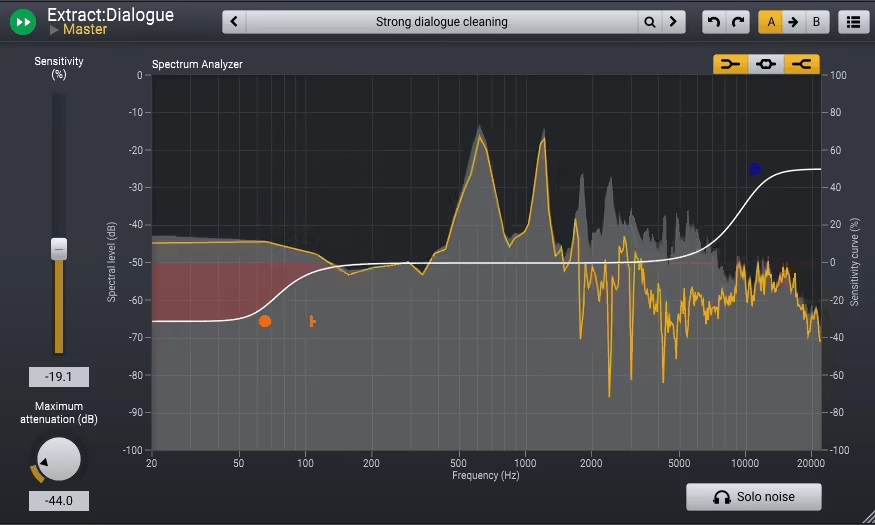
The first time I dropped Extract:Dialogue 1.5 on a noisy voice track, it felt like someone quietly vacuumed the background out of the room.
I’m a sucker for plugins that don’t waste my time, and this one nails it. The interface is stripped down in the best way without labyrinth of tabs, no learning curve. Just a couple of sliders, a visual readout, and results that happen fast enough to keep me from overthinking. It feels like the opposite of wrestling with a “science project” plugin.
- AI-Powered Real-Time Analysis
This AI isn’t just a buzzword feature, it actually listens. Dialogue gets pulled out of the mud in real time, whether it’s subway rumble or a gusty outdoor take. I’ve even tossed it interviews recorded on a phone mic, and somehow the voices came back sounding confident instead of crushed.
- Independent Frequency Band Control
Noise doesn’t live in one place, and this tool knows it. Being able to treat the lows differently from the mids and highs has saved me countless times.
One session had a nasty air conditioner hum; I dialed that down while leaving the brightness of the vocal alone, and suddenly the track was usable.
- Maximum Attenuation Control
Sometimes you don’t want silence, you just want subtlety. This knob is great for those moments. I often use it to keep a touch of room tone so the edit doesn’t sound like it was carved out with a machete. It’s the kind of detail that makes a dialogue track feel alive.
What surprised me most is how light this plugin runs. I stacked it across half a dozen dialogue tracks, and my CPU meter barely blinked.
That makes it a lifesaver for big post sessions where time is short and clients are breathing down your neck. The only real caveat is that it’s not a surgical fixer, clicks, pops, or extreme glitches still need other tools.
Extract:Dialogue feels less like “noise reduction” and more like an assistant quietly standing in the background, cleaning up your tracks while you focus on the creative work.
Acon Digital Extract:Dialogue 1.5 comes in AAX, AU, VST, and VST3 formats for macOS and Windows users.
7. Waves W43
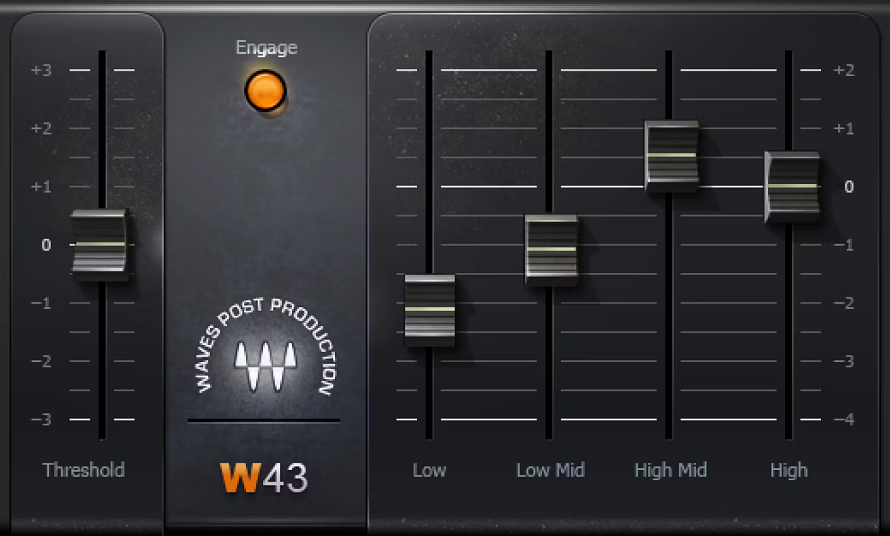
There’s something charming about a plugin that doesn’t try to reinvent the wheel but instead pays homage to a piece of kit that made its name in film and TV history. W43 is exactly that.
It is a faithful digital take on Dolby’s legendary Cat43 noise reducer. It’s not packed with flashy spectral displays or AI brainpower; instead, it’s a straight-up, four-band workhorse that feels like a nod to the old-school engineers who cleaned up dialogue by ear.
The interface couldn’t be simpler, as it has 4 sliders for frequency bands plus a master threshold. No meters, no spectral wizardry, no distractions.
At first, I missed having some kind of visual cue, but once I started working with it, I realized the design forces you to actually listen. There’s a tactile honesty to that process, almost like using an analog box.
- 4-Band Noise Reduction
Instead of the dozens (or hundreds) of tiny bands you’d find in modern spectral tools, W43 just gives you four. Low, low-mid, high-mid, and high.
It feels limited at first, but it’s quick, intuitive, and surprisingly effective when the noise falls neatly into one range, like air-con rumble or camera buzz.
- Zero Latency
This thing runs without delay, which makes it perfect for post work where dialogue sync is non-negotiable. I’ve dropped it into sessions with multiple video tracks and never had to worry about lip-sync drifting.
- Dolby Cat43 Emulation
The real story here is heritage. The Cat43 hardware was a staple in dubbing stages for decades, and W43 carries that workflow forward in software. It’s not “surgical restoration,” but it does give you that same gentle, transparent pushback against background noise that editors trusted for film and TV.
Using W43 feels almost like a palate cleanser after wrestling with feature-heavy denoisers. It’s quick, minimal, and effective, provided you’re dealing with steady background issues and not random clicks or tape hiss.
If the noise is modest, it’ll knock it back without robbing your dialogue of life. Push it too hard, especially in the highs, and you’ll hear the tone soften a little. But that’s the trade-off, and honestly it’s part of the charm.
What I like most is how approachable it is. Even someone new to noise reduction could have it up and running in minutes, trimming out air conditioning, low rumbles, or camera hum without getting lost in technical jargon.
It’s not a “one plugin to rule them all” solution, more like a vintage tool you keep on hand for specific kinds of clean-up.
Waves W43 runs on macOS and Windows in AAX, AU, VST, AudioSuite, and TDM formats, and is also bundled in Waves Mercury.
Bonus: iZotope RX 11 Advanced
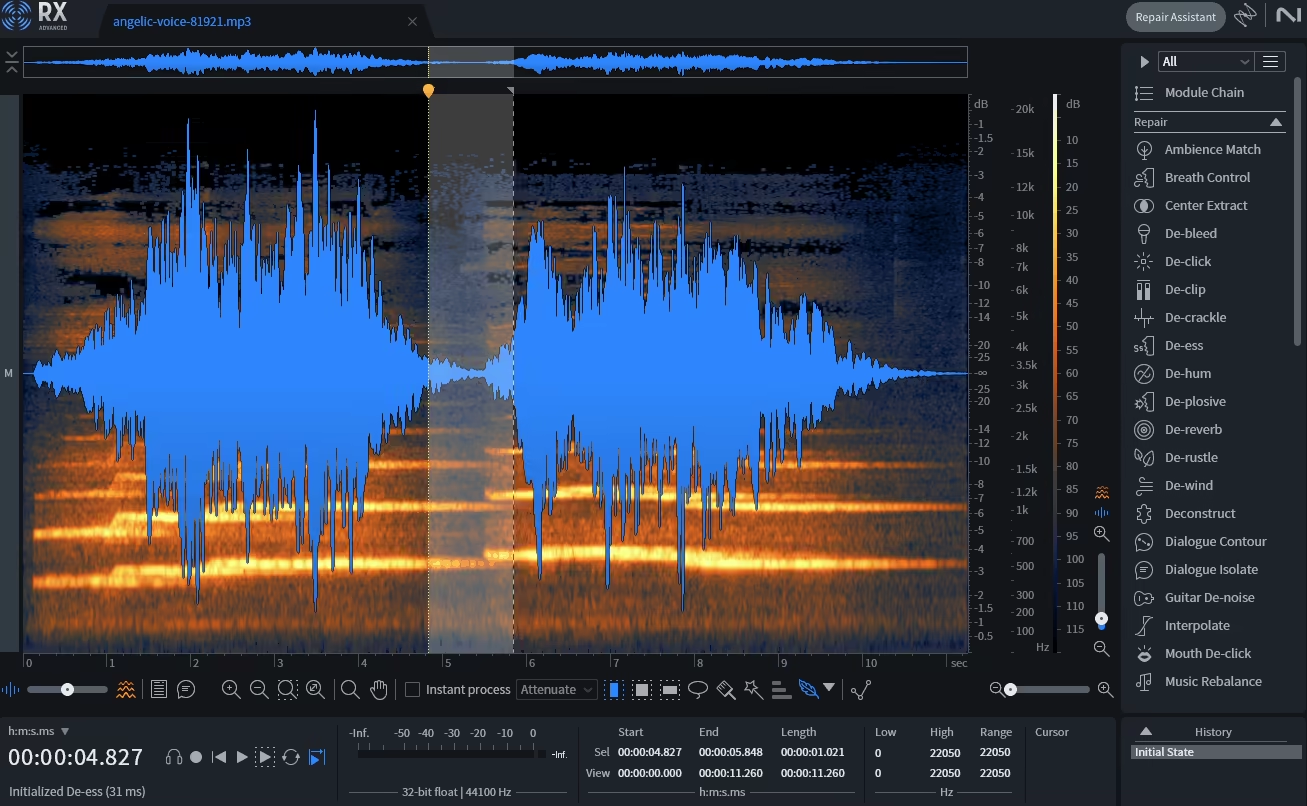
Most noise reduction tools feel like broad brushes, but RX 11 is more like a surgical scalpel.
RX 11 Advanced does more than just cleaning up the mess; it lets you zoom in on the tiniest imperfections and carve them out with scary precision. That’s why you’ll spot it everywhere from bedroom studios to Hollywood post-production suites.
The interface is built around its signature spectrogram view, which feels more like photo-editing software than a traditional plugin. You’re literally painting out noise or isolating parts of the spectrum, and that visual feedback is addictive.
Once I got used to “seeing” my audio instead of just hearing it, I wondered how I’d ever worked differently.
- Repair Assistant
Think of this as your AI sidekick. It listens, suggests fixes, and gets you 80% of the way there, leaving the fine-tuning in your hands. For quick podcast edits, it’s a lifesaver.
- Dialogue Isolate
Voices buried in noise? This module pulls them forward brilliantly, even when you’re working with bad mic setups or noisy locations. I’ve used it on scratchy Zoom calls and came out with clean, usable tracks.
- Music Rebalance
Instead of destructive EQ carving, this lets you nudge vocals, bass, drums, or “other” elements up or down inside a mixed track. It’s not always perfect, but when it works, it feels like cheating.
- Spectral De-reverb
Echoey rooms and roomy recordings don’t stand a chance. RX 11 gives you 4 bands of reverb removal, which feels almost supernatural when you dial it in right.
Sure, RX 11 Advanced is pricey, no way around that. But it’s the kind of tool that earns back its keep if you do a lot of cleanup work.
The Standard edition brings most of the magic for a friendlier price, so unless you’re working in post-production every day, you might not need to splash out on the full Advanced suite.
RX 11 Advanced comes as a Standalone app as well as in VST3, AU, AAX, and ARA formats.
5 Free Noise Reduction Plugins:
1. Blue Lab Audio Denoiser
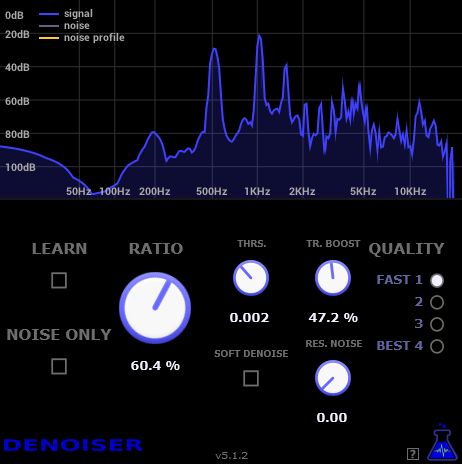
Bluelab Denoiser is a free plugin built for one job: removing hiss and background noise. It keeps things simple, with a learn function that automatically creates a noise profile from your audio, then applies it based on threshold and ratio controls.
The interface is clean and visually appealing, with a handy frequency analysis window that shows you exactly what’s being taken out.
While it doesn’t offer advanced tools like EQ band sculpting or adaptive noise tracking, it does the basics very well and without fuss. CPU optimization makes it smooth to run, and you can even adjust processing quality if needed.
It’s not the most flexible noise reduction plugin, but as a no-cost solution for quick cleanup, it’s reliable and effective.
2. Viator Voice De-Noiser
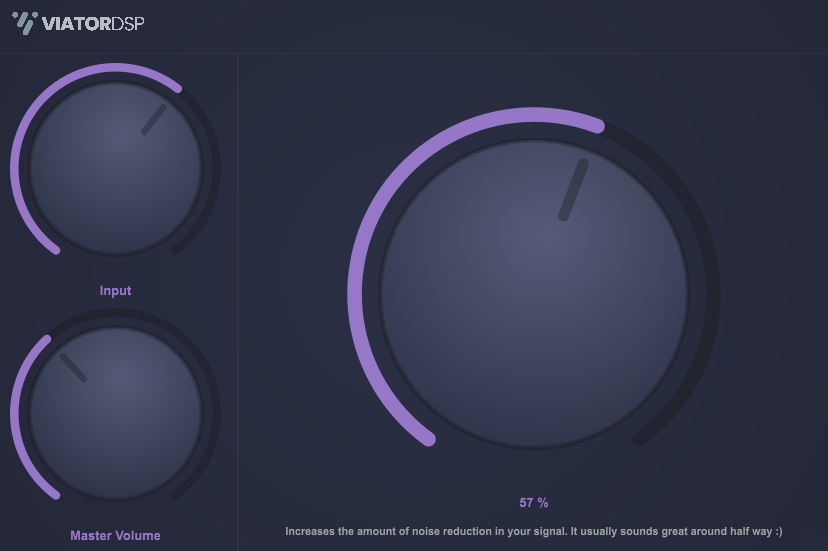
ViatorDSP has put out a neat little trio of free plugins, Voice Leveler, Voice Sweetener, and a Denoiser, all geared toward making vocals sound polished without the usual mixing headache.
Voice Leveler is the standout: it’s literally a one-knob processor that evens out vocal dynamics by combining compression and limiting under the hood. For podcasts, voiceovers, or even music, when you just want quick, consistent levels.
The fact that it comes bundled with a sweetener for adding some polish and a denoiser for cleaning up background noise makes it an especially handy package for vocal-centric work.
Sure, it won’t replace a detailed chain of compressors and EQs when you need surgical control, but when you’re on a deadline or just tired of tweaking, ViatorDSP’s set gets you clean, leveled vocals in seconds.
It’s free, lightweight, and available in VST3 and AU for both Windows and macOS, making it a no-brainer to keep in your toolkit.
3. ToneLib NoiseReducer
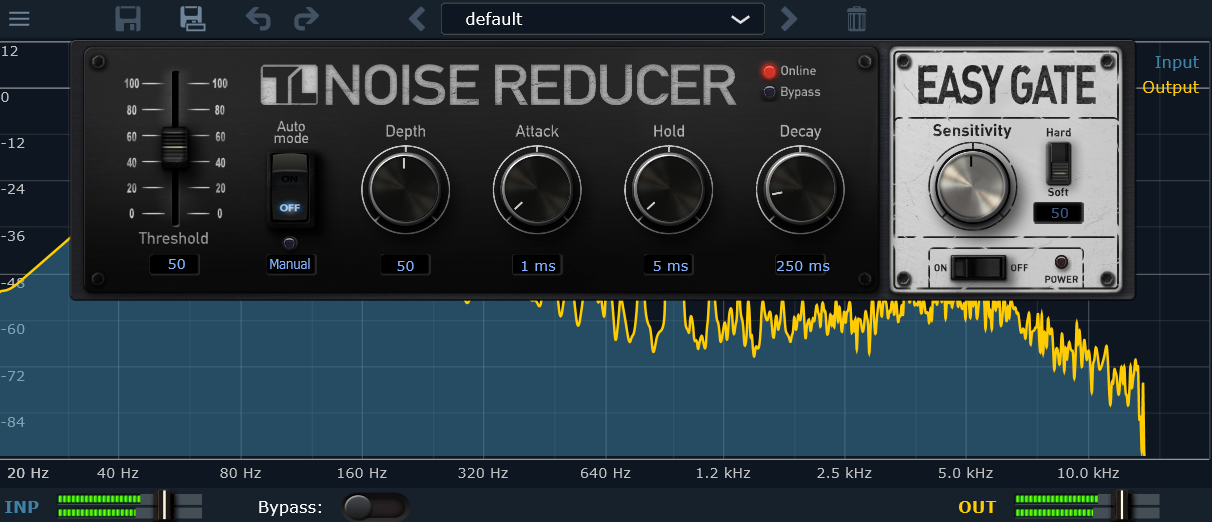
ToneLib’s TL NoiseReducer just got a solid 2.0 upgrade, making it an even stronger free option for cleaning up noisy tracks.
What I like about this plugin is its dual approach: you get both a Noise Reducer Unit with controls like Depth, Attack, Hold, Decay, and Threshold, and an Easy Gate Unit inspired by classic guitar pedals.
If you don’t feel like tweaking too much, Auto Mode turns the Noise Reducer into a one-knob wonder, letting you control everything with just the Threshold slider.
I’ve found the new preset manager particularly handy for quickly testing different setups, and the Easy Gate’s Hard/Soft modes give you flexibility whether you’re cleaning up guitar recordings or taming background noise on vocals.
For a free plugin that runs on macOS, Windows, and Linux, TL NoiseReducer is one of those “why wouldn’t you grab it?” kind of tools.
4. Vadim Taranov Noise Suppression
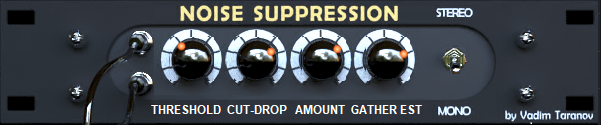
Noise Suppression is a free VST plugin for PC that’s tailor-made for taming the excessive static often found in DI (direct injection) electric guitar recordings.
It approaches noise reduction in a creative three-pronged way: a dynamic range and frequency subtractor to handle general noise while playing or during silent passages, a specialized muted-note filter that targets noise from palm mutes or harmonics, and frequency scissors, an envelope-driven low-pass filter designed to cut high-frequency artifacts before they get amplified and harsh.
The flexible unit’s aach module can be dialed in for mild, moderate, or aggressive noise suppression depending on the recording, and while it’s primarily aimed at high-gain guitar tracks, there’s no reason you couldn’t experiment on other sources too.
If you’re looking for a zero-cost, highly configurable way to clean up DI recordings without losing the attack and character of your guitar, Noise Suppression is a surprisingly capable tool.
5. Bertom Denoiser
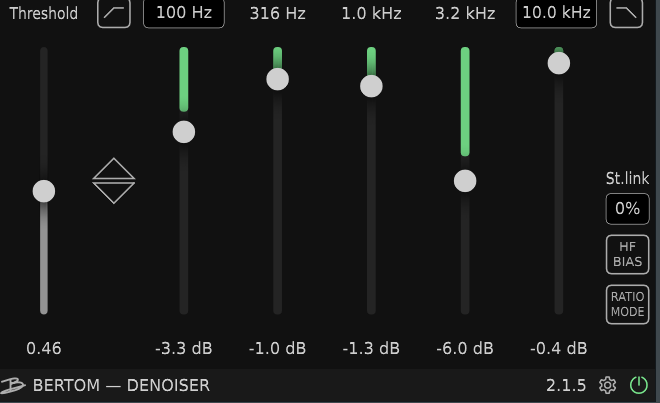
Bertom Denoiser is another popular free option if you want more control with a 5-band EQ with 2 filters to shape your own noise profile,
It offers accuracy on par with more expensive plugins like Waves Z Noise. It’s lightweight, runs with zero latency, and even avoids that “musical noise” artifact that often dulls recordings, making it especially handy for cleaning samples, voice recordings, or video audio.
The trade-off is that it’s not dynamic, so if your noise changes over time, you’ll need to automate the settings manually.
Still, its clean interface, stereo-link option, and low CPU usage make it surprisingly powerful for a free tool. For anyone who doesn’t mind putting in a little extra work, Bertom Denoiser delivers professional-sounding cleanup without costing a dime.
Last Words
When it comes to keeping your audio clean, there’s a plugin for every workflow and budget. From powerhouse suites like iZotope RX 11 Advanced to clever free tools like Bluelab Denoiser and Bertom Denoiser, you can tame hiss, hum, and background noise without losing the character of your recordings.
Whether you’re polishing dialogue, music, or foley, these noise reduction plugins make the job faster, easier, and often a lot more fun!

Berk is a multi-instrumentalist musician from Istanbul, Turkey. He has been playing guitar, handpan, and percussion for over ten years, developing a sound that blends melodic sensitivity with rhythmic depth.
He began his musical journey as a teenager, learning guitar and performing in several bands. In 2016, he discovered the handpan, an instrument that immediately resonated with him on a deeper level and gradually became central to his artistic identity.
Since then, he has performed in streets, festivals, bars, and concert venues across different countries, connecting with diverse audiences through both intimate and large-scale performances.
Alongside his live work, Berk is deeply involved in studio production. He works from his home studio, where he composes, records, and produces his own music. His studio serves as a creative space for layering handpan, guitar, and percussion with modern production techniques, allowing him to shape fully realized, atmospheric compositions from start to finish.
His music explores a wide range of genres and textures, combining organic acoustic instruments with detailed studio production to create immersive and expressive soundscapes.