

In this guide, I’ll walk you through the 6 Best Key Finder/Detection Plugins & Software, from pro-level tools to handy free options that make finding the right key effortless.
Figuring out the key of a song shouldn’t feel like solving a riddle, but sometimes it really does. When I was a beginner, I had plenty of moments where I was jamming along, only to realize I’m totally off-key and my guitar sounded like it was auditioning for a horror movie. That’s exactly where key detection plugins save the day.
These tools take the guesswork out of music-making, instantly telling you the key and scale so you can get on with actually creating. Whether you’re a producer trying to match samples, a DJ lining up harmonic mixes, or just someone who wants to stop clashing with every chord, a good key finder plugin is essential.
In this list, I’ve rounded up my favorite key detection plugins and software, including some solid free options. I’ve personally used most of these in my own workflow, and trust me, they’ve saved me from plenty of musical trainwrecks. Let’s dive in!
The 6 Best Key Detection Plugins 2026
Brainworx bx_crispyscale
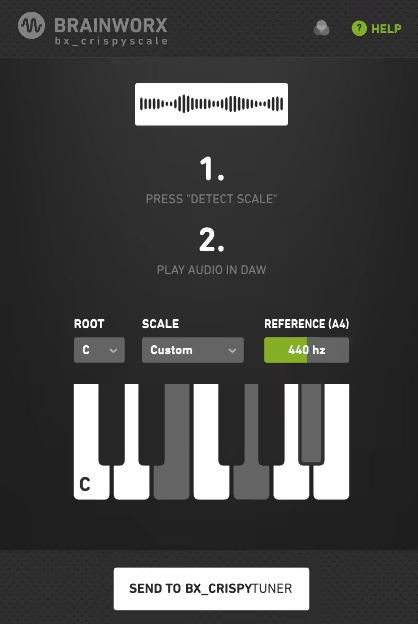
I’ve tried plenty of key detection tools, but bx_crispyscale might be the fastest one I’ve used for actually getting from “unknown key” to a usable answer — with one catch: it isn’t sold as a standalone plugin. It only comes bundled with Brainworx’s bx_crispytuner vocal tuner, so you can’t buy or download it on its own.
If you’re specifically shopping for a key detector, that’s worth knowing upfront. But if you also do vocal tuning work, the pairing makes a lot of sense: bx_crispyscale listens to your track and instantly figures out the scale, then feeds that result straight into bx_crispytuner with zero manual setup.
This makes the whole process ridiculously easy. I can load up a track, let bx_crispyscale detect the right scale automatically, and then start tuning without touching a single theory book. For someone like me who doesn’t always want to think about modes or accidentals, that’s a lifesaver.
If you’re building out a full vocal processing chain rather than just detecting the key, check out our top vocal chain plugins roundup for noise removal, compression, and enhancement tools.
- Automatic Key Detection
Bx_crispyscale listens to your track and figures out the right scale instantly. No music theory degree required.
- Direct Integration with bx_crispytuner
I love that I don’t have to copy or remember anything. The detected key goes straight into the tuner.
- 17 Scale Presets
From Major and Minor to more exotic modal options, I can quickly shape vocals to match different vibes.
- Simple or Advanced Workflow
Beginners can stick to auto-detect and subtle correction, while I can dive into Advanced or Graphical mode whenever I want more control.
- Live Mode with Zero Latency
I’ve even tried singing through it live, and it’s instant. Super fun to play with in the studio or on stage.
For me, the bx_crispyscale + bx_crispytuner combo feels like training wheels and a race bike at the same time. If I just need quick key detection and smooth correction, it’s a two-click job. But when I want to go deeper, the advanced modes give me all the tools I need to fine-tune every note.
Brainworx bx_crispyscale is available in VST2, VST3, AU, and AAX formats for both macOS and Windows.
Antares AUTO-KEY 2

Auto-Key 2 is a plugin that seamlessly fits into the whole Auto-Tune ecosystem.
Instead of fumbling around, guessing scales, it just locks things in for me instantly. That alone saves me a ton of time, especially when I’m bouncing between different tracks and vocal takes.
The interface feels fresh with its scalable design and Light/Dark modes. It’s not just about looks, though, cause the on-screen keyboard lighting up with detected pitches is genuinely handy when I’m trying to double-check what the plugin’s hearing.
- Real-Time and Offline Detection
I can throw Auto-Key 2 on a track for instant analysis, or just drag in an MP3/WAV/FLAC/AIFF file for even faster key and tempo detection.
- Direct Auto-Tune Integration
One click sends the detected key and scale across every instance of Auto-Tune in my session. It is handy that no need for setting them one by one.
- Detailed Results
Beyond just key and scale, it shows tempo and tuning reference frequency, which is a lifesaver when matching samples and different tuning systems.
- Polished Interface
The scalable GUI and Light/Dark mode fit perfectly into my studio vibe, and the keyboard visualization makes it more interactive.
The only down part is that you’ll need an iLok account (though no dongle, thankfully), which is a minor speed bump. But honestly, the time I save makes it worth it.
If you’re into Auto-Tune, this is almost a must-have, as it turns a tedious step into something automatic, freeing me up to actually make music.
Antares Auto-Key 2 comes in VST, AU, and AAX formats for macOS and Windows (iLok account required for authorization).
Zplane Tonic
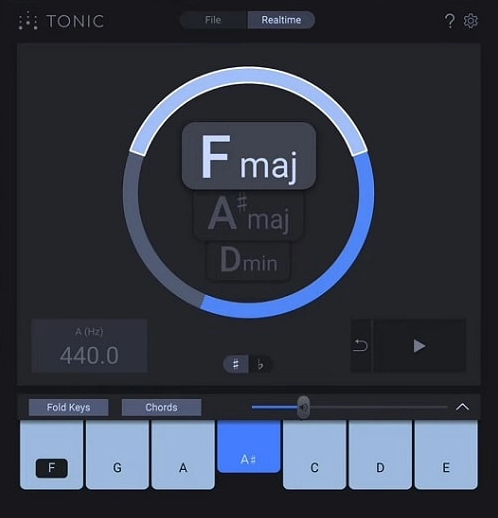
Tonic feels less like a sterile analysis tool and more like a songwriting partner.
zPlane Tonic gives me multiple possibilities with clear confidence levels, which honestly feels like having a theory-savvy bandmate double-checking my ear.
The interface is dead simple to use. I just drop it on a track or bus, hit play, and it instantly starts suggesting scales and chords that fit my music. I love the foldout Keys panel, where I can play with suggested notes or trigger one-finger triads to hear how they sit in the mix.
- Real-time and Offline Detection
Whether I’m analyzing a loop, a guitar riff, or a whole track, Tonic nails the key in seconds. I can even pause during tricky sections or run files offline for faster results.
- Multiple Key Suggestions
Instead of locking me into a single guess, Tonic shows up to 3 possible keys with confidence graphics, which helps when a track has ambiguous or shifting tonal centers.
- Built-in Keyboard and Synth
I can replay suggested notes and chords directly inside the plugin, which is surprisingly handy for sketching harmonies or testing scale ideas without leaving my DAW.
- Chord and Scale Helpers
The plugin suggests full chord sets and scales that work best for melodic phrasing, soloing, or building basslines. It’s like a cheat code when I’m stuck writing progressions.
It doesn’t really handle exotic scales, so you’ll want to stick to majors, minors, and common modes. Also, it can hit the CPU a bit when running live, but once I’ve got the info, I just disable it and move on.
For me, Tonic shines when I’m working with samples or writing from scratch, as it bridges that gap between ear and theory in such a natural way. It’s one of those plugins that quietly makes every session smoother.
Zplane Tonic comes in VST3, AU, and AAX formats for macOS and Windows.
Waves AI Key Detector
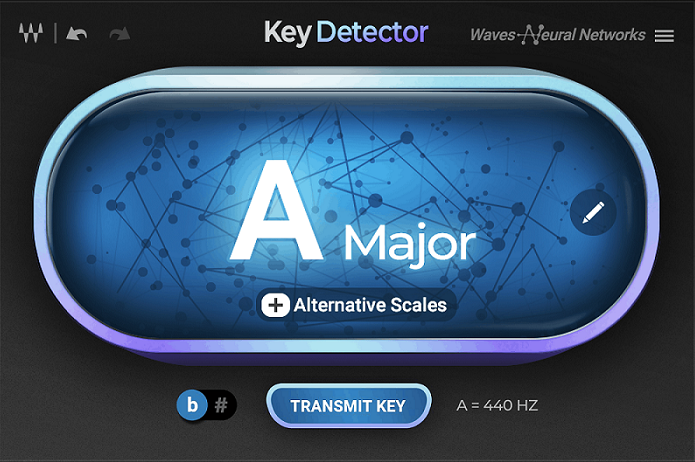
I love how Waves Key Detector takes the guesswork out of finding a song’s tonal center.
With this plugin you can stop fumbling around with the keyboard trying to match notes, and just drop it on a track, and within seconds it spits out the root note, scale type, and even a couple of alternatives in case the harmony’s a bit ambiguous.
The interface is refreshingly no-nonsense. One click and it’s analyzing, no menus to dig through or settings to tweak. What really sold me is the Transmit button, which pushes the detected key straight into other Waves plug-ins like Tune Real-Time, Harmony, and OVox. I can shift an entire vocal chain into the right key without touching a thing.
- AI-powered Detection
The Neural Networks engine feels eerily accurate, even when a sample is slightly out of tune or buried in a busy mix.
- Full Mix or Single Sample Support
Whether I’m checking a tiny vocal chop or a whole stereo bounce, Key Detector handles both with the same ease.
- Instant Compatibility with Waves’ Vocal Tools
The unit can send the key data directly to Waves’ tuning and harmonizing plug-ins, which saves me so much time mid-session.
- Alternative Key Suggestions
I like how it doesn’t just lock me into one answer but offers two other possible scales, which helps a lot when working with modal or non-diatonic tracks.
The only downside is that it’s most useful if you’re already invested in the Waves ecosystem. On its own, it’s still solid, but the real magic comes when paired with their vocal suite.
For me, Key Detector is a handy tool; fast, dead accurate, and quietly essential for modern production.
Waves Key Detector comes in AAX, AU, and VST formats for macOS and Windows.
Mixed In Key Studio Edition
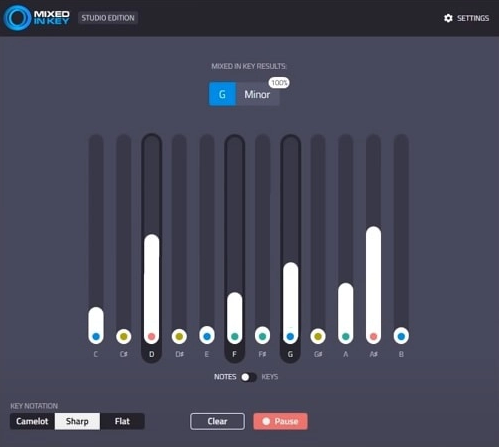
What I enjoy about Mixed In Key Studio Edition is how it brings that classic DJ tool straight into my DAW as a real-time plug-in.
I’ve always liked using the desktop version to prep tracks for smooth blends, but being able to drop this on a vocal, piano, or even my full mix and instantly get key info is highly time-saving and helpful.
The workflow is straightforward; hit Capture, and the plug-in starts listening, spitting out a root key with a confidence percentage.
I can pause or reset whenever I want, and I especially like flipping between Notes mode, which shows how strong each note is in the spectrum, and Keys mode, which lays out the likelihood of each possible scale. It’s fast, clear, and doesn’t get in my way.
- Real-time Key Detection
I love that I can analyze anything, from a single melody line to an entire mix, and get results immediately without bouncing files in and out of software.
- Confidence Percentages
Instead of just telling me “this is the key,” it shows how sure it is, which helps when I’m working with complex or harmonically rich sounds.
- Camelot, Sharps, or Flats
Switching between display modes is super handy. I often keep it in Camelot for DJ-style work, then flip to sharps/flats for composition.
- Chord and Scale Probability View
The visual bar graphs make it obvious when a note or chord is dominating, which gives me more context than a simple label ever could.
Well, I gotta say, it’s not perfect, sometimes harmonics can throw it off, and I wish it included extras like a BPM counter or a tuner. It also requires an internet connection, which can be annoying on the go. But for me, it still saves tons of time when I’m chopping samples or piecing together mashups.
I see Mixed In Key SE as more of a guide than a final authority. It won’t replace your ear, but when I’m knee-deep in stems or testing a sample pack, it points me in the right direction instantly.
For anyone who struggles to quickly identify harmonic relationships, it’s a simple, effective tool to keep the creative flow moving.
Mixed In Key Studio Edition comes in VST, AU, and AAX formats for macOS and Windows.
HoRNet SongKey MK4
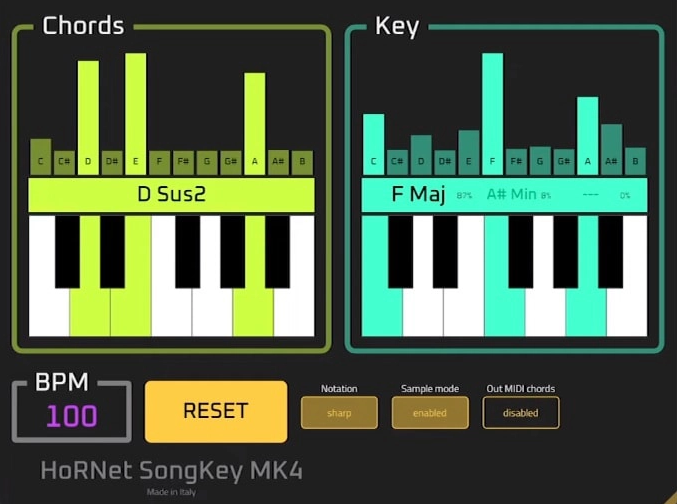
The last pick is one of the most budget-friendly options on this list; SongKey MK4 punches way above its price.
I love that it doesn’t just detect the key, it also gives me real-time chord progressions and tempo. For me, that’s quite helpful when I’m working with samples, acapellas, or even quick DJ mashups.
The interface is pretty basic. I can see key changes, chord info, and tempo updates as the track plays. The visual feedback is actually kind of nice. I’ve caught myself just feeding it random loops to watch the chromagrams dance.
It runs smoothly, barely eats up CPU, and the standalone app is surprisingly useful for quick checks outside of the DAW.
- Real-time Key Detection
I’ve tested it on complex tracks, and it keeps up with modulations smoothly. Great for genres where keys don’t sit still.
- Chord and Tempo Recognition
Beyond just the key, I get instant chord names and BPM readings, which help me lock in grooves and harmonies faster.
- MIDI Input/Output
I love being able to analyze MIDI clips, then send the detected chords back as MIDI data for editing or layering new sounds.
- Standalone App with MIDI Clock
This is great for live sets; I can sync hardware and software gear to the detected tempo without extra setup.
- Improved Chromagram + AI Detection
The upgraded chromagram feels more precise, even with tricky chords like sevenths and suspensions.
SongKey MK4 feels like having a theory-savvy friend sitting next to me in every session. We’ve also covered it in our BPM detection plugins roundup, since it handles tempo detection just as well as key detection. Whether I’m producing in the studio, figuring out chords on a tricky sample, or lining up tracks for a DJ set, it gives me instant answers without the guesswork.
HoRNet SongKey MK4 is available as VST2, VST3, AU, and AAX for macOS and Windows.
Last Words
Finding the right key and chord information quickly can completely change how you approach a track, and these 6 plugins and software options make that process faster, easier, and often more fun.
From AI-powered real-time detection in Waves Key Detector to the budget-friendly versatility of HoRNet SongKey MK4, there’s something here for every workflow and skill level. I’ve found that having a reliable key finder on hand keeps me experimenting confidently without second-guessing the harmonic compatibility of samples or recordings.
Whether you’re DJing, producing, remixing, or performing live, having one of these plugins or software solutions in your toolkit can make a tangible difference in your sessions. With so many options available, it’s never been easier to quickly identify keys, chords, and tonal structure, letting you focus on the part that really matters: making music!

Berk is a multi-instrumentalist musician from Istanbul, Turkey. He has been playing guitar, handpan, and percussion for over ten years, developing a sound that blends melodic sensitivity with rhythmic depth.
He began his musical journey as a teenager, learning guitar and performing in several bands. In 2016, he discovered the handpan, an instrument that immediately resonated with him on a deeper level and gradually became central to his artistic identity.
Since then, he has performed in streets, festivals, bars, and concert venues across different countries, connecting with diverse audiences through both intimate and large-scale performances.
Alongside his live work, Berk is deeply involved in studio production. He works from his home studio, where he composes, records, and produces his own music. His studio serves as a creative space for layering handpan, guitar, and percussion with modern production techniques, allowing him to shape fully realized, atmospheric compositions from start to finish.
His music explores a wide range of genres and textures, combining organic acoustic instruments with detailed studio production to create immersive and expressive soundscapes.