
So, in this roundup, I’ll walk you through the Best Pitch Shifter Plugins to check out for your workflow.
Pitch shifting isn’t just about fixing off-key notes anymore, it’s become a full-blown creative playground. From subtle harmonies that add depth to a vocal, to wild, otherworldly transformations that can flip an entire track on its head, the right pitch shifter can open up endless possibilities. In 2025, we’ve got some seriously powerful tools that make bending, stretching, and reimagining pitch easier (and more musical) than ever.
What I love about pitch shifter plugins is how versatile they’ve become. I’ve used them to tighten up performances, create lush layers that sound like a full choir, and even turn simple guitar lines into synth-like textures. They’re not just for fixing mistakes, they’re creative weapons in any producer’s arsenal. And the best part? They keep getting more intuitive and fun to use.
Some are precise tools for pitch correction, others are designed for wild experimentation, and a few manage to nail both ends of the spectrum. Whether you’re into subtle polish or full-on sonic chaos, you’ll find a pitch shifter here that deserves a spot in your plugin folder.
1. Slate Digital MetaPitch

Let’s start with MetaPitch; Slate Digital took almost everything I wanted from a pitch shifter and sprinkled in some extra creative goodies.
Well, this is not just about moving notes up or down, it’s about reshaping the entire character of a sound with formant control, saturation, stereo widening, and even vocoder-style MIDI tricks.
- Independent Pitch and Formant Control
I love that MetaPitch gives me separate knobs for pitch and formants. Sometimes I’ll keep the pitch steady and just shift the formant for a completely different vocal tone, or link them together when I want smooth harmonies that still sound natural. It feels like having two plugins in one.
- Robot Mode and MIDI Integration
This is where things get really fun. Robot Mode locks the pitch to a note for those classic vocoder-style effects, and when I feed it MIDI, I can literally play new melodies with my vocals or synths. I’ve even run sound effects through it and ended up with these wild, futuristic textures.
- Drive, Widener, and Filters
MetaPitch acts like a tone-shaper too. The Drive knob adds some lovely grit, while the Widener instantly makes vocals feel bigger and more polished. Add in the simple high/low-pass filters and it’s easy to keep everything sitting right in the mix.
- Low Latency Mode for Tracking
Latency can ruin a creative flow, but MetaPitch solves that with a Low Latency button. I’ve tracked vocals with it in real time without feeling any lag, which makes it just as good for performance as it is for production.
The grouped instances feature is another clever touch, great for stacking harmonies across multiple tracks.
MetaPitch feels like Slate Digital took a standard pitch shifter and reimagined it as a creative playground. Whether you want subtle formant tweaks or full-blown robotic vocal lines, this plugin brings both precision and playfulness.
MetaPitch is available in VST2, VST3, AU, and AAX formats for macOS (10.15 or later) and Windows (10/11).
2. Waves Vocal Bender
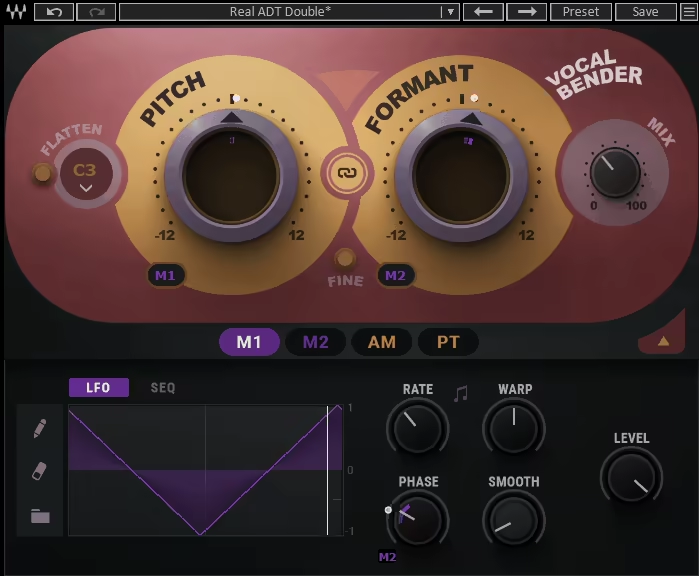
What makes Vocal Bender stand out for me is its immediacy. So many pitch tools bury you under menus and micro-adjustments, but this one just throws you two massive knobs.
The stars here are the Pitch and Formant controls, as they dare you to start twisting. I love how quickly it can turn a flat vocal take into something exciting, from robotic monotones to pitch-shifted harmonies that feel alive.
The interface is stripped down cause it’s literally two knobs, a Flatten button, and a mix control, yet beneath that simplicity sits a seriously powerful modulation system.
I’ve never had to stop and wonder “where is that control again?”, as everything’s right there, begging to be played with. It feels less like engineering and more like a jam session with your vocals.
- Independent Pitch & Formant Shifting
Being able to shift pitch and formant separately is where the fun really starts. I’ve pitched vocals down an octave while keeping the formants natural, and suddenly I’ve got a believable baritone doubling the singer.
Or I’ll stretch the formants higher without touching pitch, and it gives that quirky “chipmunk but human” vibe. It’s such an easy way to experiment without breaking the mix.
- Flatten Button & Robotic Effects
The Flatten control is one of those deceptively simple features I keep coming back to. Locking a vocal to a single pitch creates that eerie, monotone effect that’s perfect for stacked harmonies.
I’ve used it to build choirs that sound like Bon Iver singing through a vocoder, and it only takes seconds to set up. Pair it with some subtle reverb and it’s instant atmosphere.
- Modulation & Creative Presets
The presets are rich with everything from subtle vibratos to total “Dark Magician” chaos. But the real magic happens when you dive into the modulation section.
I’ve set up LFOs to wobble the pitch in sync with a beat, or used the amplitude follower to make formants shift harder the louder I sang. That kind of reactive control makes performances feel alive instead of static.
There are a couple of caveats, like the default UI size is tiny unless you’re on the latest Waves version, so definitely update to avoid squinting at your screen. And sure, there are more complex vocal processors like OVox or iZotope’s VocalSynth 2, but Vocal Bender isn’t trying to be a spaceship; it’s trying to be fast, fun, and immediate, and it nails that.
I’ve reached for this plugin whenever I want a vocal line to cut through with character. It’s perfect for pop, EDM, or hip-hop hooks that need personality, but it can just as easily sneak into indie or experimental tracks for subtle pitch-play textures. Honestly, it’s the rare plugin that makes me smile while I’m using it.
Waves Vocal Bender comes in VST3, AU, and AAX formats for macOS and Windows users.
3. OCELOT Octaver
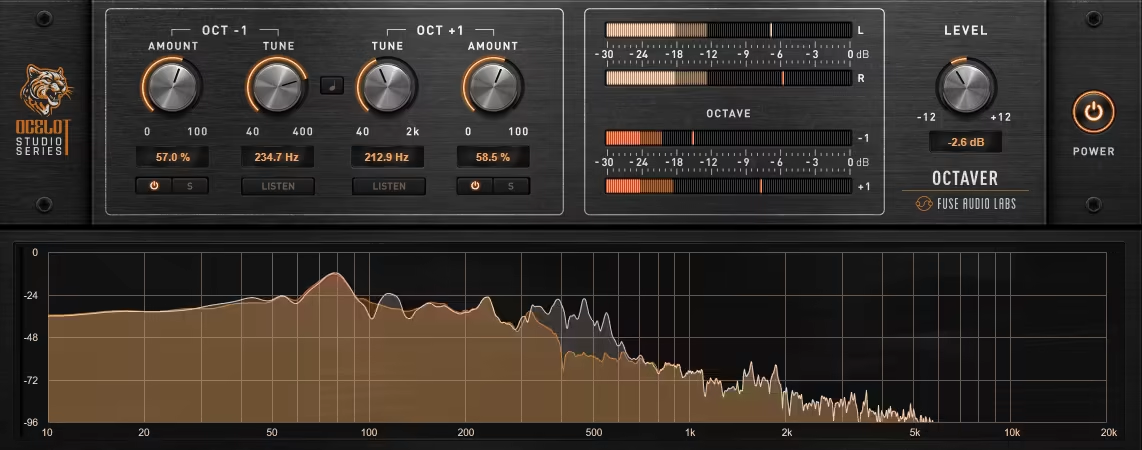
Most octavers I’ve used either give you rumbling lows or glittering highs, but rarely both at once without turning into a glitchy mess.
That’s what makes OCELOT Octaver special: it’s a true dual-engine design that lets me dial in an octave down for chest-thumping weight while also sprinkling in an octave up for extra presence. It’s like getting sub reinforcement and harmonic sparkle in the same breath.
The interface feels sleek and purposeful. Each octave has its own Amount and Tune controls, which means I can decide exactly which frequency zones get beefed up.
If I’m thickening a kick, I’ll tune the octave down into the sub range; if I’m brightening a pad, I’ll push the octave up into that airy pocket.
- Dual Octave Engines with Tune Precision
This isn’t just a blunt “drop it down an octave” kind of tool. The Tune controls let me sculpt the octaves into very specific ranges, so it’s not just heavier, it’s musically heavier. I’ve found it brilliant for adding growl to bass lines without muddying the low mids.
- Phase-Stable Tracking
One of my biggest gripes with older octavers is that they wobble or glitch when you throw fast transients at them.
OCELOT’s detection algorithm keeps everything phase-stable and smooth, even on busy drum patterns or layered synths. No warble, no random dropouts; just solid octave content that sits tight in the mix.
- Visual Feedback & Workflow Tricks
I love that Fuse didn’t just throw in meters for show. The separate level meters for Oct-1, Oct+1, and the main output actually make blending intuitive. Add the collapsible spectrum view and octave solo buttons, and suddenly fine-tuning becomes fast and musical instead of guesswork.
OCELOT Octaver isn’t just another low-end fattener; it’s a production tool that can reshape sound with precision.
I’ve been using it to extend kicks, add body to bass guitars, and even give synth arpeggios a glassy shimmer. It’s the kind of plugin you don’t realize you needed until you try it, and then it starts sneaking into every session.
Fuse Audio Labs OCELOT Octaver comes in VST2, VST3, AU, and AAX formats for macOS and Windows users.
4. Devious Machines Pitch Monster
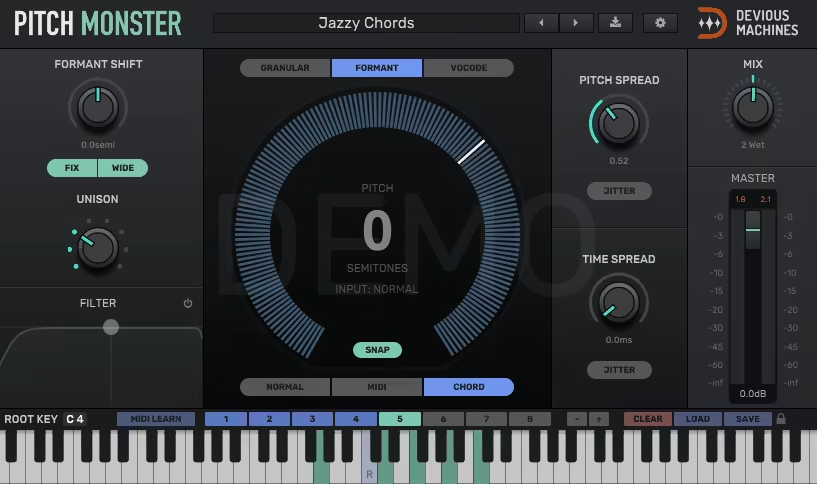
Pitch Monster is basically a lab for mangling sound into completely new lifeforms.
With its granular, formant, and vocoder engines, I’ve turned vocals into alien transmissions, built robotic choirs from scratch, and even fattened synths into 64-voice monsters. It’s one of those plugins where you open it for one idea and end up losing an hour just experimenting.
The GUI is smooth and inviting, which makes a difference when you’re staring at it for long sessions. I like how the pitch/time spread controls are right where you need them. It’s not cluttered, and even though it can generate wild results, the workflow stays logical and fun.
- Granular, Formant & Vocoder Engines
Each engine has its own flavor. Granular is clean and musical, Formant gets you those “otherworldly creature” vibes, and the Vocoder absolutely kills for robotic tones.
I’ve used MIDI control with the Vocoder, and it works great; you can literally play a voice like a synth.
- 64 Voices of Polyphony
Another great features is that you can stack up to 8 voices per note across 8 polyphonic voices, meaning 64 layers if you’re feeling reckless. Perfect for turning a mono lead into a massive chord, or just flooding a soundscape with rich, detuned harmonics.
- Pitch/Time Spread & Filters
The spread features are addictive. Well, automating pitch spread on hi-hats gave me glitchy, energetic build-ups, while subtle time spread on vocals added a lush, chorus-like width.
And having dual high/low-pass filters right inside the plugin means I don’t have to keep reaching for an EQ.
I’ve used Pitch Monster to create everything from astronaut radio chatter to demonic bass growls, and it still surprises me. If you’re into electronic music, film/game audio, or just love pushing vocals into strange, uncharted territory, this one’s a no-brainer.
Pitch Monster comes in VST/AU/AAX formats for macOS and Windows users.
5. Eventide MicroPitch

What makes Eventide’s MicroPitch stand out is that it doesn’t try to do everything, as it does one thing ridiculously well: rich, musical detuning.
I’ve played with countless chorus and delay plugins, but the subtle “just a few cents off” approach here instantly adds a weight and width that feels more natural.
I like how MicroPitch gives me that studio ADT trick without needing a whole workaround, and it’s become one of those tools I reach for when I want vocals or guitars to sit wider without sounding processed.
The interface keeps things refreshingly simple. You’ve got the two pitch voices (A and B) right in front of you, plus their delay and modulation controls. The ribbon slider is a nice touch, as it lets me morph between two sets of values in real time, which feels great when I want to perform changes rather than automate them later.
- Dual pitch-shifters with fine detuning
Instead of wide interval harmonies, MicroPitch focuses on small, musical shifts (up to ±50 cents). I love this because it avoids the cheesy “instant harmony” vibe and instead adds depth. It’s become a go-to for thickening backing vocals and giving synth pads a retro string-machine shimmer.
- Independent dual delays with tempo sync
Each pitch voice has its own delay time up to two seconds, with the option to sync individually to your DAW. I’ve used this to create slapback echoes on one side while leaving the other voice as a subtle detune, super useful for balancing depth with clarity.
- Modulation and feedback path
The modulation is smooth and musical, letting me add everything from a slight pitch wander to a full-on chorus shimmer.
Combine that with feedback and you can get dreamy spirals or metallic percussion effects. One of my favorite tricks is keeping the modulation light but driving the feedback high, it gives this hypnotic, swirling texture that works beautifully in ambient mixes.
If there’s a catch, it’s that the maximum pitch range is limited to cents, so if you’re hoping for octaves or harmonizer-style intervals, this isn’t the tool. But honestly, I think that’s part of its charm, cause it nails the “slightly out of tune, in the best way” sound.
For me, MicroPitch fills a gap between chorus and delay, and it always feels more organic than either. It’s perfect for widening vocals, guitars, and synths, but I’ve also had fun mangling drums into metallic chaos with extreme settings.
Eventide MicroPitch comes in VST, AU, and AAX formats for macOS, Windows, and iOS users.
6. Boz Digital Labs ProVocative
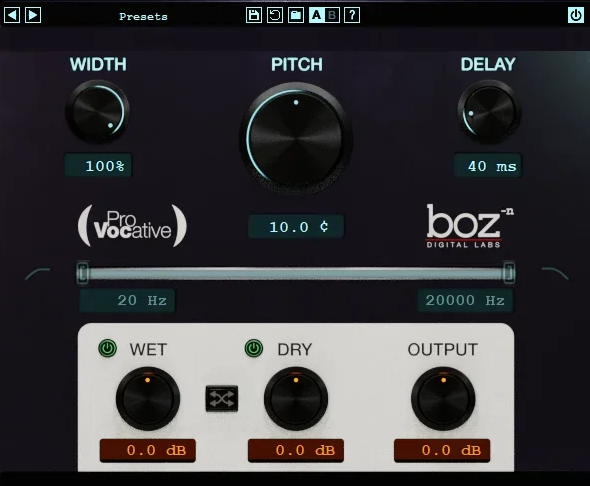
Boz Digital Labs ProVocative is a powerhorse, turning subtle pitch shifts into instant width and thickness.
ProVocative’s ability to fatten tracks without feeling artificial really caught my attention. What I enjoy most is tweaking vocals and synths and hearing them spread out naturally in the stereo field, it’s subtle magic that makes a track feel fuller instantly.
The interface is compact and surprisingly intuitive. The main controls are all in one place: wet/dry mix, pitch/delay amounts, and a handy frequency range selector.
I love that I can target exactly which part of a sound’s spectrum gets affected; this means no muddy low end or unwanted high-frequency chaos. The presets are thoughtful, too, giving a great starting point whether I’m processing vocals, bass, or full mixes.
- Micro pitch shifting
I’ve used this to thicken backing vocals and give synth pads a smooth, lush feel. Even tiny detunes create a wide, natural stereo effect that feels more organic than a typical chorus plugin.
- Frequency-range targeting
You can choose exactly which frequencies are affected by the pitch shift. I love dialing in just the vocal range between 500Hz–2kHz while leaving low-end elements untouched.
This avoids muddiness and keeps mixes clean, something I really appreciate in my workflow.
- Wet/Dry and simple control layout
Even with a lot happening under the hood, the plugin remains approachable. Adjusting wet/dry mix, pitch and delay amounts, and feedback is straightforward, making it easy to experiment quickly. I often tweak just one parameter and get an entirely new vibe for the track.
Overall, I’ve found ProVocative to be an incredibly flexible tool for widening, thickening, and adding subtle detune textures. It’s perfect for vocals, synths, and even bass lines, giving tracks extra depth without feeling overprocessed.
Boz Digital Labs ProVocative comes in VST2, VST3, AU, AAX, and RTAS formats for macOS and Windows users.
Extra: Zynaptiq PITCHSHIFT
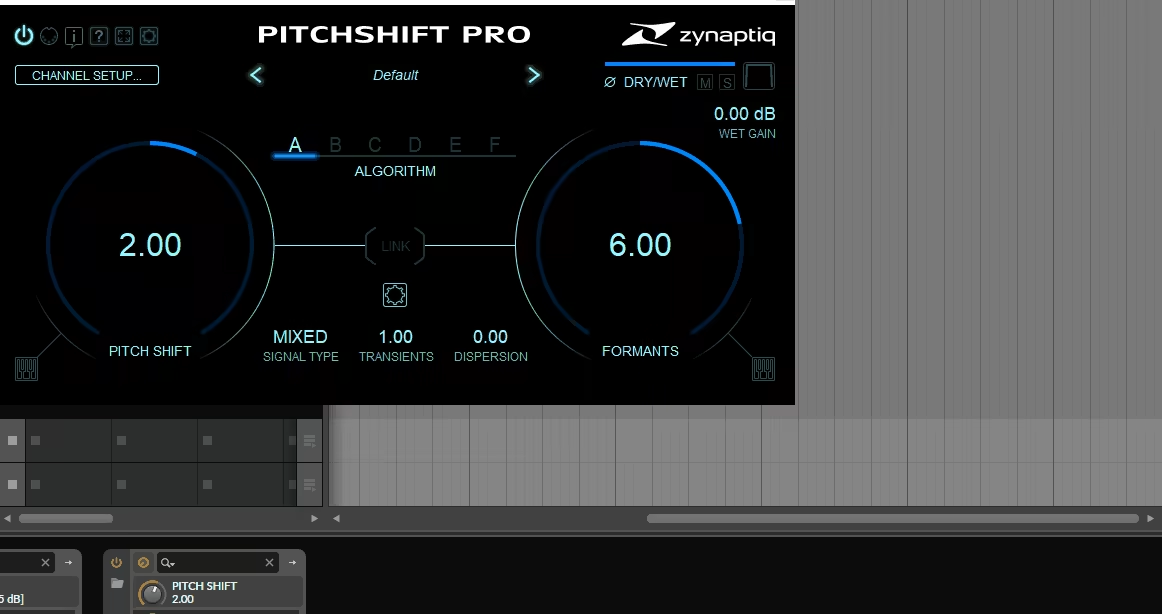
My extra pick, Zynaptiq Pitchshift Pro, naturally uniquely transforms audio.
As a versatile pitch shifter, I enjoyed using this one on vocals and synths, cause it never sounds harsh.
The interface is surprisingly straightforward for such a powerful tool. All six algorithms are easy to access, formant adjustments are right there, and the multi-channel routing is intuitive.
I love being able to audition changes instantly and tweak parameters on the fly, which makes experimenting fun instead of frustrating.
- 6 versatile pitch algorithms
From classic delay-based shifts to hybrid resynthesis, each algorithm brings a distinct character. I’ve used them on vocals, bass, and guitars, and the results are consistently rich, whether I want subtle thickness or dramatic pitch effects.
- Formant-only processing
This lets you alter the tonal character without changing pitch. I often use it to thicken backing vocals or synth layers, creating lush textures that blend perfectly without muddying the original track.
- Multi-channel immersive support
Up to 16 channels of phase-synchronous processing makes this plugin ideal for surround or immersive mixes. I’ve experimented with small pitch variations across channels, and it adds a depth that’s hard to get elsewhere.
There aren’t many drawbacks, though it can feel a bit overwhelming at first. My tip is to start with presets and then tweak algorithms and formants to find your own sound.
I’ve used this to create everything from thickened vocals to dreamy octave textures. It’s perfect for producers, sound designers, and anyone who wants more control over pitch.
Zynaptiq Pitchshift Pro comes in VST, AU, and AAX formats for macOS and Windows users.
Last Words
Pitch-shifting plugins and pedals have come a long way, offering everything from subtle detuning to wild, otherworldly effects.
Whether you’re enhancing vocals, thickening synths, or designing alien soundscapes, there’s a tool here to spark your creativity. I’ve loved testing these options, and each one brings something unique to the table, so don’t be afraid to experiment and find the perfect flavor for your tracks.
At the end of the day, the best pitch shifter is the one that inspires you to push your music further!

Berk is a multi-instrumentalist musician from Istanbul, Turkey. He has been playing guitar, handpan, and percussion for over ten years, developing a sound that blends melodic sensitivity with rhythmic depth.
He began his musical journey as a teenager, learning guitar and performing in several bands. In 2016, he discovered the handpan, an instrument that immediately resonated with him on a deeper level and gradually became central to his artistic identity.
Since then, he has performed in streets, festivals, bars, and concert venues across different countries, connecting with diverse audiences through both intimate and large-scale performances.
Alongside his live work, Berk is deeply involved in studio production. He works from his home studio, where he composes, records, and produces his own music. His studio serves as a creative space for layering handpan, guitar, and percussion with modern production techniques, allowing him to shape fully realized, atmospheric compositions from start to finish.
His music explores a wide range of genres and textures, combining organic acoustic instruments with detailed studio production to create immersive and expressive soundscapes.