

This article will discuss how you can fix the buzzing sound in your headphones and give various solutions.
A buzzing sound in headphones is an unwanted noise typically caused by electrical interference or a problem with the headphones themselves. The buzzing sound can vary in intensity and frequency and may be constant or intermittent. It may also be accompanied by other types of noise, such as crackling, popping, or static.
Static noise, also known as white noise or background noise, is a type of noise characterized by a random, continuous sound with a similar intensity level across different frequencies. White noise is similar to the static or hissing sound heard on a television or radio when no signal is received.
Electronic devices, such as audio systems or computers, produce static noise. It can be caused by various factors, including electromagnetic interference (EMI), ground loops, or faulty wiring. It can also result from environmental factors like wind, rain, or other atmospheric conditions.
Static noise in headphones is a common issue that various factors can cause. It can occur when there is interference in the audio signal, either from external factors like electromagnetic interference or internal factors like a faulty audio cable or driver. Static noise can also be caused by an audio device that is not properly grounded or shielded.
Additionally, headphones can pick up static noise from their environment, such as other electronic devices or atmospheric conditions like wind or rain. Static noise can be particularly annoying when listening to music or audio content, as it can distract and obscure the sound you are trying to hear.
Electrical interference is another common cause of buzzing sound in headphones. Various factors, such as nearby electronic devices, power lines, or atmospheric conditions like lightning, can cause this. When the electrical signals from these sources interfere with the audio signal in the headphones, it can result in buzzing or other noise.
Now let’s discuss how we can fix the noise issue in headphones.
How to fix the buzzing sound in my headphones?
A buzzing sound in your headphones can be an annoying issue, but there are several things you can do to fix it. Here are some steps you can take:
- Check the connections
Sometimes, a loose or dirty connection can cause a buzzing sound in your headphones. Ensure that your headphones are properly plugged into your device and that the jack is clean and free from debris or dirt. If you’re using a wireless connection, ensure your headphones are properly paired with your device, and that there is no interference from other devices nearby.
- Loose or disconnected cables
When there is a loose or disconnected cable in headphones, it can result in noise in the audio signal. This noise is typically characterized by crackling, popping, or cutting in and out of the sound.
Loose or disconnected cables can be caused by various factors, such as wear and tear on the cable itself or damage to the connector at either end. This can result in a poor electrical connection between the headphones and their connected device, leading to static noise.
To fix this issue, it is important to identify the location of the loose or disconnected cable. Start by checking the headphone jack, ensuring that it is plugged in securely and that the connector is not damaged. If the jack is loose, try adjusting it slightly to see if the noise disappears.
If the cable itself is damaged, it may need to be replaced. Some headphones have detachable cables that can be easily replaced, while others may require more extensive repairs. When there is a loose or disconnected cable in headphones, it can result in noise in the audio signal. This noise is typically characterized by crackling, popping, or cutting in and out of the sound.
In some cases, the issue may not be with the headphones themselves but with the connected device. If the device’s audio output is damaged or dirty, this can also result in noise in the audio signal. Try cleaning the audio jack or testing the headphones with a different device to see if the issue persists.
- Damaged Aux Port
One common issue that can cause noise in headphones is a dirty or damaged aux port. Over time, the metal contacts in the port can become dirty or corroded, affecting the audio signal quality. Additionally, if the port is damaged, this can cause problems with the connection and lead to noise in the audio signal.
To fix this issue, check the aux port for any visible damage or debris affecting the connection. Try cleaning the port with a small amount of rubbing alcohol and a cotton swab, being careful not to damage the contacts. If the port is damaged, it may need to be replaced.
- Try a different device.
If the buzzing sound is still present, try using your headphones with a different device to see if the problem persists. If the buzzing sound goes away when you use your headphones with a different device, the issue might be with your original device.
- Check the volume levels.
If the buzzing sound is only present when the volume is high, it might be a distortion issue. Lower the volume levels and see if the buzzing sound goes away. If it does, the issue might be that your headphones can’t handle high volume levels.
- Updating audio software
Updating the audio driver can be an effective solution for fixing noise from headphones. The audio driver is the software that allows the audio hardware in your computer to communicate with the operating system and applications. If the audio driver is outdated, corrupt, or not configured properly, this can result in noise in the audio signal.
First, identify the audio driver by inspecting the device manager, downloading the driver online, and installing it on your system.
Alternatively, if you are on Windows 11/10, click on the search icon next to the taskbar of your Windows system. Search for “Device manager,” and click on the Device Manager mentioned in the image below.
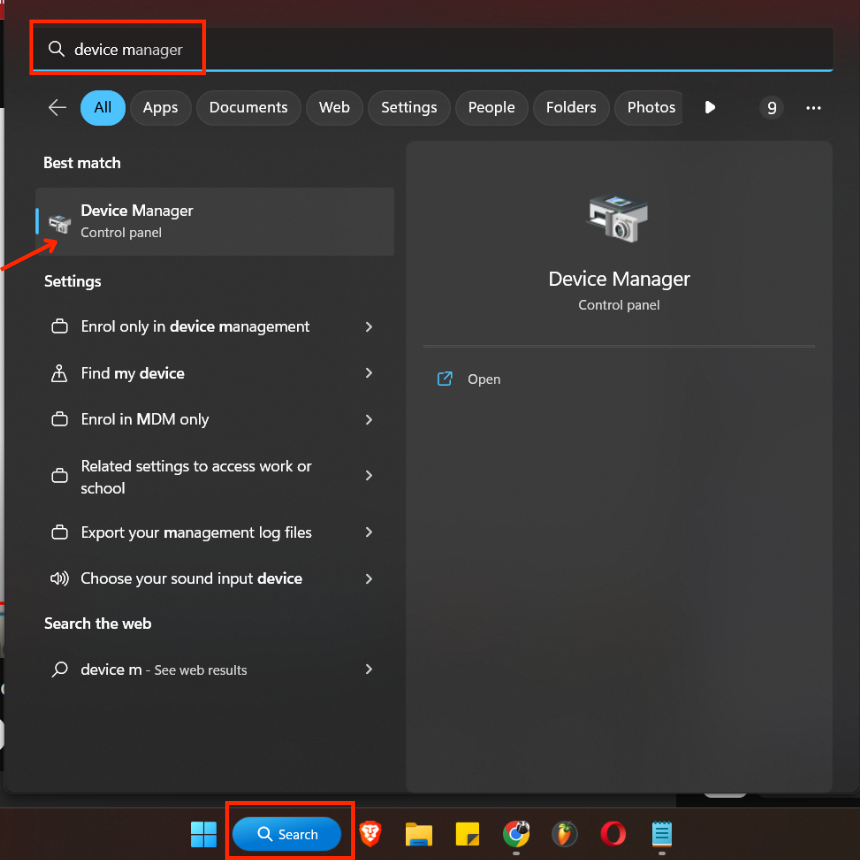
Once the device manager opens, go to “Sond, videos and game controller,” look for your specific headphones, right-click on it, and click “Update driver.”

Further, click “Search automatically for drivers,” and your system will update your headphone driver.

- Adjust the EQ settings.
Sometimes, your device’s EQ (equalizer) settings can cause a buzzing sound in your headphones. Try adjusting the EQ settings to see if that resolves the issue.
- System Troubleshooting (Windows 11)
On your system, check the headphone settings. For example, you can troubleshoot your output devices in Windows, and the system may resolve your problem. To do that, go to Settings > System > Sound > Advanced > Troubleshoot common sound problems, and click on “Output devices.”
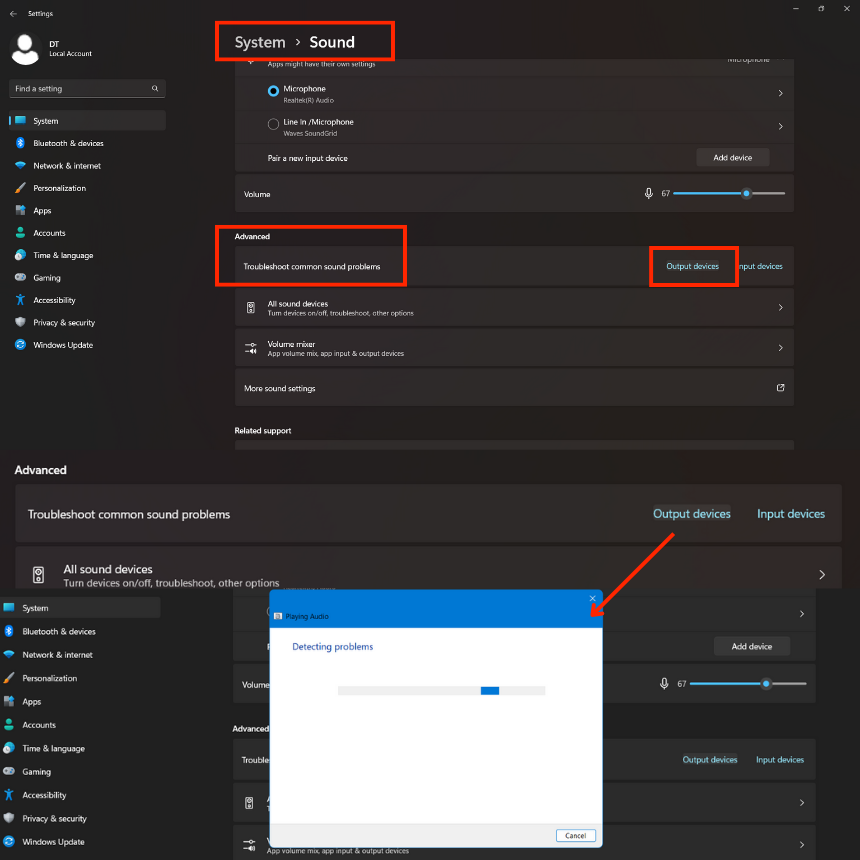
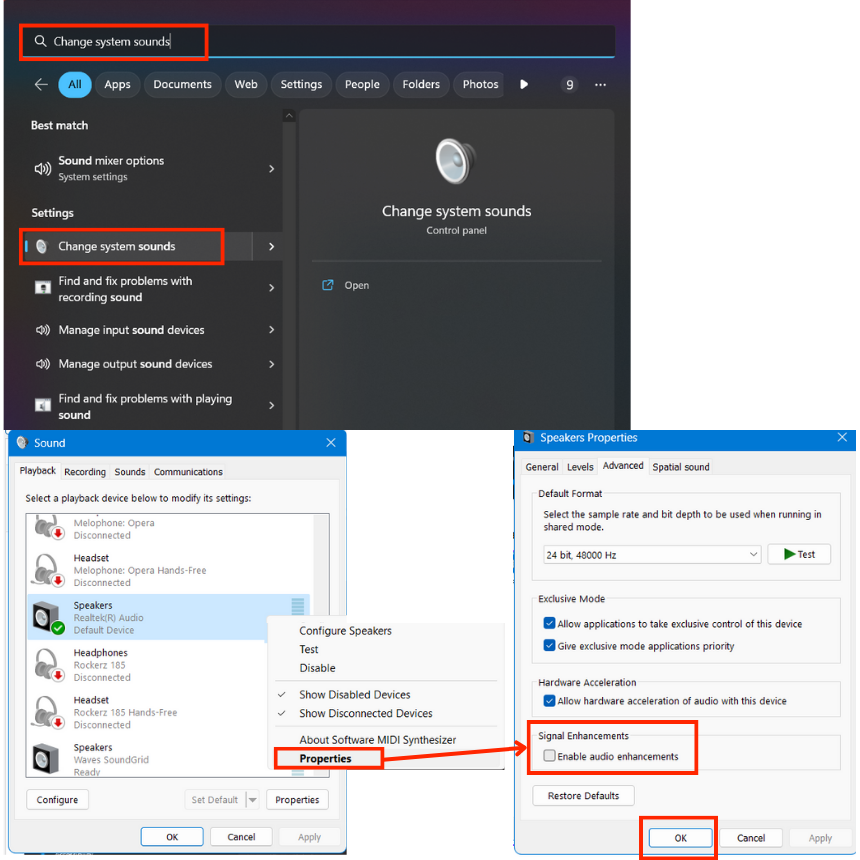
Lastly, the problem may be due to the sound enhancement settings in Windows, which you can disable by looking for “Change system sounds” in the search bar on the taskbar. Further, click on “Change system sounds,” open Sound “Playback” settings, right-click on the device, and click on Properties.
Further, in the Properties window, open the “Advanced” tab and ensure that “Enable sound enhancements” under Signal Enhancements is ticked off. Lastly, click on Apply and OK.
- Fix interference issues
Interference in headphones can occur due to various reasons, such as poor quality cables, radio frequency signals, or electromagnetic interference from other electronic devices. To fix noise in headphones caused by interference, one can try moving away from sources of interference or changing the position of the headphone cables.
Alternatively, one can use noise-canceling headphones that actively eliminate background noise by producing anti-noise signals. Shielded cables and ferrite beads can also reduce interference by blocking electromagnetic radiation. Lastly, you can turn off any electronic device or set your phone/tablet to airplane mode.
Overall, various techniques can be used to fix noise in headphones caused by interference, and the most effective approach depends on the specific cause.
- Check the headphones themselves.
If none of the above steps fix the issue, the problem might be with the headphones themselves. Check the wiring to ensure it’s not damaged, and look for any signs of wear and tear on the ear cushions. If the headphones are damaged, you may need to replace them.
Conclusion
In conclusion, buzzing and static noise in headphones can be frustrating. Electronic devices usually produce static noise, while buzzing can be caused by electrical interference or loose/damaged connections. Checking the headphones and the device’s connections, cables, and aux ports can often solve the problem.
If interference is the issue, moving the device away from other electronics or using a noise-canceling adapter or cable can be helpful. Following these steps can eliminate unwanted noise and fully enjoy their audio experience. Lastly, the issue may be in the device’s software settings you have connected to your headphones so you can check that too.
I hope the article was of help. Thank you for reading.

The Integraudio Editorial Team consists of experienced music producers, audio engineers, and plugin enthusiasts dedicated to providing in-depth reviews and guides for music production software.