
Garageband is among the most used DAW today. Although it is free software, it can allow you to produce music professionally, especially if you use the right tools.
Launched in 2004 and designed to be intuitive and accessible DAW, it is still in force two decades later. In fact, it is regularly used by established industry artists in their productions. At the same time, it is a great option for those who are getting started in music production or looking to enhance their mixes without investing in a paid DAW.
Despite being a software developed for Mac and IOs (it can be run on your iPhone or iPad), which limits compatibility on certain occasions, there are a large number of free plugins that you can take advantage of and take your productions to the next level. Here, we review some of the best.
11 Best Free VST Plugins for Garageband
1. Slate Digital Fresh Air

The Fresh Air is a simple but effective exciter that can add brightness to your mixes to enhance them without being too harsh. Simply the necessary amount.
Based on classic exciters, the Fresh Air combines advanced processing and two intuitive knobs that simplify the task. You can apply it to your vocals, instruments, drums, and even your entire mix. This makes it versatile and one of the most suitable options to add to your Garageband FX chain.
Key Features:
- Simple Interface:
It has two central knobs where you can adjust values from zero to one hundred, and they are the ones that will do most of the work. The Mid Air knob can highlight the frequencies that define vocals and instruments, while the High Air knob can be handy in post-production and add definition to mixes.
- Versatility:
The Fresh Air performs well in various settings and can overwhelm a kick or bass, highlight a vocal, or give more definition to a guitar. As a post-production tool, it can add that touch of shine that is sometimes missing from the mix, achieving excellent results. Depending on what is being processed, the results returned by this plugin will vary.
- Performance:
For a free plugin, Fresh Air’s features are remarkable. It adds brightness and clarity, achieving a more natural sound without overloading frequencies. With just a few quick setups, you can significantly improve your high-end.
Compatibility:
This plugin requires macOS 11 or later, an Intel or Apple Silicon (M1) Processor, and a 64-bit host that formats AU, VST2, VST3, or AAX. It also requires Windows 10 or 11 with an Intel or AMD Processor and 4GB RAM. VST2, VST3 or AAX formats, 64-bit host.
2. Integraudio Blowdio

The Integraudio Blowdio is a tape saturation plugin that allows you to add character to your mix in different ways. If you are unfamiliar with this tool, it is a good option to start experimenting.
This tool offers a complete configuration, without being overly extensive, and four main modes in which you can adjust its parameters and achieve good results in your drums and basses.
Key Features:
- Four Modes:
In the center of its interface, you can choose between Studio, Cinematic, Vintage, and Lofi modes. The Studio mode stands out for being subtle and precise, while the Vintage and Lofi modes provide texture in a more incisive way. On the other hand, the Cinematic mode offers a greater emphasis on mid and low frequencies, which is useful for generating soundscapes.
- Five Knobs:
At the bottom of the Blowdio, we find the central Drive knob, with which you will control the amount of saturation that enters the mix. It also has two texture knobs that you can experiment with (dust and flutter), a tapehad knob, and an output knob to compensate for the gain.
- FX Switches:
In addition, you have some options that can expand your variety of filters, such as your Low Pass, Wow, Digitize, Softclip, Hot In, and Darken switches. You can achieve different characters while maintaining low processor resource consumption with them.
Compatibility:
This plugin is available in VST/AU format, which is compatible with DAWs on Windows and Mac 64-bit operating systems.
3. Analog Obsession FRANK 2

Frank 2 is an EQ plugin created by Analog Obsession and attempts to emulate the features of some of the most famous analog EQs and compressors in this digital hybrid.
Like all Analog Obsession creations, this free tool offers professional-level features. This EQ emulates some classic parameters, including H-Type low cut at 50Hz (Helios), A-Type mid-band at 1.6kHz (API), and P-Type high attenuation at 20kHz (Pultec).
Key Features:
- Custom Line Amp:
As an improvement over its first version, the Frank 2 works with a gain compensator that automatically adjusts when you cut frequencies. This results in a more balanced sound.
- Oversampling:
Another improvement in this version is the inclusion of the oversampling function. This function makes digital processing smoother, and the accumulation of effects does not generate noise or distortion in our signal. It is activated by pressing the developer logo.
- DSP Improvement:
In this version, the circuits have been redesigned, and the DSP (digital signal processor) has been improved, which reflects higher processing speed and lower resource consumption.
- Comfortable Interface:
Despite this plugin’s processing volume, its interface has three stages (Low, mid, and High frequencies) and two pass filters. The merit of this plugin lies in taking the best frequencies of legendary hardware, not only emulating its processing and part of its visual appearance but also doing it simply.
Compatibility:
FRANK v2 is available in AU, VST, and VST3 formats for macOS (10.9 – 11) and Windows (7-8-10-11).
4. Brainworx bx_masterdesk Classic

The bx_masterdesk Classic is a post-production plugin created by Brainworx and is based on the same high-end analog mastering as its predecessor, the bx_masterdesk.
Thanks to its analog emulation design, it is easy to use and can add value to your Garageband projects when it comes to mastering. You only need to register and download its free license to obtain it.
Key Features:
- Three Main Knobs:
In its interface, you can see several Knobs. However, there are three that we will mainly use: 1. Volume – 2.Foundation – 3.Tone. With the volume knob, you will regulate the sound output, which also works as a limiter. Foundation is an EQ that, if you turn it clockwise, will put greater emphasis on the lows; if you turn it counterclockwise, it will attenuate those low frequencies. On the other hand, the Tone knob has four modes (A, B, C, D) with which you can add different characters to the mix.
- THD & Stereo enhancer:
At the top right, you will find the THD knob, with which you can add some harmonic distortion typical of analog hardware. Like every mastering tool, it has its Stereo Enhance knob with which you will enlarge the space within the mix. This stereo Enhancer, in particular, will not affect tracks in mono, such as kicks and basses, which is very useful.
- Built In Compressor:
Just below its Dynamic Range meter, you will find a built-in compressor that will always be present during the mastering process you run. This compressor has two modes, (Soft and Hard) which you will activate using the same button.
- Presets List:
It includes around 25 presets for processing different musical genres, which work well as a template when starting to master.
Compatibility:
This plugin can work with AAX DSP, AAX Native, AU, AAX AudioSuite, VST2, and VST3 formats. MacOS 14 down to macOS 11. Windows 11 down to Windows 10×64-compatible CPU.
5. Analog Obsession MaxBax
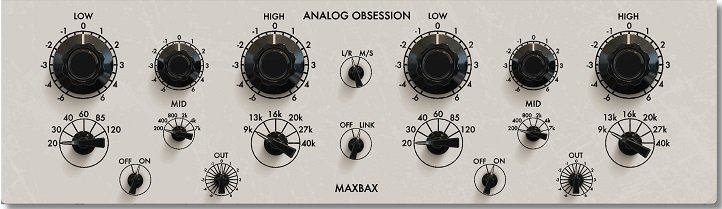
Another great free plugin designed by Analog Obsession is MaxBax, a tonal shaping EQ for instruments, drums, and vocals.
This two-stage plugin, which looks classic, provides exciting options. You can use it as a complementary EQ and individually process the center and sides or the left and right sides of your mix with good results.
Key Features:
- Double EQ:
At first glance, we find two parametric EQs in which you can process Low, mid, and high frequencies individually, moving the lower knob and selecting the desired value and gain. At the same time, in the center of the interface, there is a Link switch that you can activate so that both EQs work exactly the same.
- L/R – M/S Switch:
Through this switch, which is also located in the center of the interface, we make the EQs process the left and right side of the mix, or the mid and sides, being able to process specifically and without affecting the rest of the mix. This is very useful when mastering or working on drums and basses since it is an option not all EQs include.
- Individual On/Off Switch:
In addition to allowing us to apply EQ to the sector that is most convenient for us, the MaxBax does not have a general bypass key; instead, each stage of the EQ has its own off switch, making it easier to process in isolation.
Compatibility:
VST3/AU/AAX Native – Audiosuite | Mac 10.11 or Higher | Intel/Apple Silicon. VST3/AAX Native – Audiosuite | Windows 10 – 11. Mac Versions require a graphic card that supports “Metal”.
6. Matt Tytel Helm

The Helm is a free Synth designed by Matt Tytel and is mainly aimed at creating EDM music.
With over 250 presets, 32-voice polyphony, 2 oscillators, 3 LFO modulators, and many options for setup purposes, this synthesizer allows you to create all kinds of basses, melodies, and effects.
Key Features:
- Formant Filter & LFOs:
The Helm includes an interesting Formant Filter with which you can design the sound of the notes in real-time by holding down the mouse and moving it in different directions. At the same time, you can activate or deactivate the LFO modulators individually to generate new textures and sounds.
- 274 Presets:
It has a wide list of presets, among which you can find pads, basses, amps, leads, and all kinds of sounds you can shape to your liking. It also includes functional effects such as delay, reverb, distortion, and stutter, which can be activated individually.
- Step Sequencer:
With its integrated step sequencer, you can generate sounds of up to 32 steps, altering the frequency, tempo, and speed. Its two oscillators, which can transpose and detune, can be modified through the below mixer control. The possibilities are almost unlimited.
Compatibility:
This plugin is available on GNU/Linux, Mac OSX, and Windows, in LV2, VST, VST3, and AU formats, or as a standalone synthesizer.
7. SONICBITS Exakt Lite

Exakt Lite is a synthesizer based on FM algorithm technology and is a creation of SONICBITS.
It can be a good option to add to your virtual instruments in Garageband if you are looking to experiment with synthesizers of this type. Drag-and-drop envelopes are possible, making it a virtual instrument that is intuitive and quick to operate.
Key Features:
- 4 Operators:
It includes 4 Operators (A, B, C, and D) with classic TX waveforms, which you can shape to your liking and combine in different ways from the algorithm panel. Its algorithm window allows you to modify and control the signal easily. This panel offers eight different combinations and a feedback knob that goes from 0 to 100. You will find adjustable parameters for waveform, detune, phase, velocity sensitivity, and pan within each operator.
- LFO Filter:
In the LFO section, you can choose between four different waveforms, rates, and depth patterns. It also has an individual knob to regulate the amount of filter sent to each operator. It also includes a general Output that can act as a limiter.
- User Friendly:
The interface is visually attractive, the design is well laid out, it includes a good-sized keyboard display, and its processing options are extensive but without being excessive. It also includes more than 20 presets, so you can start testing its sounds from the beginning, even if you have no knowledge about synthesizers.
Compatibility:
Exakt Lite works with Windows 8 or higher, 64bit host. MacOS 10.11 or higher, 64-bit host. macOS 10.15 and 11 is supported.
8. Heavyocity Foundations: Synth Bass (Requires Free Kontakt Player)

The Heavyocity Synth Bass offers good options for quickly creating synth bass and melodies. This plugin is part of Foundations, a series of virtual instruments created by this brand.
It has four sections, among which you can find presets, filters, gates, and effects. It is simple, easy to set up, and suitable for creating cinematic or epic sounds.
Key Features:
- 2 Main Knobs:
In the first section, you will find the Low Synth Bass Knob and the Aggressive Growl Knob. While with the first knob, we can emphasize the low frequencies and give greater depth to the sound, with the second, we will inject distortion into the signal to achieve a more aggressive sound. At the bottom of this section, we can choose between 10 presets and adjust their Bass and Growl parameters.
- Amp Envelope:
In the second section, we will find an amp envelope that can drastically modify the preset’s sound. In this section, you can adjust attack, decay, sustain, and release. In the next section, you will find the adjustable gate and an arpeggiator, which can add rhythm and ambiance to the sound we are shaping. The gate and arpeggiator option has an amount knob to adjust the intensity.
- MasterFX:
The fourth section of this plugin includes a punch knob, delay knob, and reverb knob, which can be very useful for putting the finishing touches on the sound we are shaping. Both the delay and the reverb have individual controls to adjust the time.
Compatibility:
This plugin works on macOS 10.14, 10.15, 11, or 12 (latest update) PC: Windows 10 or 11 (latest Service Pack), Intel Core i5 or equivalent CPU, 2 GB RAM. Graphics hardware support for OpenGL 2.1 or higher. 4 GB RAM (6 GB recommended for large KONTAKT Instruments).
9. Ujam Usynth Drive

The Usynth Drive is much more than a free synth, as it offers a vast number of processing options. This plugin, created by Ujam, is the only free one in its Usynth series and is worth adding to your instruments.
The Ujam Usynth Drive includes presets, sequencers, LFO filters, modulators, effects, and more, all together smartly in a comfortable interface.
Key Features:
- Simple Layout:
This plugin is divided into three sections: Synthesizer in the center, Sequencer on the left, and Finisher on the right. These last two sections have the option of being deactivated individually. The synthesizer has 21 sounds you can process, while the Sequencer and Finisher have 5 and 29 options, respectively. This makes the number of possible combinations very wide. Each of these sections has adjustable values and its own characteristics.
- More Than 100 Presets:
In addition to the presets that we will find in the three main sections, this plugin offers more than 100 general presets ranging from basses and keys to pads and plucks. You can also save your own presets. You will also find delay and reverb knobs, which will process the sounds of this synth in its final stage, and a general volume knob.
- Surprise Button:
The surprise button is an interesting option, as you can create new and fresh sounds by randomly setting the controls. This function has a knob that gives us the choice between a small or big surprise. At the same time, the Synthesiser, Sequencer, and Finisher sections have a switch that turns surprise mode on and off individually for them.
Compatibility:
The Usynth Drive is available in AU, AAX, and VST 2 plugin formats and requires a minimum of macOS(10.15) or Windows 10 operating systems, 8 GB of RAM, and 1.23 GB of hard disk space.
10. 2getheraudio Cheeze Machine 2
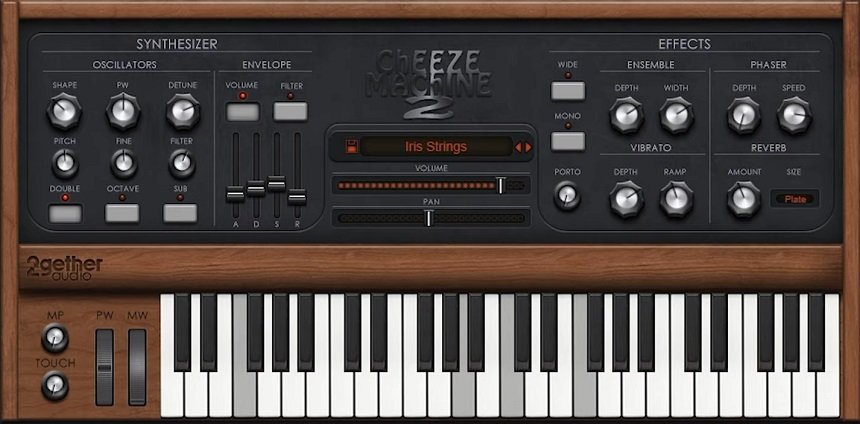
The Cheeze Machine 2 is a synthesizer with a large number of presets, such as basses, brasses, leads, pads, and strings.
It is a simple virtual instrument with a vintage appearance, low processor resource consumption, and the ability to start creating sounds and modulations quickly.
Key Features:
- Simplicity:
This plugin is intuitive and has a simple layout. Beyond this, it offers around 60 sound options you can experiment with and has a very interesting retro style. Its basic oscillator is an excellent way to start understanding sound synthesis.
- Oscillators:
In this section, you can modify oscillation values such as Shape, Pulse Width, Detune, Pitch, Fine, and Filter knobs. You will also find three buttons such as Double, Octave, and Sub, which will give you some more processing options. Next to it, you will find an envelope with which you can further alter the signal, which can be used on the volume or filter.
- FXs:
In the section located on the right side, you can add effects such as Esemble, Phase, Vibrato, and Reverb to the signal. Each of these effects has its own adjustable parameters, and in the same section, you will also find a portamento knob and two panning options (Wide and Mono).
Compatibility:
This plugin works with Mac OS X 10.12 or later. Intel Core i5, i7, 2.3GHz processor or higher, 1GB RAM (2 recommended), and 50 megabytes of free disk space.
11. u-he Tyrell N6
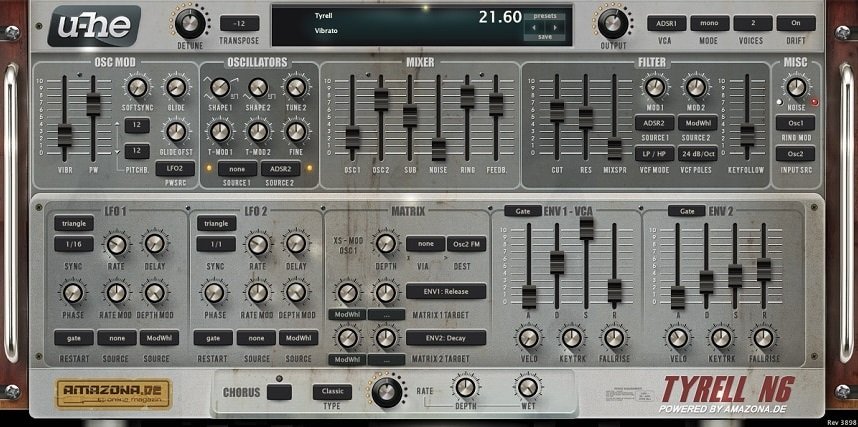
The Tyrell N6 is a synth with many processing options and a large number of presets. It can help create synth-wave music, sound effects, and transitions.
This creation by u-he offers all the facilities of a paid plugin, making it a good option if you are looking for a synthesizer that allows you to perform complex processing.
Key Features:
- Complete Synthesizer Module:
The Tyrell N6 includes oscillators, envelope filters, LFOs, a chorus channel, and a mixer located in the center of the interface. Each of these sections has many adjustable parameters that make it completely moldable. Below the mixer, we find a section called Matrix, which works as an oscillator module.
- Unlimited Presets:
In addition to being a complete synthesizer, this plugin has more than 500 presets created by different authors (each author has their own section), some of which are very successful. So, even if you have little knowledge of using a synth, you have many options to experiment and create sounds.
Compatibility:
This software requires a host application. It’s available as VST and AAX in Windows and AU Vol. 2, VST 2, and AAX in MacOS. It can run on Linux, Windows 7 (or newer), and Mac OS X 10.7 (or newer). A minimum of 1 GB of RAM is required to run it.
Conclusion
There are many free plugins available, and many of them offer features that can compete with paid plugins. At the same time, the more you use and practice with them, the faster you will begin to develop your skills and understanding of these tools.
Keep in mind that not all plugins can be used in Garageband since some are only available for Windows operating systems. Sometimes, your computer’s compatibility and processing capacity also need to be taken into account.
Beyond the number of options that exist, it is vital that you focus on finding the plugins that can practically accomplish the task and learning how to do it. Sometimes, having an unlimited number of options can cause you to accumulate plugins without knowing how to use them. Here, we give you some recommendations on where to start. Thanks for your time!

The Integraudio Editorial Team consists of experienced music producers, audio engineers, and plugin enthusiasts dedicated to providing in-depth reviews and guides for music production software.