
Live Streaming is one of the most used forms of content creation today.
It allows us to make broadcasts for any device, connect with other users, or even play online video games—all in real time and with many video and sound configuration options.
The microphone occupies a vital role in the necessary equipment to perform quality live streaming. It will be in charge of transmitting the sound of your voice. To get the most out of it, it is advisable to use VST plugins that can process the audio and optimize your performance.
There is a large number of Live Streaming Software available (OBS Studio, Wirecast, X-Split, V-Mix, among others), and most include options to import this type of plugins and work with them in the same way we would do in a DAW.
In this article, I will detail some of what I believe are the best VST plugin options to optimize the sound of your Live Streaming, with the premise that they are easy to use, have moderate to low CPU usage, and perform well processing vocals. We will see some paid plugins and some free ones.
Important: Depending on the live streaming software you use, some will support VST and VST2 formats but perhaps not VST3 and vice versa, which is something to consider.
8 of the Best Vst Plugins for Streaming / OBS
UrsaDPS Boost
More Info & Price (Trial Available)
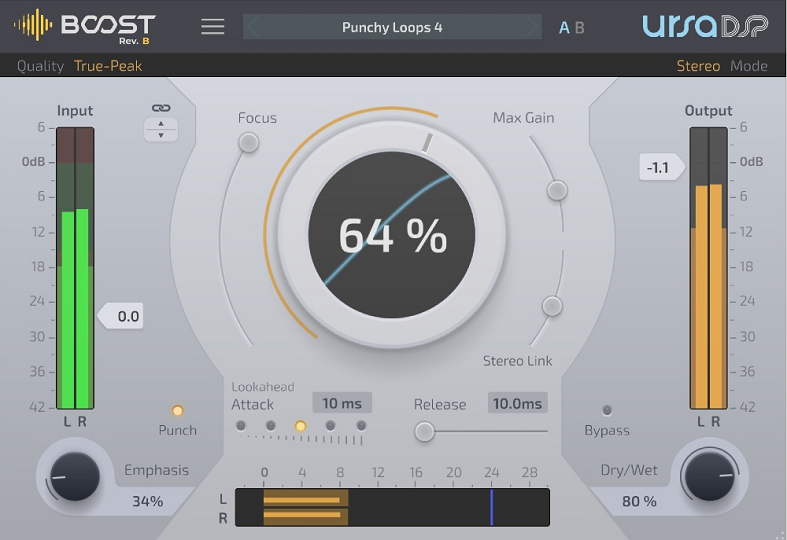
The Boost is a limiter created by UrsaDPS that makes the sound of your streaming heard with the appropriate volume intensity without generating peaks or saturation.
This limiter is easy to operate and has features that can add character to your sound. Although it is not cheap (it costs around $100), it can be a good investment for your live streaming.
Key Features
- Main Section:
In the main section, you will see a central knob that will adjust the boost percentage, along with two sliders for Focus and Gain. With Focus, you can increase the Boost of quieter sounds and reverb tails. With Max Gain, you can reduce from 3dB to 48 dB. With a Boost of between %50 and %70, you can significantly enhance the sound of your voice.
- Sides Section:
On the sides, you will see the Input Control on the left and the Output Control on the right, with sliders that you can use to obtain the appropriate values. Below the Input control is the Drive control, with which you can add some texture to your voice. I recommend setting the output control values between -0.5dB and -1.5dB. Below the Output, you will also see a Release parameter, which I recommend keeping at low levels.
Compatibility
UrsaDPS Boost supports Mac OS X 10.9 or later (64-bit only). VST3/AU/AAX. Windows 7 or later (32 or 64-bit). VST3/64-bit AAX. Note: VST2 format is not supported.
TDR Nova Parallel Dynamic EQ

The Nova Parallel Dynamic EQ is a powerful plugin developed by Tokyo Dawn Records. I would say that it is another excellent option for optimizing the sound of your streaming.
This EQ is versatile since it can also work as a compressor. With a few simple steps, you can achieve good results, and it is a free tool.
Key Features
- 4 EQ Bands:
This plugin can display up to four bands, each with its Q, Frequency, and Shape parameters. In addition to the four bands, you can activate the High and Low Pass filters located at the bottom left. By cutting frequencies below 80Hz and above 12kHz, you will begin to clean up the sound of your streaming. Then, highlight the frequencies between 1.5kHz and 5kHz a little until you feel the sound of your voice begin to gain presence.
- Threshold Mode:
Each of the TDR Nova’s EQ bands includes a Threshold mode that you can activate to begin compressing the signal of that band. Like every compressor, it includes its Ratio, Attack, and Release parameters. You can use this function to attenuate some sibilance without cutting with the EQ between 4kHz and 10kHz. This will cause the compressor to act only when necessary. It also includes a Dry Mix parameter to apply parallel compression.
Compatibility
TDR Nova supports VST, Audio-Unit or AAX compatible host plugin. Win XP SP2 or above. VST, Audio-Unit, or AAX compatible host plugin. Mac OS X 10.6.8 or above.
Baby Audio Crystalline
More Info & Price (Trial Available)
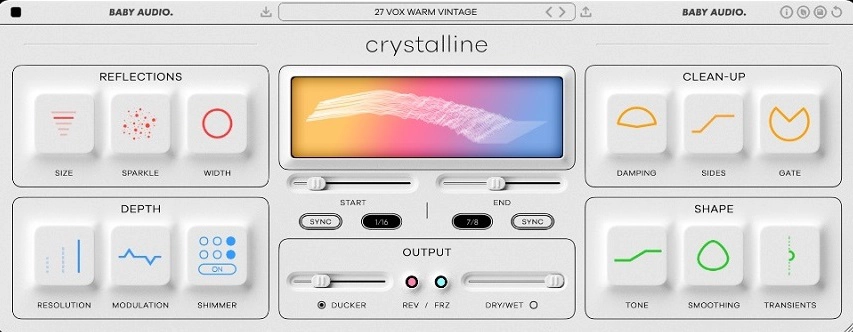
The Crystalline is an algorithmic Reverb created by Baby Audio, and I think it can add depth and interesting effects to your live streaming.
This powerful reverb has an intuitive interface, which allows us to view all its parameters quickly. It will also allow you to shape the sound of your voice to your liking and costs around $99.
Key Features
- Reflections & Depth Sections:
In the Reflections Section, you can adjust the size of the reverb, the Sparkle, with which you can add or attenuate the brightness, and the Width parameter to obtain wide or compact reflections as needed. In the Depth section, you can modify the Resolution, Modulation, and Shimmer parameters. I recommend setting the Resolution parameter to Basic so that the plugin uses low resources from your processor. By varying the Modulation, you can create greater dynamics in the reverb.
- Clean-Up & Shape Sections:
In the Clean-Up section, you will see the Damping parameter, which allows you to trim high and low frequencies in the reflections. The Sides parameter works with a pass filter, while the Gate can generate an interesting tail effect. In the Shape section, you can modify the Tone, Smoothing, and Transients.
- 300+ Presets:
In addition to an intuitive interface, the Crystalline includes more than three hundred presets to allow you to start experimenting quickly. This allows you to add different reverb effects to your live streaming without having to waste time configuring parameters.
Compatibility
Crystalline supports Mac OS X 10.7 or later (64-bit only), Intel or M1 Apple Silicon Processor (Native compatibility), and Formats: AU, VST, VST3 & AAX. Windows 7 or later (32/64-bit). Formats: VST, VST3 & AAX.
FabFilter Pro-Q3

The Pro-Q3 is a music industry standard and the most used EQ in the world. It works very well with voices and allows you to offer professional-quality audio.
This plugin is easy to set up and can process both voices and instruments. By adding it as a tool to your streaming, you can configure it to balance your voice so it can be heard clearly. While it is not a cheap plugin, it is one of the best EQs you can get.
Key Features
- 24 EQ Bands:
The Pro-Q3 can use up to 24 bands, each identified with a different color. Each one has adjustable parameters, where you can change the intensity, frequency, and shape. By double-clicking, you will create a new band in the sector you choose. In the case of spoken voices, it is indicated to cut frequencies less than 80Hz, remove boxy frequencies around 400Hz to 800Hz, and improve presence by increasing a little between 1.5kHz and 5kHz.
- Spectrum Visualizer:
This plugin includes a classic visualizer that will show how the sound behaves before and after processing. This is very useful for determining what adjustments you should make and what frequencies need to be modified. With a few simple adjustments, you can quickly improve your sound. If you also play instruments in your streaming, they will need their own EQ on their assigned channel.
- Mid/Sides Mode:
The Pro-Q3 will also allow you to process the sound specifically, emphasizing more in the middle of the mix or on the sides if you wish. The Mid/Sides mode can be changed to the Left/Right mode for greater control over panning. Each band has its interchangeable parameter; this can help you give more width to the sound of your streaming.
Compatibility
Pro-Q3 is available in VST, VST3, Audio Units, AAX Native, and AudioSuite formats (all 64-bit and 32-bit), as well as RTAS (32-bit only). Windows 32-bit: Windows 8, 7, Vista or XP64-bit: Windows 8, 7, or Vista (x64) VST 2/3 host or Pro Tools. Mac OS X 32-bit: OS X 10.5 or higher. 64-bit: OS X 10.6 or higher. AU or VST 2/3 host or Pro Tools.
Teletronix LA-3A Audio Leveler
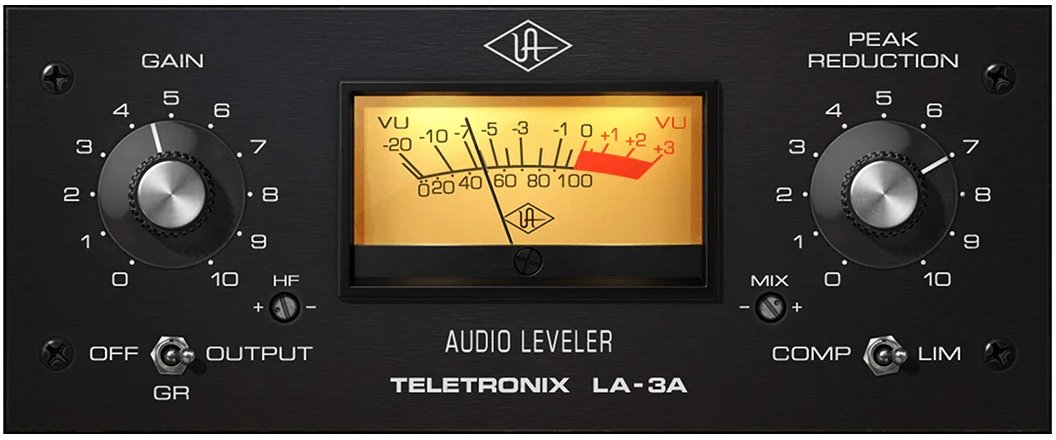
The Teletronic LA-3A is the digital version of a legendary hardware compressor created by Universal Audio.
This compressor can significantly improve your sound output while adding tone and definition. While its primary function is to level the signal and decrease the dynamic range, it can also add energy and harmonics to your voice. You can get it for $39.
Key Features
- Simple UI:
This plugin has a Gain knob that you can set in three different positions (Off/Gain Reduction/Output), which will be reflected in the Visual Meter located in the center. The other main control is the Peak Reduction knob, which is what we will use to tell the plugin how much we want to reduce to make the signal compact. This knob also has a limiter option, which we will activate with the switch located just below.
- HF & Dry/Wet Mix:
The Teletronix LA-3A also includes an HF control, which acts as a sidechain filter, preventing the compressor from affecting specific frequencies. The Dry/Wet Mix parameter allows you to add parallel compression, combining the compressed signal with the original signal, making the mix enhance the final result. Although these options are not essential for our purpose, they can provide definition to your live streaming.
Compatibility
Teletronix LA-3A requires macOS 10.15 Catalina, 11 Big Sur, 12 Monterey, 13 Ventura. Windows 10 or 11 (64-bit only Editions) VST3, Intel, AMD, or Apple silicon processor.
Klanghelm DC1A
The DC1A is a simple and effective compressor developed by Klanghelm and is the synthesized version of the DC8C.
With this compressor, you can optimize the audio signal of your live streaming in seconds. Its interface is straightforward, has some configuration options that work well, has very low CPU usage, and can be downloaded for free from the manufacturer’s site.
Key Features
- Main Knobs:
The DC1A has an Input knob and an Output knob, both with values ranging from -20 to 20. With the Input, we will begin to compress by increasing the ratio until we reach the sweet spot where we notice that the sound starts to compact and gain definition. With the Output, we will compensate by raising the gain or lowering it if necessary. You can control all this from your display. With the Mix parameter, you can apply parallel compression, processing only part of the signal.
- Special Functions:
This simple plugin also includes Deep, Relaxed, Dual Mono, and Negative modes. Deep mode activates a high pass, while Relaxed mode acts directly on peak and RMS, placing greater emphasis on attenuation. Dual Mono mode processes only the sides without affecting the middle sector when activated. Finally, with Negative mode, you can add some saturation to the signal.
Compatibility
The DC1A supports Windows 8 or higher. 64bit VST-, VST3-host, Pro Tools® 11 or higher for AAX versions Mac OSX 10.11 or higher. 64bit VST-, VST3-, AudioUnit-host, Pro Tools® 11 or higher for AAX versions. Intel mac or Apple Silicon (M1, M2, M3) – supported natively.
U-He Protoverb
The Protoverb is a room simulator reverb developed by U-He that can add depth to your voice with just a couple of simple adjustments.
This plugin generates the effect by focusing on the reflections of giant and medium spaces, offering a wide range of reverbs with a natural tone. You can download it for free from the developer’s site.
Key Features
- Three Main Knobs:
This plugin has a really simple interface. Its three main parameters are Decay, Dry, and Wet. With Decay, you can increase the size of the space, generating space climates. The Dry and Wet parameters serve to control the input and add effects to the mix, respectively.
- Cool Presets:
Protoverb also includes presets that I recommend trying. The Cathedral preset can give your voice a lot of depth and presence, while the Vapor Excursion preset lets you experiment with generating deep echoes. The Life in 3D preset will generate a reverb with a modulation effect as if you were adding a subtle chorus.
- Random Mode:
If you want to continue experimenting, Protoverb includes a Random section at the bottom of the interface. There, you can choose between different network structures and tap delays that will appear when you press their random buttons, making the possibilities unlimited. You can also save those combinations by copying their code.
Compatibility
The U-HE Protoverb requires macOS Windows 7 or newer VST2, VST3, AAX. 32-/64-bit. AAX requires Pro Tools 10.3.7 or later. Linux: glibc version 2.28 or newer.
Thomas Mundt LoudMax
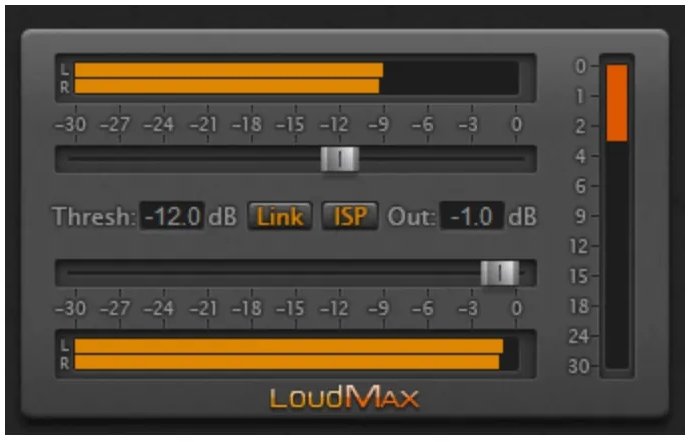
The LoudMax is a limiter with a clear and transparent sound developed by Thomas Mundt that will optimize the Output of your live streaming.
This plugin is simple, easy to set up, and will take the sound of your voice up front in the mix, without altering its essence or producing peaks, even at high compression levels. It has a very low CPU usage, and you can download it for free.
Key Features
- Threshold & Ceiling:
With these two simple sliders, you will increase the gain of your sound. First, you will set the ceiling, which you will see as Out in the interface, at the indicated value. For general use and streaming, -1dB is recommended. With the Threshold slider you will begin to compress the signal to the point that the sound gains volume and intensity.
- Stereo & Reduction Meters:
The LoudMax includes two stereo meters, where you will display the input and the output, giving you a clear reference of what the plugin is compressing. On the right, in orange, you will find the gain reduction meter. I recommend not exceeding 4dB to 6dB of cutting so as not to lose naturalness in the vocals.
- Link & ISP Modes:
This plugin also includes a Link mode so that the Threshold and Ceiling parameters act synchronously. The ISP mode places greater emphasis on peak detection.
Compatibility
LoudMax is available as VST 2.4 and VST 3 Plugin for Windows and Mac OS X, Audio Unit Plugin for Mac OS X, LADSPA Plugin for Linux x86 and as Winamp Plugin.
Conclusion
If you don’t have experience using audio processing plugins, here are some good options to get you started. Many tools are available, but the important thing when optimizing the sound of a live stream is to focus on intensity and clarity. Because of this, the use of EQs, compressors, and limiters is almost mandatory for quality content.
It is also essential to know that these types of effects, when combined, need to work in a specific order to work correctly. As a general rule, in a master channel effects chain, the compressor should come first, then the EQ, and lastly, the limiter. You can start optimizing your sound with those three tools and some basic settings.
For more information about compression, equalization, effects, and audio processing plugins, check out our sections and articles, where you will find everything you need. Thanks for your time!

The Integraudio Editorial Team consists of experienced music producers, audio engineers, and plugin enthusiasts dedicated to providing in-depth reviews and guides for music production software.