
Cubase is a powerhouse for music production, offering endless potential for crafting your sound.
To make the most of it, finding the right plugins can elevate your work, from rich synths and lush pianos to powerful effects and unique guitar tones, here are the 20 Best Plugins for Cubase 2026 & (of course) 13 Free Plugins.
In this article, we’ll explore the best plugins for Cubase across all categories, helping you add depth, texture, and creativity to your tracks. Whether you’re a seasoned pro or just starting, these plugins are essential tools for any music producer.
20 Best Plugins for Cubase 2026
Instruments:
Sonuscore CHROMA – Grand Piano (Piano – Kontakt Library)
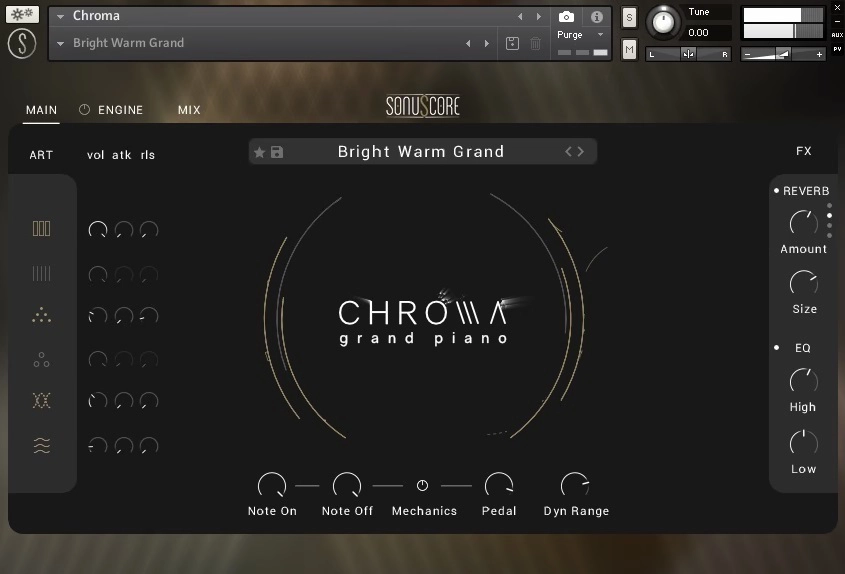
Designed to emulate the sound of a movie piano, Chroma is Sonuscore’s take on the instrument.
CHROMA is a representation of the timeless elegance of the piano. This recording was painstakingly made using a Yamaha C3 to ensure that it would preserve the full sonic vitality of the perfect piano sound. It is an exhaustive investigation of the instrument and faithful recreation of its acoustic properties.
CHROMA is more than just a piano; it’s the experience of playing the piano, from the depth of a single note to the expansive soundscapes made possible by mallets, pads, and even an e-bow.
Key Features:
- Articulations
- Engine
CHROMA gives you a lot of creative leeway by drawing from various recordings of the piano and its body and a set of powerful effects. However, CHROMA is more than just a piano; it’s also a potent tool for creating soundscapes, from novel and abstract compositions to realistic recreations of natural sounds like rain.
- User Interface
Chroma’s controls are neatly separated into three tabs.
- Mix Page
You may find faders and buttons to activate the four mic inputs on the MIX Page.
- Presets
More than 90 different “presets” are at your disposal in the preset browser, all of which can be modified to suit your needs. In addition, the preset browser allows you to filter the presets you see and then scroll through the filtered results.
Compatibility:
The library is available for Kontakt 5.7 or higher (NOT the free Kontakt Player). Kontakt 5.7 is available for Windows 7 or higher 32-bit and 64-bit and macOS 10.10 or higher 64-bit. It comes in VST 2, AU, and AAX formats.
Summary:
CHROMA goes well beyond a standard piano library — the effects and layering options make it just as capable for atmospheric soundscapes as it is for a straightforward piano part. With 90+ presets to explore, it’s a strong pick for composers who want more than just a good-sounding piano.
Tracktion Novum By Dawesome (Granular Synth)
More Info & Price (Trial Available)

Beautiful visual elements and superb sounds come from this unique synth. This can be really useful Cubase VST.
Novum is the kind of instrument that inspires you to achieve new soundscapes, always evolving and surprising you simultaneously. The main concept behind this Tracktion plugin lies in the way it handles sampling: it “breaks down” a sample into six different layers for enhanced access to the timbres inside your track.
Key Features:
- Granular algorithm
The way Novum works is very straightforward: every sample is divided into six different layers with the help of a specific algorithm.
- MPE support
“MPE” is an extension of a MIDI protocol, meaning “MIDI Polyphonic Expression.” It basically makes use of multiple MIDI values simultaneously, giving unprecedented control over the playability of your controller. If by any means your keyboard offers MPE support, you can use it to further explore Novum’s features.
- Patches
Patches are parameter value bundles saved automatically inside the software. You can save your patches, but there are also over 300 factory patches that fully represent a bit of what Novum can achieve in terms of sound crafting.
- Drag and drop
The intuitive “drag and drop” movement is present inside Novum’s functionalities.
Compatibility:
This plugin is available for macOS 10.13 or higher (64-bit only) and Windows 10 or higher (64-bit only). It runs in VST3 and AU plugin formats.
Summary:
Nowadays, forward-thinking programs like Novum are useful in multiple situations. The hard work behind crafting interesting, new sounds from scratch is demanding, and sonic tools like this plugin should exist to help us out in that issue.
Sampling is the main process behind it, but the innovative ways you can manipulate that audio may be useful for varied projects.
Matt Tytel Vital (Wavetable Synth)
More Info & Download (Paid Version Available)


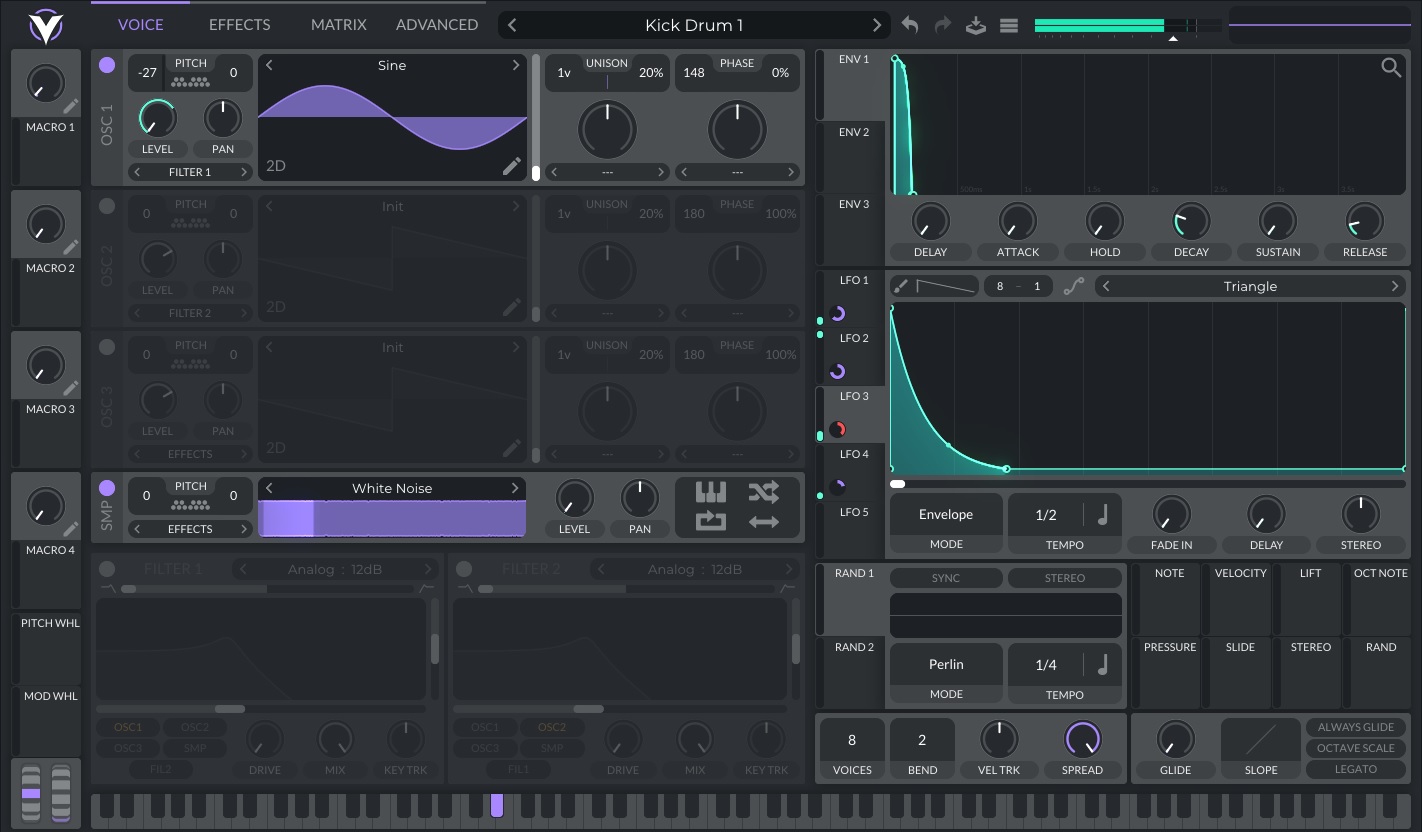


Vital’s synthesizer brings spectral oscillator warping to add new life to your wavetables.
Acting directly on a waveform’s harmonics, this technology can create drastically different tones and shapes from a signal source. Thanks to this simple tool that creates endless possibilities, what was already incredibly customizable became even more so.
If you want to import your samples to create a wavetable, Vital’s pitch-splice and vocode converter are two great and easy add-ons to get even more specific on your sound design.
You can also develop wavetables from scratch via the built-in wavetable generator or even directly from the text!
Key Features:
- Excellent oscillators
These oscillators have a shallow low noise floor and a sharp cut-off at Nyquist for almost no aliasing, creating the cleanest sounds with the best quality possible.
- Microtonality at its best
This synth can load .tun, .scl, and .kbd files – which can alter and configure how the tuning will perform – and play in a microtonal setting without any trouble.
- Key-tracked LFOs
It’s possible to create key-tracked bass lines with this LFO setting, combining it with an audio-rate modulation and using your LFO as an oscillator modulation source. This enables you to instantly automate certain modulation parameters in relation to whatever notes are being played.
- MPE support
If you have a ROLI keyboard, a Linnstrument, or other MPE-compatible gear, Vital offers full support and control. This way, you can add more expression to your sound and use dynamics as you’re used to.
- Audio-rate modulation
The audio modulator kicks in when you have an audio signal or a parameter being varied and brings much more personality to your tones. The variations can be tracked down and edited in the most creative ways possible. The signal whose waveform is used to trigger is modulated accordingly, with extreme precision and character.
Compatibility:
The plugin is available for mac OS 10.12 or higher, Windows 10 or higher, and Ubuntu Linux 18.04 or higher. All 64-bit only, with OpenGL 3 or higher. It comes in VST, AU, and LV2 plugin formats.
Summary:
Vital punches well above its price point (including its free tier), offering wavetable manipulation and modulation depth that rivals plugins costing several times more. The spectral warping and audio-rate modulation in particular make it a genuinely creative tool, not just a preset browser.
Ample Sound – Ample Guitar M v4 (Acoustic Guitar)

Ample Sound rebuilt their entire acoustic guitar line around a new engine in 2025, and Ample Guitar v4 (AGM) is a genuinely deeper upgrade than the version number suggests.
The core Martin-based sampling remains, but v4 adds drop tuning support down to D1, Poly Legato and Slide Smoother for natural transitions across any interval or speed, and a completely rebuilt MIDI workflow via Riffer 4 — a dual-view Piano Roll and Tab editor that understands real fretboard fingerings and automatically blocks physically impossible notes. Tab Reader 4 now imports Guitar Pro files directly (GP3 through GP8), preserving the original fingerings and expression.
Key Features:
- Riffer 4 — dual-view MIDI editor with real fretboard logic
- Tab Reader 4 — direct Guitar Pro (GP3–GP8) import with full fingering preservation
- Drop Tuning Support down to D1
- Poly Legato & Slide Smoother for realistic transitions across wide intervals
- 8-Band EQ, Compressor, 6-Tap Echo, and IR Reverb carried over from the previous generation
Compatibility:
VST2/3, AU, and AAX for Windows and macOS, plus standalone. Free update for existing v3 owners.
Summary:
If you already own Ample Guitar M III, this is a free upgrade worth installing immediately — Riffer 4 alone changes how fast you can get a convincing rhythm part down. New buyers should just buy v4 directly.
Ample Guitar L v4 (Classical Guitar)
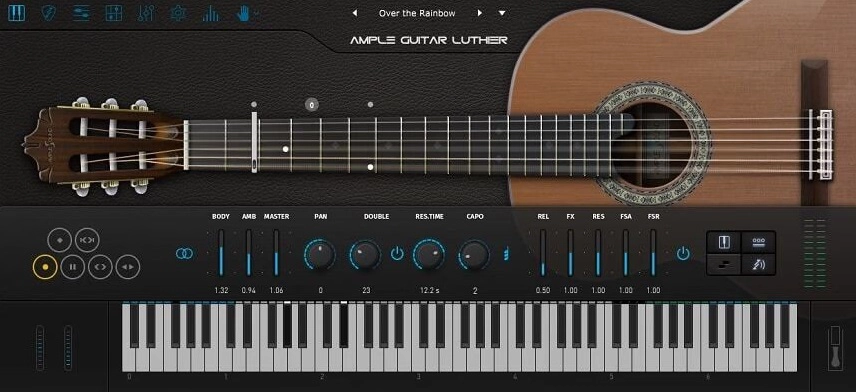
This Kontakt-adjacent classical guitar library, built on Alhambra’s nylon-string instruments, received the same engine overhaul as the rest of Ample Sound’s guitar line in 2025.
The warm, nylon-string character and extensive articulation set remain the core appeal, but Ample Guitar L now runs on the same v4 engine as the rest of the lineup — bringing Riffer 4‘s smarter MIDI editing, Tab Reader 4‘s direct Guitar Pro import, and improved legato and slide handling to a library that previously felt a generation behind Ample’s newer instruments.
Key Features:
- Riffer 4 MIDI editor with fretboard-aware note logic
- Tab Reader 4 — direct Guitar Pro file import
- Poly Legato & Slide Smoother, matching the rest of the v4 lineup
- 8-Band EQ, 2-Line Compressor, Tape Echo, and IR Reverb
Compatibility:
VST2/3, AU, and AAX for Windows and macOS, plus standalone. Free update for existing owners.
Summary:
The nylon-string tone was never the problem — the workflow was. This update brings Ample Guitar L’s editing experience in line with the rest of the v4 series, which matters most if you’re programming complex classical parts rather than just strumming chords.
Related Reading:
The 7 Best Acoustic Guitar Plugins 2026
UJAM Virtual Guitarist IRON 2 (Electric Guitar)
More Info & Price (Trial Available)

As usual, UJAM delivers the most straightforward solutions—this time, for creating rock rhythms and riffs the quickest way.
Iron 2 is a virtual guitarist best for playing rhythms for rock, metal, and similar genres. It features over 350 sampled phrases in 30 styles played by a studio session guitarist. The interface lets you customize the guitar itself and the amp/effect processors.
You can switch through patterns and chords using key switches.
Similarly, you can also use Iron 2 as a playable instrument. You can hold chords, strum or play individual strings, and play melodic riffs. It features several articulations for riff performance too.
Key Features:
- Player Mode
In the Player mode, Iron 2 plays pre-recorded strums and phrases. It’s an excellent way to get realistic rhythm tracks, even if you have no idea how to play the guitar. The keyboard will have three sections of key switches: Common Phrases, Style Phrases, and Play Range.
- Instrument Mode
This mode allows you to play Iron 2 as a standard guitar instrument. You can hold chords with one hand and strum/arpeggiate with your other hand, just like a real guitarist. Or, you can play leads and riffs.
- Trigger And Latch
In the Instrument mode, you can disable Trigger so that you can hold chords with your hand without it sounding until you use a strumming/picking key with your other hand. Similarly, Latch mode lets you hold chords without having to hold them manually. These two features are handy for playing live with a MIDI controller.
- Guitar Sound
Iron 2 lets you blend between the neck and the bridge pickup—it will change the tone of your guitar. Furthermore, you can change the character of your pickups from warm humbuckers to sharp Telecaster single-coils using the Character selector.
- Guitar Amp
Next, you can choose from five kinds of guitar amp and cabinet simulations. They include clean, crisp, cream, crunch, and metal. If you’d rather use a dedicated guitar amp simulation software, you can set Iron 2’s amp option to Direct.
- StompBox
The last step of customizing your guitar sound is using effect processors. Iron 2 features a Stomp Box dropdown menu where you can select from 30 effects that create classic guitar sounds. They include simple effects like chorus and tremolo to rotary and reverse.
- Finisher
The Finisher section lets you add even more effect processors with built-in combinations of no less than 20 effect plugins per preset. It has over sixty effect chain presets built-in, and you can control the mix level.
Compatibility:
Iron 2 is available for Windows 7 or higher and macOS 10.14 or higher, both 64-bit only. It comes in VST 2, AU, and AAX formats.
Summary:
Iron 2 is one of the fastest ways to get convincing rock and metal rhythm guitar into a track without actually playing guitar — Player Mode alone can carry a whole arrangement. The Instrument Mode and extensive Stomp Box/Finisher chains add real depth if you want to go beyond the presets.
Native Instruments: Session Bassist Prime Bass (Bass Guitar – Kontakt Library)


Prime bass emulates the single could electric bass guitar from the 70s.
The library/instrument provides great flexibility and ease of use for various bass guitar tones and playing styles. It makes programming realistic and groovy basslines extremely simplified. You need a good amount of time to explore the depth of the plugin, but once you do, you will realize the immense potential it offers to music producers and sound designers.
Key Features:
- Sounds
Prime bass has some great factory presets categorized as direct, hi gain, experiment, amped, and more. In addition, Song Browser lets you browse through categories like Rock, RnB, Reggae, Blues, FX/Perc, Funk, Disco, Electro, Latin, etc., which has a collection of 81 songs presets.
- Amps and effects
The plugin consists of amps and effects of a huge variety, such as Cat, Distortion, Skreamer, and Lo-Fi in the distortion category, choral, flair, phasis, and rotator in the Modulation category, compressors like super char, solid comp, fast comp, limiter, and tape, and many more such plugins in the categories EQ & Filter, Reverb & Delays, and Amps and Cabinets.
- Customizable Performance
Sample libraries usually take a lot of work, especially for creating realistic grooves, articulations, and playing styles. But Prime bass allows you to customize your performances with controllers like humanize, swing, feel, and timings. In addition, you can adjust latch mode, pattern sync, default mode, and tempo.
- Additional Features
The plugin has a massive loop library of over 8,000 loops and phrases that lets you pick up realistic and human-played basslines. These are arranged in 355 patterns presets, under categories like open, muted, plec, finger, and slap.
Compatibility:
Prime bass requires a minimum of 10 GB of hard disk space and the Kontakt 6.7 version or higher, but it’s also compatible with the free version of Kontakt.
Summary:
Prime Bass has a real learning curve, but the payoff is a genuinely groovy, human-feeling bassline generator once you’ve explored its 8,000+ loop library. Worth the time investment if bass programming is a regular bottleneck in your workflow.
Heavyocity Symphonic Destruction (Orchestral Instrument – Kontakt Library)

A deconstructed orchestra library, ready to push your inspiration up to its limits.
Heavyocity’s Symphonic Destruction delivers innovative results to hybrid orchestral scoring by blending traditional combinations, ingrained sound design, and profound braams in one single library. As a result, all sounds will be fresh and revamped, as this collection aims to deconstruct the orchestra ensemble as we know it.
A massive collection of cinematic elements – from full orchestral portatos to detuned staccatos – allow you to create infinite soundscapes, all worthy of much energy and vigor while maintaining the characteristic huge sound aspect that only an orchestra can provide. So be ready to unleash your most audacious and wild ideas instantly.
Key Features:
- Three different instrument types
Symphonic Destruction provides you with three different instrument types: “Performers,” which consists of instruments that can have key switches to alternate between different sounds, “SD Designer,” tailored for deep sound designing, and “SD Loop and Braam Designers,” a variation of the previous type but designed to playback and layer any loops or braam noises.
- Spaced out
A distinctive “Space” section contains two cherished effects on one single page. Here you’ll find a delay and reverb that can help you instill the proper ambiance and sense of acoustic.
- Three microphone positions
Every sample was recorded with three different microphone positions, so you can expect to alter these in any way you want to. Including “Main,” “Hall,” and “Rev FX” positions, the mixer allows you to set each value accordingly through specific faders. You also have “Mute,” “Solo,” and “Pan” options in each position.
- Modulators
There are two modulators: “Gate” and “Dynamics.” Each can create a different approach to your instruments, either by modulating the output volume (“Gate”) or by controlling the dynamics level of the instrument (“Dynamics”) over time to create rhythmic effects. You can set the “Rate,” “Steps,” and “Range” in each section to instantly achieve new sounds and textures.
Compatibility:
The library is available for macOS 10.14, 10.15, 11, or 12 (latest update) and Windows 10 (64-bit only). It comes in VST, VST3, AAX, and AU plugin formats.
Summary:
This is a feast for sound designers. With Symphonic Destruction, it’s easier than ever to develop authentic cinematic sounds worthy of great productions with as few mouse clicks as possible.
Arturia B-3 V2 (Organ)
More Info & Price (Trial Available)

B-3 V2 by Arturia offers a highly creative environment with realistic tonewheel organ sounds and a carefully made rotary speaker add-on.
With many modulation options for the sound, the B-3 V2 plugin features all the textures most organs have. With great attention to detail, the B-3 V2 will work on an elite quality physical modeling technology.
With advanced controls to optimize the instrument, the plugin also features a realistic interface with two keyboards and a swell pedal, along with percussion settings.
Key Features:
- Effects
The B-3 V2 will give any producer a complete experience. The Arturia plugin features twelve pedals with different effects: Chorus, Flanger, Compressor, Delay, Distortion, Phaser, Equalizer, Reverb, Stereo Pan, Analog Delay, and Tape Echo.
- Drawbars
The Organ VST by Arturia gives an automation option to the movement of drawbars using envelopes, LFOs, and step sequencers. The highly customizable Drawbars feature possesses ten modulator slots that can individually hold one LFO, multi-point envelope, or step sequencer.
- Rotary Speaker
The amount of work that went through B-3 V2’s rotary speaker is incredible. You can produce subtle variations on the sound with the different cabinet models that you can switch between at any time. These models are Closed, Open, 122 Closed, 122 Open, and 147 Open.
Compatibility:
This plugin is available for Windows 10 or higher and macOS 11 or higher, both 64-bit only. It comes in VST2, VST3, AU, and AAX formats — RTAS is no longer supported.
Summary:
B-3 V2 is one of the more convincing tonewheel organ emulations available, and the rotary speaker modeling in particular stands out — the amount of detail put into those five cabinet models is obvious once you A/B them. A strong pick for anyone regularly writing organ parts.
Related Reading:
Top 14 Arturia Plugins For Musicians
UAD Minimoog (Analog Synth – Moog Emulation)
More Info & Price (Trial Available)
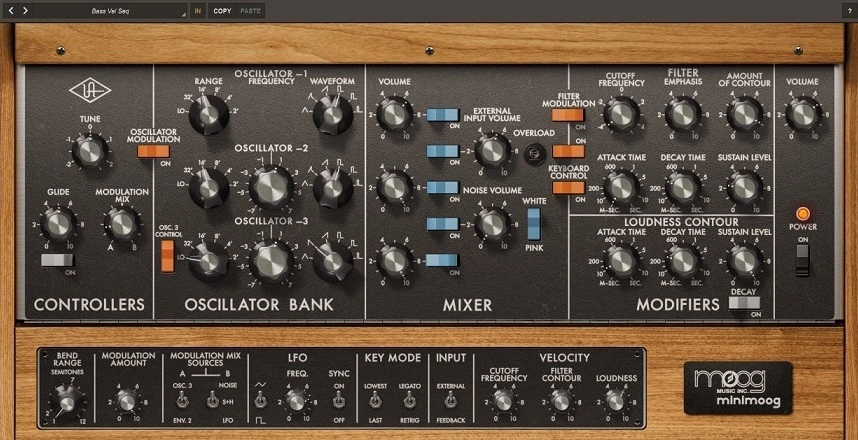
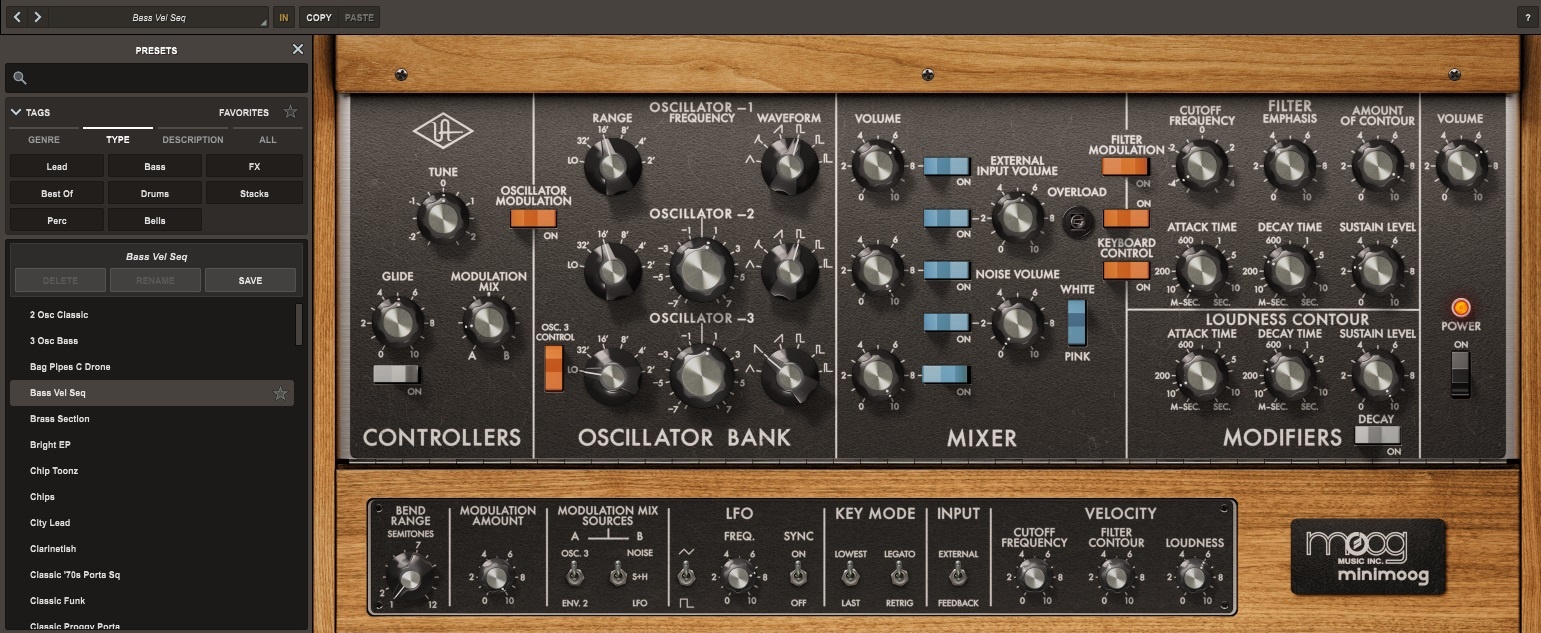
UAD launched their virtual version of the legendary Minimoog synth with UAD Spark in collaboration with Moog Music.
The plugin has been created with plenty of research to emulate the classic circuitry and rigorous modeling to precisely capture the module-to-module coupling and impedance, to re-create the authentic analog sound of the original Minimoog as a soft-synth.
It has three oscillators, each with six different basic analog waveforms to choose from, along with a volume knob in the mixer window. Overall, the interface and the signal flow, like the hardware, are simple and easy to use.
Key Features:
- Analog filters
The plugin allows you to set the cutoff frequency, filter emphasis (resonance), and contour amount (mix) of the filter, and the filter sound warm, vintage, and analog. It’s modeled from a VCF (Voltage Controlled Filter) and the filter response has been programmed accordingly.
- Software additions
UAD has added flexible velocity sensitivity and additional modulation features like a separate LFO, modulation amount, and modulation mix sources. These features are not present in the hardware version.
- Expansive Presets
The presets are classified and organized in terms of Genre, Type, and Description, and there is a huge variety of presets you can choose from, which fit a lot of different genres and styles. That makes the sound selection process easier, especially for composers and new music producers.
Compatibility:
The plugin requires a macOS 10.15 Catalina, 11 Big Sur, or 12 Monterey, and is available with the UAD Spark in AAX, AU, VST3, and LUNA plugin formats. Now, also available on Windows 10 or more.
Summary:
UAD’s Minimoog emulation captures the classic analog warmth of the original hardware while adding modern conveniences (extra modulation, velocity sensitivity) that the vintage unit never had. The well-organized presets make it approachable even if you’re new to subtractive synthesis.
Algonaut Atlas 2 (Sample Organizer & Much More)
More Info & Price (Trial Available)
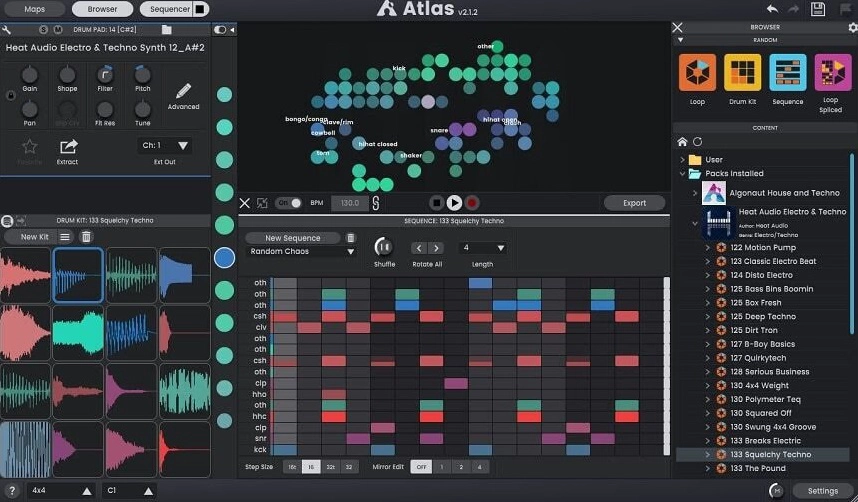

Atlas 2 is a sample browser, kit creator, and drum sequencer by Algonaut.
It uses AI technology to analyze your countless samples and organize them into categories based on their common characteristics. It aims to speed up creating cohesive and interesting drum kits and make creating beats an easy process.
Here is a playlist with 9 various teasers covering house, techno and UK garage. All sounds you can hear comes from Atlas 2:
Key Features:
- Excellent user interface.
Atlas 2 uses AI technology to split your samples into categories such as kicks, snares, open hi-hats, closed hi-hats, toms, etc. If the sounds are not percussive but synth one-shots or vocals, they are in the “others” category.
- In-depth editing.
Once you load the samples of your choice in a new kit, you can modify them in great detail. You get pitch controls for each sample and volume, pan, filter, resonance, and velocity controls. Another great feature is the time control, which will nudge a sample forwards or backward in time by a few milliseconds.
- Easily save kits and sequences.
You can save a kit and a sequence to use them in future projects. Once you save a kit, you can load it in a new sequence by dragging and dropping it, or drag and drop an old sequence to a new kit for inspiration.
- Smart technology.
Atlas 2 is meant to cater to each producer’s needs. Its smart AI technology uses machine learning, meaning the more you use it and the more loops and kits you create, the more it understands and learns what sounds you prefer to use in your productions.
Compatibility:
Atlas 2 is available on macOS and Windows, in VST3, AU, and Standalone formats, 64-bit only.
Summary:
Atlas 2 solves a real problem — sample library chaos — by using AI to organize and categorize your sounds automatically. It’s less a traditional instrument and more a workflow tool, but for producers sitting on thousands of unsorted samples, that’s exactly the point.
Effects:
Waves Harmony (Harmonizer)
More Info & Price (Trial Available)

The best vocal harmonies can be naturally created inside this awesome plugin.
Waves is well-known for producing high-quality plugins and audio software, which come in a variety of versions and choices to suit a wide range of applications. However, any plugin that may improve the sound aspects or make the workflow easier is appreciated, and Waves Harmony is just like that.
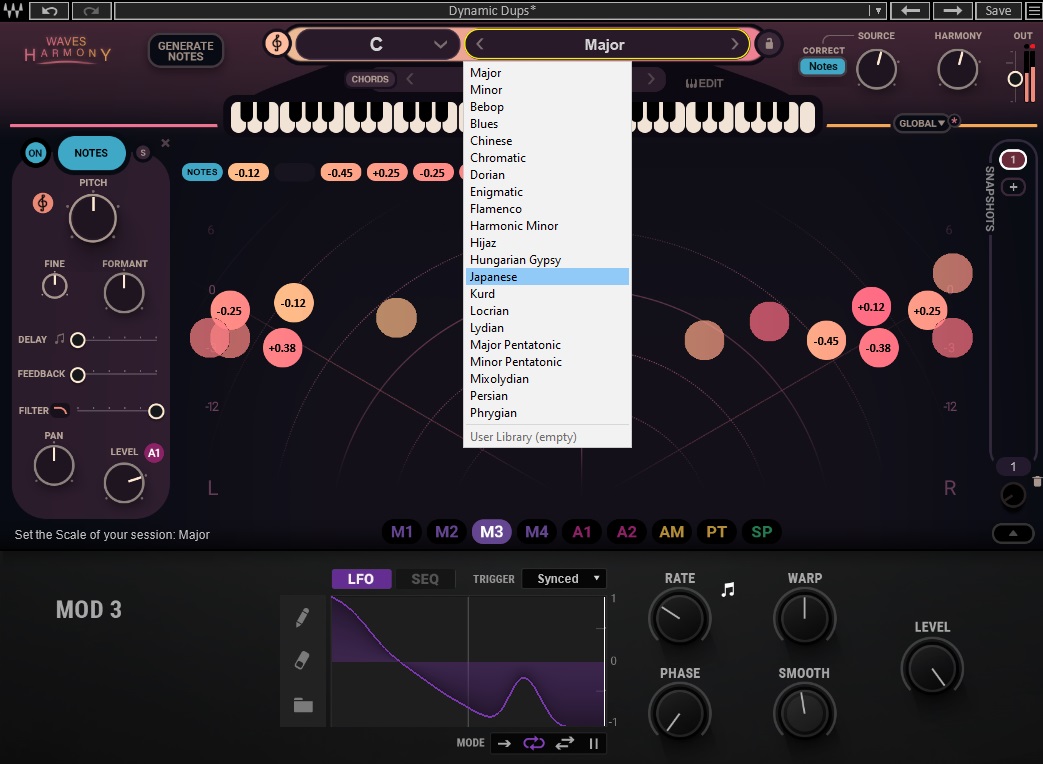
This useful voice harmony generator has a simple and beautiful UI with clear controls that are entertaining to experiment with in the recording studio or on stage.


Key Features:
- Eight voices
Vocal Harmony is an excellent engine with eight separate voices, allowing for everything from a basic doubled-melody to a complicated and rich vocal arrangement for all these eight voices. This is critical and works flawlessly, with a true sound character like what actual vocalists would deliver.
- Pitch correction
As predicted, this plugin makes pitch adjustments quickly and simply. You may freely change and vary the pitch of every note, either by accident or by personal desire, with relative indicators on the screen. Feel free to correct any lines or simply repair one erroneous note as quickly as possible.
- Harmony Generator
The powerful engine hidden within Vocal Harmony is ideal not just for duplicating a vocal but also for sparking your creativity. The harmony generator may create immediate ideas based on current musical scales, giving your phrases and musical ideas even more authenticity.
- Formant shift
This type of vocal plugin typically includes a “formant” preset, which allows you to mimic the actions a human lip makes when talking or singing. Of course, there are other factors to consider when giving a genuine aural experience, but being able to modify how a singer’s lips react to a given phrase adds realism to this replication.
- Built-in effects
Although you can always add post-effects to anything you make, having the most significant aspects related to vocal harmony provided in this package is really useful. A separate “Delay” fader controls the effect’s feedback, while an extra “Filter” fader allows you to easily sweep over the frequencies in your music.
- MIDI controlled
One of the finest features of virtual instruments or effects such as Vocal Harmony is the ability to connect a MIDI device and play whatever you want. This plugin has complete MIDI compatibility from Waves, which may be quite handy for getting your vocals done correctly with the help of a keyboard, for example.
Compatibility:
This plugin is available for macOS 10.15.7, 11.6.5, and 12.4 (64-bit only) and Windows 10 or higher (64-bit only). It runs in VST, VST3, AAX, and AU plugin formats.
Summary:
Harmony’s eight-voice engine and MIDI control make it a capable, flexible vocal harmony generator for both studio and live use. The formant shifting adds a layer of realism that a lot of harmonizers skip entirely.
iZotope Nectar 4 (Vocal Strip)

Nectar 4 is iZotope’s first major update to their all-in-one vocal suite since Native Instruments brought iZotope into the fold, and it adds genuinely new AI-assisted tools on top of the already-complete processing chain.
The headline addition is Auto-Level, an intelligent, transparent alternative to traditional compression that keeps vocal levels consistent without the artifacts a compressor can introduce. The former “Harmony” module is now called Voices, offering expanded auto-harmony vocal layering, and a new Backer module uses AI to generate virtual background singers in eight different styles. The Vocal Assistant has also been redesigned with a macro-control overview page, matching the workflow introduced in Neutron 4 and Ozone 11.
Key Features:
- Auto-Level Module (ALM) — transparent volume consistency without compression artifacts
- Voices — expanded auto-harmony vocal layering (formerly the Harmony module)
- Backer — AI-generated virtual background singers across 8 styles
- Redesigned Vocal Assistant with macro-control overview, matching Ozone 11 / Neutron 4
- Breath Control, now included directly under the Nectar name as a standalone module
- Melodyne 5 Essential included with Standard and Advanced editions
Compatibility:
VST2/3, AU, and AAX for Windows 10/11 and macOS Sonoma/Sequoia/Tahoe, 64-bit only.
Summary:
Nectar 4 refines rather than reinvents — the improvements run deep even though it looks similar on the surface. Auto-Level and Backer are the two features most worth the upgrade price if you’re still on 3 Plus.
Three-Body Technology Kirchhoff-EQ (Dynamic EQ)
More Info & Price (Trial Available)

The ultimate modern-looking parametric EQ plugin available nowadays.
Equalizers can be taunting to master properly, as they can inflict strange results in the process of tailoring the effect itself. One wrong twist or turn in a specific bandwidth, and your sound can go to crap instantly. This is one thing that Kirchhoff-EQ nails, and it’s all due to the incredible ease of use to set any parameters properly.
Key Features:
- Great processing
The tweaks you make inside the plugin will be reflected automatically in your sound, as expected. The incredible number of options and parameters to adjust can be overwhelming, but almost assuredly, it won’t be a problem to be loaded properly.
- Filter types
There are 15 filter types included in this EQ, with the most common shapes included – like low pass, high pass, and notch, for instance – and also some unusual ones, such as the “Sword” (kind of like a bell shape, but with a sharper slope) and brick wall low and high pass.
- Phase modes
You can set the phase in your track between some unique modes, such as “zero-latency,” “analogue,” “linear,” and “mixed.” However, if the “Dynamic Functions” option is activated for a specific filter band, it will work on a minimum-phase mode that won’t affect other bands besides the one you’re currently working on.
- Unique threshold adjustment
The threshold is usually the control that sets the “limit” upon which an effect can act upon. Most options only go one way, but in Kirchhoff-EQ, things are done differently. You can have a two-way threshold control to configure simultaneously the part of your signal acting above or below the threshold mark.
Compatibility:
This plugin is available for macOS 10.9 or higher (64-bit only) and Windows 7 or higher (64-bit only). It runs in VST2, VST3, AAX, and AU plugin formats.
Summary:
Kirchhoff-EQ manages to pack a genuinely deep feature set — 15 filter types, multiple phase modes, two-way threshold control — into an interface that stays approachable rather than overwhelming. A strong modern parametric EQ whether you’re mixing or mastering.
Polyverse Manipulator (Vocoder/ Sound Design Tool)
More Info & Price (Trial Available)

Polyverse Manipulator has the ability to radically modify the tone and pitch of monophonic audio in previously unseen ways. It can be a great Cubase VST.
Thanks to Infected Mushroom’s sonic madness, the Polyverse Manipulator is guaranteed to make your audiences’ spines shiver. The algorithms in Manipulator revolve around five basic effects: altering pitch, formant, harmonics, as well as oscillating frequency modulation, and grains.
The MIDI capabilities, ideal for real-time performance whether or not you play keyboards, can expand the possibilities to fit your every musical idea. An innovative vocal synthesizer like the Polyverse Manipulator plugin is the next-step tool if you’re a performing vocalist or an electronic music producer, but it’s also great for creating soundscapes and textures as well.
Key Features:
- Supporting effects
Aside from the main effects based on the five algorithms listed above, some additional effects can further expand the sonic madness. Controls for “Glide,” “Smear,” “Stereo,” and “Detune” are there to evolve your sound by the tweak of a knob.
- Real-time pitch-shifting
Manipulator allows users to accept MIDI input in real-time and control pitch shifting with a MIDI controller on the go. This plugin can effortlessly transpose pitch and gives incoming audio a unique feel right when you play it.
- Made in collaboration
The vocal modification techniques used by Infected Mushroom are a big aspect of their sound. The majority of the vocals on their records have been twisted, manipulated, chopped, and highly processed in order to sound like synthesizers.
- Detection control
This dedicated control located on the far left side of the screen allows you to set the pitch detection range with “Hi,” “Mid,” and “Low” options. For instance, each of these options is suited for specific instruments, such as implementing the “Low” setting on bass and low voices.
It’s important to remember that this plugin doesn’t track polyphonic signals well, so it’s best to just go for one note at a time.
- Cross-Modulation
The plugin allows you to use a single Modulation Source as an amplitude modulator for another. That helps you create complex sounds that would be unattainable any other way.
- Modulation Slots
The plugin offers you five modulation sources: Meta Knob, ADSR, MIDI, Follower, and Sequencer. The plugin lets you choose four to use simultaneously, each in one slot. You can, of course, add multiple instances of the same modulation source.
The Meta Knob can control various parameters and be saved with user-generated names in presets. ADSR is triggered by incoming MIDI notes and controls the Attack, Decay, Sustain, and Release of the input signal.
MIDI converts the information into a modulation signal, while Follower converts the amplitude of the source into a modulation signal and lets you control its attack and release. Finally, the Sequencer creates a triggered, or free-running, LFO.
Compatibility:
This plugin runs in Windows (64-bit only) and macOS 10.9 or higher (64-bit only). It comes in VST2, VST3, AU, and AAX plugin formats.
Summary:
Manipulator is a distinctive, sometimes unpredictable tool for vocal and sound-design work, born out of Infected Mushroom’s own production style. It’s monophonic-focused, so it won’t suit every situation, but for the right use case (twisted vocals, unique textures) nothing else quite sounds like it.
Waves Tune Real-Time (AutoTune)
More Info & Price (Trial Available)

As the name suggests, the Waves Tune Real-Time is designed for live performances and an instant effect. It’s great to have in the studio when recording vocals too. Thanks to its compelling interface and simple controls, this plugin is an uber-efficient tool for many needs.
If you’re looking for a great vocal tool to use in real-time that achieves seamless results and can add such value to a live show, check out the key features that follow.
Key Features:
- Real-Time Correction
The main feature of this plugin is the real-time adjustment and correction made to make live performances and studio recordings sound great. The low-latency algorithm does a great job of keeping the natural nuances of the singer’s vocal alive while smoothly integrating adjustment.
- Straightforward Design and Layout
Waves have made it easy to navigate the various functions by designing an interface with an instinctual layout and workflow. Essentially, you can control the initial signal by adjusting the speed, note transition, and vibrato controls which determine how quickly, smoothly, naturally, or unnaturally correction happens.
- Tolerance Controls
The tolerance controls have two parameters that can adjust to achieve various intensities of ‘tolerance’. The cents and time parameters determine how much a singer can be off, and how long it will be corrected while the singer is off. By increasing the cents, you allow more ‘tolerance’ from the plugin when adjusting off-key notes.
On the other hand, you have time control, which determines how long this adjustment is held. If the singer is dropping off towards the end of a long note, you can extend the time which the adjustment will engage.
Compatibility:
This plugin is available for Windows 10–11 and macOS 10.14.6 – 11.5.2. It comes in VST/3, AU, and AAX formats.
Summary:
Built specifically for live use, Tune Real-Time’s low-latency correction holds up well under the demands of a live show while still sounding natural. The straightforward tolerance controls make it easy to dial in exactly how much correction you want without fighting the interface.
Related Reading:
20 Best Waves Plugins For Mixing, Mastering & Producing
Brainworx bx_limiter True Peak (Advanced Limiter)
More Info & Price (Trial Available)
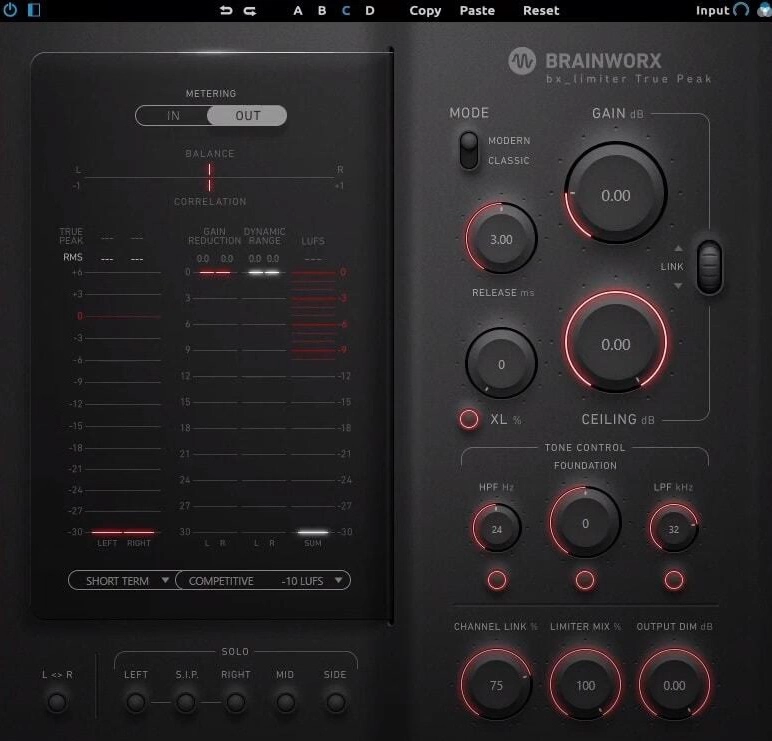
The bx_limiter TP, by Brainworx, was designed from the ground up with True Peak technology in mind.
The plugin offers straightforward parameters in a comprehensible UI, but it sounds way better than it looks. You can meter both in the input and output signals and solo individual parts of the audio. The balance and correlation meters are beneficial to ensure mono compatibility and the metering section is really precise.
Key Features:
- Mode
Modern will suit any kind of modern music, while Classic will be great for old-school genres.
- Foundation
Higher values give you a more bass-heavy foundation, creating a huge-sounding foundation, which will benefit most genres.
- Dynamic Range Meter
This helps you determine the density of the track. Numbers below 6dB mean you’re applying too much compression in your mix, making your track sound lifeless.
- Solo Buttons
Here, you can choose which part of the output signal is being monitored. If you choose either the L or R channels, they’ll play in the center unless you click the S.I.P. button, which will make the audio play in its respective position.
- XL
This saturation unit adds smooth harmonic distortion to the output signal.
Compatibility:
This plugin is available for Windows 7 and up and macOS 10.9 and newer in AAX, AU, and VST formats.
Summary:
bx_limiter TP trades flashy visuals for genuinely precise, mastering-grade metering — the balance and correlation meters in particular are a cut above what most limiters offer. A strong choice when precision matters more than a colorful interface.
iZotope Ozone 11 Advanced (Mastering Suite)

Ozone 11 Advanced arrived roughly a year after version 10, and it’s a meaningfully sharper mastering suite rather than a cosmetic refresh.
The standout new addition is Clarity, an adaptive spectral module that maximizes a track’s spectral power — making a master sound louder and more polished without the usual loudness penalties. Stem Focus uses AI to isolate individual stems within an already-mixed file and lets you apply any Ozone module to just that isolated element, effectively letting you make targeted fixes without a full remix. Most modules also gained Transient/Sustain processing, letting you treat the punchy and sustained parts of a signal separately instead of only splitting by stereo, mid/side, or left/right.
Key Features:
- Clarity Module — adaptive spectral processing for a louder, more polished master
- Stem Focus — AI-powered stem isolation with full access to any Ozone module
- Transient/Sustain Modes across most modules, alongside the existing stereo/M-S/L-R options
- Upward Compression added to the Maximizer
- Assistive Vocal Balance for automatically balancing vocals within a mix
iZotope offers this plugin with the purchase of Ozone 10 Advanced, and it is an AI-run tool that compares your mix with reference genres and tracks by listening to them from an audio streaming platform and collects data based on that listening to give you suggestions and inferences on sonic characteristics, by which you can visualize, compare, and match your songs with other songs.
Compatibility:
VST3, AU, and AAX for Windows 10/11 and macOS, 64-bit only.
Summary:
Clarity and Stem Focus are the two features that actually change your mastering workflow rather than just adding polish — Stem Focus in particular solves a problem (fixing one element post-mixdown) that used to require going back to the full mix. Worth the upgrade if you master client mixes you didn’t produce yourself.
Xfer LFO Tool (Advanced Sidechain)
More Info & Price (Trial Available)

The Xfer LFO device is a comprehensive tool that gives you a vast selection of signal shaping options.
This plugin is very well suited to low-frequency instruments such as synth bass. The user interface is quite intricate and might be intimidating for those without basic knowledge of LFO’s function.
Key Features:
- Customizable LFO Editor
The LFO editor lets you draw in your volume automation onto an x-y grid mapping, which you then apply to your signal. The editor allows you to link their programmed automation to affect things like the volume level, stereo panning, or filter parameters.
- Modulation Layering
The interface allows you to control up to 4 graphs at the same time. This is handy when your want to create different modulation patterns for the same signal. For example, you might want the volume to open up while the filter’s cutoff is being brought down.
- Smooth Setting
You can use the Smooth parameter to soften the punchiness of any peaks in the volume automation. Volume ducking can either be enhanced or dulled with this setting, giving you better control of signal dynamics while processing.
- MIDI-CC output routing
The LFO Tool comes with a midi out option. This feature converts any modulations that you have programmed and converts them into CC information. You can then route this information to an external digital or analog device like a synthesizer or sampler and affect its output accordingly.
Compatibility:
This plugin is available in VST or AU formats for Windows7 and above users and Mac OS 10.12 or later.
Summary:
LFO Tool takes real effort to learn, but the payoff is total control over sidechain-style ducking and rhythmic modulation that goes well beyond a standard sidechain compressor. Especially useful for bass-heavy genres where precise pumping and movement matter.
iZotope Stutter Edit 2
More Info & Price (Trial Available)
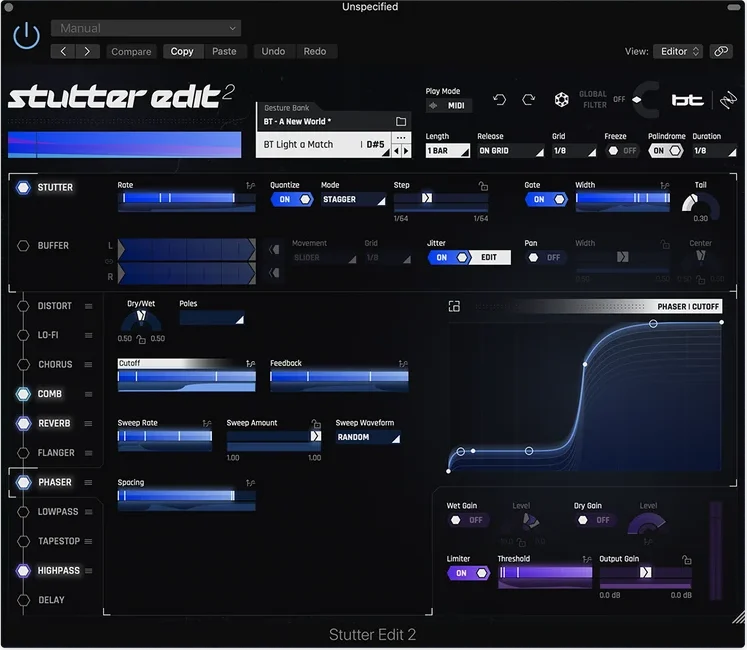
Born from a collaboration with GRAMMY-nominated producer BT — who essentially invented the “stutter edit” as a production technique — Stutter Edit 2 turns what used to be hours of manual audio-chopping into a single keystroke.
The whole plugin revolves around Gestures — professionally designed preset banks that trigger intricate stutter, glitch, and rhythmic slicing effects instantly. You can fire them off live via MIDI keyboard, or use the new AUTO mode to audition and apply them without any routing setup at all. Beyond the stutter effect itself, Stutter Edit 2 layers in a full effects suite — filters, distortion, delay, reverb — all of which can move in sync with your gesture using the redesigned Curve Editor.
Key Features:
- Gestures — professionally designed preset banks for instant stutter, glitch, and rhythmic effects
- Curve Editor — draw custom automation curves that move any effect parameter in time with your gesture, without touching your DAW’s own automation
- AUTO Mode — audition and apply effects instantly with no MIDI routing required
- Tapestop Effect — the classic turntable slowdown sound, borrowed from iZotope Vinyl, settable to repeat at different speeds
- Full Effects Suite — two-band distortion, low/high/band-pass filters, and a touch-responsive delay with Cut on Release
Compatibility:
AU, AAX, and VST3 for Windows 10/11 and macOS (Sonoma, Sequoia, Tahoe — Intel and Apple Silicon, native and Rosetta). Confirmed supported in Cubase, alongside Logic Pro, Live, Pro Tools, FL Studio, Studio One, REAPER, and Bitwig. Note: VST2 is no longer supported — Cubase users will need VST3.
Summary:
Unlike the entry it replaces, Stutter Edit 2 is a genuine cross-DAW plugin that actually works in Cubase. If you’re producing anything electronic, trap, or transition-heavy, the Gesture system alone will save you hours of manual chopping — and the Tapestop effect is a great way to add turntable-style character without needing an actual turntable emulation plugin.
13 Best Free Plugins For Cubase 2026
NI Kontakt 8 Player (Sample Player)
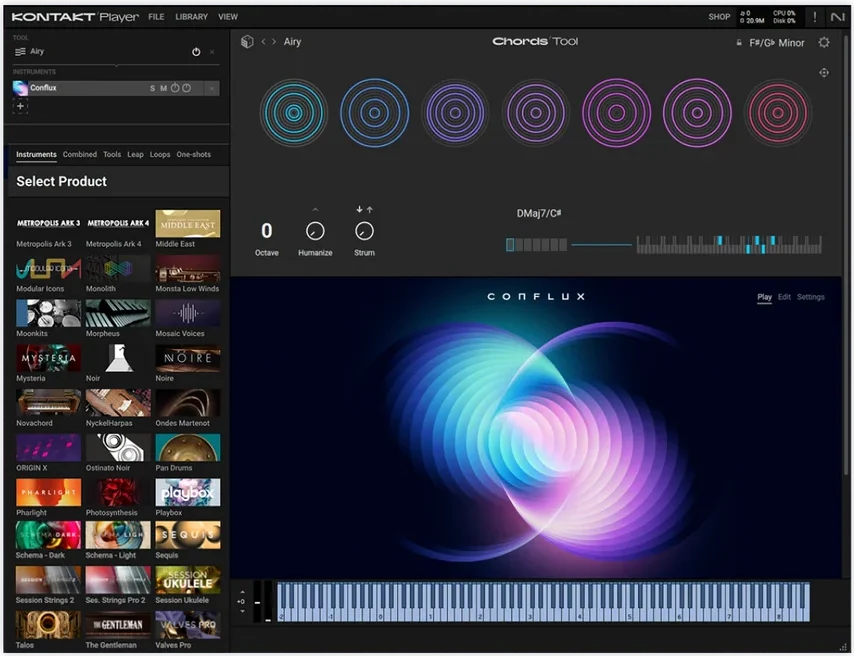
Kontakt 8 Player is the free version of Native Instruments’ industry-standard sampler, and the 8th generation brought it a genuinely bigger update than most previous Player releases.
Kontakt Player lets you run Native Instruments’ own sample-based instruments alongside thousands of officially licensed third-party libraries — many of which are built specifically for the free Player, so you don’t need the paid full version to use them. Version 8 adds a completely refreshed browser with better search, filtering, and auditioning, plus a new loop-mangling engine called Leap that comes with two ready-to-use expansions out of the box (Lo-Fi Vibes and Acoustic Drums).
Key Features:
- Chords & Phrases Tools — MIDI creativity tools that generate chord progressions and melodic ideas, compatible with any Kontakt instrument you load
- Leap Engine — a real-time loop and one-shot performance tool, included with two free Expansion packs (Lo-Fi Vibes, Acoustic Drums)
- Piano Uno — an exclusive, ready-to-play concert grand piano included free, so you can start playing before downloading anything else
- Kontakt Factory Selection 2 — a starter library included by default, spanning acoustic, band, beats, synth, and vintage categories
- Refreshed Browser & Interface — new filtering, tagging, and high-DPI support shared with the full paid version
Compatibility:
VST3, AU, and AAX for Windows and macOS. Note: as of Kontakt 8.8, macOS 13 is no longer supported — macOS 14 or higher is required for the latest updates.
Summary:
Beyond just being the current version, upgrading from Kontakt 7 Player actually matters practically — several newer libraries released since late 2024 throw a “your version of Kontakt is too old” error on the 7 Player specifically, and updating resolves it. If you’re still on 7 Player, this is worth doing before it blocks you from a library you actually want to use.
Cherry Audio Surrealistic MG-1 Plus (Moog-Inspired)

Great analog tones are available for free in this plugin.
All the funky sounds and expressive elements of the Moog Concertmate MG-1 synthesizer are present in Cherry Audio Surrealistic MG-1 Plus. This unique recreation delivers the best analog sounds with serious offerings, like tailored effects and controls, for free.


Key Features:
- Modeling process
As with their paid plugins, Cherry Audio studied and analyzed the circuitry for an authentic rendition of the Moog Concertmate synth. The final result excels in good vibes about its sound, as the great aspects of the funky synth from the 1980s were preserved and honored in this freebie.
- Presets
There are 130 presets in Surrealistic MG-1 Plus, which is more than enough to start exploring around. It can be crucial to explore these, as they can teach you more about the workings of a synth and help you get nice sounds in no time.
- Ring modulation
The ring modulation segment was also present in the original Moog Concertmate synth, and one of the most distinctive aspects of it was the “bell tone” it provided. Thanks to Cherry Audio, that same effect was brilliantly translated into digital format.
Compatibility:
This plugin is available for mac OS 10.9 or higher and Windows 7 or higher, both 64-bit. It comes in VST, VST3, AAX, and AU plugin formats.
Summary:
This is a surprisingly capable free recreation of a genuinely funky piece of analog history, and the 130 included presets are a great way to learn what the original Concertmate MG-1 could do. Hard to beat at the price of free.
Ample Guitar M Lite 4 (Acoustic Guitar)
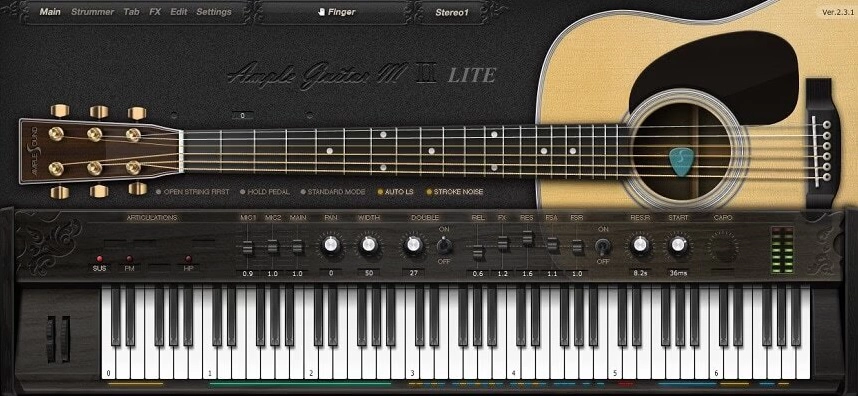
Ample Sound’s free acoustic guitar plugin — one of the best free instruments available for years — got its first major rebuild since the v2 era in mid-2026.
Still based on the same Martin D-41 samples, but now running on the next-generation Ample 4 engine, bringing genuinely useful new capability rather than just a visual refresh: drop tuning, Riffer 4‘s smarter fretboard-aware MIDI editor, and direct Guitar Pro import — features that used to be reserved for Ample’s paid instruments.
Key Features:
- Riffer 4 — dual-view Piano Roll + Tab MIDI editor with real fretboard logic
- Tab Reader 4 — imports Guitar Pro files (GP3–GP8) directly
- Drop Tuning Support
- Poly Legato & Slide Smoother for natural transitions
Compatibility:
The plugin is available for Windows 7 or higher and macOS 10.9 or higher, both 64-bit only. It comes in VST2/3, AU, AAX formats, and as a standalone host.
Summary:
This is a genuinely different tool from Lite II, not just a rename — if you’re still on the older version, the free upgrade is worth grabbing immediately for the Riffer 4 editor alone.
Ample Bass P Lite 4 (Bass Guitar)
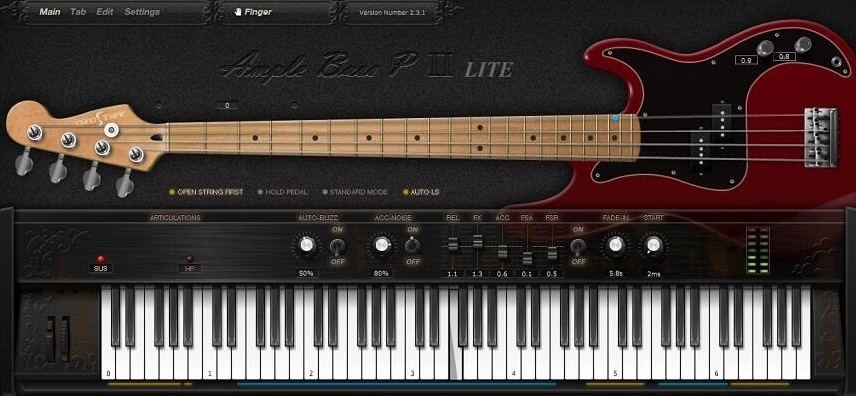
Released in July 2026, Ample Bass P Lite 4 is a from-the-ground-up rebuild of Ample Sound’s free Fender Precision Bass emulation.
The new engine brings drastically improved CPU efficiency and stability, full compatibility with current macOS and Windows DAWs, and drop tuning down to D1 for extended low-end reach. A built-in B15R-style bass amp with four selectable cabinet mic models (U87, C414, MD421, SM57) plus EQ, compression, delay, and reverb means you can go from raw DI to a finished bass tone without reaching for another plugin.
Key Features:
- Next-Gen Engine — significantly better CPU efficiency and DAW compatibility than Lite II
- Drop Tuning down to D1
- Riffer 4 & Tab Reader 4 — fretboard-aware MIDI editing and direct Guitar Pro import
- Built-In Amp & FX — B15R-style amp with 4 mic models, EQ, compression, delay, and reverb
- Poly Legato & Slide Smoother for natural articulation across wide intervals
Compatibility:
VST/VST3, AU, and AAX for Windows and macOS, plus standalone.
Summary:
This isn’t an incremental patch — it’s a completely new plugin under a familiar name, and the built-in amp section alone makes it more capable than most paid bass instruments from a few years ago. Very easy recommendation at zero cost.
Keolab Spicy Guitar (Classical Guitar)
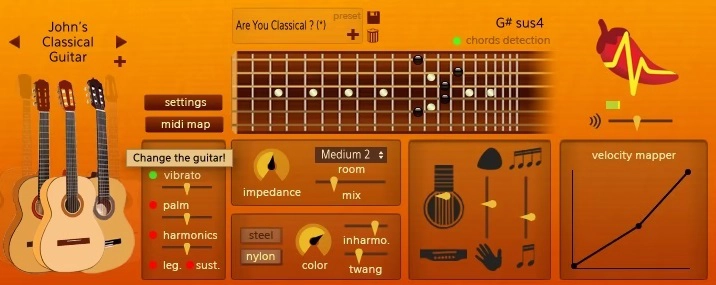
Although this is an acoustic guitar synthesizer, there’s much fun in playing with this awesome plugin.
More serious users might prefer recorded samples over synthesizers, but this might be a good choice if you don’t fit this particular group. Keolab developed this software to bring realistic guitar parts into rich, natural, and lively sounds based on innovative technology.
Key Features:
- Guitar character
Nine real guitars were used to capture the perfect wide range of a guitarist’s playing style, including major techniques and articulations. As this is based on full physical modeling of a guitar, characteristics such as body size and the string’s material can be altered in real-time.
- Chord detection
Spicy Guitar also features a chord detection system that can instantly convert piano chords into guitar chords, automatically strumming them and facilitating the development of complex rhythm patterns.
Compatibility:
This library runs in macOS and Windows (64-bit only). It comes in VST and AU plugin formats.
Summary:
Spicy Guitar takes a different approach than most guitar plugins — full physical modeling instead of samples — which makes it less traditionally “realistic” but genuinely flexible for producers who want to shape the instrument’s character in real time. The automatic chord detection is a nice touch for quick rhythm parts.
Sampleson CollaB3 V2 Tonewheel B3 Vintage Organ
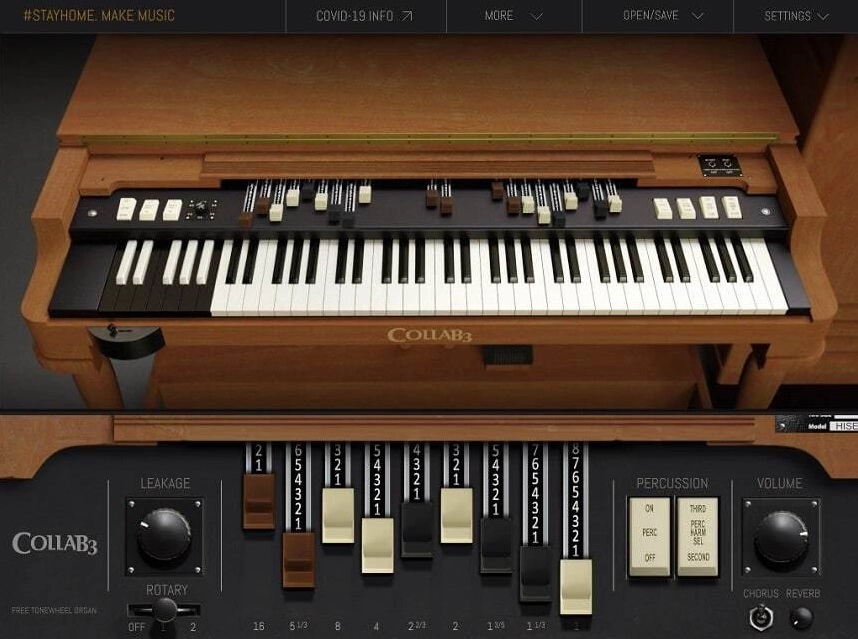
Sampleson rebuilt their beloved free tonewheel organ in 2024, and CollaB3 V2 is a substantial upgrade to a plugin that was already one of the best free organs available.
The headline change is a completely overhauled spectral-modeled sound engine for a more authentic core tone, paired with a genuine rotary speaker emulation — complete with independent horn and drum speed control, acceleration, amp circuit distortion, and mic positioning. Enhanced key-click noises, leakage modeling, and new wood cabinet resonance impulse responses round out the realism upgrades.
Key Features:
- Spectral-Modeled Engine for a more authentic core organ tone
- Modeled Rotary Speaker with independent speed, acceleration, and amp distortion controls
- Wood Cabinet Resonance Impulse Responses
- Enhanced Click Noises & Leakage for added vintage authenticity
- Free and Pro Versions — Pro adds a custom Rotary Amplifier panel, 7 tweakable rotary parameters, and 5 mic setups for $10
Compatibility:
VST3 and AU for Windows and macOS, plus standalone. Apple Silicon native.
Summary:
The original CollaB3 was already a standout free organ; V2’s rotary speaker emulation alone brings it into direct competition with paid tonewheel organ plugins. If you liked the original, this is an easy free update — no reason to stay on the old version.
RDG AUDIO Free Piano 3 (Piano & Strings)
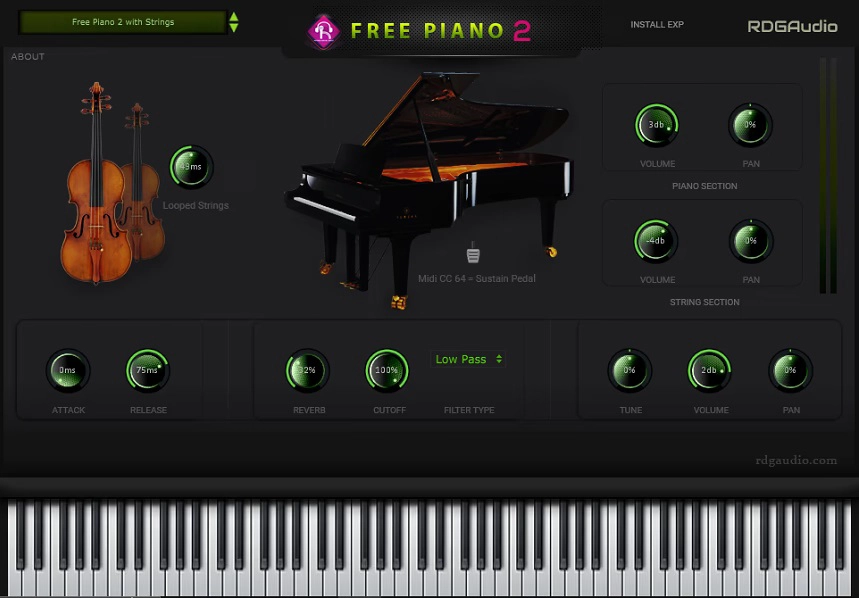
RDG Audio’s free hybrid piano-and-strings instrument moved to version 3, adding a velocity filter that gives noticeably more expressive control than the original.
The core concept stays the same — a piano-and-strings hybrid sampled from an Asian Type D Cottage Piano, with a built-in effects section (delay, reverb, EQ, stereo widener, saturation, filter, compressor) — but v3 adds finer velocity-based dynamic response, smooth CPU-friendly performance, and a resizable GUI.
Key Features:
- Velocity Filter — new in v3, adds finer dynamic expression over the previous version
- Piano-and-Strings Hybrid sampled from an Asian Type D Cottage Piano
- Full Effects Section — delay, reverb, EQ, stereo widener, saturation, filter, compressor
- Resizable, Smooth GUI
Compatibility:
VST3 (Windows, 64-bit) and AU (Intel Mac). Note: no VST2 support, so older DAW setups may need a wrapper like Element.
Summary:
A modest but genuine improvement over Free Piano 2 — the velocity filter alone makes it feel less flat than the original. Available as a donationware download; a small donation to RDG Audio is appreciated but not required.
MaxSynths DR-910 (Drum Machine)
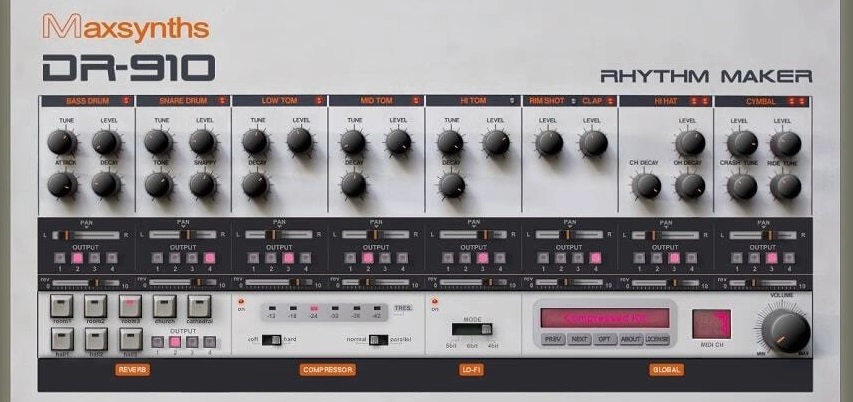
As the name suggests, DR-910 is a Roland TR-909 drum machine emulation.
The plugin attempts to recreate the original unit’s sounds by emulating each sound section (kick, snare, tom, hi-hat, and cymbal) individually. The result is a delightfully close reproduction. Furthermore, it adds to the legacy by including effects to make mixing easier.
Key Features:
- Mixing Effects
The DR-910 includes a reverb, compressor, and a Lo-Fi effect. Each channel has an individual send control for the reverb, whereas the compressor is tailored to work with drums. And the Lo-Fi effect includes three modes for convenience. Overall, they offer enough for in-the-box mixing.
- Four Outputs
The plugin includes four outputs for external mixing. They come in handy in real-world uses. Not only that, you can assign one of the outputs for the reverb channel as well. So, you can process the wet reverb signal alone with EQs or other effect plugins to achieve cleaner mixes.
Compatibility:
The plugin is available for Windows 7 or higher 32-bit only. It comes in VST 2 format.
Summary:
DR-910’s individually-emulated drum sections make for a convincing TR-909 recreation, and the built-in mixing effects are a nice bonus for a free plugin. The 32-bit-only, Windows-only limitation is worth knowing before you count on it in your setup.
Hvoya Audio Ribs By Eugene Yakshin (Granular FX)
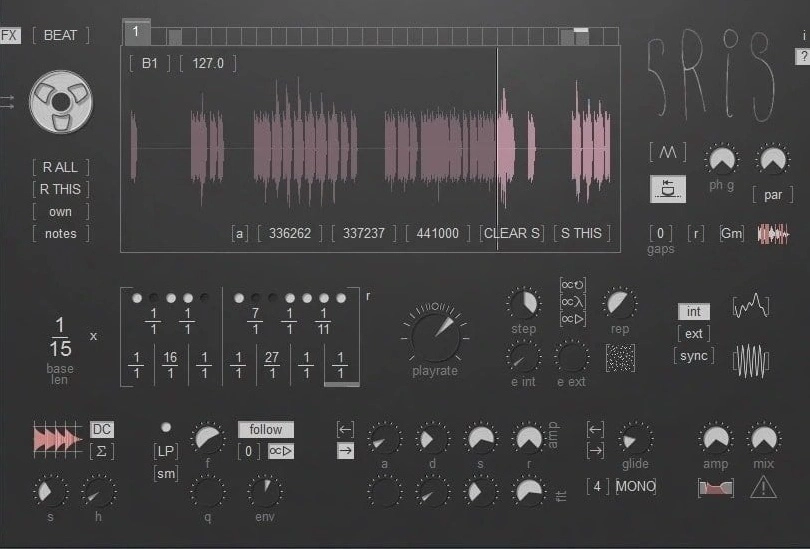
Despite being a free plugin, Hvoya Audio Ribs is very complex and offers you a huge amount of control.
The complexity of this plugin is both its advantage and disadvantage. You will have to spend some time familiarizing yourself with this plugin and learning how it functions. Still, once the learning is done, you will realize that this plugin is incredibly powerful and full of potential.
Ribs require MIDI input to fill up at least one of its 32 buffers. This is quite difficult for usage on some DAWs like Sonar One, Pro Tools, etc, where inputting MIDI notes is a bit more frustrating.
Key Features:
- Highly versatile plugin where you can edit the sound design in great detail
- It can be used as a synth as well as be used to generate glitch or scratch effects and textures
- 32 buffers that can be filled together or individually
- MIDI parameters are automatable
- Ribs offer on-spot information about what each control does to help you understand the plugin easier and faster. All you have to do is click on the “?” icon next to the logo and then hover every control to understand what it does
- For further understanding, the developers of the Ribs plugin provide a comprehensive PDF manual that is very helpful
Compatibility:
Hvoya Audio Ribs By Eugene Yakshin works on Windows 7 or higher for PC and OS Catalina or higher for Mac. It comes in VST/AU formats and supports 32 and 64-bit devices.
Summary:
Ribs is genuinely complex for a free plugin, and it takes real time to learn — but once it clicks, the combination of granular synthesis and glitch/scratch textures is hard to find anywhere else at this price. Not for beginners, but a rewarding deep-dive for sound designers.
TDR Nova (Dynamic EQ)
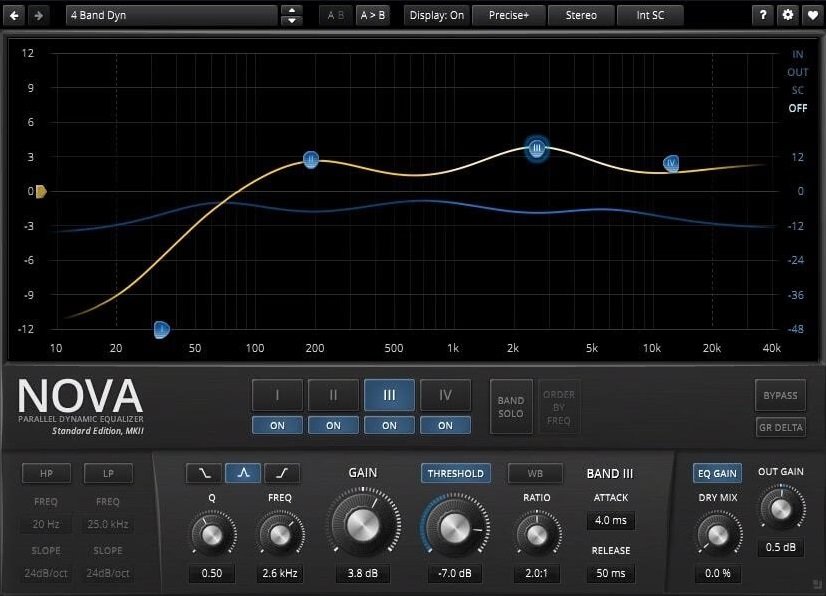
Nova is a handy toolbox with everything you need for dynamic processing.
Nova is a powerful parallel dynamic equalizer that you can use for transparent frequency dynamic processing in mixing and mastering situations. This plugin offers you a wide range of possibilities in both cases. In addition, it allows you to be as drastic as you need while keeping transparency with the dry/wet mix knob without adding artifacts or distortion.
If you were looking for a free mastering solution or want to get started with dynamic EQs and didn’t know what to get, Nova by Tokyo Dawn Records is a great option. This plugin gives you precise control over your signal and brings the possibility of using it as a multi-band compressor or a wideband compressor.
Besides all its features, it has a smooth user interface, and it’s super helpful if you’re at a beginner’s level and aren’t familiar with this type of tool. It explains itself and has helpers that will guide you through the plugin so that you adapt quickly and achieve results.
Key Features:
- Automatic gain compensation:
Nova has a button called EQ gain that automatically makes up for all gain additions and reductions you apply with the EQ to prevent you from confusing louder with better.
- Band individuality:
Compress each band by group or individually with separate settings for each band. Determine which parts of the spectrum will be affected by the compression.
- Wideband compression:
Nova comes with a wideband aside from the four EQ bands and the two filters that you can add to emphasize or reduce the overall EQ curve or add compression to the entire spectrum. Additionally, you can combine this band with the others to enhance an entire mix or for bus processing.
- Control over your compression:
Not only do all individual bands have their compressor, but also you can control every aspect of the processing and even limit each band separately or exclude them from being compressed. You can adjust the ratio, threshold, attack, and release to the frequency cuts and the wideband.
Compatibility:
Supports Windows XP SP2 or higher, supports macOS 10.9 or higher, runs on 64 bit only, and comes in VST, AU, and AAX formats.
Summary:
Nova is frequently mentioned as one of the best free plugins available in any category, not just dynamic EQs — the multiband compression flexibility genuinely rivals paid alternatives. If you only download one free plugin from this list, this is a strong candidate.
IK Multimedia – AmpliTube 5 CS (Amps, Cabs, Pedals & More)
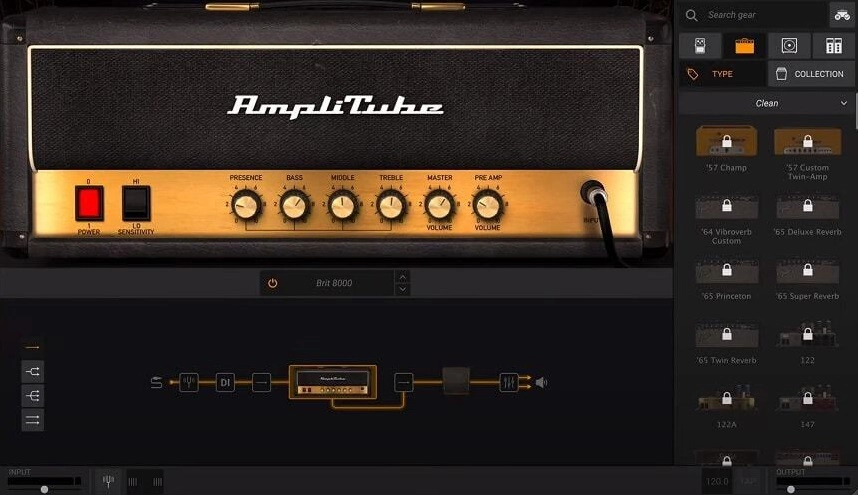
The free version of the Amplitube 5 is the CS version. You get more than 400 models of gear available for you to test before actually buying it.
First, you get 41 different cabinets, amps, pedals, and effect racks to use the way you want to record with it or just use it. These are 100% free. There already lies endless possibilities for your recording chain.
Key Features:
- Cost-benefit
If you do the math for the amount of good gear that you get for free when downloading The Custom Shop version of Amplitube 5, you’ll see it is worth it with the possibility of upgrading to the full version only if you feel the need. Besides, it lets you play and experiment with every single paid option, you can’t record with it, but you can try it out and see if it works for you.
- New technologies
All the new tech involved in the full version of AmpliTube 5 is also present in the CS version. It includes DIM™, DSM™, and the new VIR™ from IK Multimedia. They deliver super-realistic, real-world simulations.
- Interface re-modeled
The new interface that comes with the CS version of Amplitube is divided into three parts: Chain, where you organize to your taste the signal chain, Gear view, where the head of the amp is displayed, and where the general control knobs are displayed and finally, Gear Selector where you choose each model of amp, cabinet and effect pedals.
Compatibility:
AmpliTube 5 CS is available for Windows 7 or later and macOS 10.10 or later, both 64-bit only. It comes in AU (macOS only), VST3, and AAX formats — VST2 is no longer supported.
Summary:
Getting 41 free amps, cabs, and effects to experiment with is a genuinely generous offer, even with recording locked behind the paid upgrade. A smart way to test-drive AmpliTube 5’s full ecosystem before deciding whether it’s worth buying into.
Integraudio & Sixth Sample Deelay (Sound Design Delay)
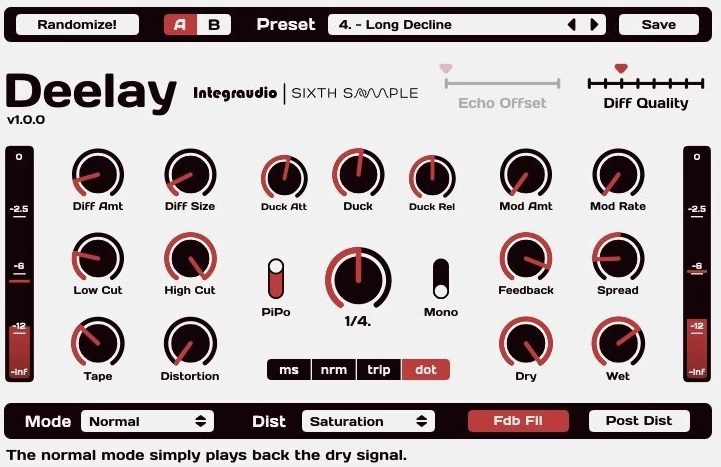
A free delay, developed by Sixth Sample jointly with Integraudio and ready to be helpful in your next production.
Our last item in today’s list is slightly different from the rest, more like a bonus. Deelay is a delay plugin created in collaboration with Sixth Sample, with a very minimalistic interface that’s very easy to work around.
The most important controls are distributed on the screen, with a very helpful dB meter on both left and right sides to monitor your signal. Please don’t be hesitant to use it in the most diverse audio productions; it’s guaranteed it will sound good.
Key Features:
- Diffusion
There are two knobs, “Diff Amt” and “Diff Size,” which control the “Diffusion” setting. Basically, it treats the delay’s echoes in a similar way to what a reverb would do, crafting the perfect ambiance in a very distinctive way.
- Distortion
It features 11 types of distortion, including “saturation,” “asymmetrical,” “clip,” “tube,” “rectify,” “crackly,” “lightning,” “amp,” “bumpy,” “razor,” and “pixelated,” you can tweak them to find the perfect saturation in your effect – just like an analog unit would offer.
- Modes
You can have five different delay modes with Deelay. Each can be toggled to invoke a specific characteristic, with options such as “normal,” “reverse forward,” “pure reversed,” “chaos,” and “reversed chaos.” The first three types are common among delay plugins, but the last two feature a new soundscape: the “chaos” modes change each echo’s pitch interval, which can be the perfect experimental tool for your track. The “reversed chaos” is equally unique and innovative.
- Ducking
This setting is featured right at the center of the interface, with three knobs (“Duck Att,” “Duck,” and “Duck Rel”) that allows for full configuration. It essentially lowers the wet signal’s volume whenever the dry signal is playing in order not to present a “muddy” and heavy-loaded frequency spectrum.
Compatibility:
This plugin is available for macOS 10.9 or higher (64-bit only) and Windows 8.1 or higher (32 and 64-bit). It comes in VST3 and AU plugin formats.
Summary:
Deelay packs five distinct delay modes and eleven distortion types into a genuinely simple, easy-to-use interface — a rare combination of depth and accessibility for a free delay plugin. The chaos and reversed-chaos modes in particular offer sound-design possibilities most delay plugins don’t attempt.
Aegean Music Pitchproof (Harmonizer)
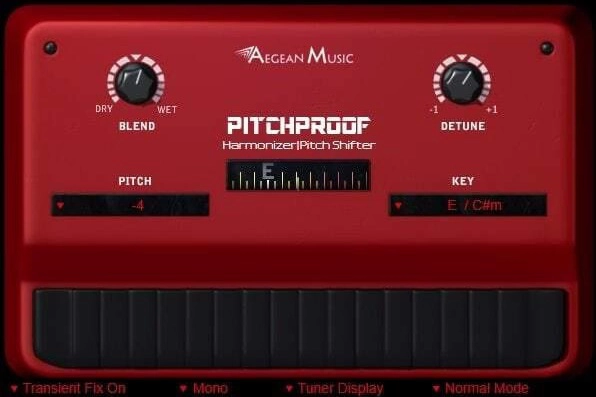
Aegean Music’s Pitchproof is a pitch shifter based on harmonizer guitar pedals.
This plugin was designed with guitars in mind, even supporting the polyphony of power chords. It can change the pitch or add harmonies to vocals or solo instruments.
Pitchproof works best in mono, but it also supports stereo inputs. So, you can use it to add harmonies on pad sounds, leads, etc.
Key Features:
- Convenient
First, you can select the amount of pitch-shifting you want using the Pitch menu. You can select values like +5 or -7 seven semitones. Similarly, you can select harmonies that select harmonizing notes based on the scale you have selected in the Key menu.
- Tuner
The display in the middle of the screen is for checking the input notes. However, you can also use it as a guitar tuner. And if it appears annoying, you can position in the bottom right by going through the Tuner Display option.
Compatibility:
The plugin is available for Windows XP or higher 32-bit and 64-bit and macOS 10 or higher 64-bit. It comes in VST 2, AU, and AAX formats.
Summary:
Aegean Music’s Pitchproof is very versatile and straightforward to use. It’s particularly awesome for guitar as it includes a built-in tuner. Of course, you can use it on any other instrument to get interesting effects. However, the stereo mode can cause some CPU spikes.
Conclusion
That’s 20 paid plugins and 13 free ones covering instruments, guitars, vocal processing, and mastering — everything from Kontakt-based orchestral libraries to Vital’s wavetable synthesis to Ozone 11’s AI-assisted mastering tools.
If you’re just building out your Cubase template, the free picks are a strong starting point — AmpliTube 5 CS alone gives you 400+ amp, cab, and pedal models at no cost. For vocals specifically, Waves Harmony and Nectar 4 cover both creative harmony generation and full mixing-chain processing, depending on which you need.

The Integraudio Editorial Team consists of experienced music producers, audio engineers, and plugin enthusiasts dedicated to providing in-depth reviews and guides for music production software.