

I used to solve almost every inconsistent vocal with another compressor. Sometimes that worked, but other times I was asking compression to do a job that really belonged to the fader. A quiet phrase needed lifting, a loud word needed pulling back, and suddenly I was crushing the entire performance just to fix a few level changes.
That’s where vocal rider and gain rider plugins make much more sense to me. Instead of reshaping transients or squeezing dynamics like a compressor, they continuously adjust gain around a target level, almost like having someone ride the channel fader for you.
For this list, I’m looking beyond vocals too. Some of these plugins are excellent on bass, dialogue, guitars, drums, and even full mixes, while others are deliberately focused on vocal leveling. What matters to me is how naturally they follow the source, how much control they give me, and whether they actually save time compared with drawing automation manually.
PSP Levelizer
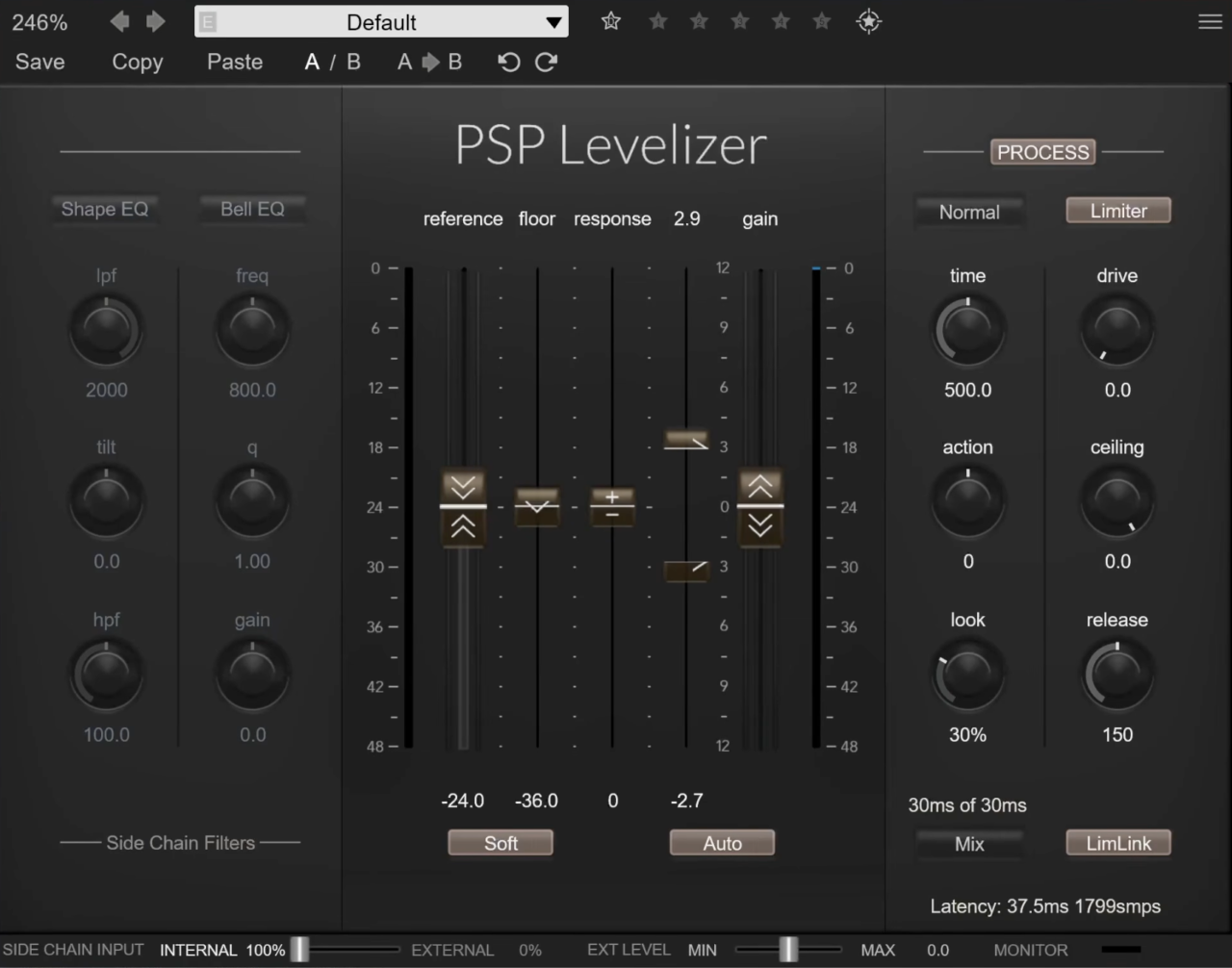
PSP Levelizer immediately appealed to me because it doesn’t pretend automatic leveling should be completely automatic.
I can let it handle the repetitive fader movement, but there are enough controls around the detector and response that I still feel like I’m deciding how the track should move.
On vocals, I found that distinction important. Instead of squeezing a performance into place with compression, I can smooth out larger level differences first and leave the smaller dynamics intact for whatever compressor comes afterward. PSP also positions Levelizer for bass, dialogue, drums, and broader level-management duties, so it feels more flexible than a vocal-only rider.
- 3 Reaction Modes
The Sharp, Normal, and Smooth modes change how aggressively Levelizer follows the signal.
For vocals, I naturally gravitated toward Smooth when I wanted the riding to stay invisible. Sharp became much more interesting on sources where I wanted quicker control, especially bass parts with inconsistent note levels.
- Internal & External Sidechain
Levelizer can follow its own input or an external sidechain signal.
That opens up more creative uses than simple leveling. I can make a vocal react relative to the mix rather than blindly chasing one fixed level, which feels much closer to how I would actually ride a fader during playback.
- Detector EQ
The detector includes Shape EQ and Bell EQ filtering, letting me decide which frequencies influence the riding behavior.
- Lookahead & Gain Limits
Adjustable lookahead ranges and gain boundaries give me control over how far Levelizer is allowed to move.
That last part matters a lot. I rarely want an automatic rider making huge corrections. Keeping the range relatively tight gives me the consistency I want without making the performance feel artificially pinned in place.
For me, Levelizer is the pick when I want automatic riding but still want to shape exactly how the detector listens.
PSP Levelizer comes in VST3, AU, and AAX formats.
sonible pure:level
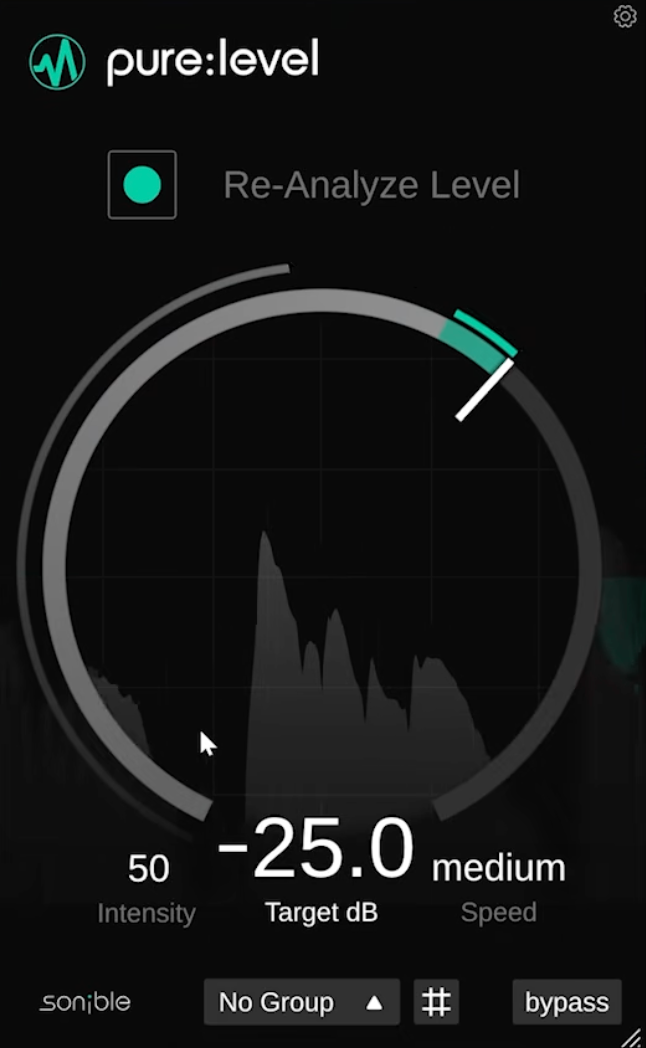
sonible pure:level is the one I’d reach for when I want automatic leveling without turning it into another technical mixing session. The interface is deliberately minimal, and that worked for me because I could concentrate on whether the performance actually felt more consistent rather than watching meters and tweaking half a dozen timing parameters.
It combines automatic level stabilization with gain riding, making it useful on vocals, instruments, and dialogue. I particularly liked it before compression, where it can deal with larger volume changes first and leave the compressor free to shape the smaller dynamics and character of the performance.
- Intelligent Leveling
The main processing continually works toward a more stable level while trying to preserve the source’s natural movement. I found it especially useful on vocals where the singer moved slightly toward and away from the microphone.
Rather than completely pinning the performance in place, I could smooth those inconsistencies and still hear the dynamics that made the take interesting.
- Group Control
One of pure:level’s most useful features is its grouping system, which lets multiple instances work toward a shared balance.
This makes a lot of sense for backing vocals, layered guitars, or synth stacks. Instead of manually chasing several faders whenever one layer becomes too dominant, I can treat them more like a connected musical section.
- One-Knob Workflow
There isn’t much menu-diving here. That’s the point. The single-knob approach makes pure:level one of the quickest options in this roundup when I simply want a source to behave more consistently.
For me, pure:level is less about detailed corrective riding and more about getting smooth, believable level control with almost no interruption to the creative process.
sonible pure:level comes in VST, VST3, AU, and AAX formats.
Waves Vocal Rider

Waves Vocal Rider is still one of the first plugins I think of when someone mentions automatic vocal riding. What I appreciate most is that it separates two jobs I used to ask compressors to handle at once: keeping the singer consistently audible and actually shaping the dynamics.
Instead of compressing the vocal, Vocal Rider continuously adjusts its gain around a target level. That means I can even out the larger volume changes first and then use compression afterward for punch, density, or color rather than forcing one processor to solve everything.
- Target & Range Controls
The central rider follows the vocal while upper and lower range limits determine how far it’s allowed to move.
I rarely give it complete freedom. Keeping the range relatively tight sounds much more natural to me because Vocal Rider handles the repetitive little corrections without overriding the intentional dynamics of the singer.
- Music Sidechain
The music sidechain is where the concept becomes much smarter than simple automatic gain.
By feeding the instrumental mix into the detector, Vocal Rider can make decisions relative to what’s happening behind the singer. A vocal that works perfectly during a sparse verse can therefore receive extra help when the chorus suddenly becomes much denser.
- Automation Writing
I also like that the plugin can write its riding movements as automation. Instead of accepting every automatic decision, I can use it to generate a first pass and then manually reshape the handful of moments where I would’ve ridden the vocal differently.
- Zero-Latency Processing
Vocal Rider operates with no added latency, which also makes it practical while tracking or in live situations.
For me, Vocal Rider remains valuable because it can save a huge amount of manual fader work while still letting me keep the final musical decisions in my hands.
Waves Vocal Rider is available in VST3, AU, AAX Native, and AAX AudioSuite formats.
NoiseWorks GainAim
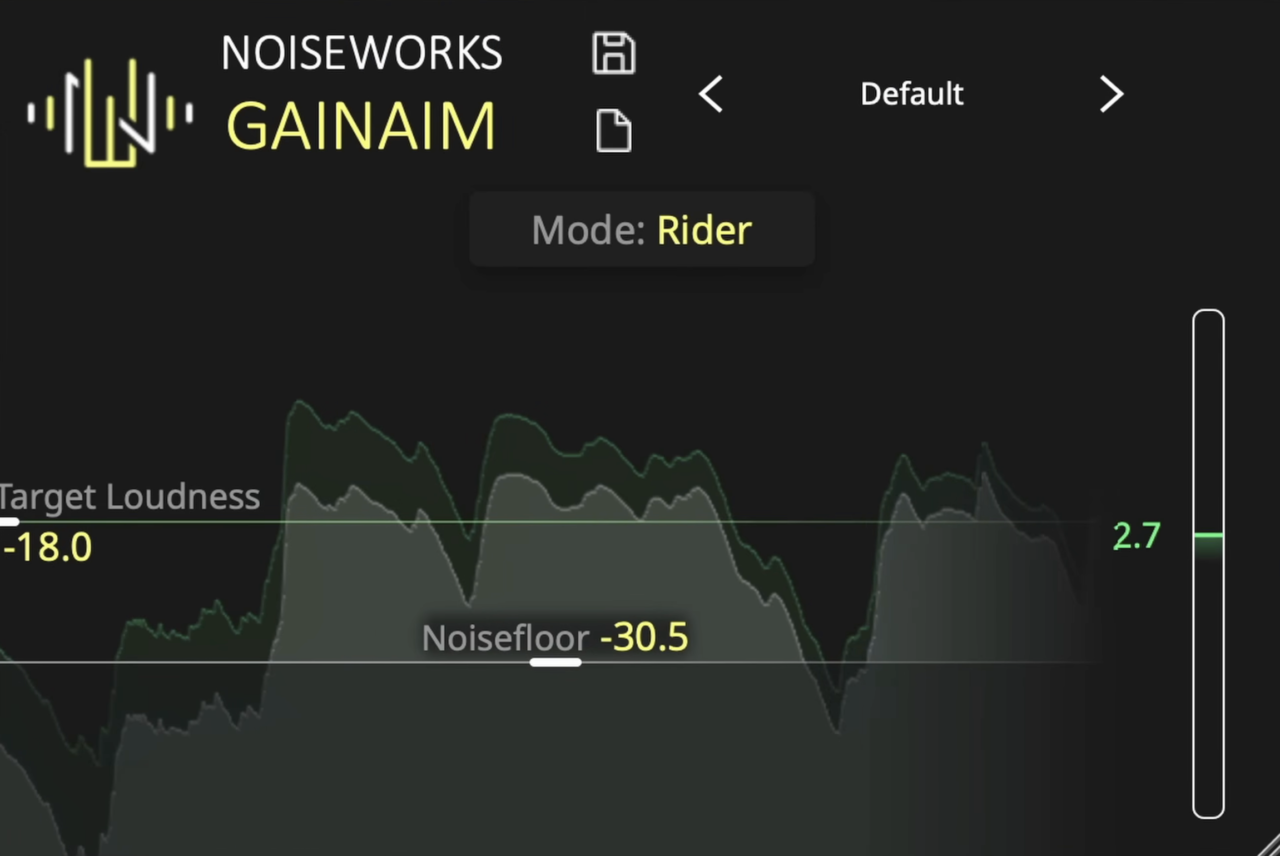
The thing I immediately liked about NoiseWorks GainAim is that it doesn’t assume a vocal, bass guitar, and percussion track should all be leveled in exactly the same way. Instead, it gives me several response modes that change how quickly the signal is pushed toward the target, which makes it considerably more flexible than a vocal-only rider.
Vocals and dialogue are obvious uses, but NoiseWorks also specifically positions the faster modes for sources such as bass, percussion, and rap vocals.
If you like the NoiseWorks approach, our VoiceAssist review covers another of their vocal tools in depth.
- Five Speed Modes
GainAim offers Rider, Leveler, Fast, Squash, and Locked modes.
I like starting here rather than immediately tweaking smaller parameters. Rider makes sense when I want natural movement in a sung performance, while Fast is much better suited to signals where the dynamics change quickly. Squash takes the idea further when tighter leveling is actually the goal.
- Target Loudness
GainAim continuously adjusts the source toward a chosen target loudness.
On vocals, I’d normally place it before my main compressor. If one line was recorded much louder than another, GainAim can deal with that difference first, so the compressor isn’t suddenly hitting 10 dB harder just because the singer moved closer to the microphone.
- NoiseFloor
The NoiseFloor control is particularly important with automatic gain riding. It prevents quiet breaths and background noise below the chosen threshold from triggering unwanted level increases.
Without something like this, an automatic rider can sometimes bring up exactly the material I’m trying to keep hidden.
- Channel Link
Adjustable Channel Link controls how the processing behaves across stereo channels, helping avoid unstable left-right movement when GainAim is used on stereo material.
For me, GainAim’s biggest strength is that it can move comfortably from natural vocal riding to much faster instrument leveling without requiring a completely different plugin.
NoiseWorks GainAim is available in VST3, AU, and AAX formats.
TBProAudio GainRider 3
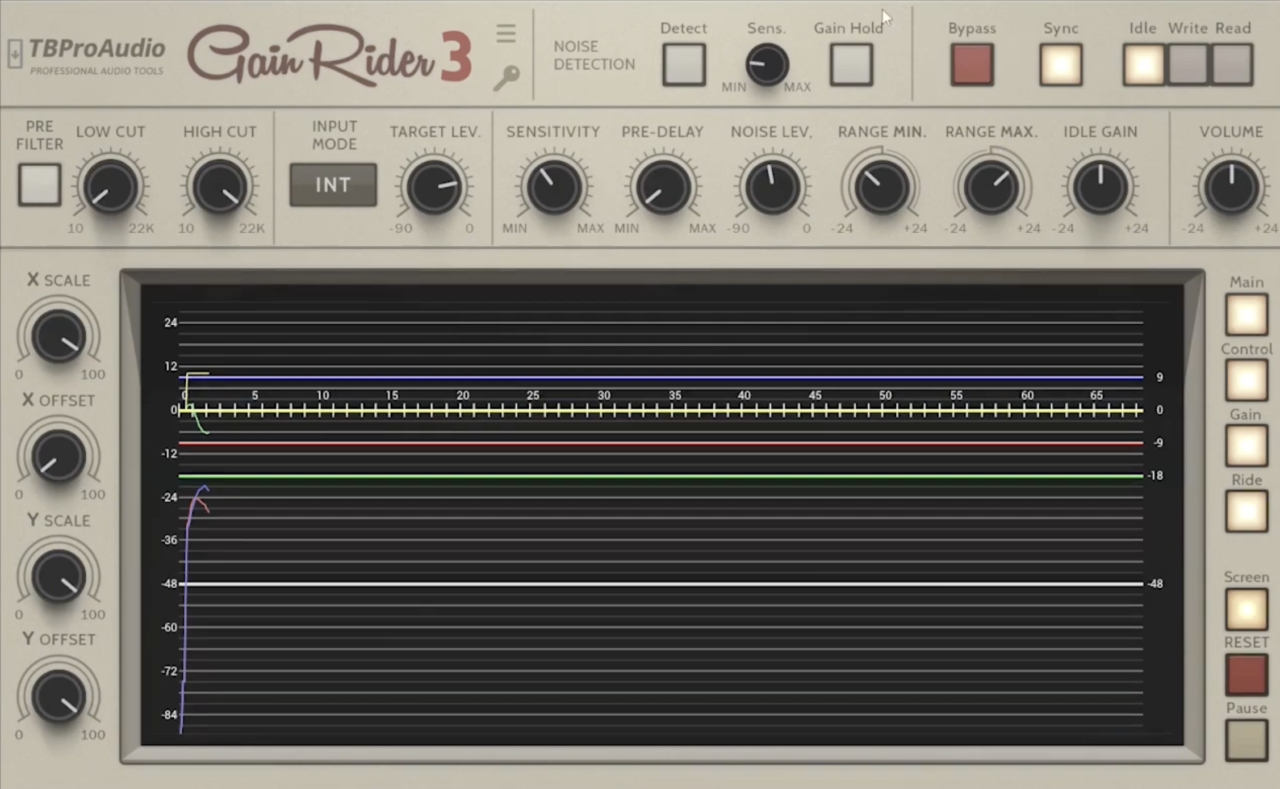
TBProAudio GainRider 3 is the one I’d pick when I want much more say over the riding behavior itself. It doesn’t hide the process behind a single macro control. Instead, it gives you direct access to speed, pre-delay, gain limits, idle behavior, filtering, and sidechain operation, which makes it feel closer to a precision dynamics tool than a basic automatic fader.
That extra depth takes a little longer to dial in, but it pays off when a vocal or bass part needs controlled movement without obvious compression.
- 3 Ride Modes
GainRider 3 includes loudness leveling, ducking, and sidechain-based loudness matching.
The standard leveling mode is the obvious starting point for vocals, while the sidechain modes open up more creative possibilities, especially when a source needs to react to another part of the mix rather than a fixed target.
- EBU R128 Loudness Detection
The riding is based on EBU R128-2014 momentary loudness measurement, rather than simple peak detection.
That makes sense on performances where perceived loudness matters more than brief transients. A sharp consonant doesn’t necessarily need the same gain move as an actually louder phrase.
- Pre-Delay & Gain Limits
The adjustable pre-delay extends from zero up to 3000 ms, while minimum and maximum gain settings keep the automation from making extreme moves.
Those limits are especially useful because automatic riders can sound unnatural when given too much freedom.
- Automation Write/Read
GainRider 3 can write and read automation data, so the generated ride can become an editable starting point rather than a permanent black-box process.
For me, GainRider 3 is best when transparency matters, but so does having detailed control over exactly how the leveling gets there.
TBProAudio GainRider 3 supports VST2, VST3, AU, and AAX formats.
TBProAudio DynaRide 2
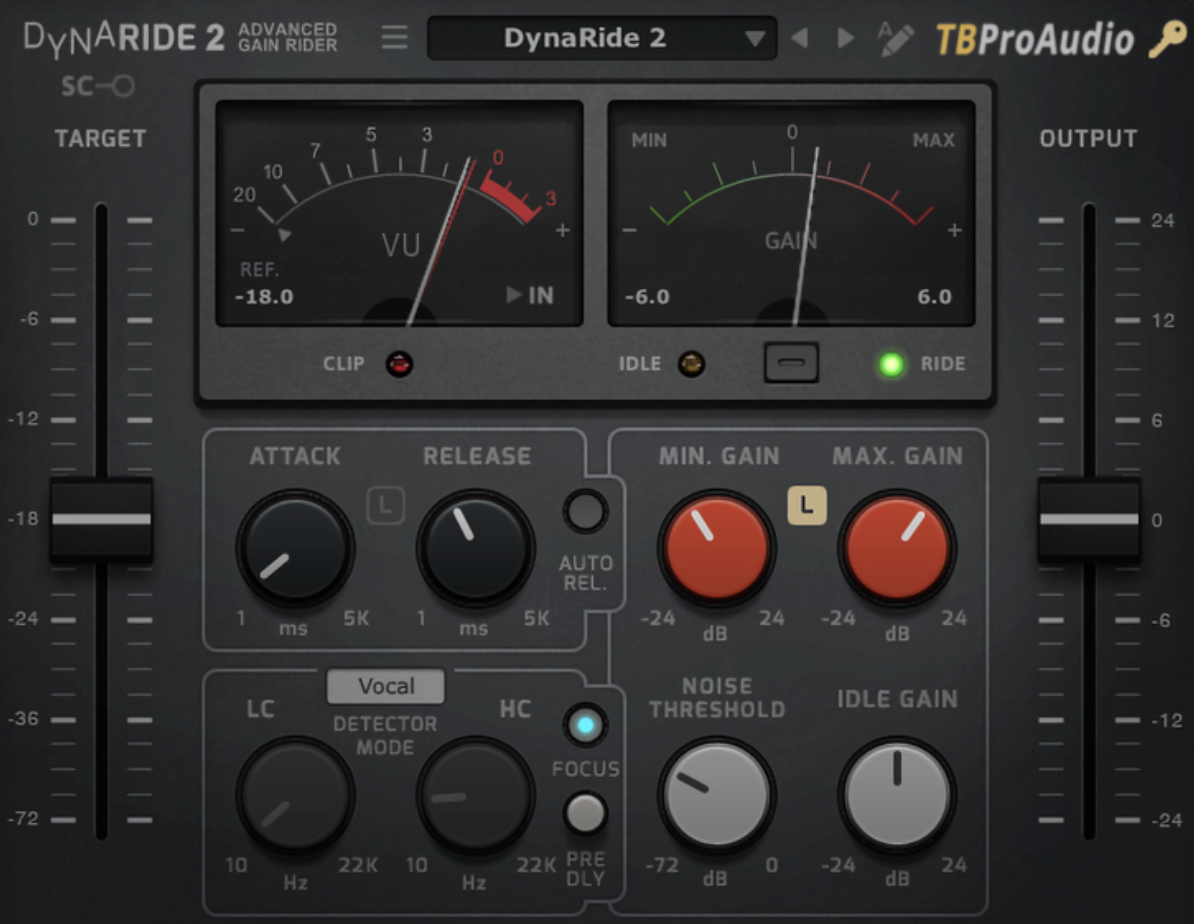
DynaRide 2 feels like the more focused sibling of GainRider 3. There’s still plenty of control, but the workflow is built more directly around common real-world sources, with dedicated detector programs for vocals, speech, and bass rather than expecting every track to start from the same generic response.
That source-aware approach makes it appealing when I want to get moving quickly without sacrificing the ability to shape the ride afterward.
- Vocal, Speech & Bass Detectors
The dedicated detector programs are the first thing that caught my attention.
A vocal and a bass guitar can have similar level inconsistencies while behaving completely differently over time. Starting with a detector designed for the source gets closer to a useful response before I touch attack, release, or gain limits.
- Attack & Release Controls
DynaRide 2 still provides adjustable attack and release, so the automatic behavior isn’t locked to the preset detector choice.
Slower movement works nicely for broad vocal phrases, while faster settings make more sense when individual notes or words are jumping forward.
- Ride Focus
The Ride Focus function can restrict or enhance the riding behavior based on the relevant signal, helping reduce the influence of unwanted background material.
That’s especially useful with dialogue or vocal recordings where room noise sits underneath quieter passages.
- Sidechain & Automation
DynaRide 2 supports sidechain detection along with automation write and read, giving you a way to capture the generated gain curve and edit it later in the DAW.
That combination gives it more flexibility than its relatively straightforward interface first suggests.
DynaRide 2 makes the most sense to me when I want faster setup than GainRider 3, but still need more control than a one-knob leveler provides.
TBProAudio DynaRide 2 is available in VST, VST3, AU and AAX.
HoRNet AutoGain Pro MK2
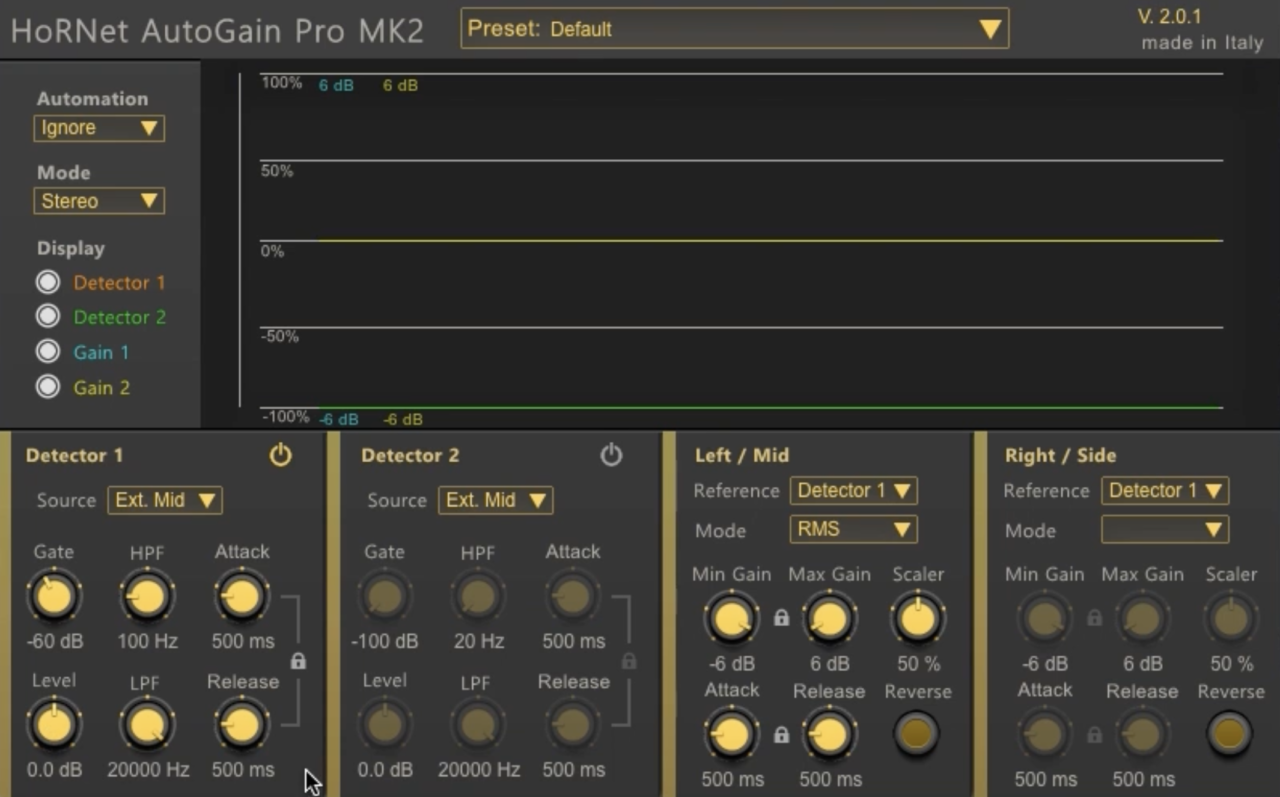
HoRNet AutoGain Pro MK2 is probably the most routing-heavy plugin in this list. Instead of one detector controlling one gain stage, you get two independent detectors and two processors, which can be configured in classic stereo or Mid/Side workflows.
That makes it much broader than simple vocal riding. It can behave like an automatic leveler, a sidechain-controlled gain tool, or something approaching more creative dynamics processing depending on how the routing is set up.
- Dual Detectors & Processors
Each detector can choose from five different source types, including internal and external signals, while either processor can follow either detector.
This is where the plugin gets interesting. A vocal can drive one processing path while another source controls a second, or the mid and side information can be treated separately.
- Mid/Side Processing
The dedicated Mid/Side mode allows the center and stereo information to receive independent gain treatment.
I wouldn’t need that on every vocal, but it becomes much more useful on stereo keyboards, backing-vocal stacks, buses, or even full mixes where level movement is affecting width.
- Detector Filters
Each detector includes high-pass and low-pass filters, plus independent attack and release controls.
That lets the automation ignore frequencies that shouldn’t dominate its decisions, such as low-end rumble or excessive sibilance.
- Automation Writing
Once the ride feels right, AutoGain Pro MK2 can write the gain movement into DAW automation, which can then be edited manually.
That workflow is one of its strongest practical advantages because the automatic pass becomes a starting point rather than the final word.
HoRNet AutoGain Pro MK2 is the one I’d choose when routing flexibility matters as much as the gain riding itself.
HoRNet AutoGain Pro MK2 is available in VST2.4, VST3, AU, and AAX formats.
Nuro Audio Xrider
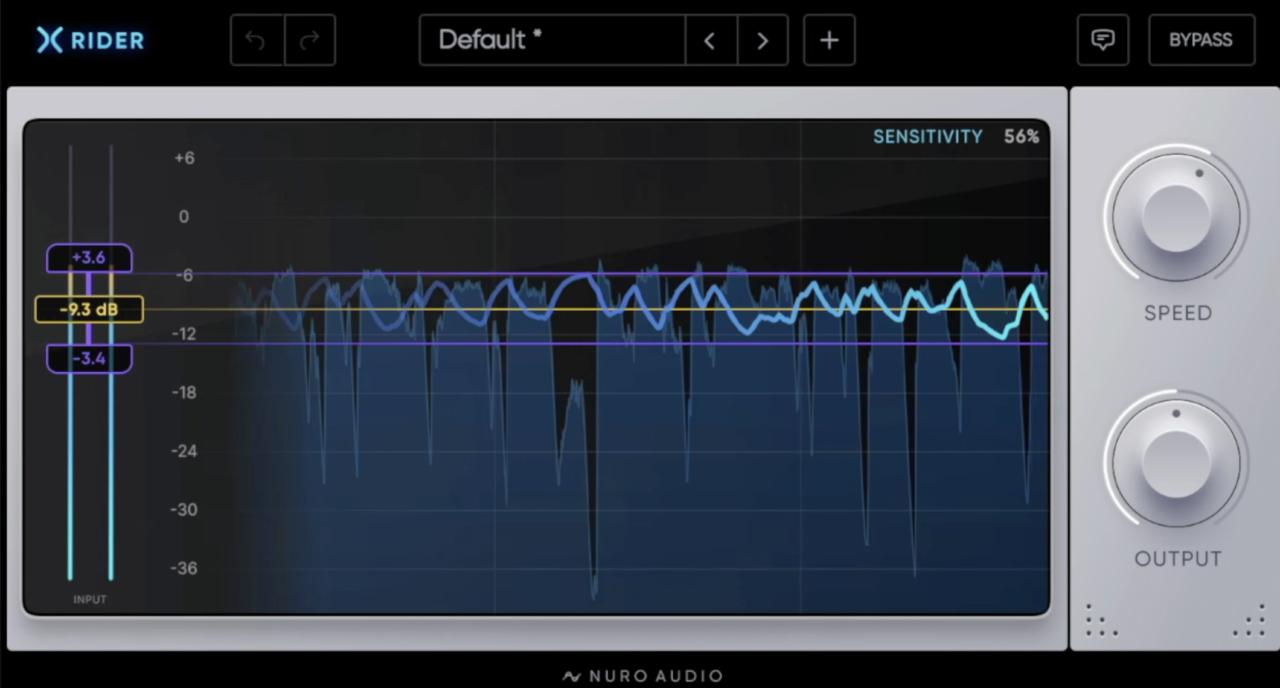
Nuro Audio Xrider feels built around one very practical idea: show me exactly what the rider is doing without burying the process under technical controls. The large waveform display makes it easy to see the vocal level, chosen target, and actual gain movement together, which helps when an automatic ride sounds slightly strange and you want to understand why.
Compared with some of the deeper processors here, Xrider is much quicker to configure. That makes it especially appealing when the goal is simply to even out a vocal before compression rather than design an elaborate gain-control system.
- Target & Independent Range
The Target, Minimum, and Maximum controls define where the vocal should sit and how far Xrider can move in either direction. The upward and downward ranges are independent, which is more useful than one symmetrical gain limit.
A singer with occasional loud phrases, for example, can receive plenty of downward control without allowing quieter breaths to be boosted by the same amount.
- Speed Control
Speed determines how quickly the gain follows incoming changes. Slower values create broader, more human-style movements, while faster settings react more tightly to individual words and phrases.
Keeping it slightly slower worked better for natural vocals, where chasing every syllable can make the level feel nervous.
- TrueGain & Waveform History
The TrueGain display provides a running history of the actual gain changes alongside the incoming waveform.
That visual feedback makes dialing the range considerably easier because overly aggressive corrections become obvious immediately.
- Zero-Latency Processing
Xrider performs its gain changes in real time with zero added latency, so it can also work during recording rather than only during mixing.
Xrider is strongest when you want fast, transparent vocal leveling with enough visual feedback to stay in control of the result.
Nuro Audio Xrider is available in VST3, AU, and AAX formats.
MeldaProduction MAutoVolume
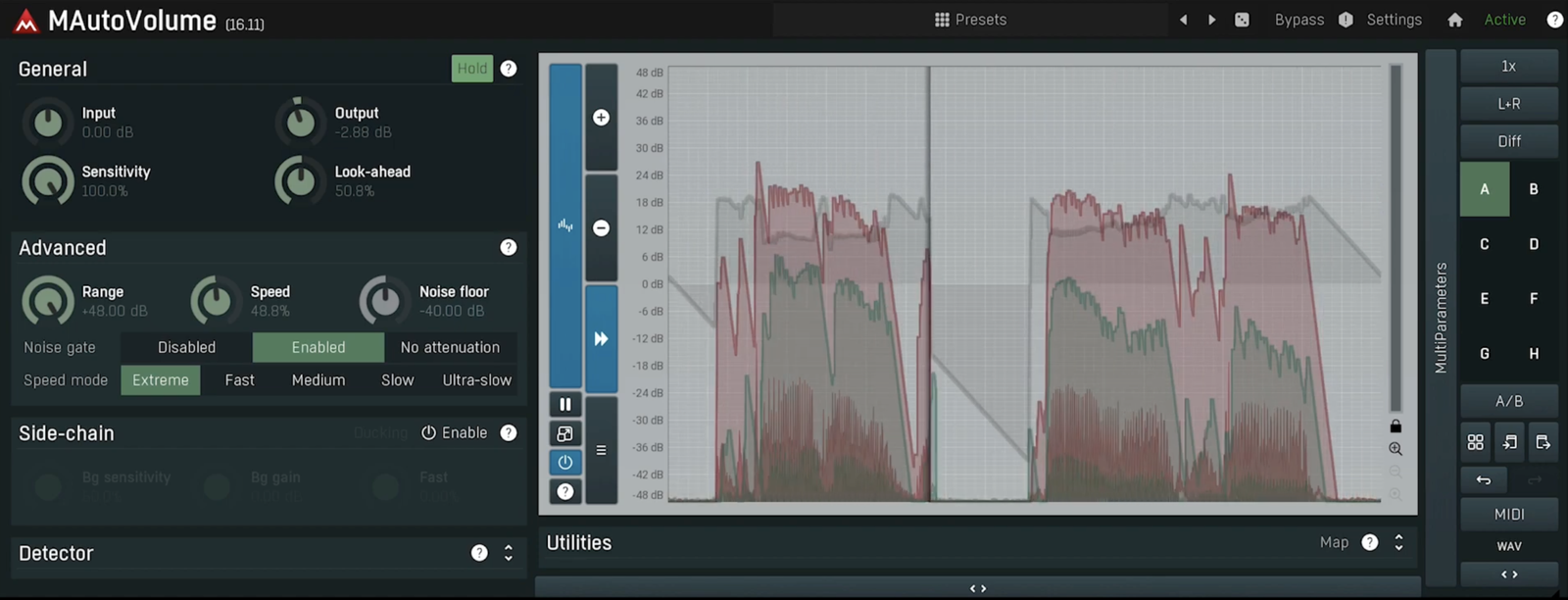
MAutoVolume is probably one of the deeper tools in this roundup, but its basic purpose is surprisingly straightforward: keep a vocal, bass, guitar, saxophone, or other foreground instrument consistently present without relying on heavy compression or endless fader automation.
The part that interests me most is how much control Melda gives you over the detector. It can work as a relatively simple automatic leveler, but there are enough timing, noise, filtering, and sidechain options to adapt the behavior when the source becomes more complicated.
- Sensitivity & Range
Sensitivity controls how strongly MAutoVolume compensates for level changes, while Range limits the amount of gain correction available.
That distinction is important because completely flattening a performance rarely sounds musical. A restrained sensitivity setting can steady the vocal while keeping the intentional dynamic changes intact.
- Five Speed Modes
The detector offers Extreme, Fast, Medium, Slow, and Ultra-slow speed ranges, with an additional Speed parameter for finer control.
That makes MAutoVolume useful well beyond vocals. Slow movement suits broad phrases, while faster modes can follow more active material.
- Noise Floor
A dedicated Noise Floor tells the plugin when the useful performance has stopped. Below that point, MAutoVolume can stop increasing gain instead of lifting room noise between phrases.
This becomes especially important on vocals recorded in less-than-perfect rooms.
- Mix Sidechain
Feed the rest of the mix into MAutoVolume’s sidechain, and it can adjust the foreground source relative to the changing background level rather than one static target.
That can help a vocal rise naturally when a chorus gets denser instead of requiring separate section-by-section automation.
MAutoVolume is the option I’d choose when automatic leveling needs to be highly configurable rather than completely hands-off.
MeldaProduction MAutoVolume is available in VST, VST3, AU, and AAX formats.
RysUpRider
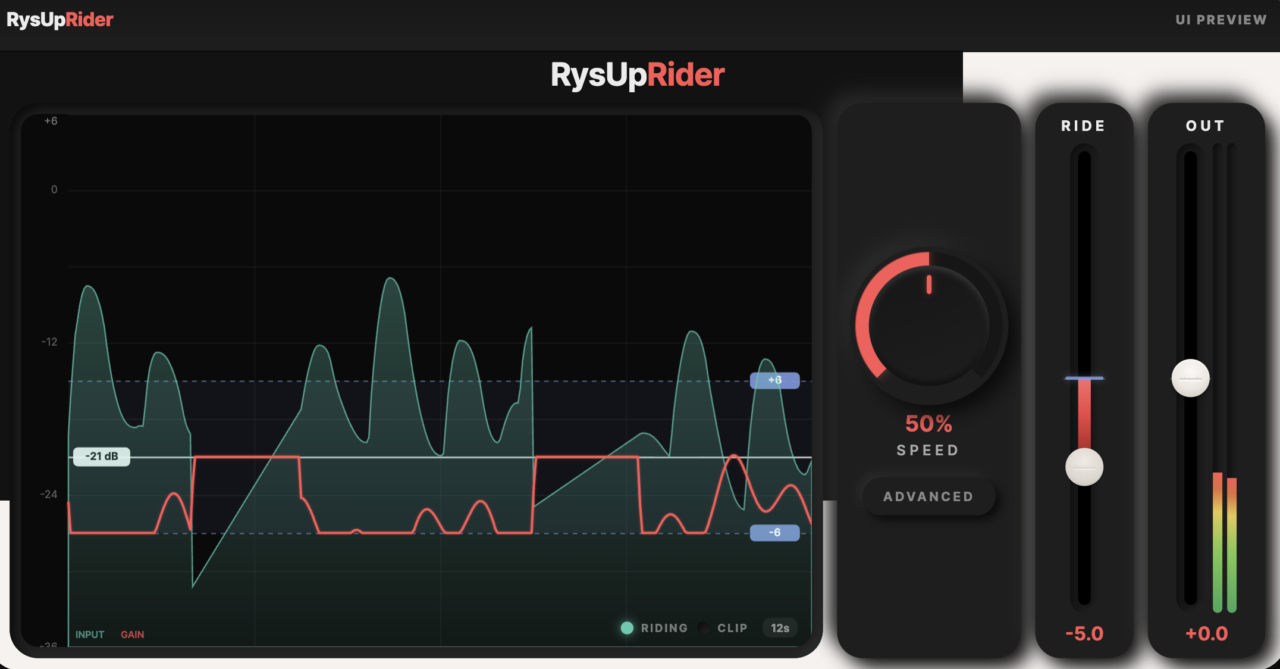
RysUpRider takes a vocal-first approach, and I think that focus works in its favor. The interface centers everything around the decisions that actually matter during a vocal ride: where the singer should sit, how far the gain can move, how quickly it reacts, and what happens between phrases.
It also keeps the entire process visible. Rather than watching one gain-reduction meter jump around, you get a live history of the vocal level, target window, and generated ride together.
- Target & Asymmetric Range
The Target control establishes the desired level while separate upper and lower ranges determine how far the plugin can raise or attenuate the vocal.
That asymmetric setup makes sense in real sessions. A singer may need several decibels of control on loud phrases but only a small amount of upward correction on quieter ones.
- Speed & Vocal Sensitivity
Speed determines how quickly the ride moves, while Vocal Sensitivity adjusts how strongly the detector follows the performance. You can also choose between RMS and Peak detection.
That gives enough control to keep the ride smooth without turning it into another compressor.
- Music Sidechain
The dedicated Music Sidechain lets RysUpRider judge the vocal against the instrumental rather than treating it in isolation. Music Sensitivity determines how much the surrounding mix influences the ride.
This is particularly useful when moving from a sparse verse into a crowded chorus.
- Spill, Idle & Park
Spill, Idle, and Park handle what happens when the singer stops. They help prevent headphone bleed, room noise, or breaths from sending the gain wandering upward during gaps.
One limitation worth knowing is that the current version processes the ride in real time but does not write that movement into DAW automation.
RysUpRider closes the list nicely because it concentrates on clear visual feedback and practical vocal control rather than piling on unrelated features.
RysUpRider is available in AU, VST3, and AAX formats.
Last Words
A good gain rider shouldn’t make a performance feel flat. It should simply take care of the level changes that get in the way, so the vocal or instrument stays present without forcing a compressor to do all the heavy lifting.
The vocal and gain rider plugins in this list approach that job in very different ways. For fast, visual vocal riding, Xrider and RysUpRider are the quickest to read at a glance, while pure:level is the closest thing to a one-knob fix. Waves Vocal Rider remains the safe all-rounder, especially if you want its ride written to automation.
If you need deeper control, GainRider 3, MAutoVolume, and PSP Levelizer let you shape the detector in detail, and AutoGain Pro MK2 adds dual-detector and Mid/Side routing. GainAim and DynaRide 2 sit in between, with source-specific modes that get bass, rap vocals, and dialogue under control quickly. I wouldn’t choose one based on the longest feature list. I’d choose based on how much control you actually need and how quickly you want to get there.
For most sessions, the best results still come from using automatic riding as a starting point, then making the final musical decisions by ear. If you’re building out the rest of the chain, our guide to the top vocal chain plugins picks up where the rider leaves off.

Berk is a multi-instrumentalist musician from Istanbul, Turkey. He has been playing guitar, handpan, and percussion for over ten years, developing a sound that blends melodic sensitivity with rhythmic depth.
He began his musical journey as a teenager, learning guitar and performing in several bands. In 2016, he discovered the handpan, an instrument that immediately resonated with him on a deeper level and gradually became central to his artistic identity.
Since then, he has performed in streets, festivals, bars, and concert venues across different countries, connecting with diverse audiences through both intimate and large-scale performances.
Alongside his live work, Berk is deeply involved in studio production. He works from his home studio, where he composes, records, and produces his own music. His studio serves as a creative space for layering handpan, guitar, and percussion with modern production techniques, allowing him to shape fully realized, atmospheric compositions from start to finish.
His music explores a wide range of genres and textures, combining organic acoustic instruments with detailed studio production to create immersive and expressive soundscapes.