
Today’s article will look at the top 20 MIDI controllers & keyboards for beginners.
A MIDI controller in your studio setup is excellent because it allows for greater expression and creativity in your music-making. Lastly, MIDI controllers are relatively affordable and easy to find, so you don’t have to break the bank to start making music.
Is a MIDI controller good starting point for beginners?
MIDI controllers are great for beginners it can help them learn and improve their skills. Many models come with tutorials, lessons, and other educational resources. Many software instruments and music production programs include various virtual instruments, drum kits, and other sounds.
This allows you to experiment with various sounds and styles and helps them develop their musical abilities. This will also develop your imagination since you don’t need to watch your PC screen when producing.
Can a MIDI keyboard help with learning piano?
A MIDI keyboard can be a helpful tool for learning piano, especially if you are starting and want to familiarize yourself with the layout of a piano keyboard. In addition, MIDI keyboards are typically smaller and more portable than traditional pianos, making them a good option if you need more space or want to practice on the go.
However, it’s essential to remember that a MIDI keyboard is not the same as an acoustic piano and may not provide the same tactile feedback and resistance level as a traditional piano. If you are serious about learning piano and want to develop proper technique and muscle memory, you may consider investing in a digital or acoustic piano.
The 20 Best MIDI Controllers For Beginners
Native Instruments Komplete Kontrol A49

Native Instruments brings a piece of performance gear that could become an essential part of your home studio.
Innovative, sleek, and essential for all passionate about music and exploring new ways to produce with an added creative touch.
The Komplete Kontrol A49 is highly integrative and lets you do almost everything without lifting your head: From its transport controls to semi-weighted keys, it has an impressive feel and texture. Capturing ideas is seamless and makes you feel you are in control. Let’s see why.
Key Features:
- Smart Play
A great help in a producer’s music because this feature allows you to activate and edit the scales, chords, and arpeggiator. You can edit these using the engine parameters in Komplete Kontrol, such as setting chromatic scales, chord modes, arpeggiator sequences, etc. - Navigation And Mode Buttons
When it comes to navigating, the A49 makes it easy to browse your Komplete Kontrol library as well as being able to navigate in your DAW with the 4-D encoder (which moves up, down, left, and right, can be pressed, as well as a continuous rotation function). In addition, you can access control functions for the selected plugins and track control functions, among other things, with these buttons above the encoder. - Transport And Control Sections
You can easily access these functions with loop, metronome, tempo, stop, record, and play buttons. You will barely even have to use your mouse or look at your screen. There are secondary functions like count-in and restart when pressed with the shift button. The control section includes eight endless knobs (you can tap them also), which allow you to adjust parameters. - Komplete Kontrol Software
With advanced host integration, Komplete Kontrol gives you so much information, presets, and parameters that you can adjust to your preferences. It combines all Native Instruments, effects, loops, and samples into one plugin. In addition, the software includes the Komplete Select bundle, which gives you high-quality virtual instruments, including Massive, Monark, and Reaktor Prism. It works with a host DAW, or it can also be standalone.
Pros:
Besides all the other noteworthy features not mentioned, like the display, undo/redo buttons, quantize, and high-quality keys, the A49 has a training mode to find control without accidentally triggering actions. And there is also a set of accessibility features offered for visually impaired users. So nothing can stop you from creating your best work yet, thanks to Native Instruments’ ingenuity.
Cons:
It all seems too good to be true. One drawback is that the host integration for Komplete Kontrol is not available on every DAW. So one must be mindful of this. Also, a MIDI Out would be a nice added feature to connect this supreme controller to a sound module.
Roland A-49

Key Features:
- Controllers
The unique pitch bend and modulation lever are found on the left. S1/S2 buttons transmit program changes, causing your sound module to switch sounds. You will find C1/C2 knobs above, which can change the functions assigned, but the default is cutoff and resonance. The D-BEAM controller is used by moving your hand up and down above it. - 4 Modes
You can select between Play mode (when performing with keys, pitch, mod, MIDI sound module, etc.), Function mode (transmits control messages or makes settings for the A-49 itself, using the keyboard), SuperNATURAL mode (controls Roland’s SuperNATURAL sound module via MIDI, using Behaviour Modeling Technology), and Visual Control mode (which lets you synchronize video with keyboard performance) - Various Connectors
Connectors would include a 1/4″ hold jack input (for sustain pedal), 1/4″ expression jack input (only for the specified EV-5 expression pedal, which is sold separately), MIDI out, and also the USB Type B computer port. - Ableton Live Lite
This package provides the Ableton Live Lite serial number needed to install the software. Suitable for introducing you to Ableton DAW if you have never used it, and although the software is the lite version, it will give you some insight.
Pros:
You can select a function to use aftertouch on the keys, which is a nice bonus. In addition, you can also set the keyboard to control the aftertouch with the D-BEAM controller. Its structure’s feel, sensitivity, and quality make it a lovely addition to your home setup. You can also play it with an iPad’s Apple USB Camera Kit.
Cons:
For some beginners, the setup of the keyboard can be challenging. The keys are slightly smaller, but not too much to make a big deal about them. It would generally just depend on the person.
AKAI Professional MPK Mini MK3
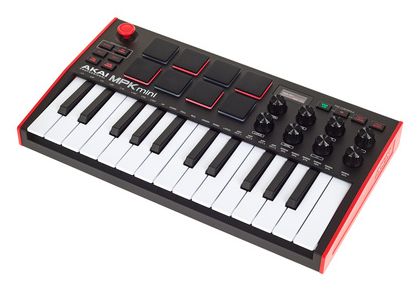
The simple-to-use MPK Mini MK3 from Akai is feature-rich yet saves space.
The build quality of the instrument is quite good. Much like other midi controllers that Akai produces, the pads on the MPK Mini are well-made and have a professional feel. In addition, the different modes and features make them fun to experiment with.
The MPK Mini has some customizable controls that can perform different functions on the keyboard and third-party digital audio workstations. In addition, Akai’s MPK Mini Editor software can access more assignable options related to the MPK Mini MK3.
Key Features:
- Appearance
The MPK Mini MK3 has 25 synth-action mini keys with velocity sensitivity. Weighing around 0.75 kg, the MPK Mini has dimensions of 12.5” x 7.13” x 1.75”. The back panel only has an input for a sustain pedal and a USB type B port, which powers the unit with the help of the included USB cable. - General Controls
Akai’s MPK Mini has octave buttons that can assign up to 10 octaves to the 25 available keys. In addition, a 4-way joystick can be used to perform the pitch bend feature. The MPK Mini MK3 also has 8 270-degree rotation knobs that can change different parameters. - Drum Pads
Eight velocity-sensitive drum pads can be used to trigger notes or drums. The pads can also be used to trigger sounds on your DAW. The pads are arranged in two banks (A/B), so in essence, the unit has 16 pads in total. A CC and program change buttons can determine whether the pads send out midi CC or midi program change information. The full level activates maximum velocity on the pads regardless of how light they’re played. The pads also have a note repeat feature. - Arpeggiator
The unit also has an arpeggiator toggle button and a tap tempo button to set the tempo of the arpeggiator. Holding down the arpeggiator button and pressing keys on the keyboard will activate different functions associated with the arpeggiator, like its timing, order of notes played, latch feature, randomizing notes, and changing octaves. Swing can also be added to the arpeggiator here. - Software Bundle
The MPK Mini MK3 comes with MCP beats and several virtual instruments, including Tubesynth, Hybrid 3, Electric, Mini Gran, Velvet, and Bassline. So, in one package, you get drums and percussion loops, acoustic and electric piano sounds, synth sound libraries, and bass guitar simulations to get you going instantly.
Pros:
The software bundle has all the beats and sound libraries you need to begin recording and mixing your music. The arpeggiator is versatile and has detailed features like a latch, randomizing notes, swing, and much more. The drum pads provide a great touch response and are customizable.
Cons:
The keys are a bit stiff. Also, the keys may sometimes be challenging to play due to their small size. The transpose feature is a bit buggy on this unit. The software accompanied by the unit requires some specific codecs, and the installation takes some doing. There is no midi out on the back panel.
Novation Launchkey Mini MK3
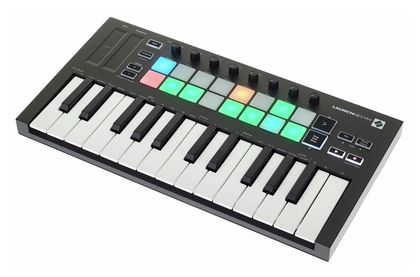
The Mini MK3 is the tiniest member of the Launchkey family.
Novation’s Launchkey Mini may be small, but it has enough features to justify its existence. The controls spread across the top panel make good use of limited space by providing a one-touch button to trigger different effects. The drum pads on the MK3 provide a premium feel and have several modes.
The package includes a digital workstation and several plugins to assign sounds to your handy Launchkey Mini. The MK3 also has enough transport controls on its control panel to manage crucial features of your digital workstation while recording and mixing.
Key Features:
- Appearance
The Mini MK3 has 25 synth-action mini keys that are velocity sensitive. The unit weighs 0.7 kg and has dimensions of 12.9″ x 6.8″ x 1.2″. The back panel has a USB type B port to power the unit while connected to a computer and a midi out port for an external midi device. The device comes with a type A to type B USB cable. There is also a port for the sustain pedal. - Controls
The MK3 has pitch and modulation controls in the shape of touch strips. A shift button gives access to secondary features of some of the other buttons. A separate transpose button can change the keys of a song up to 11 semitones in either direction. A pair of +/- buttons can change the octaves of the keys. In addition, 8 multifunctional knobs can change software/hardware parameters. The unit also has an arpeggiator and a fixed chord button that allows playing chords with a single key. - Drum Pads
The Novation Launchkey Mini MK3 has 16 velocity-sensitive pads with backlights. You can play drums or notes with the pads. Other customizations like triggering user-preferred sounds or changing the color of the backlights can also be done. - DAW Controls
The Novation MK3 has some DAW controls on board. The drum pads can be used to trigger sounds on your digital workstation. There are a couple of transport buttons, including a record and play button, that perform the corresponding functions on your DAW. You also get a button to toggle a track’s stop, solo, and mute functions. Finally, the> button can be used to launch scenes. - Software
Registering the MK3 on the Novation website allows you to download the lite version of Ableton Live 10. The AAS session bundle includes three plugins that give you access to several virtual instruments, including grand pianos, electric pianos, synths, guitars, and organ sounds. The bundle also has effects to give you the sound you want.
Pros:
The Novation MK3 is extremely light and portable. Considering its size, the MK3 still has plenty of controls to navigate and operate your DAW. The drum pads are responsive and have different modes for different tasks. The software bundle includes some valuable plugins as well as Ableton Live Lite.
Cons:
Novation Launchkey Mini MK3’s keys do not have an aftertouch feature. A TRS adapter for the midi port would have been a good inclusion. The unit needs to be powered externally when used with IOS devices. The size of the drum pads is very small, which makes hitting individual pads with multiple fingers challenging.
IK Multimedia iRig Keys I/O 49
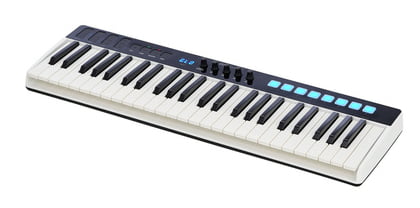
The IK Multimedia iRig Keys I/O 49 is a MIDI keyboard controller that combines a 49-key keyboard with a built-in audio interface. It features velocity-sensitive keys, pitch and modulation touch strips, and a variety of knobs, buttons, pads, and sliders for controlling software instruments and effects.
Key Features:
- Built-in audio interface:
The iRig Keys I/O 49 has a built-in audio interface that provides 24-bit/96kHz audio quality and has inputs and outputs for line-level and instrument-level sources such as microphones and guitars. The input is only mono. - 49 full-size, velocity-sensitive keys and eight pads:
The keyboard has 49 full-size, velocity-sensitive keys, which provide a good amount of resistance and feel great to play. The pads are backlit, which changes depending on the pressure. - Pitch and modulation touch strips:
IK Multimedia saved space using pitch and modulation touch strips instead of traditional wheels. Providing a new way of creating expression and modulation in synthesizers and other instruments. - Software integration:
The iRig Keys I/O 49 comes with various software instruments and effects, including the SampleTank SE virtual instrument, T-RackS CS Classic mixing and mastering suite, and AmpliTube 4, a guitar and bass tone-modeling software. - Android and iOS compatibility
The compatibility of the iRig products with iOS devices, specifically the iPhone, iPod Touch, iPad, and Android devices, is one of their best-known capabilities. There is less concern about moving with a laptop unless you want to because of this functionality.
Pros:
One of the main strengths of the iRig Keys I/O 49 is its built-in audio interface. It provides 24-bit/96kHz audio quality and has inputs and outputs for line-level and instrument-level sources, such as microphones and guitars. This allows users to record audio directly into their computer or mobile device without needing an external audio interface.
Cons:
One potential downside of the iRig Keys I/O 49 is that it can be a bit on the bulky side, which may not be ideal for musicians who are always on the go. Additionally, it’s quite a bit more expensive than other MIDI controllers with similar features.
AKAI Fire (Great For FL Studio Users)
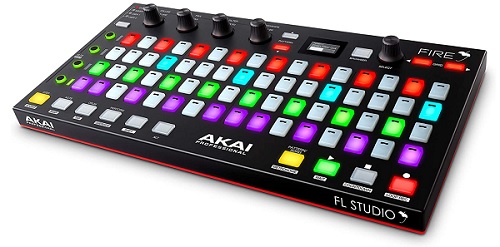
The Akai Fire is a dedicated controller for the FL Studio Digital Audio Workstation (DAW).
It is designed to provide hands-on control of the DAW, allowing users to create music more intuitively and efficiently. The main modes are Step (for recoding sequences), Note (for playing and recording notes), Drum (for the beat), and Performance.
In terms of build quality, the Akai Fire feels solid and well-constructed. It is lightweight and portable, making it an ideal controller for on-the-go music production.
Key Features:
- Basic mix and transport controls
The Play, Stop, and Record buttons and a metronome button are located in the bottom right corner. Four rotary encoders for volume, pan, EQ, and resonance are located in the top left. On the bottom, left are other handy mute and solo controls. - 4×16 velocity-sensitive pads
One of the standout features of the Akai Fire is its 4x16 velocity-sensitive RGB pad matrix, which can be used to trigger loops, launch samples, and play drums and melodies. In addition, the pads are highly responsive and provide a satisfying level of tactile feedback. - Performance Mode
When performance mode is on, you can use the pads to simultaneously manipulate several parameters while triggering clips or scenes in your music software. It allows you at once to use all features, such as pads, rotary encoders, and faders. - Customizable control elements
The Akai Fire is fully customizable, so users can assign different functions to the various control elements to suit their workflow. This allows users to tailor the controller to their specific needs and make it an integral part of their music production setup. - Compact and portable design
The controller is lightweight and portable, making it ideal for on-the-go music production. It can be easily carried in a backpack or laptop bag, making it a convenient choice for mobile producers. - Solid build quality
The Akai Fire feels solid and well-constructed, with a high-quality finish and durable buttons and encoders. It is built to withstand the rigors of regular use and should provide reliable performance for many years to come.
Pros:
The AKAI Fire is specifically designed to work with FL Studio, making it easy for users to quickly and easily control the software. The Fire allows access to 4 banks of controls, giving 64 pads, buttons, and knobs, which allow for more profound control over the DAW and virtual instruments.
Cons:
The controller is only compatible with FL Studio, so users of other DAWs will need to look for a different controller. Some users may find the pads’ layout and control elements somewhat cramped. The controller does not have a built-in display, so users must refer to their computer screen for feedback on their actions. The Akai Fire may not provide as much control as some users desire, depending on their workflow and production style. Some users may find the pads too small or difficult to play accurately, and you may require some setup and configuration to use all of its features effectively.
PreSonus ATOM SQ (Great For Ableton Users)
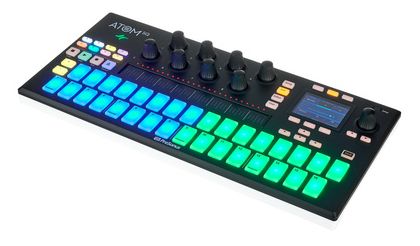
The PreSonus ATOM SQ is a compact, portable MIDI controller for software music production platforms such as Ableton Live.
It features 16 pads, eight knobs, four buttons, a built-in arpeggiator, and a step sequencer.
Key Features:
- Compact and portable design with excellent durability :
The PreSonus ATOM SQ is small and lightweight, making it easy to take with you wherever you go. The body is firm and solid with no creaks or pops when you flex anywhere on the frame, the buttons are tight, and the knobs are stiff. - 8 knobs and 4 buttons:
Eight rotary encoders on the MIDI controller can be used to manipulate different settings in your software. They can be used, for instance, to change the cutoff frequency of a filter in a synthesizer or the level of specific tracks in your DAW. - Included Software
PreSonus has included a lot of software such as PreSonus Studio One Artist DAW, the Studio Magic Plugin Suite, SampleOne XT sampler, Presence XT virtual instrument, Analog Lab Lite, and Ableton Live Lite. You will be able to record your music ideas right away. - USB-C connectivity with MIDI:
The PreSonus ATOM SQ can connect to your PC or mobile device via USB-C, making it easy to set up and use with your music production software. The USB also sends MIDI information, so that you won’t need additional cables.
Pros:
The build is very good when compared to the price range. On-screen events are great options for the production workflow. The PreSonus ATOM SQ is compatible with a wide range of music production software, including Ableton Live, FL Studio, and more.
Cons:
One common criticism of the PreSonus ATOM SQ is that it can be challenging to read the labels on the knobs and buttons in low-light conditions. The lack of a standalone mode, and the absence of a display screen, may not be suitable for more advanced users.
Arturia Keystep 37

A mighty medium-sized controller that lets you control hardware and software, the Keystep 37 has velocity-sensitive slim keys – which makes it more compact – and is an excellent tool for creative expression because of its sequencer, arpeggiator, scale, and chord functions.
It is suitable for the producer who wants to level up from a more basic controller for greater creative output.
Key Features:
- Sequencer And Arpeggiator Section
Having a toggle switch that allows you to change between sequencer and arpeggiator, this section lets you select which of the eight active sequences in Seq Mode; and which pattern will be used to playback the notes you’re holding on the keyboard in Arp Mode. You have encoders for changing the modes, time division, and rate. You can record your notes as a sequence.
- Chord Button With Related Knobs
The Keystep 37 lets you go into chord mode by holding Shift and pressing the Hold button, and there are also a couple of other ways you can go into chord mode. But the point to emphasize is that you can add notes to make the chord of a root note with the Type knob, set the chord span (number of notes in the chord up to 16) with the Notes knob, set the Velocity to Notes knob ratio, and also selecting strum type with the fourth Strum knob.
- Transport Section
Using MIDI Machine Control, the record, stop and pause/play buttons control the sequencer, the arpeggiator, and external MIDI devices. All three buttons are active in the sequencer mode, yet only Play/Pause and Stop can be used with the arpeggiator. When creating a sequence, you also have secondary functions with each button: Append, Clear Last, and Restart.
- Numerous Rear Panel Inputs/Outputs
Arturia has equipped this keyboard with various inputs and outputs for you to get the most out of this keyboard truly. A USB port to connect to your computer and a 12V DC IN (with an optional adapter). Pitch/Gate/Mod outputs (to send electrical signals to an external device), sustain pedal input, Clock Sync input/output (allows you to interface with pre-MIDI technology capable of synchronization), MIDI in/out ports.
- Octave, Transpose, And Kbd Functions
Not only can you shift octaves up and down on the keyboard, but you can also press Oct+ or Oct- and add notes while the arpeggiator is running. In addition, transpose mode is enabled with Shift as a secondary function and Kbd Play mode (which allows you to play keys independently in addition to the part the sequencer is playing).
Pros:
A row of 37 LEDs above the keys helps you check the status of notes played and those the sequencer and arp are playing. It is also well-built and sturdy, giving you comfort in its stability. You can maneuver with it as well if needing to travel.
Cons:
Some of the main functions, like switching root notes, require two hands to change, which could be an issue in live situations. But for many people, this would not be such an issue, especially if you play only one live instrument.
Novation FLkey 37
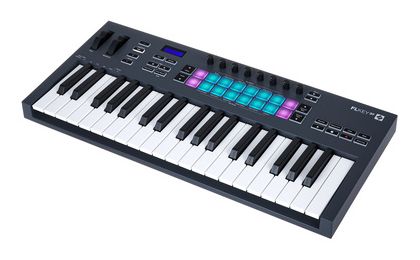
The Novation Launchkey 37 is a compact, portable MIDI controller designed with software music production platforms such as Ableton Live.
It features 37 keys, eight knobs, eight pads, a built-in arpeggiator, and a step sequencer. Users generally report that the Novation Launchkey 37 is easy to use and offers reasonable control over their software. The keys are velocity-sensitive, and the pads and knobs offer plenty of control over various parameters. The built-in arpeggiator and step sequencer are also well-regarded, with users praising their ease of use and flexibility.
Key Features:
- Arpeggiator
The arpeggiator feature on the keyboard may produce melodic patterns and ideas very quickly. A set of notes performed sequentially as opposed to all at once is known as an arpeggio. You can swiftly create melodic patterns by holding down a chord on the keyboard and allowing the arpeggiator to play the notes in a predetermined sequence. It allows you to change the arpeggio’s pattern, pace, range, and note-playing sequence. - Chord Modes
The Launchkey MK3’s Chord Modes feature turns the keys and pads into a dynamic control interface. Each note you play in this mode will have a different tonal and harmonic relationship. The mutate feature reassembles your patterns into thrilling new musical statements, while the arpeggiator lets you quickly explore new ideas and nail the ideal melodies. - Sequencer Mode:
For rapidly sketching up beats, Sequencer Mode transfers FLkey’s pads to FL Studio’s step sequencer. Two Pad settings let you go off the grid and give your rhythms a human feel: Play directly into the FPC or Channel Rack to start slices in SliceX. - Compact and portable design:
The Novation FLkey37 is small and lightweight, making it easy to take with you wherever you go. Also, it is USB bus powered so you won’t need an additional power supply unit.
Pros:
The brand-new scale function on the MK3 that I believe many producers without a strong background in music theory will adore. You will no longer need to be concerned if you want to rip a wild solo but don’t know how to perform in various musical styles. You can now transpose this on the MK3 to get the notes you need, for instance, if the pianist is unfamiliar with the Mixolydian mode. As the name says, FL integration is fantastic.
Cons:
One common criticism of the Novation Launchkey 37 is that the keys can feel small and cramped for those with larger hands. Some users have also reported issues with the pads becoming less responsive over time. The sustain pedal and protective case are sold separately, which may be an additional cost for some users.
Korg microKEY 37 MkII
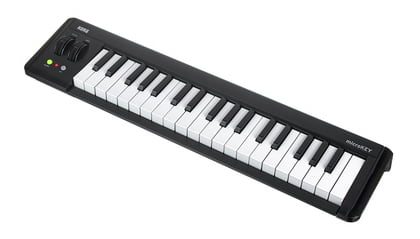
Japanese electronics company Korg is all about hardware synthesizers and electronic musical instruments and is also for the more entry-level producer.
The second generation of the microKEY is simple, plug-and-play, works with your favorite DAWs, and is light and compact. The tinier keys have Korg’s Natural Touch, making it easy to play and have the right feel for a keyboard of its size.
You can also connect a sustain pedal to the input on the side to give you more dynamic performance. Suitable for an upgrade to start producing with an actual keyboard instead of using a mouse to place notes.
Key Features:
- Velocity-Sensitive Mini Keys
The MicroKey MkII has 3 octaves of mini keys. And although the keys are more compact, they have been designed to play how you like to (after you get used to the size). And they still have a good feel with the quality you would expect from Korg, and you can adjust the velocity curve to fine-tune your performance. - Octave And Transpose Functions
This keyboard can change the octave from -4 down and +4 up. A color change switches from green to orange to red; the higher (or lower) you go in the octave range, respectively. The transpose parameter allows you to go up or down in one semitone increments, ranging from -12 to +12. - Pitch Bend & Mod Wheels And Pedal Input
Having the better-known wheels to adjust the pitch bend and modulation allows you to get that tactile feel when making these adjustments in your compositions. Some people prefer this instead of the strips that are on some of the other keyboards. You will also find a ¼” input jack on the rear side that can accept a PS-1 footswitch or PS-1H damper pedal. - Great Selection Of Included Software
Upon purchase of the microKey MkII, you will have access to download a range of software such as Korg Gadget and Korg Module, the M1 Le, Arp Odyssey, MS-20, Polysix, Mony/Poly, M1, Wavestation, and the MDE-X effect plugin. In addition, you will also get the Korg Kontrol Editor, which allows you to customize keyboard preferences.
Pros:
It is very lightweight, being a mere 2.2 lbs/1 kg. Although it is slightly longer due to having 37 keys, it is pretty easy to move with and uses little space on your desk. In addition, you can get used to the default velocity sensitivity of the keys quickly after playing them. It is also iOS compliant, so you can connect to your iPad or iPhone.
Cons:
If you are a frequent keyboard player and do a lot of your production with one, this is not for you because of the limited features and compact keys. On the other hand, if you rarely use a keyboard and just need to lay down some notes from time to time, then this is for you.
AKAI Professional MPD226
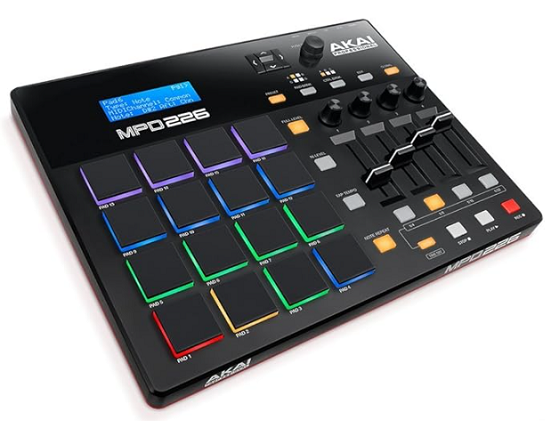
The AKAI Professional MPD226 is a professional MIDI controller popular among electronic music producers. It features 16 velocity-sensitive pads, 4 knobs, 4 buttons, a built-in arpeggiator, and a step sequencer.
Users generally report that the AKAI Professional MPD226 is a high-quality controller that offers much control over their software. The pads are responsive, and the knobs and buttons offer plenty of control over various parameters. The built-in arpeggiator and step sequencer are also well-regarded, with users praising their ease of use and flexibility.
Key Features:
- Presets:
The MPDs have a storage capacity of 30 preset configurations, 14 of which already include mappings for popular DAWs and various virtual instruments from InMusic Brands.The presets may be edited, stored and loaded using utility software. - Software bundle:
You will get Ableton Live Lite, Drum Synth 500 by AIR Music Tech, MPC Beats, Big Bang Drums, and Big Bang Cinema from Sonivox. Ensuring that brand-new users have a way to make noise with their devices. - Preset mode:
You can load your stored programs in this mode. The actions that the controls (pads, faders, etc.) will take as described in the utility program. In Edit Mode, their actions can be modified. You may save several configurations using the utility software, which can then be rapidly loaded. - Momentary mode:
Momentary mode, which enables you to punch in for brief periods by holding the button, becomes very helpful. Controls can be configured to either momentary or toggle modes. The knobs are logically set to Device Macros by default, allowing you access to the most crucial settings for the chosen device.
Pros:
One of the standout features of the AKAI Professional MPD226 is its extensive control options, with users praising many pads and knobs. It is also highly customizable, with users able to map the pads, knobs, and buttons to control various parameters in their software. The controller is built to last.
Cons:
Some users may find it a bit expensive: The AKAI Professional MPD226 is a high-quality controller, but it does come with a higher price tag than other options on the market.
Some users may want more control than the 4 buttons on the AKAI Professional MPD226 offer. It may be overkill for some users; The extensive control options of the AKAI Professional MPD226 may be unnecessary for some users who prefer a more streamlined controller.
Midiplus X2 mini
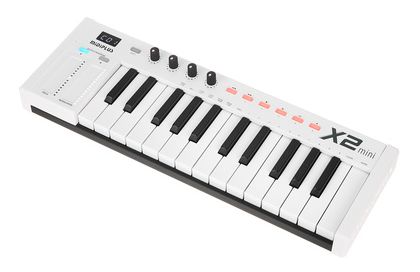
The Midiplus X2 mini is a compact, portable MIDI controller designed for use with software music production platforms such as Ableton Live. It features 25 keys, 8 knobs, 8 pads, a built-in arpeggiator, and a step sequencer.
Users generally report that the Midiplus X2 mini is a solid budget option for a MIDI controller. The keys are velocity-sensitive, and the pads and knobs offer control over various parameters. The built-in arpeggiator and step sequencer are also well-regarded, with users praising their ease of use and flexibility.
Key Features:
- 25 keys with modulation and pitch strip:
The keys are velocity-sensitive and can play melodies, chords, and more. It also has a touch-sensitive modulation and pitch strip, which saves space for the regular wheel. Also, the tactile feedback on keys is excellent for the price range. - 5-pin MIDI
It’s rare to see these 5-pin MIDI connectors nowadays, especially on a tiny keyboard. All four knobs are re-assignable to different functions from within the keyboard itself. Also, the program change messages can be sent via the MIDI port. - USB connectivity and class compliant:
The Midiplus X2 mini connects to your computer via USB, making it easy to set up and use with your music production software. There is no need to download additional drivers since the keyboard is a USB class compliant. - Excellent Build Quality
Its bottom and back/top panels are metal, while the rest are sturdy plastic casing. The knobs have an excellent quality feel with friction when turned and are rubberized to the touch.
Pros:
The Midiplus X2 mini is a budget-friendly option for those looking for a MIDI controller. The 25 keys and 8 pads offer good control over your software. It is nice to see that the keyboard had built-in features such as an arpeggiator and step-sequencer. The Midiplus X2 mini is compatible with a wide range of music production software, including Ableton Live, and FL Studio.
Cons:
Midiplus X2 mini has keys that can feel small and cramped for those with larger hands. Also, buttons may get less responsive.
Arturia MiniLab Mk II
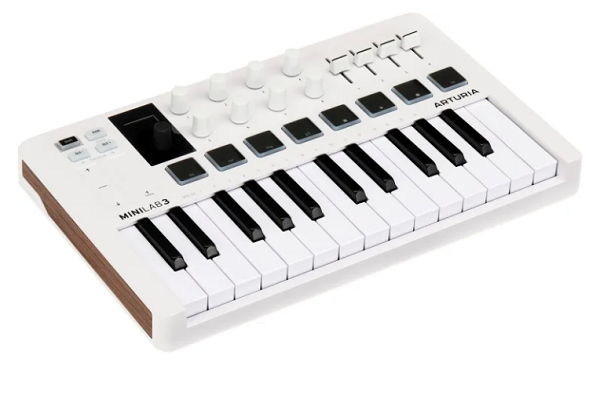
The MiniLab and MicroLab lines feature Arturia’s most compactly sized controllers.
The MiniLab MK II is a little unit that saves your studio space while offering a nice range of intuitive controls that effortlessly change parameters on your DAW and virtual instrument plugins. As with most controllers, you can do a good deal of customization and assign different functions to the onboard controls.
Arturia’s MK II’s weight and strong build give the feel of a much more expensive product. The software bundle includes Arturia’s plugin that provides a wide variety of virtual instrument sounds to map on your MK II including guitars, pianos, synths, organs, and much more.
Key Features:
- Appearance
The Arturia MiniLab MK II has 25 slim keys with synth action. Sized at 14” x 8.7” x 2”, the MK II weighs 1.5 kg which is a bit heavier than the midi controllers discussed. The input options on the back include a port for the sustain pedal and a USB type B port that powers the unit. In addition, the MK II comes with a USB cable. - Controls
The MiniLab MK II has two touch strip pitch and modulation controls. Two buttons on the top of the touch strips can change up to 4 octaves on the keys or bring the keys back to the default octave. Pressing the shift button gives access to dual functions like combining with the MK II’s keys to select midi channels, among other things. - Drum Pads
The MiniLab has 8 pressure-sensitive drum pads. The pads can be used to trigger drums or note patterns. A button labeled Pads 1-8/9-16 allows you to access the second bank of 8 pads, giving you 16 pads on the unit. When integrated with a DAW, the first 8 pads trigger sounds while the remaining 8 pads perform different software features. Pressing the shift button and pads will load up to 8 saved presets. - Encoders
There are 16 encoders on the MiniLab MK II’s interface. The first 8 encoders can be clicked to reveal certain adjustments that can be made to the saved presets. All 16 encoders are customizable and can change different parameters on the DAW or plugin. - Software
Registering the device can give access to Ableton Live Lite and the DAW included with the MiniLab MKII. You can also download Arturia’s own Analog Lab Light, which provides a rich library of piano sounds that can be easily implemented on the MK II, thanks to the user-friendly interface. In addition, the Grand Piano plugin by UVI gives access to some high-end acoustic piano sounds.
Pros:
The clickable feature of the first 8 encoders makes it easy to change the saved presets. Analog Lab Lite is a great app and helps you get going even if you have little familiarity with the interface. The unit has a nice weight and exceeds in quality compared to some of the competition.
Cons:
The USB port is quite flimsy and can be damaged with little force. The customizable knobs don’t work perfectly well with some DAW. The knobs may turn on and off at will or get reassigned automatically. Some of the links to register the product are outdated and must be fixed.
Nektar Impact GX Mini
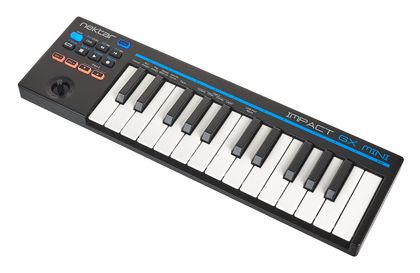
Nektar has some worthy offerings in the 25 key midi controller category.
Out of the three contenders, namely the GX Mini, LX Mini, and Nektar SE25, the GX Mini stands in the middle in terms of price. However, the midi keyboard offers sufficient transport controls to control your digital workstation and plugins adequately.
The control layout seems nice and uncluttered. The Impact GX Mini’s sleek and narrow design makes it an excellent tool to keep in your backpack for composing songs when sudden inspiration hits you. In addition, the pitch and modulation controls on the unit have been nicely handled, making the player sound even more expressive.
Key Features:
- Appearance
The Nektar Impact has 25 mini keys, which are velocity sensitive. The GX Mini weighs almost 0.5 kg and has dimensions of 15.35” x 4.52” x 1.25”. The instrument has a micro-USB port that can connect to a computer and draw power from the USB port. There is also an input for a pedal. - Controls
The GX Mini has a four-way joystick that controls pitch and modulation features. The octave of the keys can also be changed with up and down buttons. You can also layer your sounds or use a transpose feature to change the key of a song as you play quickly. - Part 2 Controls
Pressing the 2 buttons under the part 2 section can activate some essential functions labeled over the keys. These features include octave changes, transpose features, and layering notes. The sensitivity of the keys can also be set here. There are three velocities presets to choose from. - DAW Integration
A transport section has buttons controlling the DAW, including record, stop play, rewind, and forward buttons. You can also set the tempo of the tracks in the digital workstation and loop your sounds. Using shift with these buttons will access their second functions, which can help change tracks, open plugin windows, and undo previous changes, among other things. - Software
The Nektar Impact GX Mini is compatible with all famous DAWs, including Reaper, Fruity Loops, Garageband, Logic, Reason, Studio One, and more. The controller also comes with Bitwig 8-Track, which has over 50 virtual instrument sounds and integrates easily with third-party plugins.
Pros:
The pitch and modulation joystick feel great. The Impact GX Mini has a reasonable number of DAW controls to operate popular DAWs effectively. In addition, the Part 2 controls can temporarily trigger features like octaves/transposition until the buttons are released, which has some practical applications.
Cons:
The keys on the Impact GX Mini disappoint in more ways than one. The quality is relatively poor, and the pressure sensitivity of random keys decreases with time. There is no midi output. The unit malfunctions when integrated with Ableton Live.
AKAI Professional MIDImix
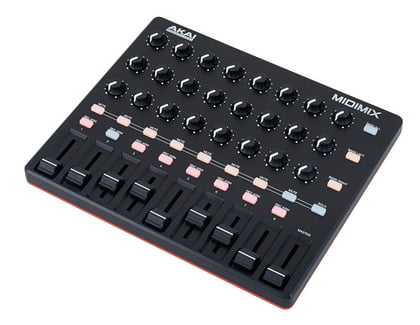
The Akai MIDImix is a compact and portable MIDI controller designed for use with digital audio workstations (DAWs) and other music production software.
It features eight rotary knobs, eight sliders, 24 buttons, a built-in arpeggiator, and the ability to simultaneously control multiple software instruments and effects.
The MIDImix’s knobs, sliders, and buttons are all high-quality and provide a smooth, responsive feel. The buttons offer tactile feedback, making it easy to know when they’ve been pressed. On the other hand, the sliders are smooth and precise, which is great for fine-tuning levels and other parameters.
Key Features:
- Multiple software instruments and effects control:
The MIDImix has a “Layer” function that allows you to assign different MIDI channels to each of the controller’s knobs, sliders, and buttons, making it possible to control multiple software instruments or effects in one DAW track. - Companion software:
Akai provides a free companion software for the MIDImix that helps to solve the lack of visual feedback, shows you the current assignments of the knobs, sliders, and buttons, and also has a drag-and-drop feature to reassign the controls. - Small and portable
Since the Akai MIDImix is only 24 cm wide, your studio won’t be overrun by it. It can also be used when away from home because it is tiny enough to fit in a laptop bag. In addition to being compact, it is entirely powered by USB, eliminating the need for an additional external power source. - Kensington Security Lock Slot
No one wants to have their preciouses gear stolen at a gig or studio session, and given its small sizer, the MIDI mix could be a tempting target for theft. Akai’s solution is to provide a slot for a standard Kensington Lock, allowing you to securely fix the MIDImix to a desk.
Pros:
One of the main strengths of the MIDImix is its compact size and portability. It is lightweight and small enough to easily fit in a backpack or laptop bag, making it a great option for musicians and producers who are always on the go.
Cons:
The MIDImix only has a USB connection, meaning it cannot be connected to external devices such as sound modules or synthesizers with traditional 5-pin MIDI ports. Some buttons and knobs don’t have clear labeling, and their function can only be seen from the companion software, making it harder for new users to understand the controller.
Behringer X-TOUCH MINI
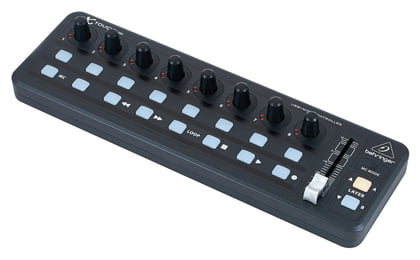
The X-Touch Mini is substantially different from the rest of the controllers listed here.
Instead of being a midi controller with semi-weighted or synth-action keys and drum pads to manage your favorite sounds and compose music for your ongoing productions, the X-Touch Mini has a different agenda. All you see on the front panel are a bunch of knobs, soft buttons, and a fader.
The absence of a key bed makes the controller extremely compact and demands very low power. Behringer has designed the X-Touch to be solely a DAW or plugin controller with layering options to get the most out of the controls on the user interface.
Key Features:
- Appearance
Behringer’s X-Touch Mini only has a mini-USB type B connector to connect to a computer. The unit is bus-powered and doesn’t need a power adapter during connectivity. The compact X-Touch mini weighs just 0.5 kg and has dimensions of 12.8” by 1.9” by 4”. - Push Encoders
The X-Touch Mini has 8 infinitely rotating knobs or encoders that are also clickable. The knobs are surrounded by a ring of 13 LEDs to show the value of the assigned parameter. In a digital workstation environment, these knobs can fine-tune different parameters like panning or leveling the tracks in your mix. - Select Buttons
The midi controller has 16 backlit soft buttons organized in two rows of 8. The top row performs different functions in the digital workstation, like soloing or muting channels. The bottom row has transport controls, including record, play, stop, rewind, and forward buttons. There is also a dedicated loop button to play a section from a mix in the DAW continuously. - Modes
The X-Touch Mini has a standard/midi mode and a Mackie Control (MC) mode. Pressing and holding the soft MC button when connecting to a computer will make the MC light go on, indicating that the unit is now operating in MC mode. - Fader & Layers
The controller also has a manual volume fader that can change different levels in your digital workstation. The X-Touch Mini has 25 assignable controls, but you can add another layer of 25 controls by switching between the Layer A and B buttons, giving you even more customizable options to control your DAW or plugin software.
Pros:
The X-Touch Mini is compact and very affordable. The build quality is quite good. The encoders have dual functionality, which makes adjustments and selection of parameters a breeze. Everything is upfront. What you see is what you get. There are no menus or tabs to find features and functions.
Cons:
The X-Touch Mini is primarily a DAW/Plugin controller. Other than controlling your software with it, don’t expect it to be your one-stop solution for composing music and creating beats. You’ll still need to invest in something with keys and pads to give you that functionality. In addition, the X-Touch Mini lacks a software/app that would cater to the needs of Mac users.

Key Features:
- Volume Slider And Advanced Buttons
Sends MIDI messages to control the volume of the notes played. The fader can also be assigned different effects like pan, attack, reverb, chorus, etc. It comes in useful when you are doing a live performance. With the advanced button, you can go into edit mode. - Directional Buttons
Just above the volume slider, there are five directional buttons. With these, you can use MIDI, Mackie Control (mixer and control surface equipment), or HUI (Human User Interface) protocols to control certain software functions that support them. - Transport Buttons
It consists of stop, play, and record buttons. The transport section (like the directional buttons) can also use MIDI, Mackie Control, or HUI protocol. Allows for smoother performance when controlling your DAW. - Software Download Cards
M-Audio has included download cards for Pro Tools | First M-Audio Edition and Ableton Live lite as if this keyboard wasn’t enough. Also, virtual instruments like Mini Grand, Velvet, Xpand!2, TubeSynth, Electric, and Bassline (from AIR Music Tech) make these a special bonus deal.
Pros:
Synth-action keys are full-sized with a softer and more natural feel than expected. It is also compatible with iOS devices by using the Apple Lightning to USB Camera Adapter, which allows you to perform music apps on your iPad or iPhone.
Cons:
There is no MIDI out for connecting to sound modules. Also, the transport section is limited to only stop, play, and record buttons. It would be nice to include loop, rewind, and fast-forward buttons. It’s not a big deal, considering its value and everything else it offers.
AKAI Professional LPD8
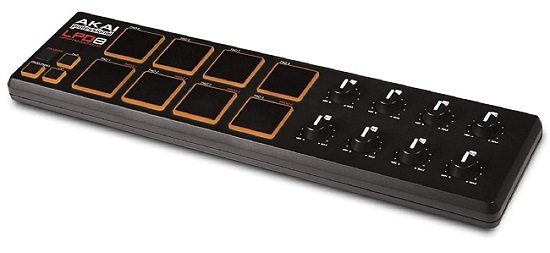
The AKAI Professional LPD8 is a compact, portable MIDI controller for software music production platforms such as Ableton Live. It features 8 pads, 8 knobs, a series of buttons, and a built-in arpeggiator and step-sequencer.
Users generally report that the AKAI Professional LPD8 is a well-built, easy-to-use MIDI controller that offers a good amount of control over their software. The pads are responsive, and the knobs and buttons offer plenty of control over various parameters.
Key Features:
- CC mode:
All eight pads transmit control change messages when in CC mode, and the controller message for each pad can be customized using the LPD8 editing program. Furthermore, because the pads respond to velocity, different control message values are sent according to how hard you strike the pads. - Program Mode:
In Program mode, the lower four pads become preset buttons, selecting any of the LPD8’s four user‑definable presets. Also, the knobs can be assigned to control software parameters which is an excellent addition to its features. - Compact design
LPD8, a fully functional plug-and-play USB MIDI pad controller with 13-inch dimensions, is made to go beyond the confines of your studio. LPD8 conveniently fits into a laptop case or backpack because it weighs less than 35g. - It can be used for DJing
You can either use it for DJing, map it to a program like Traktor Scratch Duo to control various effects or control your drum racks/effects for the production.
Pros:
Users generally report that the AKAI Professional LPD8 is a well-built, easy-to-use MIDI controller that offers a good amount of control over their software. The pads are responsive, and the knobs and buttons offer plenty of control over various parameters. The built-in arpeggiator is also well-regarded, with users praising its ease of use and flexibility.
Cons:
AKAI Professional LPD8 does not have any keys, which may be a drawback for some users. Some users have also reported issues with the pads becoming less responsive over time. Also, the knobs are not endless.
Korg nanoKONTROL 2
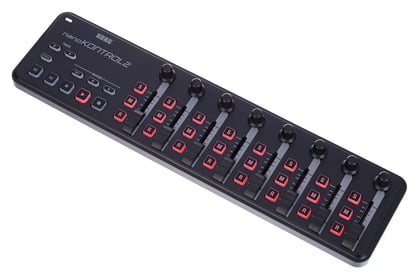
The Korg nanoKONTROL 2 is a compact, portable MIDI controller for software music production platforms such as Ableton Live. It features 8 knobs, 8 sliders, and 32 buttons, as well as a built-in arpeggiator and a step sequencer.
Users generally report that the Korg nanoKONTROL 2 is a well-built, easy-to-use MIDI controller that offers a good amount of control over their software. The knobs, sliders, and buttons offer control over various parameters. The built-in arpeggiator and step sequencer are also well-regarded, with users praising their ease of use and flexibility. The controller is compatible with Apple’s iPad with the appropriate connection kit.
Key Features:
- Mackie Control Mode
When in Mackie Control mode, the new track select buttons allow you to cycle across banks of eight channels. The advantage is that you can access more than four banks; the disadvantage is that there is no LED indicator to let you know which bank you are in. - Custom Configuration
Your customized settings can be saved in the hardware itself, so your mappings will work with whatever device you put it into, including an iPad. This means faster workflow if you are changing your studio frequently. - Pad configuration
The pads can be set up individually, so some can provide note/velocity data, some can send CCs, and others can send MIDI program changes. Each pad also has the option to function as a momentary or toggle switch inside a single scene. Each pad can simultaneously convey up to four notes, CCs, or program modifications. All of that is surprisingly good and well worth the admission fee. - Transport controls:
It consists of stop, play, and record buttons. The transport section (like the directional buttons). Allows for smoother performance when controlling your DAW without watching the screen.
Pros:
Since the controller is light-weighted, it’s great for traveling. It has many knobs, sliders, and buttons, giving you enough control in your DAW. The Korg nanoKONTROL 2 is compatible with a wide range of music production software, including Ableton Live, FL Studio, and more.
Cons:
One common criticism of the Korg nanoKONTROL 2 is that it does not have any pads, which may be a drawback for some users. Some users have also reported issues with the buttons becoming less responsive over time. In the old nanoKontrol, the buttons’ attack and release settings could fade CC changes in and out; these choices are no longer present.
Novation Launchpad X
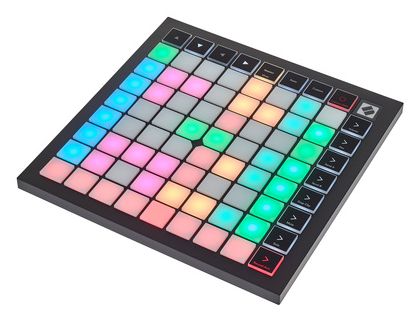
The Novation Launchpad X is a professional MIDI controller popular among electronic music producers. It features 64 velocity-sensitive pads, 8 knobs, a series of buttons, a built-in arpeggiator, and a step sequencer.
Users generally report that the Novation Launchpad X is a high-quality controller that offers much control over their software. The pads are responsive, and the knobs and buttons offer plenty of control over various parameters.
Key Features:
- 64 velocity-sensitive pads:
The pads can trigger samples, play loops, and real-time control effects. The pads are big with velocity, pressure, and aftertouch. The pads are configured in an 8×8 grid, and each of them represents a single note or a sample. - Longevity and design:
The Launchpad X is built and designed for live performance; you don’t need to worry about it as it is built from high-quality materials. It is also not so big compared to its predecessor, Launchpad Mini MK3. - Customization:
The pads, knobs, and buttons on the Novation Launchpad X can be easily mapped to control various parameters in your software. With four custom modes, you may define how this grid controller will function for you; your only restriction is your imagination. Use Novation Components to customize MIDI mappings and control nearly anything. - Software
A software bundle with different music creation tools and software instruments is included with the Novation Launchpad X. Some of the programs available with the Launchpad X are listed below: Novation Bass Station, Klevgrand R0Verb and DAW Cassette, Novation V-Station, Loopmasters, Ableton Live packs, AAS Session Bundle, and XLN Addictive Keys are just a few of the included audio production tools.
Pros:
One of the standout features of the Novation Launchpad X is its extensive control options, with users praising many pads and knobs. It is also highly customizable, with users able to map the pads, knobs, and buttons to control various parameters in their software. If you are using Ableton Live, it will reflect the layout you would typically see on your screen.
Cons:
Some users may find it a bit expensive: The Novation Launchpad X is a high-quality controller, but it does come with a higher price tag than other options on the market. It may be overkill, but the extensive control options of the Novation Launchpad X may be unnecessary for some users, who may prefer a more streamlined controller.
4 Bonuses:
M-WAVE 25 Key USB MIDI Keyboard
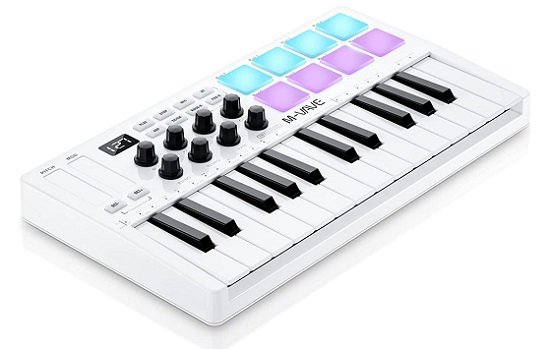
The M-WAVE 25 Key USB MIDI Keyboard is a primary MIDI controller designed for use with software music production platforms such as Ableton Live.
It features 25 velocity-sensitive keys, a series of buttons, and a USB connection for easy connectivity to a computer.
Users generally reported M-Wave is a budget-friendly option that does the job. The keys are velocity-sensitive, and the buttons offer primary control over various parameters.
Key Features:
- Scale feature:
With intelligent scale and chord integration, users may make quick keyboard selections. The single tone is a chord when utilizing the intelligent chord function. It may be configured to automatically adapt the keys to the notes in the selected scale when in use, which is ideal for setting up this function in performance and practice. This eliminates the need for tedious music theory knowledge and successfully prevents playing the wrong notes. - Built-in battery:
The Integrated 2000mha battery has a 15-hour runtime. You may start producing whenever and wherever you want because of its small size, portability, and Bluetooth connectivity. - Compatibility:
Compatible with Android, iOS, Windows, and Mac OS. The K5 is compatible with all digital audio workstations, including GarageBand for iOS, Ableton Live, FL Studio, Logic Pro X, Bitwig, Reason, and FL Studio. - RGB Backlit Pads:
The pads are velocity-sensitive and also have an aftertouch. Depending on the pressure that you apply, the pad will lighten up.
Pros:
The M-WAVE 25 Key is a budget-friendly option for those looking for a primary MIDI controller. It is small and lightweight, making it easy to take wherever you go. Also, it is compatible with a wide range of music production software, including Ableton Live, FL Studio, and more.
Cons:
There are some reports that the keys feel a little bit cheaper, which is acceptable if we consider the price range.
Arturia MicroLab
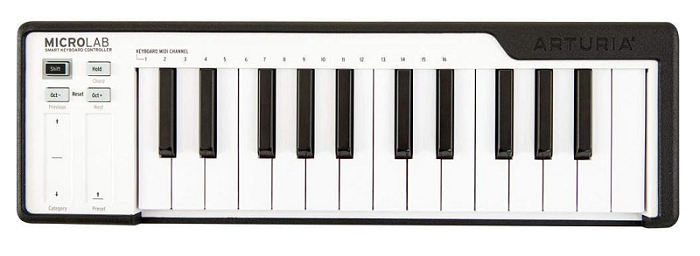
It features 25 velocity-sensitive keys, 2 touch sensors for pitch bend, and a modulation wheel.
Users generally report that the Arturia MicroLab is a well-built, easy-to-use MIDI controller that offers a good amount of control over their software. The keys are velocity-sensitive; besides, it has a shift button that allows you to choose which MIDI channel you want to use.
Key Features:
- Self-contained & portable:
Everyone despises unsightly cables. Therefore, MicroLab has a built-in cable-tidy recess to keep your setup tidy and simplify storage and travel. In addition to looking good, MicroLab’s rubberized cover safeguards your controller when you’re on the go and allows you to store your USB cable neatly. - Software:
Registering the device can give access to the Bitwig 8-track DAW included with the MicroLab. You can also download Arturia’s own Analog Lab Lite, which provides a rich library of piano sounds that can be easily implemented on the Microlab, thanks to the user-friendly interface. - Smart Controls:
MicroLab still gives you great control, even with only four buttons and two touch strips. For example, one note can be used to play chords, sustain notes with a button, and select presets by swiping through them. - In-app Customization:
MIDI Control Centre software from Arturia can be used to customize the device further. Options include changing the pitch bend’s behavior from latching (Toggle) to momentary (Gate) and changing the Hold button’s function from regular to hold.
Pros:
The keyboard is plug-and-play and has class-compliant MIDI operation, meaning you don’t need any drivers. Since it doesn’t require an additional power supply, it can be connected to Android or iPad.
Cons:
Vangoa Worlde Panda MINI
Key Features:
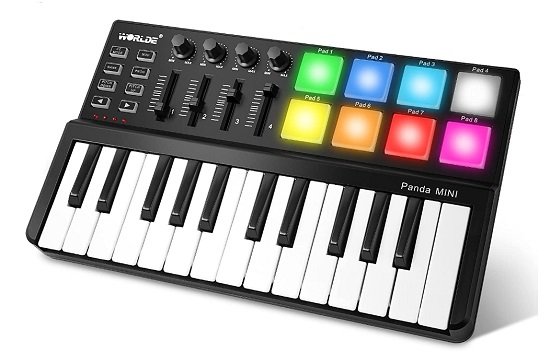
The Vangoa Worlde Panda MINI is a small, portable MIDI controller that features 25 velocity-sensitive keys, knobs, and buttons, allowing you to control various parameters in your music production software.
It also has a built-in arpeggiator and step sequencer, providing more flexibility when creating music.
Pros:
- Software customization:
Wordle also provides software that allows you to configure many aspects of the MIDI controller, including MIDI channel configuration, CC configuration, pads, and key velocity. The software allows saving the configuration directly to the keyboard. - Considerate Design:
The keyboard area and control panel are different heights, which increases the hands’ relative comfort and allows for versatile control-play interaction management. A steady performance on any surface is provided by 4 strong silicone pads underneath, letting you to adjust the volume of your music as you, please. - 8 big pads with RGB:
When you hit the drum pad, vibrant colors are displayed beneath your fingertips. These effects liven up the space with 7 gorgeous colors, giving your beats vitality and great visual enjoyment. - Compatibility with popular software:
The Vangoa Worlde Panda MINI is compatible with a wide range of music production software, including Ableton Live, FL Studio, and more.
Pros:
Keys and pad presses are recognized quickly and accurately when the velocity is set to OFF. The keyboard is small and lightweight, making it easy to take with you on the go. Affordable price point, making it accessible for musicians on a budget.
Cons:
Some users have reported issues with the keys or buttons becoming less responsive over time. This could be an issue from a specific unit or batch. Limited brand recognition; as it is a lesser-known brand, some users may be hesitant about its durability and functionality, although there is no specific reason to suspect so. Also, the velocity curve isn’t working perfectly.
Novation Launch Control XL MK2
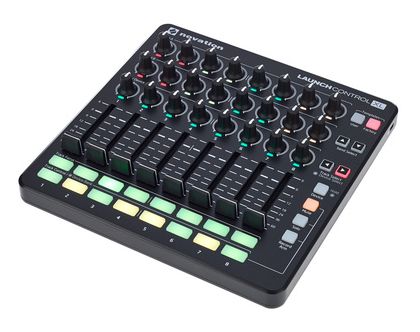
With only eight pads and sixteen knobs, Novation’s first Launch Control for Ableton Live was a small, fairly constrained controller.
Its bigger sibling, the Launch Control XL MK2, is a larger format version of the same concept that adds faders for faster workflow and more knobs, buttons, and knobs for better mixing.
It is intended to function as the Novation Launchpad S’s companion device. Given that both controllers are the same size, they could comfortably coexist on a desk, with the Launch Control controlling Ableton’s mixing functionality and the Launchpad S controlling its sampling and virtual instrument functionality.
Key Features:
- Make your layouts
Create your layouts in Ableton by assigning your buttons, knobs, and faders to any parameters. Even knobs may be personalized with custom colors, and Live’s built-in functionality and your mappings can easily switch between. Making the ideal mixture has never been simpler. - Compact design (no external power supply needed):
Launch Control XL can withstand the most demanding live circumstances because it is tough, small, and optimized for gigging. You may plug it in and start using it immediately without a power source because it is USB-bus powered. - Ableton Integration
Ableton Live automatically recognizes Novation Launch Control XL without requiring extra setup or mapping. Furthermore, there is no need to download any drivers because it is class compliant. Simple plug-and-play. - Mixing layout
The three rows of the 24 knobs exactly line up with the mixer in Ableton Live. They also include multicolored LEDs that glow to identify between sends, EQs, and other devices. 16 multi-color pads provide instant track focus and mixing control, while eight sturdy 60mm faders provide high-precision level control.
Pros:
Anyone with even the most basic understanding may easily understand the layout. Flexibility and capability are crammed into a compact, well-built, and reasonably priced device. Ideal for live use or home studio uses when more expensive equipment might be damaged.
Cons:
To be used with other DAWs, substantial mapping is required. The send knobs cannot be altered in terms of their functionality, and none of the knobs can be adjusted in User mode, which is a significant drawback.
Conclusion
In conclusion, a MIDI keyboard is an excellent choice for beginners looking to start making music and experimenting with different sounds. These keyboards offer a variety of features, such as velocity-sensitive keys, control buttons, and knobs that allow for greater expression and creativity in music production and recording.
Additionally, they allow you to easily record and edit MIDI data which can be used to control virtual instruments, sound samples, and other software in a DAW. Furthermore, MIDI keyboards are relatively affordable, easy to find, and come in various sizes and styles.
If you’re looking for something more affordable and portable, the Novation’s Launchkey Mini, Arturia MiniLab Mk II, and AKAI Professional MPK Mini MK3 are good choices from our list provided. On the other end, if you would like to play with both hands, then you should aim for Komplete Kontrol A49 or The IK Multimedia iRig Keys I/O 49; in my experience, they have the best keybed for that price range.
A MIDI keyboard is a valuable investment for anyone starting music production and recording. It offers a wealth of features and capabilities that can enhance the creativity and expression in your music-making and open up new possibilities for producing and recording.
Whether you’re a budding producer, singer-songwriter, or just looking for a fun way to make music, a MIDI keyboard is an excellent option for beginners that can help you to take your music to the next level.

The Integraudio Editorial Team consists of experienced music producers, audio engineers, and plugin enthusiasts dedicated to providing in-depth reviews and guides for music production software.