

In today’s post, we’ll review the 10 best multi-effect plugins. Additionally, we’ll give you three of the best free multi-effect plugins to download.
A good Multi-Effects processor is a sound designer’s best friend. Even when you master all the meticulous controls and feel like you understand the plugin completely, you can still find a new combination you hadn’t tried before.
That is the power that some plugins on our list offer, and not even the people that designed them know everything they can do. So let’s jump right in and look for your new multi-effects plugin!
The 10 Best Multi-Effect Plugins
1. Lunacy BEAM
More Info & Price (14-Day Return)
Or Buy Here (Support Integraudio)
BEAM by Lunacy is a multi-fx granular plugin combined with convolution reverb effects and filters for creating innovative sounds. You can use it on any instruments or percussions and create something unique out of them.

Key Features:
- Futuristic Workflow
Everything from the spacey-aesthetic interface to a map-based workflow of setting up effects to expansive detailing under the hood and macro controls, this plugin offers something really unique.
- Huge library of Impulse Responses and Presets
BEAM features more than 150 IRs that are categorized as different styles of Spaces, including Small, Large, Chaotic, Warped, Organic, etc. Moreover, each response has a different look and animation to it. Further, it has 250+ presets crafted by some of the most renowned electronic artists, such as Venus Theory, Data Broth, and more.
- Modulations
The plugin has a huge library of different motion styles and shapes, from basics like Saw, Square, and Sine to more complicated ones. For each motion, you can tweak the phase, random, and rate values. It also has more than 100 Node presets for modulations and effect nodes.
- Grains
BEAM features basic grain editing features like rate, size, shape, and pitch, as well as some other unique parameters like spray, width, reverse, detune, delay, and other effects that you can apply to these grains. What’s best is that for every value you change you get a cool visualizer that reflects the changes you’re making.
Compatibility:
Lunacy BEAM is compatible with macOS 10.15+ (M1/M2 recommended) and Windows 10 or later operating systems with DAWs that support AU, AAX, and VST3 plugins.
2. AIR Flavor Pro
More Info & Price (Trial Available)

Photo: PluginBoutique
Flavor Pro by AIR is a cutting-edge lo-fi multi-effects plugin designed to capture and manipulate the essence of vintage sampling.
It offers tools for shaping your sound with nostalgia, transforming samples, loops, and instruments into warm, character-driven productions. With 100 inspiring presets and 6 intuitive effects modules, Flavor Pro delivers the beloved aesthetics of classic lo-fi tones.
Key Features:
- Dynamic Effects Modules
At the core of Flavor Pro are 6 versatile effects modules, including Pitch Flutter, Tape Saturation, and Vinyl crackle emulations, catering to a wide variety of genres. Each module is designed for quick and easy adjustments, letting you apply instant vintage characters and create rich, textured sounds.
- Authentic Vinyl Emulations
Flavor Pro includes true vinyl noise emulation. With controls for crackle, pops, hum, and rumble, you can achieve that nostalgic vinyl feel in your productions.
- Sample Rate and Bit Rate Reduction
You can recreate the iconic lo-fi sound associated with classic gear using dedicated controls for sample rate and bit rate reduction. This allows for significant colorization of audio, adding a grainy texture reminiscent of aged tape and vintage samplers. Additional options like HP/LP filters provide further dynamics, shaping the overall sonic character of your tracks.
- Intuitive EQ Profiles
Flavor Pro features 32 selectable EQ profiles with different timbres and characters for your sound, including everything from Lo-Fi Radio Resistors to classic Gramophone tones.
Compatibility:
Flavor Pro by AIR is available in VST2/3, AU, and AAX plugin formats for macOS 10.15.7 Catalina – macOS 12.4 Monterey (Apple Silicon native compatible) and Windows 10 or later operating systems.
3. Baby Audio Transit
More Info & Price (Trial Available)
Transit by Baby Audio & Andrew Huang is a versatile and all-in-one multi-fx plugin and sound generator.
You get six slots where you can fit everything from Reverb, Autopan, Distortion, Bitcrusher, Transient control, Phaser, Delay, multiband compressor/OTT, oscillator, a noise oscillator, and more.

Key Features:
- 18+ Effects
Transit features 18 specialized effect modules that are perfectly crafted for creating smooth audio transitions. It includes timeless modulation effects, various distortion and degradation options, motion effects, reverb, delay, and two types of filters. Additionally, it offers a synth oscillator and noise generator, ideal for producing risers and swells in your transitions.
With its exceptional quality and diverse range of effects, coupled with a semi-modular design, Transit becomes an essential tool for sound designers.
- Over 200 Contemporary Presets for Every Style
Transit offers over 300 innovative and exciting presets designed by Andrew Huang and collaborators from Baby Audio. These presets span various genres and applications, providing immediate inspiration and results. Additionally, the plugin features a customizable randomization engine, allowing you to define specific randomization ranges and lock certain parameters or modules.
- Motion Sequencer
The plugin lets you easily transition from Macro Mode to Sequencer Mode, allowing you to program and trigger transitions that align with your DAW. Each transition will initiate precisely at the next bar, making it perfect for live performance scenarios or for seamlessly incorporating accurately timed automation into your mix without needing to access automation lanes.
Additionally, the Sequencer offers an exciting feature: by activating Loop mode, your transitions will continuously oscillate, effectively transforming Transit into a dynamic ‘LFO tool’ that injects consistent effects movement into your tracks.
Compatibility:
Baby Audio Transit is compatible with macOS 10.7 and up (including Native M1 Compatibility) and Windows 10 or later operating systems with DAWs that support AU, AAX, VST, and VST3 plugins.
4. AIR Sprite


Sprite is a contemporary reimagining of the 80s and 90s studio hardware multi-effects processor developed by AIR Music Technology.
It provides a simple and intuitive user interface, allowing you to control every aspect of your audio effects quickly and efficiently. Unlike one-dimensional plugins, Sprite lets you access the inner workings of the effects, enabling you to fine-tune and customize your audio for the perfect result for effects like distortion, modulation, delay, reverb, EQ, compression, and pitch shift.
Key Features:
- Diverse Distortion Options
You get access to a selection of nine distortion models, complete with smoothing, hi/lo pass filtering and precise mix control. Tailor your distortion to achieve the desired warmth or intensity.
- Modulation Flexibility
The plugin offers two modulation slots, each offering eight classic modulation types, including Flutter, Wow, Tremolo, and more. Adjust parameters like rate, stereo spread, and depth to achieve unique modulated effects.
- Dynamic Delay and Reverb
You get a robust delay section that syncs to your project’s BPM, offering Single, Dual, and Cross modes. The reverb section provides eight room character options, pre-delay, dampening, time, and volume control for immersive soundscapes.
- Pitch Shifting Precision
Pitch adjustments in Sprite include pitch shifting with adjustable depth, mix target assignment, interval settings, and the choice of algorithms for precise pitch control.
- Comprehensive Audio Sculpting
Sprite lets you shape your sound further using the EQ section with high and low-cut filters, shelving controls, and assignable routing. Customize compression with attack, release, and depth settings.
- User-Friendly Interface
Sprite boasts a striking user interface with an intuitive macros page, granting immediate control over key parameters. The interface simplifies complex audio processing.
- Comprehensive Presets
The plugin has seven categories of presets: Scavenge, Txtures, Delay, Reverb, Modulation, Saturation, and Percussive. Each category offers different styles of effects and sonic textures and contains tens of presets.
Compatibility:
AIR Sprite is available in VST 2, VST 3, AAX, and AU plugin formats and is compatible with Windows and Mac OS.
Summary:
Sprite has five different effects: one Distortion, two Modulations, one Delay, and a Reverb window. You can have various styles of each of those effects, and you also get switchable EQ and Compression effects on your delay and reverb effects.
Overall, it’s a great plugin for multiple effects under the same window with good sounds and an attractive & easy GUI.
5. Devious Machines Infiltrator 2
More Info & Price (Trial Available)

The Infiltrator 2 is a monstrous multi-effect that can combine, sequence, and adjust a whopping ten separate effects.
Devious Machines calls it a “turbocharged” update, and with 54 effects modules instead of the 28 in version 1, it’s evident the company has been hard at work. The layout is instantly recognizable, and existing customers can upgrade for no additional cost, which is a major plus.
You can utilize many copies of the same modules, and there are ten effect slots, user-editable multi-segment envelopes, and assignable macros, much like in the original Infiltrator. The amount of control you have in real-time truly sets it apart from other multi-effects. There are now two independent envelopes for each effect, each of which can be synced to a maximum of 128 bars in duration.
Key Features:
- Presets
When it comes to presets, it’s common for effects plugins that pack a punch elsewhere to fall short. This could be because some people view the use of presets as lazy. But we consider it presets to be a crucial demonstration of a plugin’s capabilities.
Infiltrators 750 presets already quite a lot, but v2 more than doubles that number. It’s an insane amount, but at least they’re organized into categories and subcategories.
To jumpstart your imagination, check out the Sound Design folder, where you’ll find patches like Faller Robo 4 Bar and Inertia. Presets like Bit Meddler, Future Announcement, and Slick Shifter are just a few examples of the incredible variety of sounds you can create with this plugin.
- Distortion Module
A new “Degrade” setting has been added to the Distort module for all distortion fanatics. The degrading vibe of this loud and destructive processor becomes apparent at around 30%.
Concerning reverb, everything has been rolled into a single module with three different settings (Reverb, LoFi, and the brand-new Void). An ‘infinite’-like effect is achieved at the highest settings, and the sound is textured overall.
- Master Section
An improved Master section with drive and compression is included in Infiltrator 2, and the same type of compressor controlled by a single knob is now available as a standalone module. The Master tab has a bass bypass option (40Hz to 1kHz), effectively disables all processing for frequencies below the specified threshold.
- Time Manipulation Modules
The modules that can alter past events are the most original additions. It’s great because of how simple it is to create tape slow-downs and reversals and how Stretch and Varispeed cover most speed ranges and spectrum.
You now have many options for adjusting how your music is played back in time, with this new effect and others like the stuttering Looper.
Compatibility:
This plugin is available for macOS 10.10 or higher (64-bit only) and Windows 7 or higher (64-bit only). It comes in VST/RTAS/AU/AAX formats and supports 32 and 64 bit systems.
Summary:
Each effect in the plugin now has a second, assignable envelope that can modulate any of its parameters, greatly increasing its modulation capabilities. The additional Formant and Notch filter modes in the Dual filter are welcome additions.
The improvement enhances the original in-depth and polishes it without changing its character. It’s not a cheap plugin, but it’s invaluable if you want a comprehensive set of creative tools.
6. Dawesome LOVE
More Info & Price (Trial Available)

Dawesome LOVE is a user-friendly multi-effects plugin with filter, delay, shimmer, chorus, clouds, and phaser effects.
It is known for its granular and shimmer capabilities, along with a cloud reverb feature, making it ideal for easily creating ambient sounds. This plugin simplifies adding atmospheric textures to your audio projects, making it a valuable tool for adding ethereal and immersive sonic landscapes.
Key Features:
- Three modes
The granular effect offers three distinct modes for sound manipulation. In SWARM mode, it creates a seamless and ethereal cloud of soft grains. CHOP mode slices the input signal into rhythmic, pulsating segments.
Meanwhile, ROBOT mode transforms the incoming sound into a structured and rhythmic sequence of harmonic tones, providing versatile options for sound design and manipulation.
- Effortless Grain Manipulation
You get intuitive control over various grain parameters, including grain size, duration, bpm synchronization, count, offset, quantization, and reverse playback. Additionally, it introduces unique and distinctive effects like TUNE-JIT, which smooths and refines sounds, and PAN-JIT, which imparts a gritty and rough texture to the audio output.
- Adult 18+ & Polyamory Mode
There is an “Adult 18+ Mode,” which, once enabled, can lock specific LOVE effect components. Subsequently, when switching presets or employing the randomization function, the locked elements remain unaffected.
You can initiate preset randomization by clicking, and for a more subtle variation, right-click or SHIFT-click, offering flexibility in crafting diverse iterations of the current preset. In addition, there’s also a Polyamory mode that lets you combine two instances of the multi-fx granular modes.
- 6 Effects
For each of the six effects: filter, delay, shimmer, chorus, clouds, and phaser effects, LOVE provides detailed tweakability with four parameters/knobs for each effect. You can tweak them to your liking and create the sound you want.
Compatibility:
LOVE is available in VST and AU plugin formats only for Windows and Mac, restricting its compatibility with Pro Tools and Linux operating systems.
Summary:
LOVE offers an accessible and efficient creative platform catering to experienced musicians and newcomers. Its user-friendly, single-page interface simplifies the creative process, while its rapid workflow sparks inspiration.
Yet it’s also deep, customizable, and feature-rich at the same time. Its limitless sonic possibilities, unique sound, and easy & attractive GUI make it one of the best multi-fx plugins.
7. Sugar Bytes Graindad
More Info & Price (Trial Available)

Graindad is a granular & multi effect plugin by Sugar Bytes for high-quality and real-time audio manipulation thanks to “Harvester”.
The advanced grain engine plugin allows you to adjust the grain size, position, pitch, speed, and jitter settings. You can also adjust the settings for filter and time modulations and add reverb and delay effects to your sounds. In addition, it has an audio editor that allows you to freeze, texturize, reorganize, and slice your audio.
Key Features:
- Effects
The plugin allows you to have high quality and a wide variety of effects, like filters, reverbs, delays, etc. For example, the reverb category includes effects like HQ reverb, spring reverb, and shimmer. The delay effects include phasers, flangers, and other time-based effects.
- Harvester
The most advanced feature of Graindad is its Harvester system which allows you to modulate all twelve controls simultaneously, allowing for complex modulations and effects.
- Granular capabilities
The plugin allows you to chop the audio into 64 grains and has 12 main controllers for manipulating the audio. In addition, the plugin has two modulation structures: harvested for creative, playful, and simplified granular manipulation and the classic system with step sequencers, LFOs, and envelopes.
- Modulation capabilities
You can use MIDI notes and randomizers as the sources to trigger modulations, along with the typical step sequencer, LFOs, and envelopes. The plugin also has Modmix control, allowing you to crossfade between the two granular engines.
Compatibility:
Graindad is available in Audio Unit, VST2, VST3, AAX, and Standalone plugin formats and requires a minimum of macOS 10.12 or Windows 7 operating system.
Summary:
The possibilities with this great granular plugin are infinite. However, due to its unfamiliar workflow, it may be a bit strange at first, but it is fun once you get hold of it. In addition, the creative output you can derive from the plugin is limitless.
It’s just great for randomizing percussions. Resample it, slice it and find the best bits to fit in your composition – great practice for advanced DnB production.
8. ujam Finisher BOOST
More Info & Price (Trial Available)

Finisher BOOST by ujam is a plugin for creating transitions, risers, impacts, and adding more tension & hype between your sections.
For example, you’re moving from a verse to a chorus and need more spice to your song. You can add the plugin to the mix bus or any instrument to create a buildup from the chorus. It will manipulate your sound to create an interesting rhythm and add excitement and drama to your song.
Similarly, you can use the plugin to create interesting impact sounds, so a drop or a particular phrase in the song has more impact.
Key Features:
- Comprehensive effects suite
You get a comprehensive effects suite, allowing you to access various creative options to enhance your audio. These versatile modes include delays, reverbs, modulation effects, pitch shifting, and more.
With 60 distinct modes, you can experiment with combinations and find the perfect sound for their mix, making the plugin suitable for various genres and production styles.
- Presets
BOOST has over 200 carefully designed presets catering to various styles and applications. These preset provide an excellent starting point for you who want to find a suitable effect setting for your project quickly.
They can also serve as inspiration for creating custom presets. The presets can be easily browsed and selected, making it simple to find the right sound without spending too much time tweaking the parameters.
- Various Modes
Various modes like Loop Control, Intuitive Flip Button, and Vari Controls offer high customization and creative control. Loop Control enables the creation of rhythmic patterns and textures by manipulating the loop length, while the Intuitive Flip Button inverts specific parameters for instant sound variations.
Custom-tailored Vari Controls provide a deeper level of customization for each effect mode, ranging from modulation intensity adjustments to altering reverb depth or delay feedback, thus enhancing users’ creative freedom.
- Seamless DAW Integration and Customizable Automation
The plugin offers a seamless connection with your digital audio workstation (DAW), allowing you to synchronize it with your DAW’s grid. You can choose from various phrase lengths, such as 2, 4, or 8 measures, and decide which beat achieves the highest intensity.
This feature simplifies the process, allowing you to manually adjust the Finisher knob position within your DAW for further customization and control over your sound.
Compatibility:
The plugin is highly compatible with various platforms and digital audio workstations (DAWs) due to its native support for Apple Silicon and availability in multiple formats.
These formats include VST3, VST2, AAX, and AU, ensuring that the plugin can be used with a wide range of DAWs such as Ableton Live, Pro Tools, Logic Pro, FL Studio, and many others.
Summary:
Finisher BOOST by UJAM is a versatile plugin that creates transitions, risers, and impacts, enhancing tension and excitement in music productions. It offers a comprehensive suite of 60 effects modes, including delays, reverbs, modulation effects, and pitch shifting, catering to various genres and styles.
With over 200 presets, users can quickly find the right sound and gain inspiration for custom settings. The plugin features Loop Control, an Intuitive Flip Button, and Vari Controls, providing users with high customization and creative control.
Seamless DAW integration and flexible automation make it easy to synchronize the plugin with your DAW’s grid and manually adjust the Finisher knob for further sound customization.
9. AudioThing Speakers
More Info & Price (Trial Available)
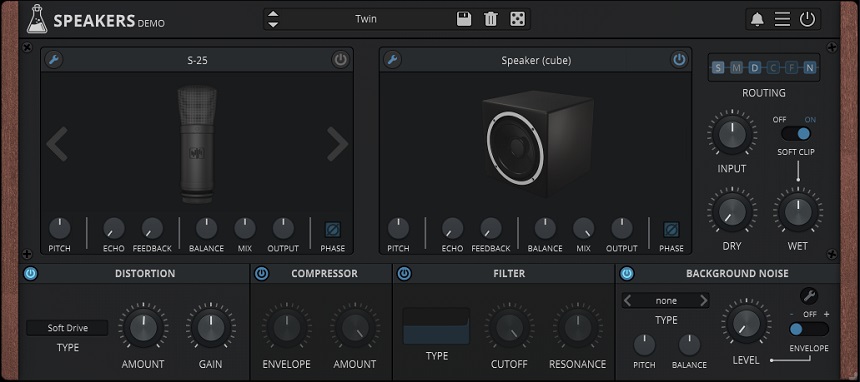
AudioThing Speakers is a multi-effects microphone and speaker emulation plugin.
The plugin simulates various speaker and microphone setups and allows you to apply effects such as distortion, filtering, and modulation to the sound. It can be used to add character and warmth to recordings or to create unique, distorted sounds.
Key Features:
- Speaker emulations
AudioThing Speakers features a library of 50 different speaker simulations, including both classic and modern models. The speakers range from vintage tube-powered units to modern digital models and include various types, such as guitar and bass speakers, studio monitors, and even car speakers.
Each speaker has been carefully modeled to capture its unique characteristics, such as frequency response, distortion, and other tonal qualities. You can choose from the library of speakers to apply to their audio and adjust the settings to taste. Some of the speakers included are Altec, Celestion, JBL, EV, Fane, Gauss, Jensen, Klipsch, and more.
- Microphone emulations
The plugin also features 32 different microphone emulations, which can be used to add a sense of realism and depth to the speaker simulations. The microphone emulations include both dynamic and condenser models, as well as vintage and modern options.
Some of the microphone emulations include: Shure SM57, Shure SM58, AKG C12, AKG C3000, Neumann U47, Neumann U67, Rode NT1-A, Rode NT2000, and more.
- Distortion/Degradation Algorithms
AudioThing Speakers also features 18 different distortion and degradation algorithms, which simulate various analog and digital distortion types, such as tube saturation, tape emulation, and bitcrushing. Tape, Tube, Transistor, Diode, Bitcrisher, Lo-Fi, Decimator, Shaper, Overdrive, etc., are some of the algorithms in the plugin.
- Realistic ambiance
The plugin also features 42 different background noise options, which can add a sense of realism or ambiance to the audio. These background noise options include various environmental sounds such as crowd noise, traffic noise, and nature.
Compatibility:
To use AudioThing Speakers, you will need a computer that meets the minimum system requirements of your chosen DAW, and that can run VST, AU, or AAX plugins, in 32-bit and 64-bit versions.
Summary:
In conclusion, the plugin is a powerful and versatile tool that can add character and warmth to recordings, or create unique, distorted sounds for electronic music production.
With its library of speaker simulations, microphone emulations, distortion and degradation algorithms, and background noise options, you can achieve many tonal options and add a sense of realism to your recordings.
10. Devious Machines Texture
More Info & Price (Trial Available)

Devious Machines’ Texture uses a library with over 340 acoustic and electronic samples to synthesize new layers into your track.
The plugin analyzes the transients and dynamics of your sound to add textures from its library. You can modulate the dynamics and EQ to make these textures fit your music. This is an excellent plugin for enhancing your mixes.
You can use it to make programmed drums more natural or generate ambiance and crowd noise, as well as analog noises of different kinds.
Key Features:
- Sample
This area lets you choose the noise that will modulate your sound. There are over 340 options, all adjustable through sample-dependent parameters, like Colour, Octave, and Pitch. Moreover, you get a dual lowpass and highpass filter that lets you shape the source’s tone. The link option connects this filter to the sidechain filter.
- Dynamics
This section is divided into two main parts: the Sidechain Filter and the Envelope. You also get a gate and a limiter, which you can control in the Envelope section. The controls for this section are straightforward.
The plugin offers attack, hold, and decay knobs in linked or dual-mono configurations. Additionally, you can activate Makeup, which will compensate for the gain loss caused by the processing.
- Modulation
The Modulation panel is here to help you add movement to your sound. You can use the envelope from Texture and the output of an LFO to the resulting sound with new depth and character. Five LFO types let you sync to the host tempo, but you can also adjust how synced they are using the Phase knob.
- Two EQs
One for the clean input material and another for the sound generated by Texture. These are 5-band parametric EQs, and you can right-click the filter icons to get extra options beyond shelves and bells.
Character & Sound:
The plugin can add incredible natural or digital-sounding layers that enhance the listening experience. From pitch-modulated effects to a subharmonic synthesizer, you can use Texture to make your music more enjoyable.
The plugin will always analyze your track volume and respond by generating a sound that perfectly matches the source’s dynamics. Whatever extra modulations you add will only make the sound more unique.
From version 1.5 forward, you can also add your own samples as texture sources. Additionally, the plugin also offers two granular synthesis modes that amplify its resourcefulness.
You can not only choose from the vast library or add your own samples; now, you can also use the granular method to select a part of the sample and resynthesize it. Then you need simply to use the Color knob to choose the area where the grains are played.
Compatibility:
This plugin is available for Windows 7 or later and macOS 10.9 or higher in VST, AU, and AAX formats.
Summary:
Texture, by Devious Machines, is a fantastic plugin that saves a lot of time in sound designing. It’s easy to lose yourself to this plugin’s far-reaching sample collection, which makes it an alluring tool for many producers in search of suitable sonic layers.
The user interface is friendly, and the controls are simple, so even inexperienced producers can benefit from its outstanding sound.
Best Free Multi-Effect Plugins
1. de la Mancha Truc2

truc2 is de la Mancha’s free multi-effect processor with four modules and two automatable XY pads.
You can use this plugin to add Dirt, Grain, Ring, and Delay to your input signals. Each effect can be thoroughly adjusted and bypassed to taste. The XY modulators can be moved manually or automated by different LFO shapes, speeds, and depths.
Key Features:
- XY Pads
The Pad on the left controls the volume level and blend amount of each module. You can set different parameters and values for each Axis. The XY pad on the right modulates 4 of the 15 automatable parameters simultaneously. This helps create rhythmic madness in your productions, which can be significantly used as sound effects.
- LFO
This free plugin offers 16 LFO types with adjustable depth and phase. These can be assigned to the XY pads to modulate the processed signal further.
- 120 Presets
The vast collection of presets is impressive for a free plugin. It makes this one of the most versatile free multi-effects processors out there. Use these to guide you in your journey to discovering the plugin’s functionality.
Character & Sound:
At extreme settings, the plugin can sound a little plastic and digital, but that might be just what some of us are looking for. If you’re expecting harmonic saturation or analog-like warmth, forget it. This is purely a synthetic-sounding plugin and a pretty good one at it.
Compatibility:
truc2 is available as a VST plugin for Windows.
Summary:
This is an excellent free plugin to add movement and a lo-fi digital quality to your sound. The extensive set of LFO waveforms make it highly versatile and even unpredictable. It can add an electronic, glitchy vibe to your productions in no time.
2. VSTzone Amplio 2

VSTzone’s Amplio 2 is a multiband effect module made to add interesting coloration to your sounds.
By splitting the signal into three bands, the plugin routes it through several processing effects that increasingly enhance the sound. You can adjust each band and add processing to singular bands in different effects without destroying the original audio.
That is to say that, in case you lower the distortion on the low-frequency band, it won’t reduce the volume, only the effect. That way, you can preserve the signal’s characteristics and only add your processing on top of it.
Key Features:
- Effects
An essential part of the plugin obviously is the signal chain. The signal is split into three bands and fed to an equalizer. From there, you get some dynamic processing via the Gate, Harmonics, Distortion, and Saturation units. Thereafter, its sent to the space modulation engine, consisting of the Spatial algorithm, reverb, and Width controls.
- Routable Reverb
The reverb is an effect of its own within the plugin. It lets you adjust the room type, its size, decay, width, diffusion, and even how you want to blend it with the signal. The best part, though, is that it saves you on EQ filters by letting you route the effect into any of the three bands.
So, if you want the reverb only on the mids for a vintage vocal sound, simply choose the Mid band in the router button.
- User Friendly
The plugin offers an intuitive way of manipulating all effects at the same time. The differences are clearly audible, so even inexperienced producers will get the hang of it pretty fast. It’s a fun way of using a multi-effects processor with zero investment.
Character & Sound:
Some of the 66 built-in can sound a little overdone, but the plugin does its job really well. Finding the perfect balance between all effects shouldn’t be a problem. And since the plugin is profoundly dependable on the frequency bands, it’s up to you to decide what the outcome will sound like.
The plugin’s original intent was to bring life into dull drum recordings, which actually sound excellent on drums. Not surprisingly, though, the three-band approach makes it excellent on other instruments, too. Try it out on your vocals, guitars, and synths. Ultimately, the plugin will save you loads of time searching and adjusting other plugins.
Compatibility:
This is a Windows-only plugin available as a 32-bit VST.
Summary:
The super user-friendly UI makes this plugin accessible to beginners and seasoned producers alike. It is an excellent free tool, primarily due to the three-band harmonics enhancer. It’s nice to have that for your productions, whenever a sound needs that extra fatness.
If you’re on Windows, don’t waste any more time and take this plugin with you to experiment for yourself.
3. Iraisynn Attinom Antiknot

The Antiknot, by Iraisynn Attinom, is a free random multi-effect processor.
The plugin offers a three-band compressor with adjustable crossovers, a highly adjustable EQ, flanger, tremolo, reverb, uniphaser, and delay modulations. You can easily edit any of this plugin’s parameters yourself or rely on its random nature to develop a unique-sounding preset.
Key Features:
- EQ
The full bandwidth EQ offers twelve adjustment points to help you sculpt your own curves. You get a Q and a volume knob that works on the selected frequency poinhttps://socialblade.com/t.
- Effects
All the available effects are randomizable, including EQ and compression. Other than that, the modulation effects can be turned on independently and sound very artifact-free even in extreme settings.
Overall, once you engage all the effects, you will start getting pretty psychedelic results due to the unusual signal path. The reverb is very convincing and can sound tight or gigantic. As the delay is routed after the reverb in the chain, it adds an excellent movement to the decay. You can combine the phaser, flanger, and tremolo to create sickening movement effects.
Character & Sound:
This plugin has the excellent addition of an anti-aliasing engine. This internal oversampling mechanism ensures the sound quality remains high as you push the effects to extremes. Other than that, the plugin creates some nice sounding effects, the compression brings warmth and an exciting drive at higher levels, and the EQ is very precise.
Compatibility:
The plugin is available for Windows as a VST.
Summary:
The Antiknot is a peculiar plugin with a lot to offer. Don’t get suspicious about its flat UI; it’s got nothing on this plugin’s multidimensional sound. It’s undoubtedly a worthy download if you’re looking for an intricate-sounding yet simple-to-use free plugin.
Bonuses:
Output Movement

Movement, by Output, creates motion in your mix using up to four simultaneous rhythmic engines.
You can apply this plugin to instruments as an effects processor or add it to effects as a modulation. The UI can be a little tricky at first sight, but the plugin gives you over 300 presets to choose from, so finding yourself isn’t hard.
Each engine provides you with three rhythm modulators: an LFO, a Step Sequencer, and the Sidechain. Furthermore, you can also generate movement from Flux, an Output proprietary modulation, and a Randomizer. All these features make Movement an exciting and fun plugin to play with.
Key Features:
- Rhythm Engines
The musical, tempo-synced effects generated by the four engines bring life and depth to your sources. Each engine gives you a 32-voice step sequencer, several LFO waveforms, and a fully configurable sidechain.
You can set up virtually any combination using the four engines. On top of that, you can add processing and modulations like delays, distortion, band-pass filters, compression, and reverb. In total, there are 76 parameters you can modulate at once, and the result is a construct of your creativity and hard work to find the right sounds.
- Sidechain Modulation
Movement allows you to use a sidechain input to modulate up to 38 parameters, including delays, EQ, filters, distortion, and a lot more. You can use anything that’s been routed through this engine as the source of its rhythm.
You can use percussive and non-percussive instruments as the triggers for this engine. The possibilities are truly limitless.
- A-B Graph
A circular handle controls the proportion between engine A and B. As you move it, however, you’ll also hear a difference in each engine’s parameters. When either A or B are at their fullest, the plugin will emphasize some of the parameters used by that engine.
At several points halfway through the center and the edges, different parameters get highlighted. Instead of simply acting as a blend between engines, the A-B graph is like a circular mixing desk with the faders’ handle. Depending on where you place the hold, the plugin will put more emphasis on specific parameters.
- Over 300 Presets
Let’s face it, even though this is a user-friendly plugin, the task of making all four engines sound great together can be overwhelming, especially if you’ve only just downloaded the plugin. Fortunately, this plugin makes it easy to overcome that by giving you over three hundred unique presets.
All you need to do is choose one of the 27 style menus, open it up and look for the best-sounding preset. The names are fun and will grab your attention, inviting you to test them out.
Character & Sound:
Output’s Movement is simply breathtaking. The sonic possibilities are endless, and the presets sound fabulous. You’ll honestly never have to create your own sounds if you don’t feel like it. The presets on this plugin have got you covered.
Furthermore, Flux, the proprietary modulation engine, automatically modulates the rate knob using the other rhythm in the selected engine. This helps create extra crosstalk between rhythms that can sometimes be the only change you’ll have to apply to a preset.
Compatibility:
Movement is available for macOS 10.7 and superior and Windows 7 or higher as a VST, VST3, AU, and AAX plugin.
Summary:
Output’s Movement is a fantastic plugin that’s at home in any musical style. Although the UI is confusing – and all the advertisements that state the opposite can’t change that -, the effects are undoubtedly flabbergasting.
The plugin becomes easy to use with a little bit of practice, and you can learn a lot about it by trying to understand the presets. In conclusion, if you’re looking for an excellent rhythm modulator, Movement should be in your collection.
Blue Cat’s Audio Mixer
More Info & Price (Trial Available)
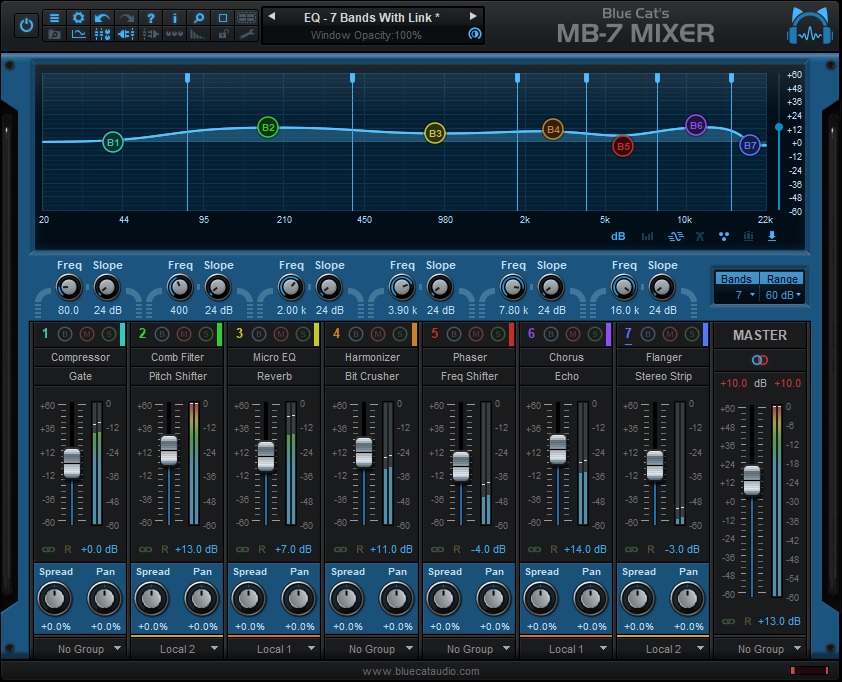
Blue Cat’s Audio MB7 Mixer is a plugin for digital audio workstations (DAWs) that allows you to create custom mixing and routing configurations.
It uses a multi-band mixing console and provides a range of features such as level and pan controls, mute and solo buttons, a built-in spectrum analyzer, and more for each frequency band. It allows you to split the spectrum into seven bands and create custom channel strip configurations for each band.
Key Features:
- Effects
Mixer comes with 30 built-in effects. You can add effects on the seven bands/channels, ranging from the chorus, flanger, compressor, reverb, EQ, etc. That way, you can add interesting effects to one band or frequency range, not the entire spectrum. That allows for deep customizations and sound sculpting.
- Parameter mapping
The MB7 allows you to map any of its parameters to external MIDI controllers so that you can control them with knobs, sliders, or buttons on a MIDI controller. This feature is called “parameter mapping” or “MIDI learn.”
Once the parameter is mapped, you can control the parameter’s value by moving the knob or slider on the MIDI controller.
This allows you to adjust the plugin’s parameters while the audio plays, which can be useful for live sound applications.
- Dual Mode
The plugin has a Dual Mode feature, which allows you to apply different processing on a stereo input signal’s left and right channels. In this mode, the plugin creates two independent processing chains, one for the left and the right, allowing you to apply different effects, EQs, or other processing on each channel.
- Interface
The MB7 has a user-friendly interface that allows you to navigate and adjust the various mixing and routing options easily. It’s divided into a mixer section, an input/output routing section, a global section, a modulation section, and a preset manager, making it easy to control and browse the plugin through these windows.
- MACROs
The plugin includes a set of macro controls that allow you to quickly and easily adjust multiple plug-in parameters. These macro controls are essentially knobs or sliders that can be assigned to control multiple parameters of the plug-in simultaneously.
You can make global adjustments to the overall sound of your mix or create complex modulation effects without manually adjusting each parameter. The macro controls can be customized to control any combination of parameters and can also be automated within a DAW for precise control over the mix.
Compatibility:
It is available in VST, AAX, and AU plugin formats, which are compatible with Windows and Mac operating systems.
Summary:
One of the standout features of the MB7 Mixer is its built-in sidechain feature. This allows you to create sidechain compression effects, which are commonly used in music production to create a “pumping” effect in the bass or to make space for vocals in a mix.
Additionally, the plugin also includes the ability to route audio between the slots and the main output, which further increases the possibilities for audio manipulation.
Sugarbytes Turnado
More Info & Price (Trial Available)
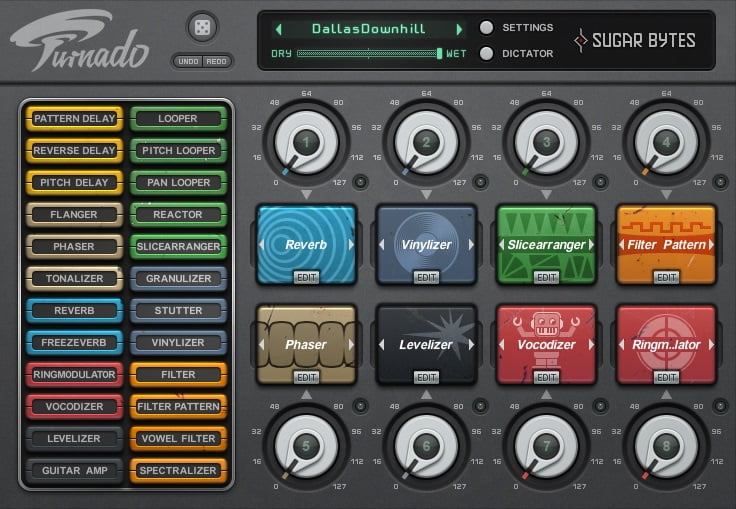
Sugarbytes’ Turnado is a one-knob-per-effect plugin with eight simultaneous slots and 24 effects.
Although it may look simple on the outside, Turnado, in fact, offers precise controls. Beyond its extensive set of effects, this plugin’s versatility lies in the edit menu, accessible per slot.
The effects are arranged by type, so you get delays, modulations, reverbs, transformations, distortions, filters, loopers, and lo-fi effects. To use them, simply drag the effects you want into the slots.
Key Features:
- Menu
The Edit menu is accessible via the Edit button under each slot. There you’ll find effect-dependent controls, two LFO graphs, and an Envelope Follower. The Edit menu lets you tweak an effect to taste, allowing complete control and contributing to this plugin’s versatility.
Each of the effect-dependent parameters is affected by the LFOs and the Envelope Follower. When the three colored lines appear from the bottom of the control area and reach “+” and “-” symbols, that means you can either increase or reduce their impact on the controls. In the upper left corner, you can easily access the Edit menus of all other effects.
Just click the tiny knob-like icons.
- Amount controller
Below each parameter, you’ll find an amount controller. When turned towards the “+” position, the Modulator has an additive effect. The opposite happens when you turn it towards the “-” part. Below the knob, there’s an arrow-down icon.
From there, you can access an extensive set of waveforms. These can be chosen and used to modulate the effects. There are a total of twenty different waveforms, which only show this plugin’s range and versatility.
- Key Sync
Inside the Edit menu, you’ll find the Key Sync menu up top. It allows you to choose a beat subdivision and lock the effect to its tempo. Alternatively, you can turn it off so that you will only hear the effect when you turn up the main knob.
You can do that via automation or with a MIDI controller. This is helpful if there is any specific effect to which you want to add a more human expression.
- Dictator
By Clicking the Dictator button, you’ll get access to a 16-beat sequencer that controls the eight effects. They’re vertically arranged, and the fader on the left lets you move through the sequence. It is super easy to automate how you want the effects to act.
You also get access here to a randomizer per track instead of the global function present in the UI. You can apply a few presets to individual tracks at the top, or you can just click the lock button and create automation points by simply moving the main knob.
Character & Sound:
Turnado is a highly customizable plugin that sounds the way you want. You can arrange and tweak the effects to taste and make them contribute to the music you’re making. Even though it’s a user-friendly plugin, it can be awe at first sight.
In case you still don’t know how to get the best sound out of the plugin, Sugar Bytes made it easy for you to rely on the several high-quality presets available. Make your way through the plugin by choosing presets and tweaking every parameter in the Edit menu to hear how they sound.
After a bit of experience, it will take virtually no time for you to develop new combinations that will affect your own.
Compatibility:
Turnado is available for macOS 10.9 or higher and 64-bit only Windows 7 and up as a standalone application or as a VST2, AU, AAX, and NKS (for Komplete Kontrol and Maschine) plugin.
Summary:
However you need, Turnado responds to your demands. If you’re feeling experimental, you could spend hours looking for the right sounds without getting bored. If you already know what you’re going for, the plugin makes it super easy to reach your target quickly.
This Sugarbytes plugin is an excellent addition to your toolkit if you’re searching for a multi-effect sequencer.
United Plugins Retronaut
More Info & Price (Trial Available)
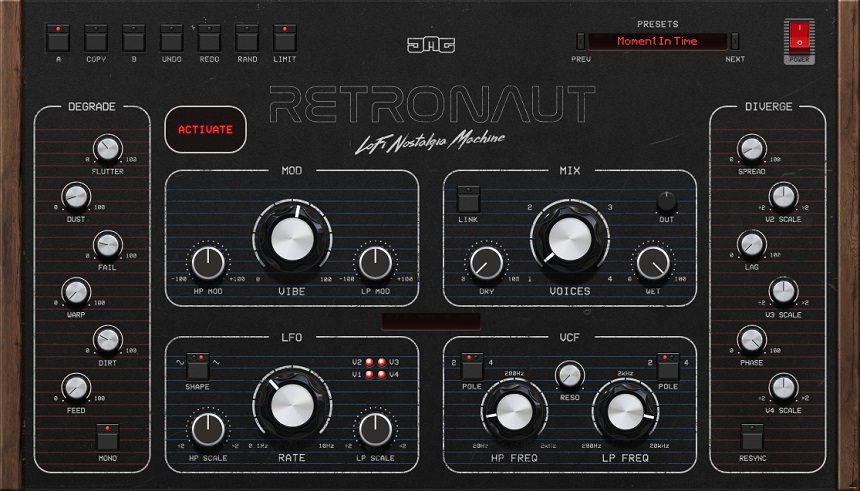
The United Plugins Retronaut is a versatile multi-effects plugin that emulates vintage analog processors, specifically focusing on vibrato and chorus effects.
It has a powerful multi-voice modulation engine ranging from a single vibrato voice to a rich 4-voice chorus. Retronaut also features a dedicated degrade section with various lo-fi effects, including warm dirt and grit, wow, and flutter dusty crinkles and crackles. Furthermore, the plugin includes analog-style resonant filters that can be used to shape further and customize the effects.
Key Features:
- Multi-voice modulation engine
You can access a range of modulation effects from a single vibrato voice to a rich 4-voice chorus. This means that you can achieve a variety of sounds, from subtle pitch shifting to more complex and rich modulation effects. Blending the effect from vibrato to chorus enables you to customize the intensity and character of the modulation effect.
- Lo-fi effects
The Degrade section of the Retronaut plugin allows you to add various LoFi effects to your sounds. These effects include warm dirt, grit, wow and flutter, dusty crinkles and crackles, and more. This feature lets you add character and texture to your sounds, creating a vintage and analog feel.
- Diverge Section
You get a set of controls to change the voice behavior of the modulation effect. These controls include Spread, Lag, and Phase controls, allowing you to control each voice independently. This feature provides greater control over the modulation effect, enabling you to create unique and interesting sounds.
- More Than Modulation
The More Than Modulation feature of the Retronaut plugin enables you to create tape saturators and crossfeed each voice back into each other to create complex feedback networks. This feature gives you a powerful tool to create interesting and complex modulation effects, adding depth and richness to their sounds.
- Interesting stereo effects
The plugin has a “Crossfeed Into the Aether” feature, a creative effect that allows you to blend the wet and dry signals, creating a unique stereo image. This feature enables you to create various stereo effects, from subtle widths to more extreme and unusual stereo sounds.
- Virtual Analog Filters
Virtual Analog Filters in the Retronaut plugin allow you to shape the sound further with high-pass and low-pass resonant filters. This feature gives you greater control over the sound, enabling them to cut or boost certain frequency ranges and shape the overall tonality of the sound.
Compatibility:
The United Plugins software plugins are compatible with Mac and Windows PCs and support AAX Native, VST2, VST3, and AU formats. The minimum system requirements for using the plugins are a display resolution of 1440 × 900px or 1280 × 960px or higher and a minimum of 2GB RAM.
Summary:
Retronaut is a versatile multi-effects plugin that emulates vintage analog processors, focusing on vibrato and chorus effects. It has a multi-voice modulation engine, lo-fi effects, controls to change voice behavior, tape saturators, analog-style resonant filters, and creative stereo effects.
Audio Damage Enso
More Info & Price (Trial Available)

Enso is a virtual audio looper that lets you record and loop audio with several real-time effects in your DAW.
It allows you to record and playback up to 10 minutes of stereo audio multi-directionally at different speeds. The single-button loop engine is fully automatic and lets you add effects in a very tape-style fashion. Hence, even if it works as a modern looper, its sonic behavior is modeled after vintage tape machines.
Key Features:
- Intuitive Interface
The resizable GUI is stunning and uncomplicated, with the signal chain being straightforward and streamlined, making Enso easy to use and operate with, both in the studio and live settings.
- Tradition signal flow
Like old-school loopers, the plugin can have the input mixed with buffer content, after which it can be sent to effects, or like a tape looper, the feedback path contains the effects and speed changes using the Dub in Place button. One can also have four different start and end points, in which sector crossfades can happen.
Compatibility:
It’s available as a VST, VST 3, AU, and AAX for Windows 8.1 or higher (64-bit only) and macOS 10.12 or newer, as VST and VST 3 for Unbutu 18 or later, and AUv3 for iOS or newer.
Summary:
Enso is a fun tool and is great in emulating the warped sonics of vintage tape manipulators, which makes it a great tool, especially for guitarist producers. In addition, its workflow is creative and can inspire your sound design process. Lastly, the onboard effects sound analog and are of good quality.
iZotope Stutter Edit 2
More Info & Price (Trial Available)

iZotope’s Stutter Edit 2 offers unrivaled effects to create complex rhythmic sequencing.
The plugin produces complex, playable effects. It uses MIDI notes to trigger “Gestures,” which is how the developers call the presets in this plugin. These presets are fully customizable, of course, so you can preserve the Gesture’s original intent but perform it differently or use it as a template for something completely new.
In short, the plugin can add variation to repetitive loops or song sections, musical filter sweeps, world-class build-ups and transitions, and a lot more.
Key Features:
- Banks
To trigger the plugin, you need to produce a MIDI note. The plugin makes it easy for you to know which notes to generate and when by separating the Gestures into identifiable Banks in the preset menu. You can, of course, assign new gestures to empty keys inside that bank as soon as you come up with a unique sound.
- Effects
The effects are reachable on the left-hand side of the interface and can be triggered to will. Each of them has a different set of parameters, which become visible as you enable the Effects menu’s effect in the UI’s center and click upon its name. You can use multiple effects for each Gesture and change their signal flow.
- Parameter Modes
You can adjust an effect’s parameters to taste, but there are a few things to consider. When there’s a lock icon above a parameter, that means it is in Locked mode, so the plugin will provide a single handle for you to edit the parameter.
It will keep the original proportion between values. In Split Mode, you enable an extra grip to control these values independently. Additionally, Some parameters that add movement are now equipped with an adjustable Arrow indicating if they’re sweeping up or down. Finally, you also get Custom Mode, enabling far more advanced controls and giving the user complete flexibility.
Character & Sound:
The plugin’s true singularity comes from allowing the user to play the effects on their MIDI instruments, but there is also a lot going on under the hood that influences the output signal. The plugin uses Time-Variant Modifiers to retrigger envelopes with multiple tempo-synced curves.
You can edit these curves any way you see fit in the TVM Graphic Editor, which lets you draw whatever shape you feel would make sense for your production. It allows you to create complex modulation shapes and, thus, exquisite-sounding effects.
Compatibility:
iZotope’s Stutter 2 is available for 64-bit only Windows 8 and up and macOS 10.13 through 10.15 in AU, AXX, VST2, and VST3 formats.
Summary:
Stutter Edit 2, by iZotope, can help elevate your productions to an entirely new level of sound designing. With a level of sheer spontaneity, the plugin suits any producer’s needs in any genre imaginable. It’s undoubtedly a resourceful addition to your collection.
HY-Plugins HY-MBMFX2
More Info & Price (Trial Available)

The HY-MBMFX2, by HY-plugins, is an astounding multi-band effects processor.
This 3-band plugin accepts up to five different effects per band, which is simply unheard of. Among the seven kinds of effects, there are twenty-two other options with randomizable functions. In addition to the bands, you can also apply an effect to the master output to create the ultimate cohesion for your sound.
However, the fun begins when you start using any of the ten available modulation sources to the effects. This is when this plugin lets you truly create your own sounds.
Key Features:
- 10 Modulations
In the modulation section of the UI, you’ll find controls for the four LFOs, two Envelope Followers, and four Macros that let you control multiple parameters at once. Each parameter accepts two modulations at once, and you can add them in two ways.
The first is by dragging and dropping the modulation’s arrow symbol into any of the parameters’ slots. The second is by right-clicking a slot and choosing the modulation source. The slot works as a knob in which you can control the modulation’s depth. Most effects accept a total of 10 modulations.
- Output EQ
This feature is unseen in most other plugins on this list. It allows you to shape the EQ of the resulting sound after the entire flow of processing. Therefore, it eliminates the need for another plugin in your chain, which makes for a charming addition.
The 3-band EQ with Frequency and Gain parameters for each region also has high-and low-shelves and a wide mid-band.
- Multi-Band Processor
If you don’t want to add modulation or extravagant effects to your sound, you can also use this plugin as a multi-band processor. You can add different compressors per band and overdrive, delay, lo-fi, or anything you see fit. This makes the plugin a lot more versatile than most multi-band compressors.
- User-Friendly
The plugin’s UI is inviting, and the understanding doesn’t take long. The ease of use ensures you’ll achieve highly creative results via experimentation. It is straightforward to create powerful effects with this plugin’s direct approach.
Character & Sound:
This plugin’s sound is highly customizable. You can reorder the effects in each band and assign different modulation sources. Additionally, you can change the crossover points to focus your effects in the frequency region they truly matter.
All this, plus the modulation assignment engine, make this plugin a creative powerhouse. Although the number of modulations may not be as extensive as other plugins on this list, it covers enough bases to ensure its flexibility.
Compatibility:
This plugin is available in VST and AU formats for Mac and Windows.
Summary:
While some other plugins can be confusing and messy, the MBMFX2 uses a What-You-See-Is-What-You-Get approach to bring control to the user’s hands. If confusing UIs put you off, this plugin will answer your prayers. It’s an excellent addition to any producer’s collection.
Conclusion
Multi-effects processors can be genuinely impressive. Their range of applications is endless, and some of the plugins on our list offer truly infinite potential. If you’re an electronic musician, producer, or sound designer, we hope you have found what you were looking for on our list!

The Integraudio Editorial Team consists of experienced music producers, audio engineers, and plugin enthusiasts dedicated to providing in-depth reviews and guides for music production software.