

1. FabFilter Pro-Q 3
Replaced with Pro-Q 4

The third and latest version of this powerful EQ now includes dynamic control.
Fab Filter’s Pro Q series has been almost a must-have for engineers at all levels for years. These EQs are perfectly transparent, easy to use, and have different display modes for the spectrogram (pre/post-processing).
Still, most importantly, they are the most versatile EQs out there in the market because of their infinite frequency bands, zero latency mode, linear phase processing, fully adjustable parameters, etc.
Now you can control dynamics to specific frequencies, whether you’re boosting and want to control the signal or dipping a particular frequency that’s disturbing you. These fab filter EQs are almost a worldwide standard, mainly because their RTA is very graphic, which is very helpful for those who are just getting started.
This new version of Fab Filter’s Pro Q has a couple of additions that we will talk about, so stay tuned.
Key Features:
- New EQ filters:
Unlike the past versions, Fab Filter Pro Q 3 brings new filters on our equalizers, such as a tilted shelf and a flat tilt. In addition, you can apply and change these filters directly from the box outside of the frequency band, which is a great plus to the previous versions.
- Optimized UI:
The new Fab Filter lets you choose whether you want to use the EQ for stereo, mid/sides, and left/right processing on the go. Create a new band and select whichever processing mode you’re interested in using, differently from the older versions, where this option was almost hidden.
Additionally, they’ve added a brick wall slope that’s surprisingly transparent and very useful for mixing situations.
- Dynamic EQ:
They’ve added a new way of processing that’s entirely new to this plugin: the dynamics control on the EQ. This new feature is perfect in several contexts for mixing and mastering, and it’s perfectly there sitting around the gain knob.
- Collisional frequency marks:
Fab Filter includes a visualization of possible areas where frequencies are potentially high. This is used to ease up finding the troubling areas of the spectrum to fix them. Keep in mind that this is not an intelligent feature, so I wouldn’t recommend you to run and try to fix something whenever you see the mark, but to use it as a reference to spot possible issues that you’re looking to address.
- Sidechain and EQ match:
Fab Filter added a new way to use the sidechain capabilities of this eq. Typically, you’d use this feature to match a reference track’s tone and spectrum balance, contrasting both tracks’ spectrum and manually matching them. Still, now, Pro Q 3 takes you there automatically with AI assistance.
Compatibility:
Supports Windows 10, supports macOS 10.10 or higher, runs on 64 bit and 32 bit systems, and comes in VST, VST3, AU, and AAX formats.
Summary:
Fab Filter Pro Q 3 is an improvement of both of its predecessors. This EQ has been very well known for its transparency and versatility, and it keeps getting better with each release.
This latest plugin version came out in 2018 and is still one of the best equalizers to use regularly.
One thing that you can appreciate from Fab Filter is that they continuously improve their plugins to optimize your performance and, obviously, your workflow. Use Pro Q3 if you want transparency and accuracy, as this is probably the best tool to use when you need precision.
2. Valhalla VintageVerb
More Info & Price (Trial Available)
VintageVerb is an algorithmic emulation reverb by Valhalla.
VintageVerb aims to bring to life the grit and dirt of vintage reverb hardware units from the 1970s and 1980s. The danger with emulation plugins is that they tend to sound fake or lifeless.
This is not the case here since Valhalla created a very versatile plugin that can be used in many different ways, with a sound that can be dark and mysterious or bright and overwhelming.

Key Features:
- Modes
Valhalla VintageVerb is very versatile, mostly due to the different modes it carries. There are numerous modes with different characteristics that will make for subtle reverb sounds or exaggerated and chaotic ones.
Some of the modes are concert hall, plate, room, chamber, random space, chaotic hall, chaotic neutral, sanctuary, chorus space, and many more. In addition, each mode has different decay length capabilities, different room size and shape, and overall completely different characters, which make VintageVerb a sound designer’s dream.
- Color
The true brilliance of VintageVerb is inside the color menu. This is where the vintage emulation occurs since you can set the tone to the 1970s, 1980s, or now. The 1970s color has a lower resolution and a downsample character that helps capture the darker, filled with artifacts, the sound of that era.
Similarly, the 1980s color has a noisy sonic profile but is significantly brighter and wider than the 1970s. Finally, if you choose the now color option, you’ll get a full stereo modern reverb with a clean sound and no artifacts. You can apply the color options to each of the different modes, which gives you unparalleled sonic flexibility.
- Damping
In the damping section, you can sculpt the tone of the reverb. You get the high shelf and high-frequency controls which allow you to decrease the higher frequencies of the wet signal.
You also get the bass frequency and bass multiplier knobs, which will help you set the decay time of your chosen low frequencies in relation to the main decay time.
This means if you choose 2x on the bass multiplier, the decay on your low end will be double what the overall decay is. This is an interesting feature that can help you sculpt your bottom end with accuracy.
- Shape and character
VintageVerb includes many more controls which you can use to fine-tune your reverb sound. The shape controls help you set the size of the reverb space and the attack of it. The diffusion menu with its late and early reflections controls will help you bring sounds in the front of the mix or push them back.
Finally, with its rate and depth controls, the modulation menu lets you add subtle or extreme pitch effects on your wet signal to either humanize it with subtle modulation or completely alienate it with extreme pitch modulation.
All these can do wonders when applied to a vocal. For example, if you increase the early reflections and decrease the late reflections, you’ll create a reverb that feels like it’s nearby. Add this to a plate model with some predelay, and you have an excellent all-purpose vocal reverb.
- Utilities
There are high-cut and low-cut knobs for precise sculpting of your reverb signal. You also have access to a predelay knob which is crucial for vocal processing since it allows the singer to sing the words and then introduce the wet signal. Finally, a dry and wet knob is included for parallel processing, and a big decay knob sets the overall length of the reverb.
Compatibility:
VintageVerb is available on Windows 7 – 10 and macOS 10.9 – 10.15 in VST2.4, VST3, AU, and AAX formats.
Summary:
Valhalla VintageVerb is a proven classic choice for an all-purpose reverb. It can be tricky to balance since it tends to get bigger than life and overwhelming, but that can be a great fit for creating long textural vocal effects.
You can also use it as a subtle vocal reverb through the plate model or add some real depth and haunting feel to your vocals through the various other modes. Overall, VintageVerb is a very versatile plugin that can compliment any production style.
3. Waves WLM Plus Loudness Meter
More Info & Price (Trial Available)

WLM Plus has all three kinds of LUFS, True Peak, and Loudness Range metering.
What it does differently is that along with the True Peak readouts, it also has a True Peak limiter built into the plugin. So, matching your master’s loudness to a standard won’t even require you to switch between two plugins.
There is both gain and input trim to help you with the mastering process.
We also liked its warning and logging system, which records any clippings or under-threshold readings in your audio. However, since it doesn’t have a graphical view, there is no way to tell where the issue occurred.
Key Features:
- Input Filters
There is an input low-pass and a high-pass filter for analyzing a set range of frequencies. Similarly, you can also choose to measure a specific channel of your audio.
- Limiter
Waves offer an in-built true peak limiter to help you with your mastering process. However, this may or may not be valuable as you could already have a favorite limiter for mastering. However, for mixing dialogs and so on, where you don’t typically introduce a huge amount of limiting, this may come in handy.
- Presets
The plugin has many presets for platforms like YouTube, Spotify, etc. The warning feature works great for making sure your audio is proper.
- Surround Support
The WLM Plus supports mono, stereo, 5.0, and 5.1 surround sound. So if you often find yourself working on low-budget indie projects, this could be of use.
Compatibility:
This plugin is available for Windows 10 64-bit and macOS 10.13.6 or higher. It comes in VST 2/3, AU, AAX, and RTAS formats.
Note that certain DAWs do not work with WLM Plus’ surround features, despite having surround support. So, make sure you check before you purchase.
Summary:
Great loudness metering plugin with an integrated limiter. With Waves Shell v12, you can have a resizable GUI as well. However, the price of this plugin without a sale is outrageous. With sales happening at Waves almost every day, though, the discounted price is undoubtedly worth the features.
4. Xfer Records Serum
Replaced by Serum 2
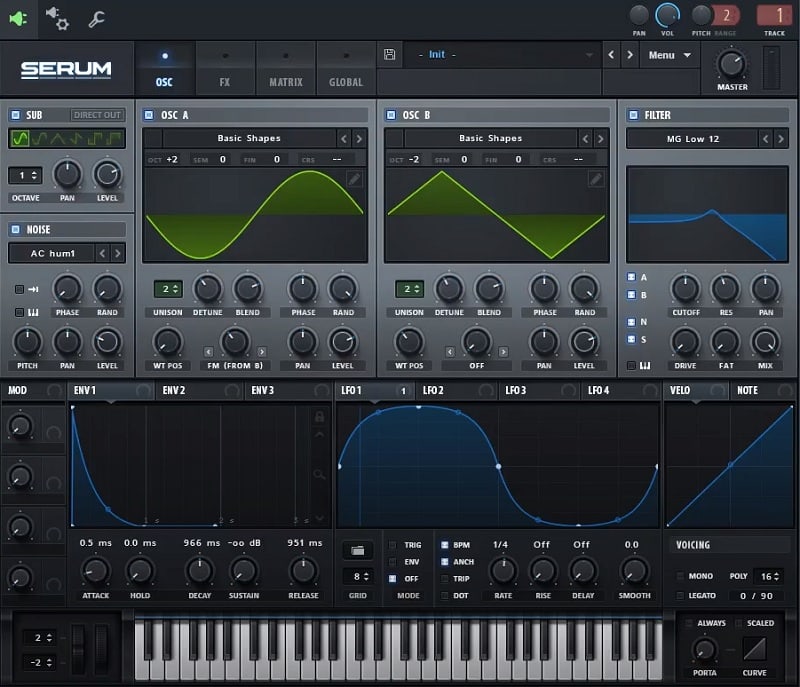
Serum, by Xfer Records, is a favorite among electronic music artists due to its remarkable user-friendliness.
Creating, editing, and manipulating wavetables is effortless with Serum’s quality-oriented workflow. Additionally, whenever you import an audio file into Serum, it will analyze and divide it into unique waveforms that you can use as wavetables within the synth.
Then, you can warp and modulate the waveforms to your liking, and when they’re done, the plugin offers a 10-effect rack that eliminates the need for more plugins in your signal chain.
Key Features:
- Filter Types
The plugin offers four filter categories: Normal, Multi, Flanges, and Miscellaneous. You’ll get a large set of filter presets for each, and the numbers beside their names represent how steep the cutoff curve is.
In addition to the ability to engage the filter for both oscillators, plus the sub and the noise engines, you can use note-tracking to keep the filter in tune with every new note.
- Sub-Tables
Not only does the plugin let you see and hear the main wavetable, but it also offers different layers of the same sound, depending on how many Unison voices you have selected.
- Copy LFOs and Envelopes
Hold down “alt” (“option” on the Mac) while clicking on the ENV or LFO top bar and dragging it to another one beside it. That will copy the entire shape and its parameters onto the new slot. You can do the same process to copy an LFO or Envelope shape into any oscillator if you want to. That will create a custom wavetable with the same pattern as the source.
Sound & Usability:
With its two main oscillators, plus a sub and a noise generator, Serum provides a wide range of sonic possibilities. Unfortunately, even though its single filter has several presets and attractive controls, such as fat and drive, it lacks in number.
If we could at least have a dedicated filter for each main oscillator, then Serum would probably be better positioned on our list.
However, usability-wise, Serum is as easy as they come. It’s fun to play around with Serum’s knobs when sculpting your sound. Additionally, the controls are appropriately named, which improves the user experience.
Compatibility:
This plugin is available for macOS 10.11 and newer and Windows 7 and higher as a VST, AU, and AAX plugin.
Summary:
It’s easy to understand how Serum got its famed status. Just from looking at it, you immediately know what you need to do. And truth be told, you can create great sounds even if you’re not that experienced. Overall, this is a user-friendly plugin that deserves a place in your collection.
5. u-he Diva
More Info & Price (Trial Available)

Diva, by u-he, offers limited controls, but it sounds very similar to real analog synths.
Overall, Diva is an easy plugin to navigate. The plugin gives you five different types of oscillators, four kinds of high-pass filters, five main filter options, and three types of envelopes. You’ll find LFOs, the effects, and the available controls in the lower panels, such as sync, pan, and tuning.
Additionally, there are individual menus for modifications, trimmers, scope, and presets.
Key Features:
- Oscillators
Each of the five types offers a slightly different GUI, which can be confusing. Other than that, they all sound incredible. For example, in the Voltage Controlled Oscillation area, the plugin gives you three options. A CPU-hungry Triple VCO with FM controls, a multi-wave Dual VCO with PWM, and a CPU-friendly Dual VCO Eco with ring modulation.
In addition to those, you get a DCO, a single oscillator with a flexible sub-OSC, and a Digital oscillator, which offers several types of waveforms.
- Filters
The heart of Diva is its filters. U-he has modeled all five units after a more significant number of classic hardware and, though the controls are similar, each has its unique flavor. For instance, VCF | BITE adds beautiful resonance by increasing the oscillator volume by 10%.
- Oscillator Voice Detune
Voltage oscillator synths detune slightly due to component wear, creating a natural effect that is almost like a soft chorus. To simulate this, u-he went above and beyond and gave us the Oscillator Voice Detune panel.
You can access it by clicking the Trimmers section at the GUI’s bottom. There are three knobs for each of Diva’s voices, and you can fine-tune them to find your sound. Additionally, you get a “Detune Amt” knob below in the same panel, which controls the global detune. In high values, the same note will sound highly different if you play it twice.
- Presets
The plugin gives you over 1200 presets, making life a lot easier, especially if you don’t have time to design your patches. Additionally, it’s easy to search for the right presets through tags or text. You can look up categories, features, or the character of the desired sound.
Sound & Usability:
Like most analog gear, you lose some flexibility to gain character and personality. And even though this is a plugin, it makes every effort to get the best of the most famous hardware synths. As a result, this plugin’s sound is warm, round, and punchy from the get-go.
Additionally, Diva’s usability is unique. That’s because u-he went for a genuinely analog look and feel for this plugin.
However, the overall UI looks a bit crowded, with small names for small knobs. There are no fancy graphs or metering here, simply the parameters laid down as knobs and faders on a clean background. For that matter, controlling the envelopes with faders will come as a new experience for those only used to digital synths.
Compatibility:
This plugin is available for macOS 10.7 or newer and Windows 7 or higher in VST, AU, and AAX formats.
Summary:
Built as an all-analog solution for your synth needs, u-he’s Diva lets you grasp the sound of the original hardware for a thin slice of their prices. Unlike the originals, though, you can replace the modules and combine them to taste, just to remind you that you’re in the digital realm.
Overall, Diva is a great-sounding plugin that will have a special place in your collection.
5. RC-20 Retro Color
More Info & Price (Trial Available)
The RC-20 Retro Color will spice any mix with a vintage flavor. Its easy-to-use features will add warmth, texture, and a retro nostalgic character to your drums, guitars, keys, basses, and full mixes.
Along with six unique FX modules, this plugin comes packed with the exclusive XLN Audio’s Flux Engine. This unique engine, developed by the masterminds behind the plugin, works by adding a certain level of fluctuation and instability to the sound, providing that pleasant warmth, and analog-style texture.
A sonic time machine, this plugin is inspired by the old analog years of audio. It aims to replicate the classic artifacts like VHS machines and Vinyl records by using a bit of distortion, noise, wobble, and more.

Key Features:
- Convenient Modules
The RC-20 Retro Color has six different modules that can be applied to any sound. Apart from the top-notch replication of retro characteristics, these modules are also pretty easy to use.
With one knob assigned to every module, you’ll be able to control the proportion in which the sound will be affected by Noise, Wobble, Distort, Digital, Space, and Magnetic effects.
Furthermore, you’ll also have the freedom to go minimalistic and change specifics that every module will work with. For example, set a particular rate for the Magnetic module and Stereo it.
- Straightforward Intensity Control
The plugin also features a very useful magnitude slider. The slider will work to control how much intensity is being applied to the overall processing of the modules working together.
It’s easily accessible when you’re building your settings. It gets really handy if assigned with automation since it will lay the ground to control the mix’s energy. Use it to get some solid breakdowns or transitions.
- Versatile Presets
By holding an extensive array of presets, the RC-20 Retro Color will surprise every producer with its versatility. The plugin includes high-fidelity presets to replicate sounds, such as two vinyl presets, two tape ones, a static radio, VHS machine, Tube, Cassette, and much more.
Each module will be equipped with a satisfying amount of features, and some will have manually selectable presets. Apart from the presets in the modules, there are also presets for the magnitude slider section, which processes the plugin’s mix.
Compatibility:
This plugin is available for Windows 7 or higher 32-bit and 64-bit and Mac OS 10.9 or higher 32-bit and 64-bit. It comes in VST2/3, AU, and AAX formats.
Summary:
A three-time awardee, the RC-20 Retro Color will give every producer freedom and variety for pushing any mix with vintage colors. Use it and explore the subtle warmth of classic analog audio in any sounds or go further and crank up some instability and fluctuation to spice up the mix. Either way, you’ll be getting modernity in the analog goodness of the old time’s best technologies.
6. Native Instruments Kontakt 7

KONTAKT 7 is the latest version of the popular sampler, and it includes a reworked HiDPI Factory library and new instruments from companies like Orchestral Tools.
KONTAKT is the best instrument-building tool on the market, and it also serves as a source of quick musical inspiration for composers. This mutating platform is much more than a sampler; it has fueled two decades’ worth of Oscar-winning film scores, Billboard singles, and hundreds of instruments.
We’re taking KONTAKT’s 20-year history into the future with the seventh iteration. First, the new adjustable browser makes it simple to locate any sound. Then, you can experiment with new musical ideas and find new inspiration using the updated Factory Library, new effects, and other audio enhancements.
Key Features:
- Effects
The numerous effects modules in KONTAKT are detailed here, along with information on adjusting their settings. Audio processors that alter the signal in a typically non-linear fashion, such as reverberation, fingering, and distortion, fall under the category of “effects.”
Open the drop-down menu of available effects by clicking the plus sign in the lower right corner of each effects slot to access these modules.
- New Sound Quality
In KONTAKT 7, the Factory Library has been updated to raise the bar in terms of both sound quality and quantity, and it also brings our flagship sampler up to date with modern features like large, attractive, HiDPI user interfaces.
In addition, learn to play and modify an extensive library of acoustic and electronic instruments, including Orchestral Tools’ brand-new collection of sampled, full-orchestra soundscapes.
- Faster Interface
It can be difficult to maintain momentum if you’re constantly on the lookout for your preferred tunes. So to make things clear, we’re introducing a brand-new way to search through them. You can now import your independent libraries and homemade instruments and search, filter, and individual audition sound across your collection.
- Build Instruments
KONTAKT 7 also comes with brand new libraries like Orchestral, Acoustic, Band, Beats, Choir, Synths and Vintage. It also includes existing Kontakt libraries Ethereal Earth, Hybrid Keys, Analog Dreams and Retro Machines MK2.
- Hardware
Load KONTAKT into KOMPLETE KONTROL or MASCHINE to manipulate key settings with specialized knobs, listen to sound libraries, and more. S-Series keyboards have an even tighter integration because all the key switches and zones are conveniently located on the Light Guide.
Compatibility:
This plugin is available for macOS 10.10 or higher (64-bit only) and Windows 10 or higher (64-bit only). It comes in VST/RTAS/AU/AAX formats and supports 32 and 64 bit systems.
7. FabFilter Saturn 2
More Info & Price (Trial Available)

Saturn 2, by FabFilter, is a highly versatile multi-band distortion plugin with a transparent sound.
Like most FabFilter plugins, this one is a parameter powerhouse. As you look at it for the first time, you’ll probably think, “Is that all?”.
But as you start adding modulations, linking parameters, and adding bands, you’ll understand how creative you can get with the sound. The plugin’s intelligent algorithm adapts easily to anything you add to it, and the results will be different whenever you need them to be.
Key Features:
- 6-band processing
You can click the waveform graph wherever you feel like adding a band crossover. The plugin lets you add up to six that can be individually tweaked.
- Multi-band compression
If you select all bands and raise the Dynamics knob, the intelligent algorithm will add program-dependent multi-band compression to your track.
- Transient Mode
The envelope followers can become transient designers with the click of a button. Simply link the EF to any band’s level knob and select Transient Mode.
- Width Controls
You can add distortion to the subbass and make only the lower frequencies mono with the width control positioned around the Level knob.
Character & Sound:
The plugin offers several distortion modes which can be used softly or taken to extremes. For example, the Subtle modes all sound amazingly transparent and can even be added to a mastering chain for coloration.
The more overdriven textures will sound astonishing on any instrument. Overall, the plugin sounds clean and precise, without the addition of the common unwanted distortion artifacts.
Compatibility:
This plugin is available for macOS 10.10 or higher and Windows XP or newer in VST2, VST3, AXX, and AU formats.
Summary:
FabFilter’s Saturn 2 is ahead of its time. It’s flabbergasting how adaptable the plugin is and all the things you can do with it. It is a distortion plugin, but it’s also a multi-band swiss-army knife. This is undoubtedly a must-have for your toolset.
9. LANDR Mastering Plugin
More Info & Price (Trial Available)
Or Buy Here (Support Integraudio)
LANDR Mastering Plugin is an AI-based mastering plugin that gives you the benefits of AImastering along with deep customization abilities to tweak your master to your preference.
LANDR AI is already one of the most superior artificial intelligence for mastering, but combined with different controls like EQ, Compression, etc., it becomes even better!

Key Features:
- Dynamic Control
Dynamics are very important in mastering, and this plugin allows you to control the compression, character, and saturation amounts so you can get the appropriate dynamics for your music.
- Equalization Control
As per the genre and feel of your music, you can control the low, mid, and high frequencies by using just knobs/controls to do that. That lets you set the appropriate tone for your masters.
- Mastering Tone
You can set the mastering to be between Warm, Balanced, and Open, depending on the sound you’re going after. Moreover, under these sections, you can further tweak the stereo width, loudness, dynamics, and EQ as per your taste.
- Gain Matching
You can match your master’s volume/gain with reference songs and compare them. Moreover, you can also adjust the Presence knob and tweak De-esser and its Frequency and Amount parameters to avoid any harshness.
Compatibility:
LANDR Mastering Plugin is compatible with macOS 10.14+ and Windows 10 or later operating systems with DAWs that support AU, AAX, and VST3 plugins.
10. FAW SubLab XL

SubLab XL is a bass and 808 instrument by FAW.
The original SubLab was a creative software instrument designed specifically for creating deep bass sounds and 808s. It featured the innovative X-Sub technology by FAW, which guaranteed sub integrity on all sound systems. The XL version includes many more features and fresher sounds.
Key Features:
- Synth engine
The beauty of SubLab lies in its split into three different engines. The synth engine is where you get to design the bulk of the bass sound. You can choose between sinewave, triangle, square, saw, and the new super oscillator.
Once you’ve selected the sound shape of your choice, you can set the pitch and detune your sound. As a result, you can achieve subtle and deep bass sounds or buzzy and supersaws with great ease. The super oscillator is an excellent addition to SubLab, and it’s great for creating buzzy sounds with a deep low end.
- Sample engine
The sample engine is where you can load different samples to handle the sound’s transient. You can load a kick drum or any other punchy sound that will be the transient of your 808. Additionally, you can choose to sidechain the synth engine to the sample engine so that the transient comes through loud and clear.
- X-Sub
The main appeal of SubLab is X-Sub, the psychoacoustic synth engine that guarantees the integrity of your sub bass no matter what playback system it’s heard on. It basically adds a consistent sublayer underneath your bass sound.
Of course, you can adjust how much of it you wish to add, but overall it’s very balanced and can help your bass sound stand out and hit hard anywhere, from earbuds and laptop speakers to club sound systems.
- Effects and modulation
SubLab offers a few different tools for sound design. You get one LFO that can be assigned to two parameters simultaneously. It can be synced to your host’s BPM or run in Hz and has sine, square, saw, triangle, and noise shapes.
Furthermore, there is a filter, perfect for sculpting your high end and boosting your low end with the right amount of resonance. Finally, you get access to new effects, like the waveshaper, which comes with sine fold and linear fold options.
This is perfect for creating interesting harmonics on your bass sound so that it cuts through the mix. There are also tape distortion effects with hiss and wobble controls and a bit crusher with decimation and bit mode controls.
- Macros
Another great new feature of SubLab XL is the macros. You get two macros that you can assign to various parameters. Once done, you can use a single knob to modulate multiple parameters.
This is a great way to turn a basic 808 into something unique and original that suits your music. There is also a captivating macro window with excellent graphics that represent the way the macro behaves with the bass sound.
Compatibility:
SubLab XL is available on Windows 7 or higher and macOS 10.12 or higher in VST2, VST3, AU, and AAX formats.
Summary:
SubLab XL is a great upgrade to the original SubLab. The new super engine offers a new range of bass sounds that can feel synth-like than 808s. The new effects are creative and fun to play with, while everything else that made the original so good is still effective.
If you’re a contemporary hip hop and trap producer, SubLab XL could be the one instrument you need to cover your bass duties.
11. Plugin Boutique Scaler 2
With its own set of built-in sounds and audio/midi chord detection, Scaler 2 is far more than your typical chord generator plugin.
Foremost, Scaler 2 is a chord generation plugin based on scale and genre. In addition to this, it has features such as modulation helper, adaptive midi phrases, chord detector, etc., to help you make chord progressions faster. The plugin comes with two versions to achieve integration with your DAW: an instrument plugin and a midi effect.
In Scaler 2, you first choose your scale, then there is a list of many genres and artists that you can choose from as the base. Once you have that set, it suggests chords that you either use directly or modify to taste. You can also use the many phrases, arpeggio patterns, and “expressions” to make the chords sound dynamic and live-performed.
Finally, if you remake or remix a song, Scaler 2 can help you detect the chords simply by feeding it an audio clip. Or, if you can’t figure out which chord you’re playing, let Scaler 2 do the job. In either case, the detection feature is quite impressive.

Key Features:
- Intuitive Interface
The GUI of the plugin is convenient to use and doesn’t have a big learning curve. It is entirely resizable as well. You can easily drag and drop clips into and out from Scaler 2 to your DAW as well.
- Chord Detection
Scaler 2 supports both audio and midi chord detection. This feature can be a huge time-saver when you’re remaking songs or studying a song for inspiration.
- A Huge Library
There are over two thousand scales and modes in Scaler 2. And each can be modified with genre/artist presets further for an endless source of creativity. Furthermore, Scaler 2 also supports saving your presets and compositions too.
- Built-in Sounds
The plugin comes with a sound engine featuring synth leads and pads to natural instruments. So, if you find yourself wondering what your new arpeggio pattern will sound like on some strings, Scaler 2 has you covered.
- Chord Expression
This plugin also features professionally played patterns and phrases to help you nail the piano or the keys parts. The patterns change dynamically depending on the chords you use, so there is never a wrong note. Similarly, a feature called “Key Locking” can help you create melodies by locking the notes to the selected scale or chords.
Compatibility:
Scaler 2 is available for Windows 7 or higher and macOS 10.8 or higher, both 64-bit only. It comes in VST 2/3, AU, and AAX formats.
Summary:
Sometimes, when you have a producer’s block, a source of inspiration is what you need, and Scaler 2 serves as one of the best. For example, if you feel your song sounds monotonous halfway through it, this plugin can help you spice it up by modulating it to a new scale. We would highly recommend giving this one a try.
12. Brainworx bx_XL V3
More Info & Price (Trial Available)
Or Buy Here (Support Integraudio)
Brainworx bx_XL V3 is an expansive limiter and mastering plugin that provides deep multi-band and mid-side processing for not just limiting and harmonic improvement but also for three-dimensional spatial enhancements.

Key Features:
- Ultimate Mastering Beast
This plugin consists of in-depth limiting effects for low and high frequencies for the mid-channel and for the side channel as well. Not only that, it also consists of a global true-peak limiter that operates in Classic and Modern modes and lets you set Gain and Ceiling parameters, along with Release time and channel link settings.
Further, you also get an overall Global compressor with Threshold and Mix knobs.
- Spatial Dynamic Processing
XL V3 allows you to process Left, Right, Mid, and Side channels separately, solo them for monitoring, and check their balance and overall stereo cohesiveness on the correlation meter. You can also pan the mid and side channels.
- Sidechain capabilities
You can turn the sidechain compressor/limiter on the Mid Hi, Mid Lo, and Side channels and also adjust the Mid/Side and Mix ratio on your sidechain signal.
Compatibility:
Brainworx bx_XL V3 is compatible with macOS 11-14 and Windows 10 or later operating systems with DAWs that support AAX Native, AU, AAX AudioSuite, VST2, and VST3 plugins.

The Integraudio Editorial Team consists of experienced music producers, audio engineers, and plugin enthusiasts dedicated to providing in-depth reviews and guides for music production software.