
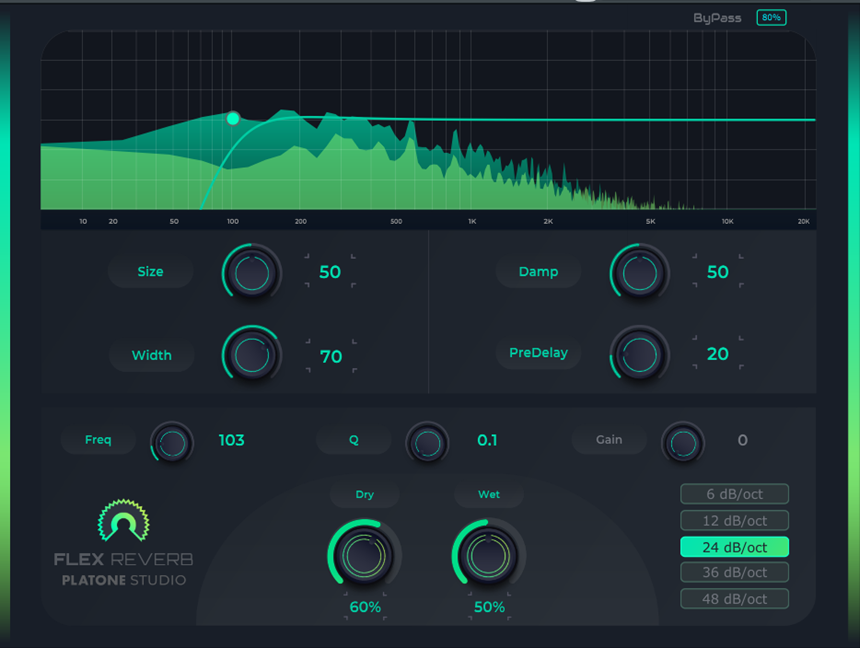

Flex Reverb is a versatile reverb plugin that you can use on various styles and genres of instruments, elements, and songs. It has a fairly straightforward GUI that features a waveform view of the input signal and an equalizer by which you can manipulate the frequency content of your wet or reverb signal. You can add up to four different EQ filter curves by simply clicking on the curve.
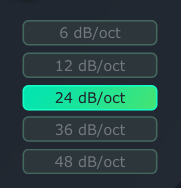
Two of the four curves are bell curve filters; one is a high pass, and the other is a low pass filter. For the bell curve filters, Flex Reverb lets you control the frequency, Q-value, and gain for the filters. However, for the high and low pass filters, you can set the slope (6, 12, 24, 36, or 48 dB/oct) and control the frequency and Q-value but not the gain.
Right below the Waveform and EQ are the main controls: Size, Width, Damp, and PreDelay. The Size parameter lets you adjust the room size or reverb length. This feature in FLEX Reverb is quite unique, as you can change the reverb style by adjusting this Size parameter.
Note that this EQ is only applied to the wet signal, not the dried signal. That lets you shape your reverb however you want, remove any unnecessary frequencies, clean any mud from it, and create a reverb sound that pleases your ear. The reverberation profile, influenced by room size, varies across types such as Hall, Chamber, Room, and Plate reverbs, each emulating distinct acoustic environments.
Hall reverb replicates large concert halls with a long tail, Chamber reverb mimics small spaces like bathrooms, Room reverb emulates medium-sized spaces, and Plate reverb produces a bright, full sound through artificial means involving a vibrating plate and a magnet.
Tip: Keep the Size value high for a Hall reverb effect, small for a chamber effect, and medium for a simple room-like ambiance.
Additional features include Pre-delay, determining the time gap between the original sound and the onset of reverb (larger values indicating a larger room), Damping for adjusting high-frequency absorption, providing a warm tone, and Width for the setting stereo width.
Moreover, you can control Dry (original sound volume) and Wet (modified sound volume), fine-tuning the balance between the two. Further, regarding the interface, you can also resize the plugin between 80%, 100%, and 150% values.
Now, moving to the application side of things. For me, the best use of the plugin was to add more width and weight to my sounds. The reverb is pretty decent for a free plugin and has plenty of customization options. However, it sounds slightly digital and may also sound artificial if not used correctly.
For vocals, I would use this plugin for short reverb and combine it with a more natural-sounding long reverb plugin. When I applied this on a vocal track, I loved how it added a deeper and more spacious layer and substance to the vocals. Also, if you’re going for a more digital Daft Punk-style vocal texture, this reverb would do wonders.
Now, on instruments, Flex Reverb can work well on synthesizers and guitars, but I am not too sure how appropriate it would be for a traditional piano sound. You can also use it to add more depth and sense of space in your percussions and samples, especially for more contemporary pop and hip-hop productions.
It’s also important to note that Flex Reverb has the required bright, lush, and smooth characteristics that you look for in a plate reverb. It has the potential to make your productions sound more Classic Rock, the 60s/70s Pop, and like other genres that require that distinct pate reverb tone. The best part about Flex is the detailed customization you can do with it to set the reverb to produce the kind of sound you want.
In conclusion, Flex Reverb is a powerful free tool for producers seeking detailed control over reverb characteristics. Its versatility, combined with the range of customization options, makes it a ‘must try’! It is available for Windows and Mac operating systems in VST, VST3, and AU plugin formats.
Download Platone Studio FLEX Reverb here
Download the FLEX Reverb manual here

The Integraudio Editorial Team consists of experienced music producers, audio engineers, and plugin enthusiasts dedicated to providing in-depth reviews and guides for music production software.