
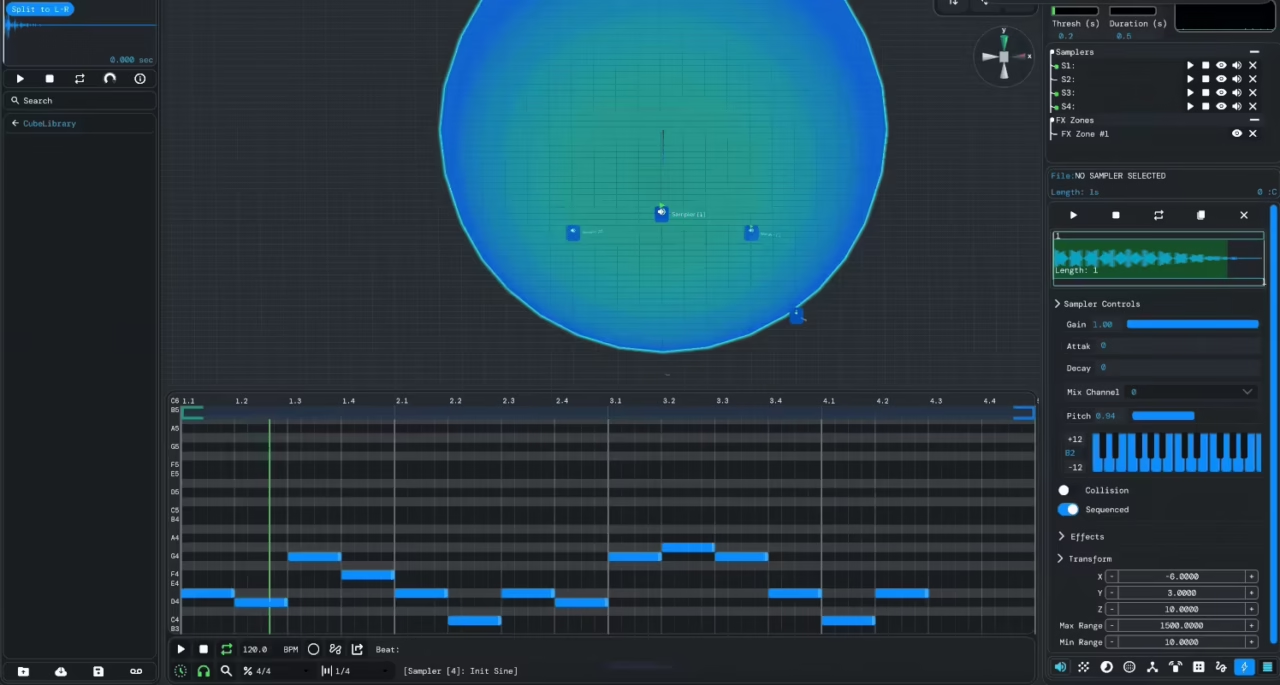
If you’ve ever wished your DAW felt less like accounting software and more like a living playground, Audiocube delivers exactly that.
Instead of sticking to the standard piano rolls and mixer lanes, it throws you into a space filled with emitters, sound walls, and ripple devices that bounce off and react to each other. It’s equal parts synthesizer, experiment, and game engine.
When I first opened it, I wasn’t scrolling through presets or fine-tuning filters, I was setting little systems in motion and watching sound literally bounce, collide, and morph. Within minutes, samplers were triggered by moving particles, reverbs were shaping an imaginary acoustic space, and textures were practically building themselves. It felt more like a physics lab crossed with a recording studio than any DAW I’ve used before.
The turning point for me was how fast the chaos turned musical. I started off spamming emitters just for fun, but suddenly I had this evolving, rhythmic soundscape locked to a sequencer and drenched in spatial effects. It’s experimental for sure, but also surprisingly practical if you’re into ambient, cinematic, or generative styles.
| Feature | What It Does | My Take |
| Samplers | Load sounds, tweak controls, and process with built-in effects | Super quick to drag in samples and start mangling without extra plugins. |
| Emitters | Physics-based devices that “shoot” notes which trigger sounds on impact | Felt like playing a game and composing music at the same time. |
| Tickers | Pulse engines that send out constant triggers at adjustable intervals | Perfect for adding structure when emitter chaos got out of hand. |
| Sound Walls | Spatial modules that simulate reflections, occlusion, and acoustics | Built an imaginary 3D room around my sounds, super immersive. |
| Effect Zones | Drop-in areas that apply reverb, flanger, echo, etc. | Moving sounds in and out just to hear them morph was dangerously addictive. |
| Sequencer | Provides traditional timing and control over devices | Great for keeping everything grounded and musical. |
| Built-in FX | Includes reverb, echo, flanger, mastering tools, and more | Not filler at all, gave me polished textures without leaving Audiocube. |
| Recording | One-click record to capture your whole session and export | Reassuring to know I could lock randomness into a usable take instantly. |
| Themes | Visual customization for the interface | A small touch that made the workflow feel personal instead of sterile. |
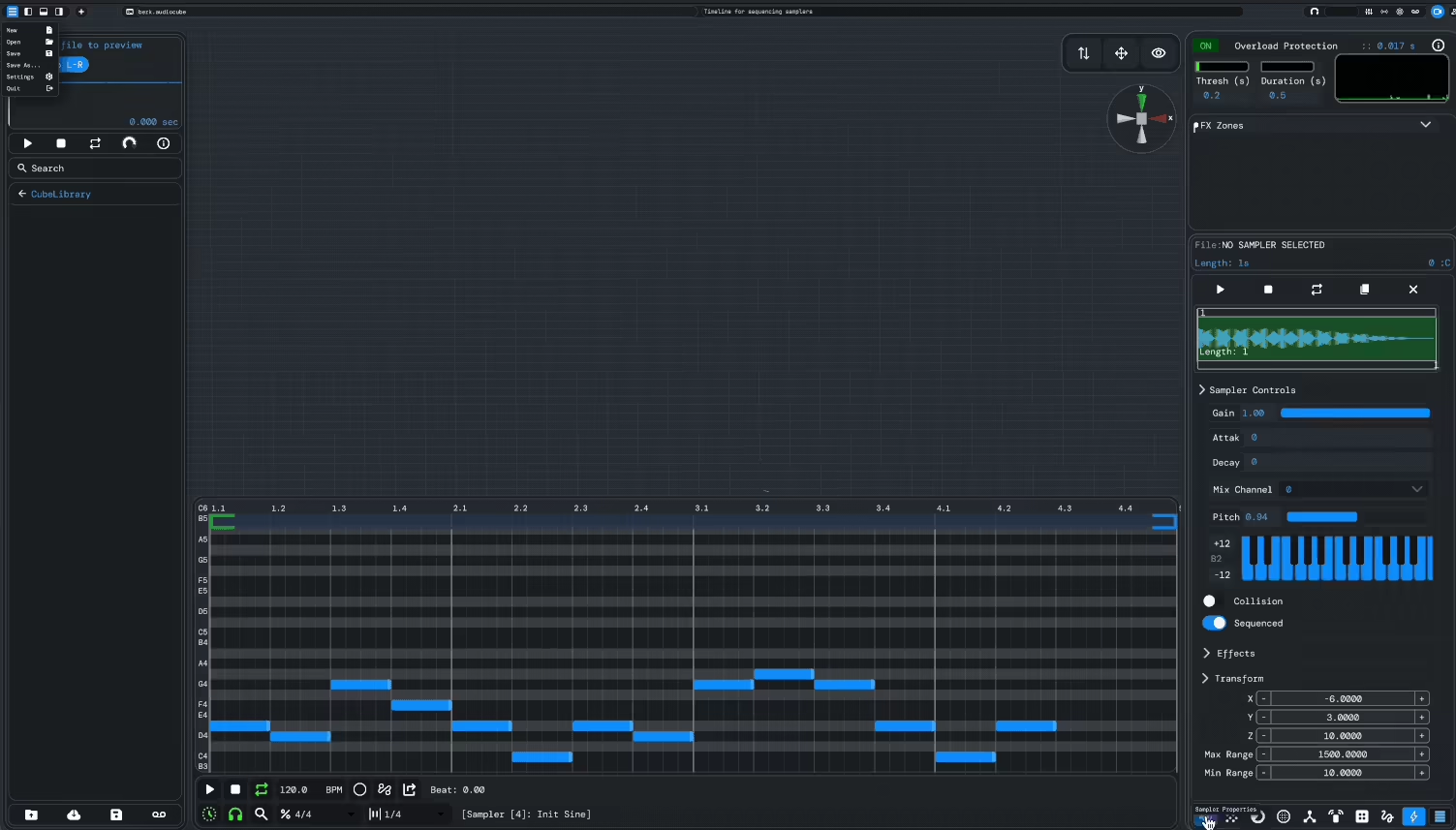
Features
- Samplers
This is where I started, and they felt instantly familiar but way more playful. I could load a sound, tweak filters and envelopes, stack effects, and even clone samplers to move multiple devices together. Building something complex in just a few clicks felt effortless.
- Emitters
This was the first time I felt like I was literally making music with physics. Emitters shoot out sound triggers that collide with objects, and each hit sparks playback. It’s unpredictable in the best way, and I’ve honestly laughed at some of the happy accidents it created.
- Tickers
If emitters bring chaos, tickers bring order. They act like pulse engines, spitting out steady triggers at any interval I set. I loved using them to lock down grooves while emitters went wild in the background, giving me a perfect balance of structure and randomness.
- Sound Walls
These completely blew me away. They simulate spatial environments, adding reflections, occlusion, and reverb that make it feel like I’ve dropped my track into a real room. Cranking up reflections or tweaking occlusion instantly shifts the vibe, and it’s insanely addictive.
- Effect Zones
Think of these as playgrounds for audio. Drop a sound inside and it instantly warps, bends, or transforms depending on the effects stacked. It felt less like mixing and more like sculpting, constantly pushing me to experiment beyond my usual habits.
- Sequencer
This ties everything together without locking me into rigid grids. It’s lighter and more experimental than a traditional DAW sequencer, and honestly feels like a sonic sketchbook. Perfect for giving ideas shape while still leaving space for chaos.
- Built-in Effects
Audiocube comes packed with reverb, echo, flanger, and plenty more, all ready to slot into any device. I didn’t need third-party plugins to get lush textures, it was all right there, from clean tones to spaced-out soundscapes in seconds.
- Recording & Export
Recording felt seamless. One click captured everything I built, and exporting was painless. Jamming with emitters and tickers, then listening back like I’d recorded a live performance, gave the whole process an organic flow instead of a sterile one.
- Themes
A small but surprisingly impactful touch. Audiocube includes multiple visual themes, and swapping palettes actually shifted the mood of my workflow. A dark mode for late-night sessions? Yes please, it kept things fun and easy on the eyes.
Interface & Workflow
Interface
Launching AudioCube felt like stepping into a futuristic music lab. Instead of the usual flat grids and endless sliders, I was greeted by a sleek 3D workspace with glassy, semi-transparent panels that made everything feel clean and spacious. The resizable windows and modern look give it a freshness most DAWs can only dream of.
The drag-and-drop design makes importing audio or MIDI effortless. I could literally grab a file from my desktop, drop it into the space, and instantly see it appear as a new device. Navigating around the 3D environment was smooth, zooming, rotating, and shifting views felt natural, even when juggling multiple devices.
What really stood out was the dynamic visual feedback. Samplers, emitters, and logic boxes all react in real time, so I wasn’t just hearing changes, I was watching them unfold. That kind of visualization didn’t just look cool, it actually helped me make faster and smarter creative decisions.
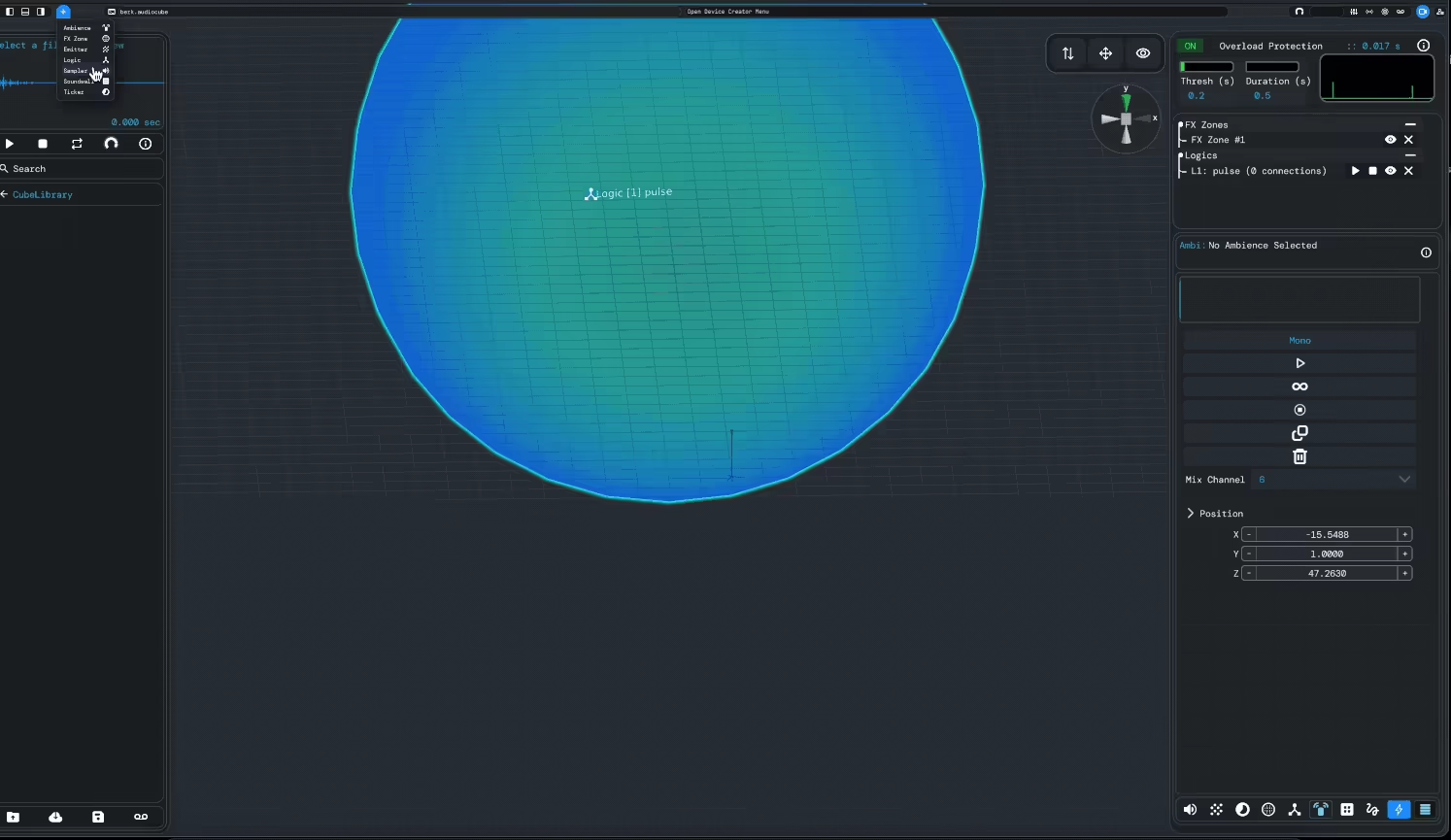
Workflow
Once I started building, I realized AudioCube completely changes how I think about making music. It strikes this rare balance between precision and playfulness. I could toss in emitters, sound walls, or effect zones and just watch them interact, almost like sculpting sound in real space.
The sequencer and MIDI editor are woven seamlessly into the 3D setup, letting me create patterns for samplers and emitters, then immediately hear how they work in context. Editing loops, duplicating notes, or tweaking timing felt intuitive, with none of the clunky friction I’ve felt in some traditional DAWs.
Recording and playback were just as smooth. I could perform directly with devices, hit record, and capture everything in real time. Even when I went wild with generative setups, the visual layout kept things manageable and surprisingly clear.
First Impressions & Sound
The first time I opened AudioCube, it felt like stepping into an entirely new sound universe after years of staring at Logic’s flat timelines. Instead of static tracks, I was in a 3D environment where I could drop audio sources anywhere in space and watch my music take shape. Just moving samplers and emitters around, seeing nodes collide and trigger sounds, felt more like playing an instrument than working in a DAW.
I started small with a synth loop, scattering emitters across the room and tweaking their gravity and collisions. The result was instant: evolving rhythms that responded dynamically. Adding a sampler with reverb and delay gave the loop depth, and even with complex interactions, the sound remained clean and cohesive.
Sound Walls and Effect Zones took it further. I shaped a virtual room with reflective walls, added ambient emitters, and started hearing real-time spatialization. The acoustic simulation included reflections, occlusion, and distance filtering. Enabling HRTF binaural mode over headphones made the spatial experience even more immersive.
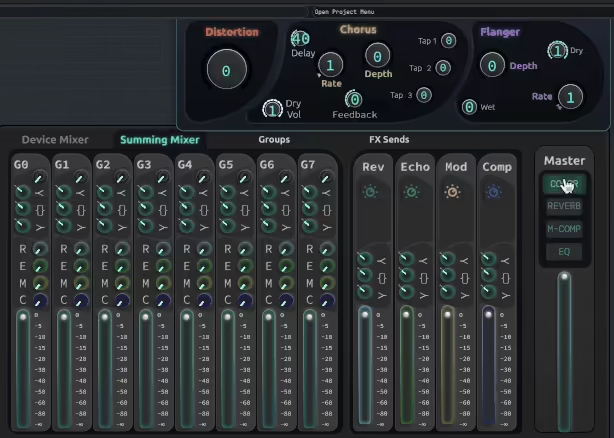
Then I went generative. Combining tickers, logic boxes, and emitters created evolving soundscapes with both randomness and structure. Small adjustments like rotating devices, shifting paths, or tweaking parameters led to entirely new sonic textures. It supports both structured composition and open-ended experimentation.
Adding a melodic sampler on top of this setup demonstrated how deep the spatial mix could go. The 3D interface allowed precise control over width, height, and distance, far beyond traditional stereo panning. Even the exported WAV file preserved the spatial detail built inside the environment.
AudioCube offers a different way to work. Whether for crafting generative textures, using the MIDI editor, or adjusting spatial mixes, the tool stays functional, flexible, and clear.
Performance & Compatibility
AudioCube is built to run smoothly across platforms while juggling complex 3D audio projects. In my testing, even big sessions with multiple emitters, samplers, and effect zones barely touched my CPU. The standalone design means no plugin conflicts to worry about, and native builds for Windows, macOS (including Apple Silicon), and Linux keep performance consistent everywhere.
Its spatial audio engine, MIDI sequencing, and physics-driven devices all run in real time, making generative soundscapes and immersive environments practical without pushing your system to the edge.
| Feature | Details |
| Platforms | Windows, macOS, Linux |
| Supported Hardware | CPU: Intel/AMD multi-core or Apple Silicon; RAM: 8GB+ recommended; GPU: OpenGL compatible |
| Software Format | Standalone application |
| Import Formats | .WAV, .MP3, .MID, .audiocube (project files) |
| Export Formats | High-fidelity .WAV with full spatialization and binauralization |
| MIDI Integration | Full MIDI editor, MIDI clip import/export, external MIDI controller support |
| System Load | Efficient real-time processing; low CPU usage even with heavy setups |
| Cross-Platform | Native builds for each OS; consistent real-time performance and spatial fidelity |
AudioCube’s efficient engine and cross-platform optimization make it a great fit for musicians, sound designers, and experimental composers who want immersive, spatially precise workflows without worrying about performance bottlenecks.
Last Words
Audiocube is a full 3D audio playground. From the moment I started placing sounds in its virtual space, I felt like I was stepping into an entirely new way of making music. The mix of generative devices, Ripple spatial engine, and the MIDI timeline makes experimenting feel fresh and exciting.
What I love most is the freedom to escape flat, linear workflows. Tweaking soundwalls, animating emitters, and exploring effect zones made every session feel like building my own little sonic universe. It’s hands-on, playful, and endlessly inspiring.
For anyone curious about spatial audio, experimental sound design, or generative music, Audiocube is both deep and approachable. Whether you’re shaping ambient soundscapes or composing complex 3D sequences, it transforms projects into something different!

Berk is a multi-instrumentalist musician from Istanbul, Turkey. He has been playing guitar, handpan, and percussion for over ten years, developing a sound that blends melodic sensitivity with rhythmic depth.
He began his musical journey as a teenager, learning guitar and performing in several bands. In 2016, he discovered the handpan, an instrument that immediately resonated with him on a deeper level and gradually became central to his artistic identity.
Since then, he has performed in streets, festivals, bars, and concert venues across different countries, connecting with diverse audiences through both intimate and large-scale performances.
Alongside his live work, Berk is deeply involved in studio production. He works from his home studio, where he composes, records, and produces his own music. His studio serves as a creative space for layering handpan, guitar, and percussion with modern production techniques, allowing him to shape fully realized, atmospheric compositions from start to finish.
His music explores a wide range of genres and textures, combining organic acoustic instruments with detailed studio production to create immersive and expressive soundscapes.