

We’ve done the research and put together a list of 7 of the best multiband compressors and added 7 free and 3 bonus plugins.
Before we get into the list, here’s some uses for multiband compressors. This is so you can bring to mind situations where a multiband compressor could be helpful in your particular workflow. Once you have a specific goal in mind, then you can decide which multiband compressor in our list fits your needs best.
A multiband compressor is a set of regular compressors, each of which only applies over a specific range of frequencies assigned by the user. Each range of frequencies is called a band, and processing the dynamism of each band allows for a level of control otherwise unachievable.
It could be used for many things, some of which are:
- Sculpting sound
Multiband compressors are often helpful for reducing muddy frequencies on synth pads, guitars, and other backing instruments. They are preferable over EQs as multi-band compressors work dynamically, so they can be set not to change the tonality of the instruments too much.
- Tightening up busses
Whether we are talking about drum busses or instrument sub-mixes, multiband compressors can significantly help tighten up the sound. Compressing the low frequencies with ample attack time ensures your mix doesn’t sound muddy at the low end.
- Vocals
Multiband compressors have often been used for vocals as a de-esser for decades. It can also help keep the low end tight and add airy character to the high frequencies.
- Manipulating full mixes
By separating the frequency spectrum based on individual instruments’ frequency ranges, you could use the multiband compressor to compress and gain-stage full mixes. Mastering engineers have often used this technique to achieve great masters even without access to the actual mix project.
Note: To keep this article concise, we’ve provided a brief overview of each plugin. For complete details and features, we recommend checking the official product pages.
Now let’s have a look at the
7 Best multiband compressors
available in 2026 and the features each of them offer:
Minimal Audio Fuse Compressor

The “Minimal Audio Fuse Compressor” offers multiband compression, allowing you to target specific frequency ranges independently.
It’s known for its transparent and natural sound. It effectively tames dynamics without introducing unwanted artifacts or coloration, making it suitable for various audio applications. The intuitive user interface makes navigating and dialing the desired settings easy. You can quickly adjust compression parameters, making it suitable for beginners and seasoned professionals.
The plugin provides visual feedback through its graphical user interface, aiding in real-time monitoring of compression and gain reduction across frequency bands.
Key Features:
- Dual Compression
The plugin harnesses up to six bands of dual compression to craft diverse sonic effects. From subtle transparent cohesion to intricate enhancements, the possibilities are endless.
- Streamlined Workflow (Flow)
The Fuse Compressor offers you the ability to streamline the complexities of multi-band compression. Its functions, such as spectral tilt, macro ratio adjustment, and adaptive timing, enable you to concentrate on your music without becoming entangled in technical details.
- Pinpoint Precision
You can achieve surgical precision with mid-side processing, soft knee, channel linking, and individual band controls. Dial in your settings quickly and accurately.
- Versatile Presets
You get to explore over 40 presets covering classic control to unique configurations, providing instant inspiration for your sound.
- Dynamic Spectrum Display
Visualize your compression in real-time with the dynamic response curve, allowing you to monitor compression across the spectrum.
- Spectral Tilt and adaptive time
The plugin allows you to easily adjust multi-band dynamics distribution across frequencies, tailoring compression to your specific needs. You can automatically fine-tune attack and release times for each frequency band, achieving cleaner or more pronounced compression characteristics.
- Macros and Other Controls
Simplify multi-band compression with macro controls, adjusting thresholds and ratios for all bands simultaneously. You get to customize thresholds, ratios, makeup gain, bypass, and solo settings for each band individually, offering complete flexibility.
Compatibility:
VST3, AU, and AAX for Windows 10 or higher and macOS 10.13 or higher, 64-bit only.
Summary:
Fuse Compressor makes multiband compression genuinely approachable without dumbing it down — the Flow features (spectral tilt, adaptive timing) let you get musical results fast, while the full manual controls are still there when you want to dig deeper.
Softube Tube-Tech SMC 2B

Image: PluginBoutique
Tube-Tech SMC 2B emulates the hardware compressor SMC 2B, renowned for its smooth and musical sound.
This advanced multiband compressor features flexible control options and authentic tube warmth. It features 3 discrete optical compressors for low, mid, and high-frequency bands, allowing precise control over sound dynamics. You can independently adjust parameters for each band, including Threshold, Ratio (from 1.5:1 to 10:1), Attack, Release, and Gain.
Key Features:
- Customizable Crossover Filters
Utilizing 6 dB/octave crossover filters, the SMC 2B allows detailed focus on specific frequency ranges. The low and mid bands can be set between 60 Hz – 1.2 kHz, while the mid/high bands range from 1.2 kHz – 6 kHz.
- Advanced Processing Techniques
With features such as Mid/Side processing and Dual Mono operation, the SMC 2B introduces advanced processing capabilities.
- Comprehensive Effects Suite
The plugin includes parallel compression options via the Dry/Wet knob, granting you further control over the tonal balance. Additionally, the integrated sidechain input provides flexibility in managing dynamics.
Compatibility:
VST2, VST3, AU, and AAX for Windows 7 or higher and macOS 10.13 or higher, 64-bit only.
Summary:
A faithful, warm-sounding emulation of a genuinely respected piece of mastering hardware — strong specifically when you want tube character alongside multiband control, not just transparent processing.
Slate Digital MO-TT
More Info & Price (Trial Available)

The renowned preset OTT on Ableton Live’s multi-band compressor is synonymous with contemporary electronic music.
The effect adds clarity, punch, and body to just about any instrument using upward and extreme downward compression in order. You can find similar effects by various developers, including the beloved OTT freeware plugin by Xfer. However, they don’t truly attempt to give comprehensive control over the effect. Slate Digitals MO-TT seeks to change that.
MO-TT accurately recreates the iconic sound of the original OTT preset in Ableton’s multi-band processor. However, it also adds various features alongside a gorgeous user interface. The plugin features two modes: easy and advanced.
The easy mode is excellent for people who want to try the presets with the fundamental controls readily available. Conversely, the advanced mode (pictured below) offers a lot more control, like changing the band frequencies, boosting or cutting each band, etc.
Key Features:
- Band Customization
There are three bands in MO-TT, each allowing you to change its crossover frequency. Furthermore, the lowest and highest bands will enable you to change the frequencies of their outer ranges. So, you’re essentially getting a five-band dynamics processor, albeit the lowest and the highest bands don’t allow adjustments.
- Filter Slopes
MO-TT offers a global filter slope control that changes the steepness of all the bands’ crossovers. The control provides three options: 12 dB/octave, 24 dB/octave, and 48 dB/octave. Choose a lower value if you want adjacent bands to affect each other more, creating a gluing effect.
- Global Features
The plugin comes with several other global features and controls. The user interface provides a handy frequency spectrum analyzer that helps you customize the bands. Similarly, you’ll find a global input gain and a stereo link fader. The latter fades the plugin between stereo and dual-mono modes.
A pair of attack and release sliders simultaneously control the settings on all the bands. And you can switch between three Timing Style behaviors: classic, smooth, and smack.
- Preset Library
MO-TT includes three “quick set” presets: OTT, Hip Hop, and Vox. These are ideal for use in the easy mode, where you can adjust the mix amount per band and get instant results. However, if you want more changes, you can access the preset library by clicking on the folder icon at the top left.
Compatibility:
VST3, AU, and AAX for Windows 10 or higher and macOS 10.13 or higher, 64-bit only.
Summary:
If you’ve ever reached for the OTT preset inside Ableton and wished for more control, MO-TT is exactly that — the same iconic sound, with genuine depth added via the advanced mode’s band customization.
PSP oldTimer Multiband Compressor

A simplistic, vintage-styled multiband compressor from 2010, the PSP oldTimerMB is still one of the universal favorites.
What differs this plugin from the rest on our list is that it’s designed to look and sound like a vintage analog multiband compressor. Users of the PSP oldTimerME compressor will instantly recognize the musically colored sound of this plugin.
There are only three bands in this multiband compressor. However, don’t let the single-page, minimalistic layout throw you off — this plugin packs several modern features up its sleeves.
Key Features:
- Analog Sound
Being a vintage compressor, the character of the sound, of course, is the biggest feature of this plugin. The compressors themselves have a distinctive sound, but PSP has also added a Valve amp feature.
- Stereo Control
Each band has a Width knob, which lets you turn the band mono or wide using stereo enhancements. It is great for adding some stereo width to the mid and high frequencies 0f your mix bus while keeping the low frequencies mono.
- Nostalgic GUI
The vintage look gives the plugin an air of class. PSP has also made the GUI resizable using the option found at the top left. Despite having several knobs, the plugin is quite self-explanatory and should pose no issue in quickly getting up to speed.
- Multiple Slopes
The crossover slopes of the three bands can be adjusted as well. There are three options available: first, second, and fourth-order. The first is the most gentle and the fourth is the steepest. We would have loved to see each band having its own slope adjustment, but the one provided modifies all of the bands at the same time.
- Presets
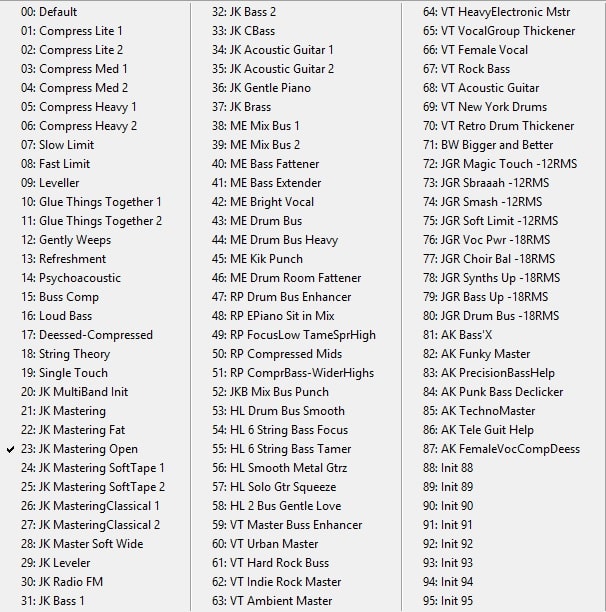
oldTimerMB offers 87 premade presets great for mixing as well as for mastering:
Compatibility:
VST2, VST3, AU, and AAX for Windows 7 or higher and macOS 10.9 or higher.
Summary:
A genuinely characterful vintage-style multiband compressor — the Valve amp feature and colored sound make it a strong choice specifically when transparency isn’t the goal, unlike most modern multiband tools.
FabFilter Pro-MB
More Info & Price (Trial Available)

FabFilter remains a leader in software plugin innovation and development with this ultra-flexible multiband compressor.
The most significant feature that sets this multiband compressor apart from the rest is its ability to create a free band anywhere you like. That means, if you want a band from mid to high-frequencies, there is no need to create three bands to set the middle one where you need.
Instead, you just create one band exactly where you want, and the rest of the frequency spectrum remains untouched.
Key Features:
- Six Bands
The FabFilter Pro-MB has a maximum of six bands. Each band could be created and moved freely, so there is no crossover between bands. Of course, if you prefer the traditional crossover system, the Pro-MB easily lets you snap the bands together as well.
- Multiple Processing Modes
This plugin has both compression and expansion modes. And FabFilter offers mid/side modes, stereo control per band, and gating to top it off.
- Global Mix
The Pro-MB has a global dry and wet knob that could be useful for NY/parallel compression. Your DAW can automate the knob as well. Automation of the mix knob is instrumental if you have to engage the multiband compressor in the middle of a song without the effect sounding obvious.
- Linear Phase mode
Speaking of using the compressor in the middle of a song, the Linear Phase mode offered by this plugin is remarkably smooth. With up to four times Linear Phase oversampling, moving the band around in the middle of playing audio will create no audible artifacts at all. This feature is also great for using the multiband in a mastering chain.
- Crossover Slope
As with most multiband compressors, the Pro-MB also offers multiple options for the crossover slope steepness. The steepness ranges from 6 dB per octave to 48 dB per octave. It is great to see a relatively large range for the steepness. It makes the plugin suitable for both subtle mastering uses to surgical sound sculpting.
- Great GUI
One of the best things about this plugin is that the graphical user interface is freely resizeable. And not only that, but the UI is also very intuitive to use. Almost every change you make in the parameters gets reflected in the beautiful, large graphical view.
Compatibility:
VST2, VST3, AU, and AAX for Windows and macOS.
Summary:
The free-band placement system genuinely sets Pro-MB apart from every other multiband compressor on this list — a strong all-rounder for both surgical mixing work and full mastering chains, especially with Linear Phase mode engaged.
Devious Machines Multiband X6
More Info & Price (Trial Available)

Devious Machines’ Multiband X6 is an advanced multiband compressor with zero-latency performance; it is suitable for tasks such as radio-ready vocals, pumping drum bus, and punchy mastering.
The plugin offers three compression modes – Smooth, Crunch, and Punch – each with its unique musical characteristics. While it excels at emulating the iconic 1176 compressor sound, its sonic capabilities go beyond that. Additionally, there’s an expansion mode that can enhance transients or reduce noise.
X6 brings a user-friendly experience with a simplified workflow. You can swiftly set compression levels using macro controls and fine-tune individual bands to your liking.
Innovative features like automatic threshold adjustment speed up the process, while smart gain compensation and automatic level matching ensure balanced levels, allowing you to concentrate on shaping your audio effortlessly.
Key Features:
- Smart Gain
Smart Gain compensation, available in two modes, ensures that your audio maintains a consistent level, preventing unwanted volume fluctuations. The auto-threshold function recommends suitable threshold levels for each band, simplifying the setup process.
- Visual Feedback
A spectrum analyzer display provides visual insight into your audio, helping you make informed compression decisions. In/Out level matching ensures seamless integration of processed audio with your mix.
- Deep Adjustments
You have the flexibility to choose between minimum or linear phase crossovers, with adjustable slope settings for each band, catering to your specific needs. Selectable lookahead and up to 4-times oversampling further enhance precision. The plugin supports mid-side processing, adding depth and dimension to your sound.
- Sidechaining
The external sidechain input feature permits advanced signal routing possibilities. Meanwhile, the ability to toggle between multiband and wideband/filtered sidechain modes empowers you to shape the character of the sidechain signal according to your preferences.
- Extensive metering options
Detailed metering options include RMS, peak, LUFS, and true-peak metering, empowering you to monitor various aspects of your audio’s dynamics.
Compatibility:
Multiband X6 is supported on macOS 10.11 or later, as well as Windows 10 or later. The plugin comes in various formats for your convenience, including VST 2, VST 3, AU (Audio Units), and 64-bit AAX for Pro Tools. Notably, it also offers Native Apple Silicon support, ensuring seamless performance on Apple’s latest architecture.
Summary:
X6’s automatic threshold suggestions and smart gain compensation make it one of the faster multiband compressors to dial in — a strong pick when you want professional results without a long manual setup process.
Softube Drawmer 1973

Softube is well known for its meticulous models of analog studio hardware, and this emulation of Drawmer Electronics’ 1973, a hardware multiband mastering processor, is no different.
Like the original hardware, this plugin is a FET multiband compressor with three bands. Softube has recreated all of its nuances under license and collaboration with the creator Ivor Drawmer himself. On top of that, they have also added mid/side mode and sidechaining, which weren’t available in the hardware.
The resulting plugin is a truly versatile and great-sounding compressor with the unmistakable sonic flavor of the hardware. The crossover slope is fixed and matches the original hardware, resulting in a subtly distinct sound.
Key Features:
- Great Sound
The most significant feature of this plugin is the sound. The Drawmer 1973 uses an emulated FET compressor, which has a peculiar drive to it. The plugin also has a “big” and “air” switch, which respectively adds character to the lows and wide, airy boost to the highs.
- Faithful GUI
The UI of the plugin is very pleasing to look at and easy to use. While there isn’t a modern spectral analyzer to help you visualize the changes you are making, we would argue that the features it provides for quick results render visual analysis unnecessary.
- Global Mix
As this plugin is as much an enhancer as a multiband compressor, the need for a global mix knob becomes paramount. Not to mention this global mix knob could also be used for NY/parallel compression.
- Side Chaining
This feature wasn’t available in the original hardware, but being able to sidechain external audio gives you a whole new set of possibilities. For example, you could use it to tighten some of the low ends of a bass guitar whenever the bass drum hits while keeping the mid and high frequencies free and open.
Compatibility:
VST2, VST3, AU, and AAX for Windows and macOS.
Summary:
A meticulous, license-backed recreation of genuinely respected mastering hardware — the added mid/side mode and sidechaining give it more flexibility than the original unit while keeping its distinctive FET character intact.
The 7 Best FREE Multiband Compressor Plugins 2026
Integraudio & Sixth Sample Cramit

Cramit by Integraudio is a free multiband compressor and distortion plugin.
The plugin combines the classic OTT sound with distortion effects, creating an interesting sonic character that you can use to add a new flavor to your mixes/productions. With an easy and user-friendly GUI and parameters like Distortion, Drive, Type, Pre/Post buttons, Speed, Depth, etc., you can use the plugin for dynamic processing and interesting morphing and distortion effects.
Key Features:
- Multi-band processing
Featuring a 3-band upwards/downwards compressor with expansion and solo/bypass options for each band, the plugin allows you to easily apply compression or expansion to specific frequency bands to achieve the desired sound effect. This feature can be particularly useful when balancing the mix or fixing issues with specific frequencies.
- Harmonic processing
Cramit also includes a distortion section with seven different types and mixing controls. This feature adds a unique character to the sound and can help you achieve the desired tonal coloration. The distortion unit can be particularly useful for enhancing the warmth and grittiness of recordings, adding more depth and dimension to the sound.
- Intuitional GUI
One of the standout features of Cramit is its user-friendly interface. The plugin features a simple and intuitive design that makes it easy to use, even for beginners. The interface provides insightful visuals that allow you to quickly and easily see the changes you make to the audio. This makes it easier to fine-tune your audio and achieve the desired sound quality.
- Presets
There are ten factory presets that the plugin comes with that provide you with a starting point for your audio processing. These preset can be modified and customized to suit individual needs and preferences, making it easy to get the desired sound quickly.
- CPU-efficient
The plugin balances functionality and usability while still being efficient in processing power. This is an important feature, as it ensures you can apply the necessary processing without encountering issues such as lag or system crashes.
Compatibility:
VST2, VST3, and AU for Windows and macOS.
Summary:
Cramit’s built-in distortion section gives it more creative range than a typical free multiband compressor — a strong pick specifically if you want tonal character alongside dynamics control, not just transparent compression.
Analog Obsession KolinMB

Analog Obsession’s KolinMB is a vintage multiband limiter/compressor and amplifier plugin.
It features adjustable attack and release times, allowing you to fine-tune the dynamics of your sound. KolinMB also includes program-dependent attack and release settings, ensuring that the plugin responds to your audio signal in a natural and musical way. With an attack time range of 1ms to 50ms, this plugin offers flexibility for shaping the character of your audio.
Key Features:
- Low and High X-overs
The KolinMB plugin by Analog Obsession presents low and high crossover control, allowing you to precisely define the frequency ranges where audio processing occurs. This feature provides detailed control over your audio, separating low and high frequencies for targeted manipulation.
- Comprehensive controls
KolinMB offers Attack, Release, In/Out levels, Mix knobs, and gain reduction meters for each band. This extensive parameter set lets you sculpt the dynamics and timbre of individual frequency bands with precision.
- Analog Warmth
One of KolinMB’s standout qualities is its ability to deliver an analog sound. The plugin’s design and processing algorithms aim to replicate vintage analog gear’s warm and characterful qualities, providing a classic and sought-after sonic signature.
Compatibility:
VST2, VST3, and AU for Windows and macOS.
Summary:
A genuinely warm-sounding free multiband compressor with real program-dependent behavior — strong for adding vintage analog character rather than clean, modern compression.
Xfer Records OTT

Hailing from the creative minds of the makers of Serum synth, the OTT is an easy-to-use multiband enhancement plugin that needs no introduction.
You’d have to be living under a rock not to have heard about OTT at least once somewhere on the internet. This great freeware by Xfer is a preset multiband compressor that gives you a super-simplified interface and spectacular sound.
People have used it on aggressive bass synth, leads, sound effects, drums, and sometimes even the master channel. If it sounds good, it belongs there, we say.
Key Features:
- Quick Results
The preset OTT uses under the hood is great at delivering results. The lows get tightened, the mids are tamed, and the highs get clearer with the fewest knob tweaks. For people who aren’t experienced, this plugin should be the easiest to get results from.
- Lightweight
OTT is light enough on the CPU to be used multiple times in a single project. Trying it out on various instruments and vocals makes it one of the most fun plugins to use.
- Multiple Processing Modes
It has an upward compression and a downward compression mode with individual dials for controlling the amount processed.
Compatibility:
VST2, VST3, and AU for Windows and macOS.
Summary:
If you only try one free plugin from this whole list, it should probably be this one — OTT’s simplified interface delivers an instantly recognizable, genre-defining sound with almost no learning curve.
J1000 MCS6

An out-of-the-box freshness in an ocean of ordinary.
If there were one word we would use to describe this plugin, it would be different. Instead of the traditional use of crossovers and bands to give you a multiband compressor, this one goes down a very different route of “serial stages.”
Simply speaking, there are six stages that work serially. This means that if you were to create two stages with bands that overlap the same range of frequencies, it would apply the compressor/saturator you use twice, serially. If the stages’ bands never overlap, you will have a regular multiband compressor/saturator.
Key Features:
- Six Serial Stages
There are six stages, each of which can have a filter or a band. The filter has full range, lowpass, high-pass, band-pass, and notch filter options. The band option works just like any other multiband with crossovers. Another interesting thing is that you can have multiple filters per stage as well.
- Input Filters
The plugin also features a low cut and a high cut feature on the master input. This could be useful for removing unwanted frequencies from the beginning, so there is no confusion while using the complex stage system.
- Compression and Saturation
Each stage can have a compressor and a saturator. The saturator adds asymmetric saturation based on the compressor’s parameters. This could be great for adding character to the low frequencies or airy harmonics on the high end.
- Stereo Control
Each stage also has a stereo width control ranging from zero percent to two hundred percent, where zero means mono and two hundred means twice the stereo width. If your mix is having trouble in the correlation reading, adding this plugin and lowering the stereo width at the low end could help greatly.
- Detailed GUI
The GUI is notable for a free plugin. A large PeakScope shows a graphical representation of your input, output, and gain reduction over time. The parameters are all placed logically and should give no issue while operating.
Compatibility:
VST2 and VST3 for Windows.
Summary:
Genuinely one of the more inventive free dynamics tools available — the serial-stage design lets you build processing chains a traditional band-based multiband compressor simply can’t replicate.
DYNASAUR Analog Obsession

While not quite a multiband compressor, this is a terrific tool for taming peak frequencies in a mix.
The Dynasaur is a dynamic EQ. So, instead of having bands, it has shelves and peaks like an equalizer. However, each of them has a compressor. This makes it ideal for handling peak frequencies for which a multiband compressor would be overkill or not precise enough. The simplistic layout of the user interface is also a welcome element.
Key Features:
- Five Bands
There are a total of five bands in this dynamic EQ. Three of them are peak filters, and the remaining two are shelf filters. The peak filters have a huge range of Q-factor, making them versatile for both broad sound shaping and precision editing. Similarly, the shelf filters also have their own Q-factor to control the slope steepness.
- Multiple Modes
Each band in the plugin can be set to Peak mode or RMS mode. You could find that using RMS mode for low frequencies is helpful to tame them better, or perhaps for mastering too.
- Gain Reduction Meter
Each band has its own gain reduction meter, stylized to look like classic needle meters.
Compatibility:
VST2, VST3, and AU for Windows and macOS.
Summary:
Less a multiband compressor and more a dynamic EQ, and better suited for it — a strong choice specifically for taming problem peak frequencies where a full multiband compressor would be overkill.
Cockos ReaXComp

This incredible free plugin from the developers of REAPER has a surprise.
You could say that we saved the best for last in the free plugins list. The ReaXComp by Cockos is a pure multiband compressor with unlimited bands. While about as appealing to the eye as Windows 98, this plugin sure does pack a punch with its customizable spectral analyzer, controls in the graph, detailed meter readings per band, and extremely transparent-sounding filters and compression.
Turning off Tabs at the bottom right lets you work entirely with the analyzer window without the faders. This is great for fine-tuning your crossover frequencies while getting a visual response.
Key Features:
- Unlimited Bands
The ReaXComp has an unlimited number of bands. And there are straightforward Add Band and Delete Band buttons that let you adjust the number of your bands. Each band can be as narrow as you want and as wide as feasible.
- Lightweight
If there’s one thing Cockos can do, it’s saving CPU. The ReaXComp, compared to many other multiband compressors, barely consumes any CPU resource at all. So, with a moderately powerful computer, you should be able to use as many instances as you need per project without worrying about taxing your CPU at all.
- Adjustable RMS size
Each band has its own input RMS window size. Setting it zero milliseconds will make it act instantaneously (peak detection), while setting it to thirty will make it behave like a traditional RMS compressor.
- Text Parameters
Each parameter has a text box next to it, so you can simply type in the desired frequency or other value with ease. The ReaXComp has yet another trick up its sleeve here — if the fader only takes the value up or down to a certain extent, you could use the text box to make it any value you want.
- No-nonsense GUI
The look of this plugin can be a little hard to get used to. However, based on functionality, the user interface really does do several things right. The analyzer section has many options to be modified, such as the analyzer slope, band control button size, grid visibility, and so on.
Compatibility:
VST2 and VST3 for Windows and macOS.
Summary:
An unlimited-band, genuinely transparent multiband compressor that costs nothing — the dated interface is a small price to pay for this much flexibility and CPU efficiency in a free plugin.
Waves StudioRack

StudioRack, Waves’ plugin chainer, benefits die-hard Waves enthusiasts because it can host plugins from other manufacturers.
StudioRack is a plugin utility originally launched in 2014 by Waves and recently upgraded to allow users to create chains of plugins. The goal is to view them as a unified whole rather than a collection of unrelated plugins.
A processing chain for the vocals or the percussion bus is required. Alternatively, you may build a multi-effects rack to simultaneously process delay, reverb, and pitch shifting. StudioRack is perfect for projects like these.
Key Features:
- Interface
StudioRack can be used like any other effect plugin in your favorite audio editing software. A plugin, parallel processing split, or multiband split can occupy each of the eight available slots in each instance. Copying and pasting plugins and presets are as simple as dragging and dropping.
- Parallel Processing
Multiband channels can be separated using the plugin, supporting as many as five separate frequency bands per instance. It’s now possible to make your multiband plugins with this method.
- Macros
Since StudioRack can store many plugins, it could become unmanageable if too many were to be kept in one area. So, in a pleasant twist, it comes with eight customizable macros that you can use to keep everything under control.
- More Processing Power
You can use as many plugins as you like while mixing intensive sessions without worrying about crashing your computer. StudioRack facilitates the migration of plugin processing from a local PC to a high-powered SoundGrid DSP server whenever you’re ready to switch.
Compatibility:
VST2, VST3, AU, and AAX for Windows and macOS.
Summary:
Less a compressor itself and more a chaining utility that enables multiband-style processing using other plugins — genuinely useful if you already own several Waves tools and want to combine them into one manageable rack.
Bonus Plugins:
Waves C6
More Info & Price (Trial Available)

Aptly named for its six bands, the Waves C6 is a trusted classic from a long-standing name.
This multiband compressor is excellent for both precision sound manipulation and broad shaping. Its low latency performance makes it great as a de-esser for live use as well.
The uniqueness of this plugin is that it has four crossover bands and two dynamic EQ-like floating bands. These two floating bands could be used for pinpoint-accurate editing, making this plugin highly versatile in any use case.
Key Features:
- Four Crossover Bands + Two Floating Bands
The four crossover bands function as a regular multiband compressor that we are all familiar with by now, whereas the two floating bands are essentially two Dynamic EQ bands.
- Multiple Processing Modes
Each band can be set to function as a compressor or an expander.
- External Sidechain
This plugin also supports sidechaining, which is handy for dynamically cleaning up your sound only when needed.
- Master Parameter Controls
On the left side of the plugin, you will find a list of the parameters you can control per band. The enlisted labels for the parameters double as the master parameter controls. That means if you tweak a parameter using one of the labels here, it will modify the parameter for each band as well.
- Intuitive GUI
Since the twelfth version of the Waves plugins release, you can now resize the GUI freely. The clean layout of the parameters, the handy spectral view, and the resizeable interface together make for a comfortable experience, indeed.
Compatibility:
VST2, VST3, AU, and AAX for Windows and macOS.
Summary:
The combination of four crossover bands plus two floating dynamic-EQ-style bands gives C6 genuine versatility — equally strong as a precise de-esser or a full mix-bus multiband compressor.
Blue Cat’s Audio Dynamix
More Info & Price (Trial Available)
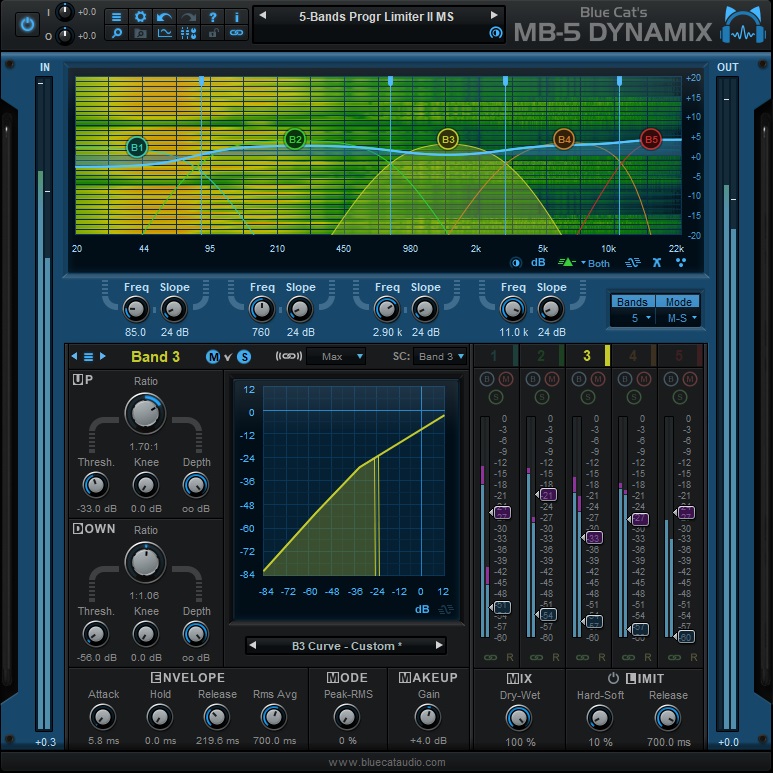
Dynamix is a versatile and flexible multiband compressor plugin by Blue Cat’s Audio.
For each band, it allows in-depth dynamic processing, with Ratio control, Threshold, Knee, and Depth controls. Plus, you can also adjust its envelope/ADSR, switch its modes between Peak and RMS, add some make-up gain, and adjust the Dry/Wet Mix knob. Lastly, it also has a switchable limiter with adjustable settings.
Key Features:
- Advanced Dynamic Processing
Blue Cat’s Audio Dynamix has various dynamic processing tools that allow you to shape the dynamics of your audio signal in a particular frequency range or band. It has a compressor, a limiter, a gate, an expander, and a transient shaper that allows you to flexibly adjust its dynamic range.
- Waveshaper
Waveshaper is a type of distortion effect that allows you to shape the audio signal’s harmonic content by altering the signal’s waveform. It can add character, warmth, or edge to the audio signal.
- Interface
The plugin has a user-friendly and intuitive interface that makes it easy to use and navigate. The interface is designed to give you easy access to the plugin’s features and controls. The interface is divided into three main sections: the processing chain, the control panel, and the preset manager.
- Compressor Types
The plugin has a comprehensive set of audio processing tools, including various compressor types, such as optical, RMS, and peak compressors, that allow you to control the level of the audio signal and reduce unwanted peaks or increase perceived loudness.
- Other features
There are a variety of limiter types, such as brickwall and soft limiters, that allows you to set an upper threshold for the audio signal and prevent clipping. It also includes a variety of expander types, such as noise and downward expanders, that allow you to increase the audio signal’s dynamic range and reduce background noise.
Compatibility:
VST2, VST3, AU, and AAX for Windows and macOS.
Summary:
Dynamix packs an unusually complete dynamics toolkit into one plugin — compressor, limiter, gate, expander, and waveshaper together make it a genuinely flexible one-stop option for multiband dynamics work.
Leapwing Audio Dynone 3

DynOne 3 is a five-band parallel compression plugin that adds zero aliasing, phase problems, or distortion. It’s highly transparent while offering no artifacts.
The modern algorithms of DynOne deliver quality and musicality in any track. The plugin has an exciting approach in dynamic control; instead of flattening the bigger transients, DynOne will make the lowest levels of the audio more protuberant.
Youcan select between the standard compression or the parallel compression modes for a different workflow, with both ways routing the signal to a separate dynamics processor.
Key Features:
- Settings
You can use many controls to set the plugin’s behavior. With Detection, you will operate the material’s peak sensitivity, 0 (RMS) a smoother response, and 100 (Peak) an aggressive response.
- Five Bands
Each of the five bands contains slopes that minimize any issues between the crossover frequencies. The bands fill all the frequency spectra and can be linked, soloed, stored in two different settings in the A/B comparison function, and disabled.
- Center-Side Mode
You can switch between two processing modes, Stereo and Center-side. Some extra controls will be present when the you toggles the center-side mode, like separate commands for the threshold, ratio, attack, and release values for middle and lateral signals.
Compatibility:
This plugin is available for Windows 8 or higher and macOS 10.10 or higher, both 64-bit only. It comes in VST 2/3, AU, and AAX formats.
Summary:
DynOne 3’s parallel-focused approach — emphasizing quiet detail rather than just flattening transients — makes it a strong, transparent choice specifically for mastering-grade dynamics work where artifacts need to stay inaudible.
Conclusion
That’s 17 multiband compressors covering everything from surgical mastering tools to instant one-knob character — the right pick really comes down to how much control you want versus how fast you need results.
If sound quality and flexibility matter most, FabFilter Pro-MB is genuinely hard to beat — the free-band placement system alone makes it worth the price for serious mixing and mastering work. For a warmer, more colored alternative, Softube’s Tube-Tech SMC 2B and Drawmer 1973 both bring genuine hardware character rather than clean transparency.
If you want fast, obvious results without deep manual programming, Slate Digital’s MO-TT and its free counterpart Xfer’s OTT remain genre-defining for a reason — dial in a preset and you’re most of the way there.
On a budget, the free options here genuinely compete with paid plugins. Cockos ReaXComp offers unlimited bands and real transparency at zero cost, while DYNASAUR is worth grabbing specifically for taming problem peak frequencies a full multiband compressor would be overkill for.
And if creative character is what you’re after rather than clean correction, Cramit‘s built-in distortion section and J1000’s MCS6 unconventional serial-stage design both push well beyond standard multiband processing into genuine sound design territory.
Whatever you choose, remember that a multiband compressor is a precision tool — it’s easy to over-process with this much control available, so start subtle and add more only once you can clearly hear why you need it.

The Integraudio Editorial Team consists of experienced music producers, audio engineers, and plugin enthusiasts dedicated to providing in-depth reviews and guides for music production software.