

Today we’ll take a look at the best vocoder plugins available in 2025.
A vocoder is a type of speech programming that examines and synthesizes the human voice for purposes such as audio compression, voice encryption, and, most notably, voice transformation.
For decades we’ve been trying to manipulate audio signals in the most complex, innovative ways possible. The audio synthesis showcases the most extreme manipulations among many audio effects, thanks to the iconic sounds it produces. They can be fresh, modern-sounding, and bring the perfect amount of innovation to a keyboard or even the human voice.
If that doesn’t ring a bell to you, think of Daft Punk‘s signature robot voices: that effect, heard on hits such as “Get Lucky” and “Harder, Better, Faster, Stronger,” is a vocoder doing its best to bring a synthesized aspect to the human voice.
Anyway, now let us walk you through our selection!
Top 6 Vocoder Plugins In 2025
1. Baby Audio Humanoid
Humanoid is a powerful vocal synthesizer, vocoder, and pitch correction tool that is specially engineered for immediate vocal tuning, filtering, and dramatic alteration.
This plugin offers a fresh perspective on vocal tuning and phase vocoding. It enables performers of all styles and proficiency levels to achieve a strikingly synthetic sound.

Key Features:
- Ultimate Vocal Processing
Humanoid consists of five different engines/windows: Pitch Corrector, Synthsize (Vocal synthesis), Filter, Utility (for cleaning vocals), and Effects (vocal fx). The UTILITY window in the plugin consists of effects like de-esser and gate. Similarly, the EFFECTS window has fx for stereo width, warble, buffer, and freeze.
Similarly, you can also add high and low-pass filters and adjust resonance, frequency, width, and gain for those filters.
- Pitch Correction
The Pitch window in the plugin lets you set the root note and key, quantize vocal timings, add robotic tuning, and change the formant of your incoming signal. It uses an FFT-based engine and technology to employ pitch correction.
- Vocal Synthesis
The synthesizer in Humanoid takes your audio input as a reference and lets you select the shape of the waveform, shift octaves and notes, and stretch the audio. Moreover, you can choose from 64 factory wavetables and import waveforms too.
- Presets
Humanoid is a deep and complicated plugin, but to get you started, it also has more than 180 presets. These presets can also give you great ideas for your vocal processing.
Compatibility:
Aberrant DSP Lair is compatible with Mac OS 10.11 and up (including Native Apple Silicon M1/M2 Compatibility) and Windows 10 or later operating systems with DAWs that support AU, AAX, VST, and VST3 plugins.
2. Arturia Vocoder V (Vocal Synth)
More Info & Price (Trial Available)
Vocoder V enhances the classic 16-Band Vocoder with additional synth, sampling, and modulation features.
The vocoder was first developed as a method of analyzing and synthesizing human speech, and it was also employed in the army to save bandwidth and encrypt radio broadcasts.
It wasn’t until the 1970s that someone recognized the music’s potential: Bob Moog’s classic 16-band vocoder made some of the most peculiar sounds in music history, from robotic voices to richly harmonized vocal lines.
Arturia’s Vocoder V pays homage to this great unit. This is a new voice-altering sandbox that blends carrier and modulator (synth and voice analyzer) into one excellent plugin, unlike average vocoders.
If you don’t want to sing, there’s a specialized sampler built-in that allows you to process any noises you want. This could be the missing ingredient of your track, as it mixes a voice analyzer, analog synth, and sampler.

Key Features:
- Analog bliss
Every component of the vintage 16-channel vocoder has been meticulously re-engineered using “True Analog Emulation” technology to sound and behave exactly like the original. This brings authenticity and classic tones to the plugin, taking the best possible reference for a vocoder unit as inspiration.
- Every tool you’ll need
The original unit of the 16-band vocoder required an additional synth to process your vocals, but that’s not a problem in Vocoder V. This plugin includes a synthesizer module, sample player, and creative upgrades, making it a complete vocoding and resynthesis toolbox. Create vowel-like synthesized sounds, resynthesized samples, or booming rhythms in addition to robot vocals.
- Chord mode
With 12 voicings to select from, including a custom one, you may instantly turn every note into a whole chord. This can create huge-sounding vocal lines and customized harmonies just by hitting a button located on the left side of the vocoder screen.
- Dual-oscillators and expression controls
Thanks to a familiar dual-oscillator analog architecture with envelope and shaping parameters, you now have doubled control over your vocoder’s sound in a single interface.
Controls such as waveform modifiers (“Square,” “Triangle,” and “Saw,” for instance) and a fixed button that removes the pitch control from the controller are a great addition, and so are the “Bend” and “Mod” wheels that allow you to fine-tune your performance dynamics right away.
Compatibility:
This plugin runs in macOS 10.13 or higher (64-bit only) and Windows 8.1 or higher (64-bit only). It comes in Standalone, VST, AU, NKS, and AAX formats and requires Open GL 2.0 compatible GPU.
3. Auto-Tune Vocodist (Advanced Auto-Tune Vocoder)
Auto-Tune Vocodist recreates the famous tone of vintage vocoders with all of Auto-power Tune’s and flexibility.
With Auto-Tune Vocodist, you may use your voice or a MIDI keyboard to regulate your vocoded audio’s pitch. A built-in 8-voice dual oscillator synthesizer is designed for ease of use, allowing you to get started effortlessly.
Alternatively, you can experiment with any external audio source using the sidechain input.
This powerful vocoder plugin brings models of your favorite old vocoders right to your DAW interface.
Plus, to help you get started, there’s a vast library of artist presets featuring P-Thugg (Chromeo), producer Buddy Ross (Frank Ocean), and electronic artist Rachel K. Collier, just to name a few.

Key Features:
- Vocal FXs
You can further customize your vocal lines very quickly with built-in vocal effects. For extreme vocal mutations, experiment with exotic embellishments like classic tube saturation, choruses, and ring mod. Controls like “Warmth” and “Voice Env” allow you to set the output effects simply by twisting a knob, and the results can be as organic as possible.
- Built-in Auto-Tune
You can tune your vocals all without leaving Vocodist’s screen because it’s the world’s only vocoder plugin with built-in Auto-Tune. Turn it down for a mild effect, or turn it up to blend the renowned Auto-Tune effect with vocoder sounds for a truly unique sound.
- Compatible with Auto-Key
Auto-Key and Auto-Key Mobile were designed to instantly recognize the key of any song from an audio file or a mic input. Auto-Tune Vocodist is fully compatible with this awesome add-on and can make you save time in the studio by automatically detecting your music’s key and submitting it to Vocodist with a single click.
Compatibility:
This plugin runs in macOS 10.14 to 11.x (64-bit only) and Windows 10 (64-bit only). It comes in VST3, AU, and AAX plugin formats.
4. XILS 201 Vocoder (Vintage Vocoder)
More Info & Price (Trial Available)

The XILS 201 Vocoder is based on the design and engine of the classic vintage vocoder.
It’s one of the best vocoder plugins with extensive effects, an in-built oscillator, and 20 bands of advanced vocoding. In addition, you can edit the filter resonance, and envelope sews rate in its vocoder section. The plugin also allows you to add pitch bend modulations and use them as a MIDI-controlled effect.
Key Features:
- Presets
The plugin has a great collection of presets you can sort by categories like Author, Feeling, Type, Style, Bank, or Projects. The preset management on it is simple, as you can easily browse through the presets, save presets, tweak them, and select different banks.
- Expansive Vocoder Architecture
XILS 201 consists of 20 finely designed filter bands that are great for vocal reproduction, along with automatic gain control, pitch tracking, variable knobs for different filters, a VOC switch, and vintage analog modeled effects like Input Gate, Pitch Tracker, Reverb, Delay, Chorus, Flanger, etc.
- Internal Synth
The plugin has a synthesizer, which can be used as a carrier signal. The synth section has an oscillator with level, pulse width, tune, and range parameters, a noise with level and filter parameters, and an LFO with frequency and tempo sync parameters.
- Silence Bridging
The plugin gives you access to a multi-band frequency-dependent Envelope Follower engine, which sculpts the audio based on its harmonic content, and is great for processing transient heavy sounds.
Compatibility:
XILS 201 is compatible with Windows 7 (and later) and MacOSX 10.8 (or later) and is available in VST, AU, and AAX plugin formats.
5. Polyverse Manipulator (Great For Vocal Sound Design)
More Info & Price (Trial Available)
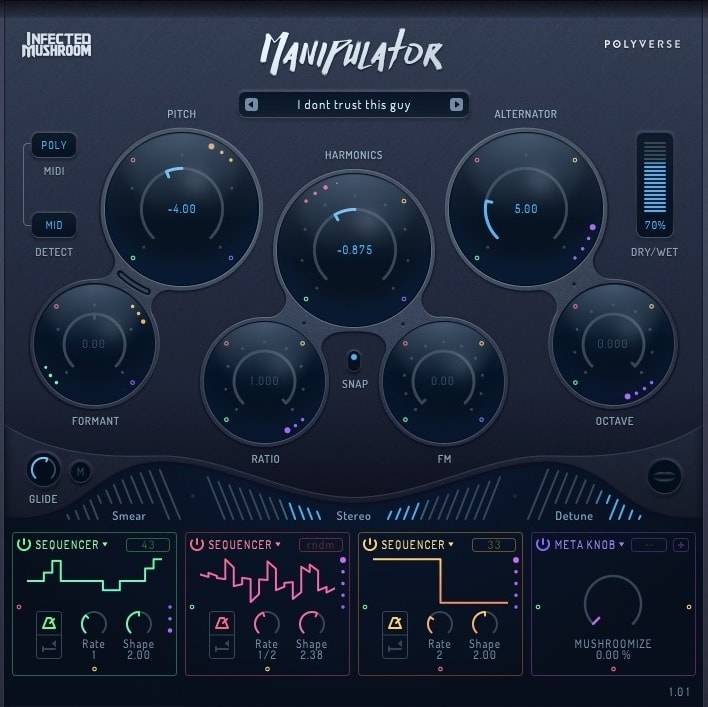
Manipulator has the ability to radically modify the tone and pitch of monophonic audio in previously unseen ways.
Thanks to Infected Mushroom’s sonic madness, the Polyverse Manipulator is guaranteed to make your audiences’ spines shiver. The algorithms in Manipulator revolve around five basic effects: altering pitch, formant, harmonics, as well as oscillating frequency modulation, and grains.
The MIDI capabilities, ideal for real-time performance whether or not you play keyboards, can expand the possibilities to fit your every musical idea. An innovative vocal synthesizer like the Polyverse Manipulator plugin is the next-step tool if you’re a performing vocalist or an electronic music producer, but it’s also great for creating soundscapes and textures as well.
Key Features:
- Supporting effects
Aside from the main effects based on the five algorithms listed above, some additional effects can further expand the sonic madness.
Controls for “Glide,” “Smear,” “Stereo,” and “Detune” are there to evolve your sound by the tweak of a knob. For example, the “Stereo” control can instantly enhance the stereo imaging of your signal so that the final result can sound even bigger and fuller than the original.
- Real-time pitch-shifting
Manipulator allows users to accept MIDI input in real-time and control pitch shifting with a MIDI controller on the go. This plugin can effortlessly transpose pitch and gives incoming audio a unique feel right when you play it.
And if used as a MIDI input, Manipulator can accommodate up to four polyphonic voices, so every chord or harmony can stand out in the mix.
- Made in collaboration
The vocal modification techniques used by Infected Mushroom are a big aspect of their sound. The majority of the vocals on their records have been twisted, manipulated, chopped, and highly processed in order to sound like synthesizers.
Manipulator has changed and evolved into what it is now because of the unique “artistic feedback” approach, in which the artists employ ever-changing prototypes to create their own music and expand this software’s possibilities.
- Detection control
This dedicated control located on the far left side of the screen allows you to set the pitch detection range with “Hi,” “Mid,” and “Low” options. For instance, each of these options is suited for specific instruments, such as implementing the “Low” setting on bass and low voices.
It’s important to remember that this plugin doesn’t track polyphonic signals well, so it’s best to just go for one note at a time.
- Cross-Modulation
The plugin allows you to use a single Modulation Source as an amplitude modulator for another. That helps you create complex sounds that would be unattainable any other way.
To use this function, drag the colored controls on the outer edge of any given modulation slot. You can use an LFO to modulate the Pitch parameters or an ADSR to control the Harmonics. You can also use the MIDI Velocity to make the Alternator respond to how hard you press the keyboard’s keys.
- Modulation Slots
The plugin offers you five modulation sources: Meta Knob, ADSR, MIDI, Follower, and Sequencer. The plugin lets you choose four to use simultaneously, each in one slot. You can, of course, add multiple instances of the same modulation source.
The Meta Knob can control various parameters and be saved with user-generated names in presets. ADSR is triggered by incoming MIDI notes and controls the Attack, Decay, Sustain, and Release of the input signal.
MIDI converts the information into a modulation signal, while Follower converts the amplitude of the source into a modulation signal and lets you control its attack and release. Finally, the Sequencer creates a triggered, or free-running, LFO.
Compatibility:
This plugin runs in macOS 10.6 or higher and Windows 7 SP1 or higher, both in 32 and 64-bit options. It comes in VST, AU, and AAX plugin formats.
6. iZotope VocalSynth 2 (Vocoder Synth FX)
More Info & Price (Trial Available)
This is an excellent sonic tool that handles past, present, and future creative vocal sounds.
VocalSynth 2 is a comprehensive vocal experience that adapts to your unique style, allowing you to explore a whole new universe of vocal possibilities.
This plugin is also a piece of iZotope’s software collection that allows for inter-plugin communication. VocalSynth 2 can interact with instances of other products, such as Neutron 3 and Ozone 8, for a variety of automated mixing and mastering operations when placed on a track in your session.
This can save up some significant work time and give a unique feel to your song.

Key Features:
- Five vocal modules
VocalSynth 2 offers five different modules dedicated to making your vocal line stand out in the mix. They provide adjustments, such as a “Drive” or “Clarity” control, that can expand every tweak to the human voice.
The “Biovox” module allows you to get characteristics like nasality, vocal shapes, and formants instantly, while the “Compuvox” puts a glitchy, computerized sound aspect to your vocals.
The other modules – “Polyvox,” “Vocoder,” and “Talkbox” – bring other elements, such as rich harmonies and a vintage style envelope modulation.
- Exclusive artist presets
There are four exclusive artist presets ready to expand your creativity: “Deezle,” “Jonny Hawkins of Nothing More,” “Computer Magic,” and “KillaGraham.” Each preset was developed with a specific soundscape in mind, going from an ethereal texture to powerful, aggressive vocal textures.
- Three processing modes
With exquisite algorithms, the “Auto” mode lets you instantly tune your vocals with real-time pitch correction, add extra voices, build harmonies, and smoothly blend your module configurations.
The other two processing modes, “MIDI” and “Sidechain,” allow for full control of your pitch when you play your controller (recreating a typical vocoder/talkbox experience) and the ability to use your audio signal as the carrier sound, allowing for any audio to “talk” and generate new, lavish sounds.
- Stompbox Effects
VocalSynth 2 gives you seven modulation effects that further enhance its capabilities. You can easily drag and reposition the effects within the chain to have one influence the other. Apart from the tried-and-true Distortion, Filter, Chorus, and Delay, the plugin also gives you a sequencer called Shred, a Ring Modulator, and a Transform function.
Compatibility:
This plugin runs in macOS 10.8.5 or higher (64-bits only) and Windows 7 or higher (64-bits only). It comes in VST2, VST3, AU, and AAX plugin formats.
Best Free Vocoder Plugin
1. Tal-Software TAL-Vocoder

The TAL-Vocoder is a free 11-band vocoder plugin with an envelope follower for each band.
Its algorithm is optimized for vocal processing and includes intelligent consonant identifiers designed to make speech clearer. The plugin has some analog-modeled components and a few all-digital algorithms, making it a modern plugin with a vintage soul.
Key Features:
- Carrier Controls
The basic timbre is created by any of the four generators in the Carrier section. You can use any one of the four or a combination of them. There, you’ll find Pulse and Saw waves, a Sub oscillator, and a noise generator.
These will use a VCO as the carrier for the Vocoder sound. Alternatively, you can use the left channel as the carrier by clicking the Input Mode button on the other side of the GUI.
- 11 Bands
The Vocoder section gives you faders for all eleven bands, which you can individually mix in volume. This lets you shape the sound and achieve classic or futuristic sounding robotic voices. You’ll find ESS Volume responsible for giving back definition to unintelligible vocals, among the other parameters.
- Chorus
On your way out of the plugin, you’ll find the Chorus button, which gives the 11 bands the final blend and make the overall sound even more vintage. This is reminiscent of eighties synthesizers and is very useful in several situations, including choosing to play the plugin like a synth.
Character & Sound:
In addition to the 11-bands and carrier modulators, the plugin also offers a Harmonic knob, which adds subtle harmonics to the sound, making it fuller. The Chorus effect also comes in handy, and the Polyphony capabilities are simply stunning.
Compatibility:
This plugin is available in VST and AU formats for Mac and PC.
Bonuses:
Image Line Vocodex (Classic Vocoder)
Only available with FL Studio
A straightforward voice manipulation tool that will bring that characteristic “robot quality” to your voice, as simple as possible.
Image Line developed an interesting version of the vocoder effect, with easy controls and an insightful interface that can help you better visualize what’s going on with your audio signal. All effects and tweaks are present here, and although some knobs might not be as intuitive as in other plugins, it’s fairly easy to get around after a few minutes of using it.
Vocodex controls the frequency band activity of another synthesized sound by examining the actual frequency band of your audio input and using it as a modulator. It then filters out the synthetic sound frequencies that aren’t present in the voice sound with a sequence of narrow-band frequency gates.
The result is a vocoder effect similar to that of a “talking synthesizer.”

Key Features:
Carrier synthesizer
Vocodex features a carrier synth among its features, based on the Sytrus synthesizing engine. Using mouse clicks, you may turn on and off the locking of keys to generate chords. When the interface is selected, it can be played manually by stealing any MIDI keyboard controller input.
The note or chord will persist until the next one is played when responding to a controller keyboard. This engine will pair nicely with MIDI controllers and get your vocoder effect just the way you want it.
- L-R encoding
Basically, this feature makes the left channel deal with modulation, while the right channel gets the carrier of the stereo input. By setting a numeric value from zero to 100, you can adjust how much of each band will act on your final sound and tail how the synthesizes will be applied to your voice.
- Bonus options
The “down arrow” at the screen’s upper right corner brings two “bonus” options: a “Detect Modulator Noise Level,” which analyzes the “MOD” input source for about two seconds and generates a modular noise level mapping, and a “Subtractive Denoising” that, when selected, reduces the modulator noise level from the same input.
- Mixer Section
At the top, you get faders and filters for the modulation and carrier inputs and noise. This lets you blend the effect and the source as you please. The SG controls are a Maximizer called “Soundgoodizer.” It is applied to the output and can control the vocoder’s sometimes unpredictable output levels.
- Pitch-Shifter
The knob lets you alter the pitch of the modulation input. Roll it to the left to lower the pitch and to the right to increase it. This will cause the vocoder effect to sound more masculine or feminine.
- Unison
This section includes three parameters: Unison Shift, Panning, and Order. The first controls the pitch shift between multiple Unison voices. Panning lets you narrow or extends the stereo width of the Unison effect. Finally, the Order detunes and pans up to five copies of the original signal. It is similar to a chorus effect.
Compatibility:
This plugin runs only in Windows XP or higher, both in 32 and 64-bit options. It comes in VST plugin format.
Waves OVox Vocal ReSynthesis
More Info & Price (Trial Available)
Next-generation voice-controlled synth and vocal effects processor.
The Ovox Vocal ReSynthesis isn’t your typical vocal processor. Do you want a vocoder? Ovox is capable of completing the task. What about a vocal harmonizer? No trouble at all. How about adjusting the pitch? Yes, it can handle it very easily. All of this and more is possible with this plugin, and it does it in a beautiful way.
This isn’t a re-creation of a vintage vocoder but rather a fresh twist on the classic effect. OVox delivers unrivaled vocal synthesis sound quality thanks to Waves’ Organic ReSynthesis (ORS) technology.

Key Features:
- Two synthesis engines
OVox has two synthesis algorithms, “OVox 1” and “OVox 2,” that you may operate separately and are based on an 8-voice polyphonic synth with depth and richness. Both modules feature controls for “Noise,” “Formant,” “Gain,” and “Dynamics,” just to name a few.
- Modulators
Drag and drop OVox’s nine modulators (four LFO/sequencers, two traditional ADSR modulators, and three unique ORS modulators that use amplitude, pitch, and formant configurations) onto any other control within the plugin for even more vocal morphing insanity.
- Automatic note mapper
Even if you don’t use a MIDI keyboard, the “Automatic Note Mapper” configuration allows you to quickly select and map that activates chords, harmonies, and scales immediately from your vocals. This can save you tons of time because of the instant communication between your audio file and any changes you’d like to make to it.
- Tailored FXs
The expanded view in OVox allows you to fine-tune the “Formant Filter”, a complicated filter curve that allows the plugin’s synth to properly simulate the human voice and replicate the sound of multiple vocal folds.
OVox’s EQ with four bands and six standard effects (“AutoPan,” “Chorus,” “Compressor,” “Distortion,” “Delay,” and “Reverb”) are all completely modulable via the modulators as mentioned earlier and can be tweaked for more vocal shaping power.
Compatibility:
This plugin runs in macOS 10.14.6, 10.15.7, 11.6.2, and 12.1 (64-bit only) and Windows 10 and 11 (64-bit only). It comes in Standalone, VST2, VST3, AU, and AAX formats.
Softube Vocoder
More Info & Price (Trial Available)
Or Buy Here (Support Integraudio)
An inspired approach and a fun-to-use MIDI-controlled vocoder effect.
There’s a built-in six-voice carrier synth with MIDI capability, an easy-to-use envelope filter, and an innovative “Freeze” section, too. This plugin brings authentic vocoder sounds and can be used on a variety of sources, including drums.
With a futuristic instrument that has become a nostalgic classic, you can play outside the box live or in the studio. Vocoder’s vintage tone and ease of use make it ideal for electronic and pop music creation while retaining the old unit’s vibe at the same time.

Key Features:
- True analog feels
The Softube Vocoder plugin is powered by a built-in analog-inspired synthesis engine and outperforms rival emulations of this iconic effect with its warm, textured, three-dimensional sound.
With a purpose-built feature set that includes 6-voice polyphony, pitch modulation, and pulse-width modulation, you can quickly fine-tune or completely rearrange your sources.
- Wave selector
You can change the carrier’s waveform, which gives you four different-sounding options. Each of the waveforms can be further modulated using the PWM knob below the wave selector. The available waveforms are Sawtooth, Square, Noise, and Pulse.
- Freeze mode
The “Freeze” function, which is uncommon on vocoder plugins, allows you to grab a fragment of a vocal, for example, and generate chopped, DAW-synced rhythms within a track. It also opens up new creative opportunities for musicians and producers aiming to create genre-bending sounds thanks to real-time MIDI control.
- Resynthesis control
It allows you unprecedented control over your vocoded performance’s spectrum response. The analyzer’s bands can be modified independently, or you can use the “Spectral Tilt” control to shift from low to high frequencies quickly.
The “Parallel Blend” control blends the dry and wet signals, allowing you to fine-tune or automate the degree of synthetic texture you apply to your source.
Compatibility:
This plugin runs in macOS 10.13 up to 12 (64-bits only) and Windows 10 (64-bits only). It comes in VST, VST3, AU, and AAX plugin formats.
Conclusion
Arturia’s Vocoder V brings the first units designed by Bob Moog himself to your computer and is an exquisite example of how good a digital recreation can be. Softube’s Vocoder follows a similar formula, and all the vintage characteristics are there.
More modern takes, such as iZotope’s VocalSynth 2, can elevate your track to levels never-seen-before. The number of effects, controls, and adjustments to be made are infinite and will surely make your voice sound like from another world.
Polyverse’s Manipulator is an excellent choice if you’re dwelling on even more experimental uses, like using a vocoder in an audio track that doesn’t contain vocals – yes, it’s possible! A cool, special mention goes to MeldaProduction’s MVocoder, a plugin that offers similar controls but offers a morphing between multiple audio materials.
Vocoders are awesome because the more you play with them, the more doors open to expand your perception of soundscapes and dynamic layers. This is a musical effect that can also be very fun to explore around non-musical situations. Remember always to try what might suit your needs best, so creativity won’t be stopped for nothing.

The Integraudio Editorial Team consists of experienced music producers, audio engineers, and plugin enthusiasts dedicated to providing in-depth reviews and guides for music production software.