

This list will cover the hottest saturation plugins we have found.
As musicians and audio producers, we will never cease to be amazed at how good our equipment can sound. Be it live or in the studio, we love the gear that sounds great, especially the vintage ones.
Saturation is often an imperative element in music production, especially at the mixing stage.
The vintage units used over the decades to enhance, shape, and create warmth on many types of instruments are the main inspiration, and skillful developers and dedicated audio companies are the ones that make the original sound more accessible to everyone, sometimes for free.
1. Kalifornia Dynamic Alkane
More Info & Price (Trial Available)
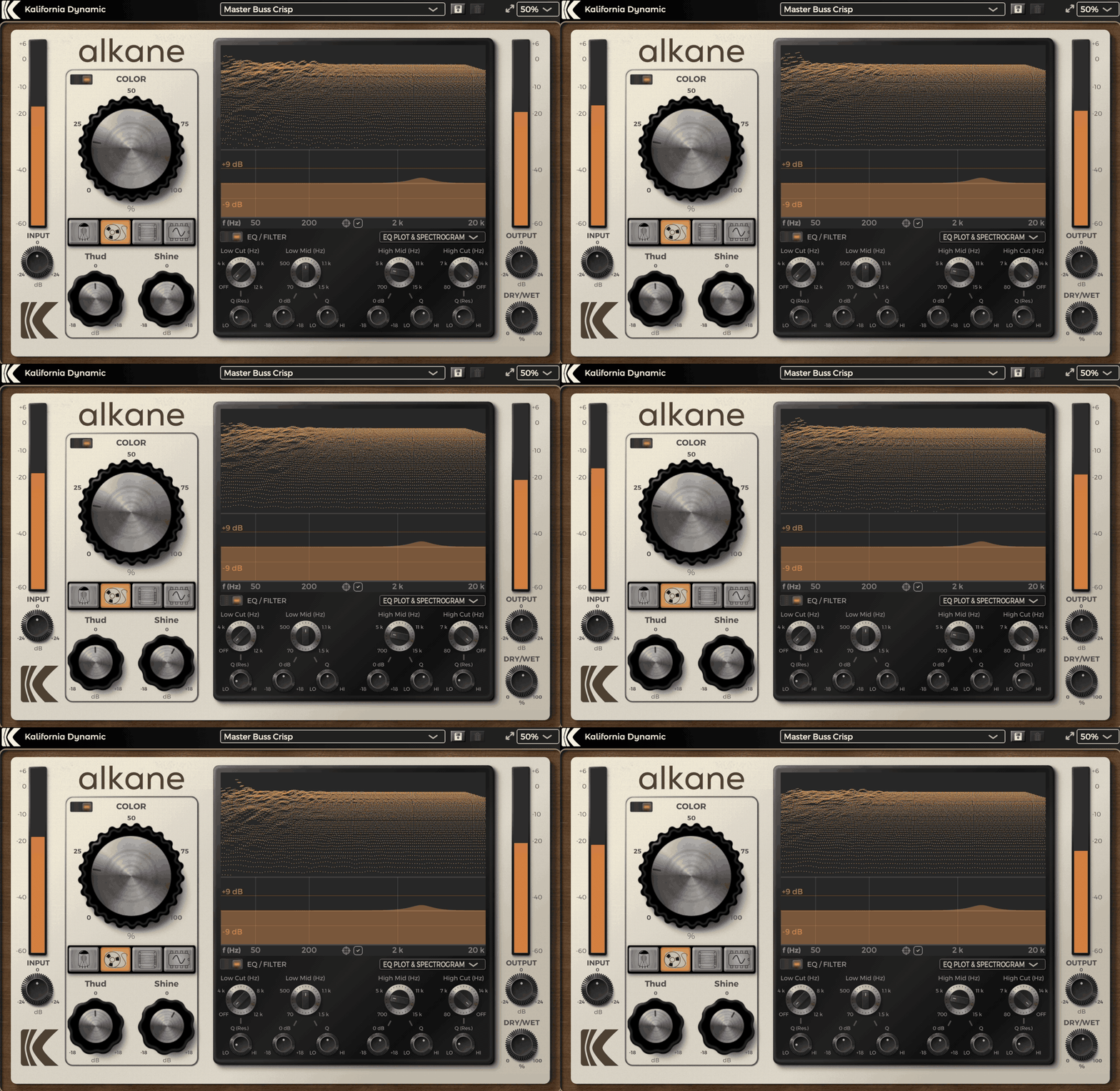
What makes Alkane stand out for me is how it blends four different analog-style saturation types into one plugin without feeling bloated or gimmicky.
I love how you can flip between Tube, Tape, Transformer, and Synth modes depending on what your track needs, instead of juggling multiple plugins. Alkane feels like having a mini analog rack on standby, but way easier (and cheaper).
The interface is one of the things I enjoy most about working with this saturator plugin. It’s clean, stylish, and super easy to get around.
- Colour Knob
The big Colour knob is front and center, making it obvious where the magic happens, and there’s a smart visualizer section you can customize if you want less visual noise.
The way the plugin changes its color theme depending on the circuit you’re using adds a small but satisfying touch, especially when you’re bouncing between different flavors during a mix session.
- 4 Saturators
Alkane gives you Tube, Tape, Transformer, and Synth saturation models, each with its own distinct vibe.
I found Tube mode perfect for warming up pianos and acoustic guitars, while Synth mode added just the right midrange bite to drum busses without wrecking the transients. I love that you can swap between them instantly without losing your other settings.
- Thud and Shine Controls
The Thud and Shine knobs are not just bonus EQs, as they shape the low and high ends differently depending on the selected circuit.
I’ve used Thud to add more punch to kicks and Shine to lift synths higher into the mix without layering extra plugins. They’re subtle but super effective when you need that little extra polish.
- Built-in Musical EQ Section
Under the spectrogram view, Alkane includes a simple post-saturation EQ with sweepable high/low cuts and two midrange bell curves.
I like using it to clean up any low-end rumble or brighten things slightly after adding saturation. It’s not surgical, it’s meant to keep things musical and colorful, and it does that really well.
It’s a small extra step but worth doing if you’re serious about A/B checking your tone changes. It’s especially great on drums, bass, synths, and even sometimes on a full mix when I want just a touch of analog glow without losing clarity.
- Dry-Wet Knob
The Dry/Wet mix knob lets you balance the saturated and clean signals without any fuss. Most of the time, I like pulling it back a bit so I can keep the punch of the original track while still sneaking in some extra warmth and texture.
Alkane comes in VST3, AU, and AAX formats for macOS and Windows users.
2. Waves Abbey Road Saturator
More Info & Price (Trial Available)

Abbey Road Saturator delivers a unique saturation character by combining two classic EMI tools: a Compander and console saturation chains.
Winner of the 2021 NAMM TEC award, this plugin can bring some great features to your DAW that are present at the heart of the iconic EMI studios. The combination mentioned above of a Compander and a console saturation brings to the table all the subtlety of the original unit.
A Compander was initially designed to reduce noise in telecommunications, compressing the signal before the transmission and expanding it on the receiving end.
In 1962, the EMI Central Research Laboratories invented a tape noise-reduction system called the TG12321, emphasizing the high frequencies and adding more air to the tracks before sending the signal to the saturator. Producers like Peter Brown and Geoff Emerick used this quite a lot, and now it’s available for your use too.
- Compander
As mentioned earlier, the Compander was meant to reduce noise in an audio signal but later was further developed to enhance the high-end of the signal.
- Pre and post EQ
If a Compander is not enough, maybe these two equalizers will satisfy you. The “Pre EQ” section deals with the frequencies before the Compander and saturator, with low, mid, and high filters.
- Stereo modes
This switch near the “Input” knob can deal with three stereo processing modes. The “M” indicates that the middle of the stereo image is distorted, while the sides are not processed.
3. Black Box Analog Design HG-2MS
More Info & Price (Trial Available)

Adding colorful tube saturation with M/S processing has never been easier.
Black Box Analog Design is known for developing the critically-acclaimed HG-2 Saturation Processor unit and later a plugin version. After a while, they decided to bring the updated version of this plugin, the HG-2MS.
With the Brainworx Tolerance Modeling Technology™, this plugin showcases the brilliance and imagination of its developers being risen to another new level. The HG-2MS is a mid/side version of its older brother, including More Saturation options and a wider variety of colors with its refreshed filter section.
- Brainworx Tolerance Modeling Technology™
It emulates the subtle variations between each module or channel in an actual hardware unit. This is caused by the components and all parts involved in each section. The final result is an organic and characteristic feel to your sound, recreated with this brilliant modeling technology.
- New filter section
Improving its quality from its older brother HG-2, the filter section has been revamped and updated. You have “HighPass,” “BandPass,” “Flat,” “BandStop,” and “LowPass” modes to choose from, with a complete 20Hz-20kHz frequency range in each of them.
- Solo function
Switching the “Solo” button on, you will get the saturation soloed for you to hear better what’s going on there. This allows you to precisely listen to the saturation and how the filters are behaving towards it.
4. SSL Native X-Saturator
More Info & Price (Trial Available)

X-Saturator provides a wide variety of saturation effects that come straight from analog hardware designs.
When we talk about saturation, we mostly mean the warmth generated in hardware consoles. This type of saturation is usually third-order saturation, caused by transistor circuits. Conversely, a tube or valve circuit generates second-order saturation, which sounds “warmer” in low amounts.
SSL Native’s X-Saturator can generate both types of saturation and anything in-between. This flexibility lets you create various saturation styles, ranging from vintage tube hardware to modern outboard gears.
Furthermore, you can drive the saturation mildly to create slight warmth or produce full-on trashed distortion with high settings. Let’s have a look at its user interface and key features:
- Harmonics Control
The Harmonics parameter lets you select between second and third-order harmonics. It changes the saturation style from tube to transistor. Similarly, you can set the knob somewhere in the middle to create unique, unheard-of sounds.
- Distortion
The Shape knob controls whether the saturated sound has hard edges or soft edges. A harder edge helps the sound cut through the mix better, although it may make the sound harsher.
- Level Control
If the saturation generates too much distortion without driving it, you can turn down the Input Gain on the left of the user interface. Similarly, if the distortion isn’t enough, try turning on the +6 dB gain button at the middle right of the plugin.
5. United Plugins Plamen
More Info & Price (Trial Available)
Or Buy Here (Support Integraudio)

It’s designed to provide different treatments for various frequency bands in audio, offering a flexible approach to saturation and distortion.
This plugin includes several modules, each well-crafted to enhance different aspects of audio production. Plamen offers a range of features, including attack and release time controls, mix knobs for blending dry and wet signals, external sidechain options, input and output level controls, bypass functions for individual bands, and more.
- Five Distinct Saturation Types
Plamen offers five unique saturation types (British, Magnetic, German, American, Clip) for each frequency band. This allows you to choose the perfect tonal color and character for your audio, ranging from classic analog preamps to tape saturation and clipping distortion.
- Tape Wow Effect
Besides traditional saturation, Plamen includes a “Tape Wow” effect. This emulates the relatively slow flutter or pitch variation characteristic of vintage tape recorders, adding a touch of analog warmth and movement to your audio.
- Flexible Crossover
Plamen features four crossover points, giving you precise control over the frequencies they wish to saturate. You can fine-tune your saturation targets, whether subs, bass, low-mids, high-mids, or treble. The crossover operates in two modes: Linear phase and Analog 6dB/octave.
- Selective Frequency Band Processing
You can solo or mute (bypass) each frequency band individually. This feature is useful for checking the impact of specific bands or applying saturation to selected bands. Plamen offers individual input gain control for each band, parallel Mojo processing, and additional parallel Dry/Wet mixing for the entire plugin, all while maintaining a Linear phase.
- Oversampling for Audio Quality
Plamen provides oversampling options of 2x, 4x, and 8x. This ensures maximum precision and pristine audio quality by reducing unwanted artifacts and aliasing, resulting in crystal-clear, professional-grade results.
- Tonal Balance in 5 Bands
The plugin enables you to achieve balanced and pleasing tonal characteristics by selectively adding warmth and harmonics to five adjustable frequency ranges. This helps balance the energy levels in different parts of the audio spectrum.
- Targeted Enhancement
You can focus on specific elements in the mix, such as enriching bass frequencies, enhancing midrange harmonics for instruments, or adding sparkle to high frequencies. This targeted enhancement contributes to clearer audio separation and a more polished mix.
- Band Controls
The plugin controls different processing modes, including LR, L, R, M, and S processing. You can utilize mute, solo, and AC boost switches and adjust gain and output levels. The “Mojo” feature enables parallel processing for added versatility.
6. Arturia Tape MELLO-FI
More Info & Price (Trial Available)
Or Buy Here (Support Integraudio)

Inspired by the iconic Mellotron, this plugin brings the tape simulation and all its desired imperfections straight to your computer.
The famous unit, which excels as one of the earliest sampling devices ever produced, has gained fame through classic songs like “Strawberry Fields Forever” by The Beatles. The grainy and lo-fi character of the Mellotron is brought to life on this plugin by Arturia, in all its glory.
Distributed between three main modules, the Arturia MELLO-FI recreates that old-school atmosphere present in these instruments with a dedicated preamp, a tape module ready to adjust the perfect tone, and a filter. A tape stop feature is also present to make it even closer to the authentic feel of these machines.
- Tape controls
In this section, you’ll find the heart of the plugin, which makes it sound like a tape. Distributed between four knobs, the quality and design of the tape sound can be easily molded.
For example, the “Flutter” knob directly impacts the pitch of the recording by mimicking the rotations of a tape motor, which can also be visually seen on a little screen above the controls.
- Preamp
The preamp module features three primary controls: “Drive,” “Tone,” and “Noise.” At this stage, the signal can be manipulated and processed similarly to the genuine preamp of a Mellotron. The “Drive” knob deals with the amount of distortion applied to the original signal, and this value can easily be monitored via the VU meter.
- Tape stop
This great function is present to instantly bring that classic tape stop effect to your track, a ubiquitous tool used in sampled recordings that can be added to your instrument while you play.
- Filter
This control deals with the high-pass and low-pass filters that might apply to your signal. You can rapidly shape the high or low-end spectrum and tame any undesired frequencies created or enhanced by any previous controls by twisting this knob.
7. Baby Audio TAIP
More Info & Price (Trial Available)

Unlike the previous plugins mentioned up to this point, TAIP isn’t supposed to recreate any specific circuits but rather explore a new and original version of the famous tape effect.
You can colorize, saturate, modulate, compress, and distort any audio you want with much character and quality.
As the name implies, TAIP is a plugin that depends on an AI-powered engine to work, and this is an example of how the future of music technology lies within artificial intelligence. This plugin proves that by bringing the desired elements of a tape recorder machine in a new and refreshed way, it’s possible to have an innovative and modern tape sound.
- Auto-gain
You can count on a dedicated “auto-gain” option that automatically sets the output level of the preamp section to be more consistent with whatever values you input on the “Drive” control.
- Adjustable interface
Working for long hours in audio productions may be tiresome to your eyesight, and you can customize this plugin’s interface to comfort you better. On the top left corner, you’ll see three different options for theme – white, gray, and black – that can be changed very swiftly.
- Limiter
This plugin contains a brick wall limiter at the output section, right at the end of the signal chain. Even if you turn your volume up to 11, it’ll be prevented from clipping at your DAW.
- Models & input
Centered at the bottom of the controls, two switches can help shape the tape sound. The “Input” selection offers an extra push at the gain drive with the “Hot” option, going further than the “Drive” knob goes.
8. denise God Mode
More Info & Price (Trial Available)

Another plugin inspired by iconic hardware from the past, but with a refreshing modern interface and updated take on how saturation works.
The Pultec EQ was a passive tube equalizer from the 1950s. It featured a “push-pull” technology that motivated the denise team to recreate it.
In a nutshell, the EQ would “push” the gain for a specific frequency range into its tube circuit to have it “pulled” back again, smoothing out the overall frequency response. The result is a sound with boosted frequency ranges added to it – the famous “warmth” so much sought after.
It does bring the same kind of sound vibe of the original unit into play, further developing it with the infinite capacity of the digital world. Combining these worlds can be crucial to “push” specific frequencies to saturation more efficiently than ever, aiming specifically at their values. This can enhance their response and resonance.
- Three drive types
Each drive can be dialed in simultaneously with the exact amount you configure. The drives can be chosen and mixed within three main types: “Tape,” “Warp,” and “Buzz.” The first type is the smoothest, featuring the algorithm mentioned below.
- Multi-band distortion
This is a saturator plugin intertwined with equalizer parameters, so, logically, they decided to have a nice screen showing you the nodes on the graph. With linear phase filters, you can blend in the wet and mix signals as you please with enormous precision and without phase issues.
- Panning
God mode allows you to pan the wet and dry signals independently. This not-so-usual feature allows for a more creative stereo placement, resulting in exciting sounds. The “Split” mode at the upper right corner allows to enhance the stereo image or create a new one from a mono source, as well.
- Tape Analog VM™ algorithm
The “Tape” drive type is the only one to feature this algorithm. It was earlier developed and included on denise’s Bad Tape plugin, which is supposedly its evolution. This algorithm emulates the smoothness in old tape machines while pushing it to its limits at the same time.
9. Tone Projects Kelvin Tone Shaper
More Info & Price (Trial Available)
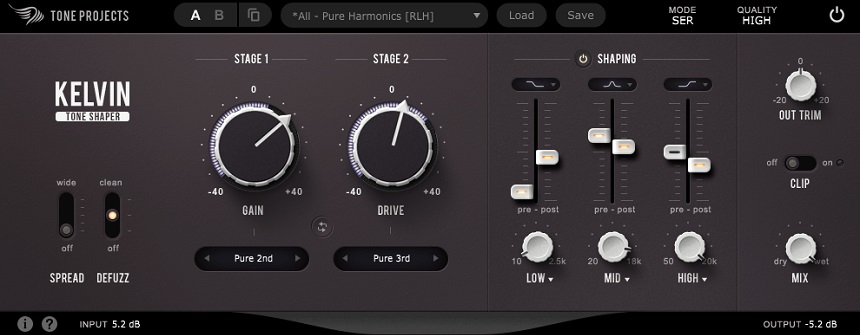

Kelvin Tone Shaper is a unique saturation plugin that uses a proprietary algorithm to provide high-quality analog-style saturation.
It offers a range of different saturation types, including Tape, Tube, and Transformer, and allows you to blend these types to create your custom sound. One of the standout features of the plugin is its flexible dual-stage saturation. The plugin blends multiple saturation types to create your custom sound. You can also adjust the amount of saturation for each stage, giving you fine control over the level and character of the saturation.
Another great feature is its ability to preserve the natural dynamics of your tracks while adding warmth and color. That allows you to enhance the sonic characteristics of your tracks without sacrificing their natural dynamics and transients.
- Intuitive Interface
With a simple and intuitive interface, the plugin lets you quickly dial in the perfect saturation for your tracks. The plugin’s controls are labeled clearly and provide visual feedback, making it easy to understand and use.
- Push/pull EQ
Allowing you to boost or cut the gain of specific frequency bands while simultaneously adjusting the gain of the opposite band, the equalization technique in the plugin creates a unique “push/pull” effect, which can be used to sculpt the tonal balance of your tracks creatively and musically.
- Presets
You get a range of presets designed by professional mixing engineers, making it easy to get started with the plugin and explore different sonic possibilities.
- Unique Saturation Characteristics
Kelvin Tone Shaper offers unique saturation characteristics that can enhance the sonic characteristics of your tracks in a way that is distinct from other saturation plugins. You can combine its ten different saturation modes to create interesting effects.
- Harmonic Exciter
The plugin includes a built-in harmonic exciter, which can add high-frequency detail and sparkle to your tracks. In addition, it also includes M/S processing capabilities, which allow you to apply saturation to the mid or side components of your mix independently. This can be useful for fine-tuning the stereo image of your tracks.
- Output Limiter
The plugin includes a built-in output limiter, which helps to prevent clipping and ensures that your tracks stay within a safe, dynamic range.
10. PSP Saturator
More Info & Price (Trial Available)
Or Buy Here (Support Integraudio)
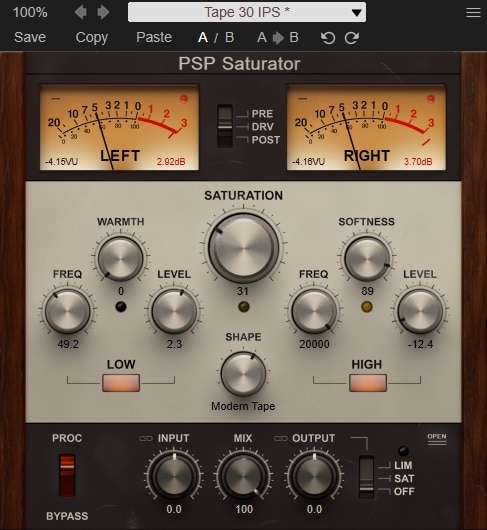
A combination of refined algorithms and inspiration comes from great saturation units that come in a beautiful interface and offer an abundance of controls.
PSP Audioware brings a new plugin to their catalog, dedicated to assisting you with the most common saturation processes and offering plenty of presets to start working right when you open it for the first time. With an intuitive set of controls displayed at the interface – which resembles vintage studio gear -, each knob twist is precise and full of character.
You can saturate any sound by adding harmonics, taming the frequencies, and dynamic processing to simulate an analog circuit as best as possible. Allied with that, you have three algorithms, distributed between eight saturation types.
- Shapes
Right below the large “Saturation” knob, there’s a “Shape” switch with eight variable settings. This is a collection of saturation types, going from left to right on a scale from less intense to a very distorted sound. A versatile tool like this is essential to suit every need when applying saturation.
- Band-processing controls
Divided between two sections, the dedicated band-processing controls are distributed straightforwardly. At the “Low” module, you’ll find a dedicated knob to set the frequency value, a “Level” knob to adjust the volume, and a “Warmth” setting designed to give some consistency to the low-end.
- Linking
There’s an entire section dedicated to the input and output controls on the bottom. This can be essential when dealing with gain and saturation, but a particular configuration should’ve been in every similar plugin.
- Output modes
A small switch located at the right of the “Output” knob can cover two output modes. The first, “SAT,” allows saturation to be applied to the output signal. The second, “LIM,” brings a limiter to help you control a signal with lots of peaks or dynamics.
- Open it up
At the same bottom section, there’s a very tiny “Open” button at the right. This fantastic feature lets you open the plugin up, just like you would a real tape machine. A section of what would be the circuit of the plugin is shown when you click it, and some controls can be tweaked to enhance your sound even more.
11. Waves BB Tubes
More Info & Download (Trial Available)
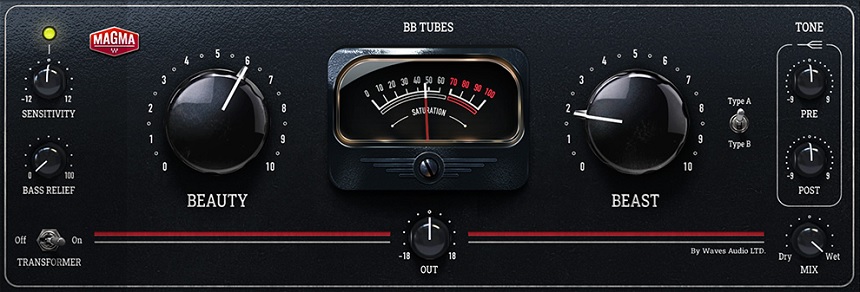
Waves BB Tubes is a plugin designed to emulate the sound of tube amplifiers known for their warm, rich tone.
The plugin can add character and warmth to various audio sources, including guitar, bass, and vocals, and can create a sense of space and depth in a mix due to the harmonics it adds.
It has controls like Beauty and Beast, pre and post-saturation, sensitivity, a dry/wet mix knob, a transformer, and more.
- Presets
The plugin comes with a library of presets that can be used as starting points for your sound design. These presets are designed to provide a range of sounds that can be used in different contexts, such as rock, blues, and country music.
- Modes
The Waves BB Tubes plugin has two distinct modes, called “Beauty” and “Beast” modes, which are designed to provide different types of tube emulation. The Beauty mode is designed to emulate vintage tube amplifiers’ warm, smooth sound, and the Beast mode, on the other hand, is designed to emulate the more aggressive and distorted sound of modern tube amplifiers.
- Flexibility
The mix control feature allows you to blend the processed audio with the original audio, giving you more flexibility in shaping the final sound. This feature allows you to add just the right amount of warmth and character to the audio without altering the overall balance of the mix.
- Transformer switch
The transformer switch in the Waves BB Tubes plugin allows you to choose between different types of transformer emulations, which can help to shape the overall tone and character of the sound.
12. Softube Overstayer M-A-S
More Info & Price (Trial Available)
Or Buy Here (Support Integraudio)

A versatile plugin that offers saturation, peak-bending, tone sculpting, and harmonic shaping with high-fidelity details at the power of your fingertip.
The Overstayer Recording Equipment was designed, developed, and built by Jeff Turzo in Los Angeles. With a handmade appeal to it, these units were initially intended for Jeff’s personal use.
As the word got around, he eventually started fabricating more units in 2009. Since then, Overstayer has gathered a very loyal fanbase amongst producers and audio geeks.
This plugin is 100% based on the hardware, offering the same saturation and peak-bending capabilities present on the equipment. You may find this plugin very suitable for adding energy to your tracks, as well as gluing buses and enhancing the quality of your mixes.

- Filter controls
The three switches featuring various boosts or cuts can increase the quality of your signal before it runs through the plugin’s “circuit.” The top button can boost the highs, the middle one can boost the lows, and the last can cut the lows.
- Dual and 2nd modes
The “Dual” button at the right of your screen enables the second stage in series to the signal path, spreading the load amongst both stages. The result is a complex and lively harmonic character brought to your track.
- To dry or not to dry
This control underneath the “Mix” button is a feature not so commonly seen: it automatically allows the input to adjust the dry and wet signals’ levels together. This can save you some good hours while trying to balance both signals.
Best Free Saturation Plugins 2025
Linda Audio Instavibe
More Info & Price (Trial Available)

Its remarkable features, including tube distortion and harmonic enhancement, cater to enhancing your audio’s tonal warmth and depth.
In addition, the plugin houses an integrated EQ, customizable noise generation, a unique set of modulation tools, and additional utilities like Undo/Redo and A/B comparison options.
- Saturation
It can reproduce the desirable tonal warmth of tube distortion and serve as a subtle harmonic enhancer, adding an extra layer of richness and depth to your audio.
- EQ
The plugin offers an integrated EQ with three distinctive profiles, each contributing a unique tonal curve. The additional Modes B and C introduce an extra edge of distortion for that desired crunch. The EQ function also offers a turn-off feature, LF and HF boost options for resonance control, and an Age parameter allowing precision EQ narrowing.
- Noise Generation
Linda Audio’s Instavibe stands out with its noise-generation feature. It offers five distinct noise types: two varieties of audio cassette noise, two versions of vinyl record static, and the soothing hum of brown noise.
- Modulation Tools
Instavibe boasts robust modulation capabilities, providing ‘wow’ and ‘scratch’ fluctuations to bring a touch of analog irregularity to your digital sounds. The stereo modulation width is adjustable, allowing precise control over the stereo image.
- Additional Functionalities
Rounding off its feature list, Instavibe includes practical utilities like Undo and Redo options for hassle-free editing. The A/B comparison tool allows for instantaneous evaluation of different settings, and the plugin comes with 15 ready-to-use presets, perfect for beginners and quick inspiration.
Chow Tape Model
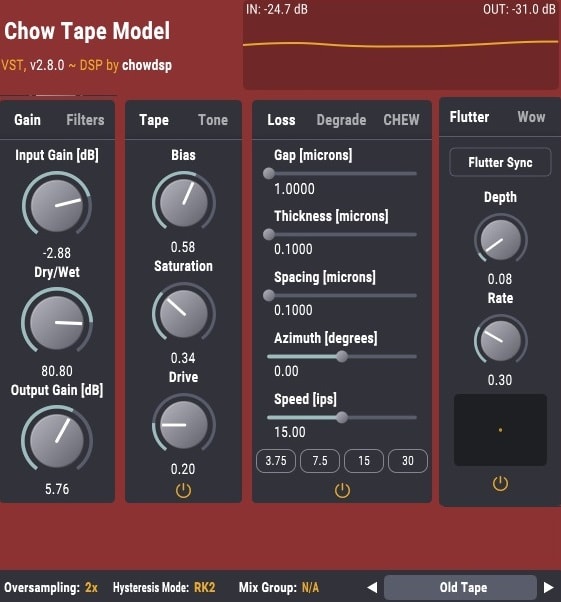
The Chow Tape Model was made as part of a school project by the developer.
The Chow Tape Model is a great-sounding and musical-free tape emulation that takes the idea of physical modeling and applies it to a tape machine. This plugin can add heat and glue to your master bus, apply smoke vibes to your key loops, and do anything in between, making up for a versatile, helpful piece of freeware.
It gives you access to many different parameters and fine-tuning options to nail down the exact sound of tape you want. This plugin stands out because it’s not limited to emulating a specific tape machine; instead, it emulates the physical characteristics of tape and gives you access to dial in the tape sound you’re looking for.
- Absolute control over sound:
Use physics-based settings to adjust every aspect of the sound. You can do just about anything with this plugin, from the spacing and azimuth to unreal tape speeds.
- Sound design tool:
With so many parameters, the only limit with this plugin is your creativity in what you can do with this powerful freeware. You can play around with different setups with any sound source and be amazed by the results.
- GUI:
Despite having so many controls, this plugin’s graphic interface is perfectly organized and easy to follow. In addition, it has a helper which explains each function as you step over them to get you on the same page quickly.
Analog Obsession SweetDrums 4.0

Shape your drum track in a heartbeat with the simple twist of a knob.
Simplicity is a commodity much valued when dealing with mixing audio. Tweak in the perfect tone for any instrument can be a proving task, especially when talking about drum kits. For this reason, Analog Obsession decided to create a plugin as simple as possible to achieve perfect drum saturation, and here we have SweetDrums 4.0 to make it come true.
- One simple control
Aside from the “Input” and “Output” mandatory knobs, SweetDrums 4.0 also has a “Process” control where the magic happens. Combining analog modeling with digital processing will blend equalization and saturation coming out of this knob.
- Circuit modeling
Most saturation plugins are trying to recreate the effect heard on the physical hardware, so modeling is imperative. Analog Obsession’s team, as the name suggests, sure knows a great deal about studio equipment to summarize an entire effect up to a single knob.
KIT Plugins Burier

Burier has a distinctive distortion sound and lots of mojo attached to it, a classic combination of saturator and filter.
KIT Plugins designed this audio tool to help you “bury” basically anything you’re up to, a drum track, a vocal sample, or a whole bus; anything will sound good. A wild saturation stage is combined with resonant low and high-cut filters to bring the best flavor possible.
- Filters
There are two knobs on the top of the plugin, each dedicated to a frequency range. The “Low-Cut” and “Hi-Cut” knobs have a 12dB per octave slope and Infinite Impulse Responses, with a topology-preserving transform structure.
- Bury it
The central, big knob is responsible for the amount of saturation. Its distortion is very consistent and full of character, primarily because it’s modeled after an unspecified circuit – a real one, full of components and singularities. The algorithm’s response is similar to the genuine gear, which may bring life to anything you put through it.
Klanghelm IVGI 2

An exciting plugin that reacts dynamically to the input signal, delivering a natural saturation or dense distortion in no time.
This is the second version of the IVGI plugin by Klanghelm – by the way, you can use the original and this second version at the same time if you’d like to -, equipped with the same controls but a renewed algorithm. This freeware software has many parameters to set while retaining a compact and pleasant visual interface.
A dedicated “Trim” knob controls the input level, the “Drive” knob deals with the saturation, and the “Output” knob sets the post-circuit volume. These three settings should get you into saturation territory, but a dedicated “Response” knob will also help you tame the frequencies on your signal.
At last, the “Relaxed” switch will bring a variation of the original IVGI algorithm, so you have one more sound profile character to choose from.
- X-Talk
IVGI 2 has a great control dedicated to the crosstalk effect. This used to happen in vintage units quite often. Essentially, the signal from one track can be leaked to another, like a bass going into the drums.
- Asym Mix
This is a kind of transparency tool to make your distortion signal as clear as possible. At 0 value, you’ll have symmetric saturation, with a strong compression character; if you turn it up to 10, an asymmetric distortion with a more clean and transparent profile will be brought up.
- VU meter modes
There are three options available: the “In” deals with the volume of the “Trim” knob, the “Out” monitors the “Output” control, and the “Out-In” option will display the RMS difference between both input and output. It’s an excellent way to properly gain stage your track with a simple visual tool.
SNFK Music OrangeFlavor

As simple as possible, OrangeFlavor deals with saturation in the most straightforward way possible.
Sean Funk is the mastermind behind this elegant plugin. Inspired by Steve Duda, the creator of Serum ad Xfer, he started creating plugins during the lockdown and offers several plugins and preset packs for free. They’re all open-source and available on their GitHub page.
With just two settings, “Drive” and “Output Gain,” you can control both drive and output volume and have your saturation as it is. There’s also a frequency visualizer to help you get a more accurate idea of how the harmonics behave. And that’s it, no more settings to dwell into.
- Unique algorithm
OrangeFlavor features a unique anti-aliasing algorithm. It allows you to have the best color in your signal and was developed with a distinctive character in mind to get only the best possible sounds out of the plugin. It works automatically, and you don’t have to set up anything.
- Gentle looks
With two simple controls and a small screen next to them, this plugin is one of the most lightweight in terms of complexity. The looks are very minimalistic, which can be very straightforward in terms of workflow. Trusting the algorithm of this software is essential and may bring pleasant surprises to you.
Analog Obsession CHANNEV

A channel-strip plugin that can deliver much more than just saturation, with many features and a great vintage look.
Plugins that try to emulate the glorious equipment of the 1960s, 1970s, and 1980s are widespread, and we all love them. Usually, the genuine gear costs way more than “simple” software, so we’re more than pleased to save money and get a similar result without breaking the bank. Even better than that is to get a freeware option for that.
CHANNEV is Analog Obsession’s second plugin on this list, and they make up their names once again. Featuring a mic preamp, de-esser, line-amp, four-band equalizer, compressor, limiter, and tape saturation, this plugin is one marvelous toolbox loaded with all the basic features of a great vintage console.
- EQ
The equalizer featured on CHANNEV is very robust. You have variable instead of selectable frequencies, distributed in low, mid, and high sections. While low and high bands have a bell option, mid has a “Hi-Q” option. Aside from that, pre and post-Filters are also included.
- Vintage-inspired modules
This plugin retains a vintage vibe to it, with great inspiration. The compressor and limiter modules were based on the anthological 2264 unit, totally independent and with each own’s external side-chain.
- The perfect vintage sound
Although the sound character may be excellent, the amount of ways you can control your signal is breathtaking. The tape saturation module is the last one in the signal chain, as you can see on the right side of the interface.
Bonuses:
IK Multimedia Saturator X
More Info & Price (Trial Available)

One more T-RackS software to feature in our list that can bring to your track the impressive dynamics present only in analog saturation.
It can deliver what promises with amazing articulation, from very light dynamics to a nasty wooly distortion. The best thing is that you got covered in both tape and tube-style realms and also in transformer or transistor alike.
Saturator X works as an individual plugin or part of the T-RackS chain. It can blend analog distortion with digital processing without altering the linearity of a signal’s frequency response and harmonic pattern. In a nutshell, you get a well-preserved audio signal that can be changed only by what you dial in at the interface.
- Analog modes
At a knob’s twist, you’ll find ten saturation modes that accurately bring the hardware component’s response and the overall behavior of the circuitry. You can choose between “Tape 1,” “Tape 2,” “Master +6dB,” “Master +12dB,” “Push Pull,” and “Class A” in either tube or solid-state, and “Transformer” in “Iron” and “Steel” options.
- Brick wall limiter
With a brick wall limiter present at the end of the circuit, you don’t need to worry about clipping at all. This feature will prevent any digital clipping from happening without any controls – just a simple gatekeeper that automatically ensures your track never goes in the wrong direction.
- Oversampling
Near the “Brickwall” switch, this effect allows you to choose the oversampling modifier you’d like to be included in your signal. The result is a high-definition sample of your audio, providing an excellent rendering of the harmonics pattern and overall processing quality.
Audified U78 Saturator
More Info & Price (Trial Available)

The original circuit of the U73b model is explored within this brilliant saturation plugin by Audified, with particular attention to all the details of the circuit.
The U73b compressor produces a unique kind of saturation, which many producers seek. It’s arguably more accessible and cheaper to have a plugin alternative to the hardware running perfectly into your DAW, and with this plugin, you’ll see how close it is to the actual unit.
This is inspired by a valve-type saturation, which can tell how the plugin works. Valves are the kind of component that can breathe new life in your tracks, and their warmness and punch are present here. From crunchier claps to burning strings, massive drums, to rich-sounding guitars, all can be achieved at a knob’s twist.
- Perfect modeling
Modern designs sometimes tend to copy the old gear in every capacity. Even so, the newest technology advances can get us even more closely to the perfect simulation of these old gears we love so much.
Audified‘s passion for these types of equipment is visible through the dedicated mix of vintage circuit values with modern software modeling, capturing the essence of the analog character in the final sound result.
- Saturator controls
Based on the iconic compressor, these controls are responsible for shaping your sound.
The “Gain” knob controls the amount of saturation at the input signal, and the three other knobs can help tailor the sound to perfection. The “HiPass” and “LowPass” controls can set the frequency values to be allowed through in an entire range from 30Hz to 8kHz. However, the “Tone” knob can be used to darken or brighten your sound, acting as a second type of filter.
- Metering
A switch can alter a VU metering of the input or output signals in grand fashion and vintage style. It makes monitoring the decibels and overall distortion easier and can better tame the saturation with the “Output” control. There’s also an “Auto-gain” switch available to make this refinement more automatic at the output section.
Tone Empire Reelight PRO
More Info & Price (Trial Available)

The real deal about recreating vintage units in the digital world lies with all the algorithms and their response to the audio signal. It’s not impossible, but for sure, it’s tough to replicate every subtle aspect of functioning hardware in a program.
Tone Empire proves that some companies get what it takes to make this dream come true. The Reelight PRO can get you that old-school vibe based on iconic tape machines with its settings and looks by working with a great IR and physical modeling.
Navigating through the six models available and mixing through the basic controls, you’ll instantly get a warm and classic tone.
- Six tape machine models
You can choose between six different models, distributed from “A” to “F” on the lower section of the plugin. All the differences between one model and another can be replicated and brought here. Models covered (from A to F) are the Ampex ATR 700, Studer A 812, Studer A 80, Teac A2300 SD, AEG Telefunken M20, and Revox B77 MK II.
- Bias control
The bias control lets you adjust the bias of the machine. This is supposed to simulate the variations between electric current inside an original unit, which we don’t usually get on plugins. It means that your final sound can have a bit more subtle character or a crunchier grip to it, depending on how you configure this parameter.
- Crosstalk
In some multitrack tape machines, there’s a “Tape Bleed” option that would make signals from adjacent tracks leak into one another. This creates a definite mono-spatial effect, simply blending the different instrument tracks in an old-fashioned way. The amount of this effect can be adjusted at the “Crosstalk” knob.
IK Multimedia Tape Machine 99
More Info & Price (Trial Available)
Or Buy Here (Support Integraudio)
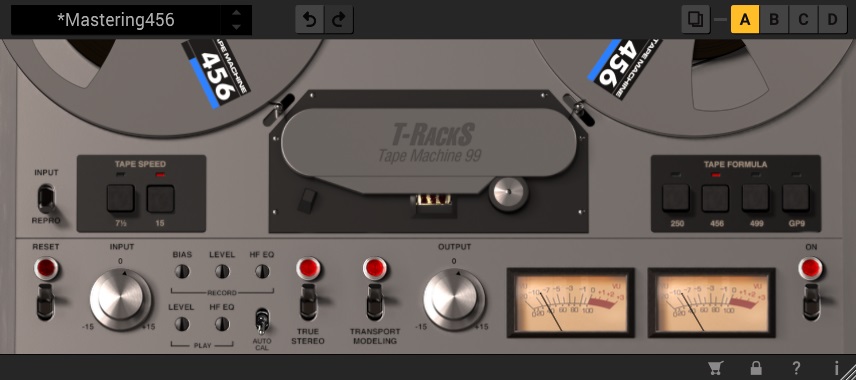
Known for great plugins such as Amplitube, IK Multimedia never misses when talking about faithful recreations of legendary sounds.
The T-RackS Tape Machine Collection is a bundle that includes four different tape machine simulations, and Tape Machine 99 is one of them.
This plugin is a recreation of the Revox PR99 MK II, a classic rack-mount stereo tape recorder produced by Studer in the 1980s. It was engineered initially around a hybrid design that would feature a unique stereo simulation and an excellent frequency response.
- Faithful reproduction
This plugin was developed with a mix of dynamic convolution and physical modeling, focusing on capturing the complex interplay of effects during the audiotape recording process.
Essentially, this was a measure to mimic every smallest detail of the original unit, with lots of character and response.
- Tape formulas
There are four tape formulas present on all plugins from this bundle. This means that you can choose between four tapes commonly used since the old days. The “250” (modeled after the 3M/Scotch 250) provides a slightly more warm and saturated tone, while the “GP9” (based on the Quantegy GP9) captures higher levels of signal with minimal distortion and compression.
- True stereo
Every tape machine has the slightest and subtle level, EQ, and distortion differences between left and right channels. This is due to components, the actual circuit, and many more variations from one unit to another.
- Modeling
Since it’s all about the smallest differences this effect can bring to your tracks, you can even simulate the irregularities in the movements of the tape. The “Transport Modeling” option creates various degrees of sonic alteration that could happen while the tape moves inside the unit.

The Integraudio Editorial Team consists of experienced music producers, audio engineers, and plugin enthusiasts dedicated to providing in-depth reviews and guides for music production software.