

Let’s discuss the best bitcrusher plugins on the market with some old and newer picks as well!
Musicians use bitcrushers to add a nostalgic element to their songs. It uses quantization to separate the sample into bits, allowing you to alter digital audio resolution by discarding some parts of the data. You could automate its use as an intro, or you could even make one instrument stand out with a crunchy sound while the rest remain clean.
However, bitcrushers tend to vary based on what algorithm they use. Hence, it is crucial to keep your needs and genre in mind when selecting a bitcrusher plugin. We will include plugins from brands like Native Instruments, Klevgrand, D16, AudioThing, United Plugins and some more.
At the end of the list, you will find also free bitcrusher plugins (we LOVE Tritik Krush free version), but with that said, let’s jump to our list!
7 Best BitCrusher To Crush Your Sound 2025
1. United Plugins BITPUNK
More Info & Price (Trial Available)

BITPUNK allows you to alter the characteristics of audio signals and alter bits in several ways, like bit crushing, swapping them, inverting them, and morphing them.
Whether you want to achieve an experimental tone, fidelity aesthetic or create animated or aggressive distortion effects, BITPUNK got you covered.
Key Features:
- Enhance or Destroy
Bitpunk allows you to subtly enrich your audio or unleash extreme audio degradation. It allows for top-end crunch with bit-crushing and rate reduction, smoothing filters, beefing up the low end with feedback, and finalizing with compression and saturation.
- Creative Bit-Swapping
The plugin’s primary focus is on bit-swapping between channels A and B. To create distinctive effects, A and B FX options include rate reduction, square-wave frequency shifting, sync-able delay, and high-pass and low-pass filters.
- Mute Mode
In Mute mode, Bitpunk enables you to selectively mute bits for a modern twist on classic bit-crushing effects, offering greater control and creative possibilities.
- Sidechain Input
Bitpunk’s sidechain input allows you to route audio into the B channel, facilitating the blending and swapping of bits between two audio sources in innovative ways.
- Master FX
After bit manipulation, you can refine your sound with master effects, which include harmonic and dynamic effects like light clipping diode saturation, a hard clipper, high-cut and low-cut filters, a hard compressor, etc.
- Hassle-Free Activation
Bitpunk simplifies activation with license files, eliminating the need for external hardware or internet access allowing you to utilize the software on multiple computers.
- Realistic GUI
Thanks to the resizable interface, the photorealistic graphical interface offers a tactile experience while remaining adaptable to your preferences. Bitpunk also ensures audio processing at the highest quality with its 64-bit internal processing and compatibility with any sampling rate, including 192 kHz and beyond.
Compatibility:
BITPUNK is available in AAX, AU, VST, and VST 3 plugin formats and is compatible with Windows and Mac operating systems.
Summary:
It allows you to enhance or transform your audio, from subtle enrichments to extreme degradation. The focus is on creative bit-swapping between different channels, complemented by various effects. Bitpunk also provides master effects for final sound refinement.
2. Denise Bite Harder
More Info & Price (Trial Available)
Bite Harder is a distortion plugin with bitcrusher abbilities.
What I like the most is its push-pull graph, where you can add distortion to specific frequencies using the EQ-like workflow.
Furthermore, the plugin is fully automatable. So, you could make intricate and creative sound designs merely by adding modulation on the graph. Another thing I recommend is adding distortion to basslines to make them stand out in the mix much better.
Before we talk more about Bite Harder, have a look at My Crush by the same developer. It’s the free version of Bite Harder, featuring only the bitcrusher and resampler.

Key Features:
- Crushing
For mangling up sounds, the plugin features a resampler, bitcrusher, glitch, and drive distortion. The resampler changes the sample rate, while the bitcrusher reduces the bit depth. And glitch introduces ring-modulation into your sound post-crushing.
- Push, Pull, And Filter
The EQ graph at the top of the interface controls the level of the signal entering the plugin. Increasing the volume of a node boosts the gain and results in harder distortion.
However, doing so increases the volume of that frequency too. So, you can use the Pull slider to reduce the output volume and achieve a sweet spot. And finally, the high-pass and low-pass filters in the input and output (pre and post) help tame the signal even more.
- Random, Repeat, And Stutter
There are five tabs below the EQ graph, and the first is Random. It randomizes the graph to give you some inspiration. And both Repeat and Stutter are automatable toggles and sliders. The slider controls the rate of repeat/stutter, while the toggle disables and enables it. You can also set the effect to sync with your host.
Compatibility:
Bite Harder is available for Windows 7 or higher and macOS 10.7 or higher, both 64-bit only. It comes in VST 2/3, AU, and AAX formats.
3. Tritik Krush Pro
More Info & Price (Trial Available)
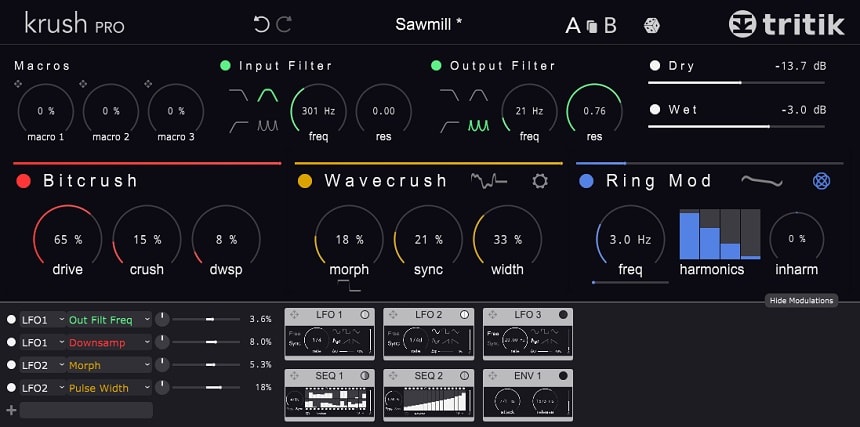
Being the first bitcrushing plugin to feature complete stereo field tweaking, KrushPro offers sleek modern design, combined with the easy-to-use knobs and buttons.
The plugin features modular effects, allowing you to tweak your sample with Bitcrushing, Wavecrushing, Ring mod, and Freq shift. For some dynamic audio signal, try using the integrated LFO presets that can be tweaked to be on your speakers’ left or right side.
Krush Pro also contains filters and stereo modulations that will help you cut off some excess frequencies and expand or narrow the stereo field.
Key Features:
- 4 Filter Types
A good bitcrushing effect has to contain at least one filter type; Krush Pro has got 4. Choose between applying the classic Low-pass and High-pass filters, or try something new with the Comb and Bandpass filters.
- 2 Step Sequencers
The plugin features two step-sequencers with up to 16 steps each. You can create rhythms using step bypass and parameter modulation. The sequencers are a superb way of making each sample sound unique that other people can’t easily copy.
- Bitcrushing And Wavecrushing Effect
Bitcrushing allows you to configure the drive stage, crushing effect, and downsampling. Like the Bitcrushing effect, Wavecrush focuses more on a crunchier sound by pressing down on your audio wave and reducing its size. The effect also features three knobs: morph, sync, and width.
- Full Stereo Modulation
The Tritik KrushPro plugin allows you to apply the effect on only one channel or in the middle of the stereo field. For example, you could have a bitcrusher on the left side of your sample and a wavecrusher on the right, creating a weird symphony.
- Ring Mod
The ring modulation duplicates your signal and allows you to tweak their harmonics. In addition to that, it also offers you a frequency knob fine-tunes the exact frequencies you want to hear from the effect. This feature is great for creating exciting timbres.
Compatibility:
Krush Pro is available for Windows 7 or higher and macOS 10.8 or higher, both 32-bit and 64-bit. It comes in VST 2/3, AU, and AAX formats.
Summary:
The plugin brings you simple-to-use effects such as the bitcrusher and wavecrusher while offering complicated tweaks like the full stereo modulation and step sequencers.
4. AudioThing: Things Crusher
More Info & Price (Trial Available)

Things Crusher combine a multimode filter with a bit crusher. It offers various filter modes, including lowpass, highpass, bandpass, and notch filters.
You can choose between 2 or 4-pole filter options to achieve different filtering effects. It also includes a bit crusher that reduces the bit depth and downsamples audio, adding a distinctive lo-fi or retro character to your sounds.
Further, you can also fine-tune your audio with controls for Cutoff, Resonance, Output, and Bit Crusher settings.
Key Features:
- Filter customizations
Crusher offers a versatile array of filter types and modes, allowing you to perfectly shape your audio signal. It provides multimode filtering options for lowpass, highpass, bandpass, and notch filters.
You can choose between 2 or 4-pole filters to tailor the filtering effect precisely to your needs. Additionally, the plugin features an output gain control, giving you control over the overall volume of the processed audio.
- Crusher Parameters
Crusher introduces a range of sound-altering options. You can adjust the number of bits to reduce the bit depth of your audio, add downsampled characters, and control the level of harshness in your sound.
Moreover, it offers a mixed control, seamlessly blending the processed audio with the original signal. With these crusher parameters, you can create lo-fi, retro, or experimental audio effects.
- Budget-friendly
Compatibility:
Things – Crusher is available on multiple platforms, including MAC, PC, and LINUX, and supports various plugin formats such as VST, VST3, AU, AAX, and CLAP in 64-bit versions.
Summary:
Simple, easy-to-use and affordable. Its filter, with its visual feedback, along with its tweakable distortion parameters, allows you to further shape your sound.
5. D16 Group Decimort 2
More Info & Price (Trial Available)
Used by David Guetta, Dj Michael Trance, and James Sanger, Decimort 2 is a plugin to be considered.
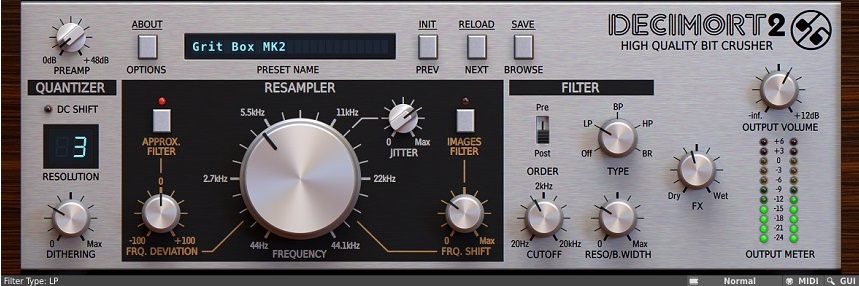
Developed by D16 Group, Decimort 2 brings the unique characteristics of older bitcrushing hardware. The plugin features the fuzzy, full, gritty sound of the ’90s, and it offers what you need to recreate some iconic Hip-Hop hits. Furthermore, it rocks an old-school UI design.
Settings such as the optional Anti-Aliasing filters, Dithering, and Adjustable jitter of your samples are some of the unique abilities of this plugin.
Key Features:
- Adjustable Jittering
Try using the adjustable jittering that creates slight random effect jumps in your sample. The plugin recreates the sound of a broken potentiometer in older hardware, where the applied effect isn’t constant.
- Dithering
After applying the jitter effect, you may find it a bit too constant or loud on your samples. To configure that, you can use the controllable dithering. Dithering allows you to minimize harmonic distortion errors, making sure the sample comes out clean.
- Two Anti-Aliasing Filters
You may find that some of the sounds the plugin offers contain slight aliasing. To address this, the D16 Group added two optional anti-aliasing filters. The anti-aliasing filter gives you maximum control of the aliasing above and below your resampling frequency.
- Analog Filters
Choose between simple filters that perfectly recreate the analog sound of real-life hardware. When the sample is resonating too much, easily tweak it with the resonance knob and have the option to fine-tune the cutoff for the applied filter.
- No Harmonic Distortion
As a recreation of real-life hardware, Decimort 2 features no internal aliasing. That means no distortion to your harmonics can occur unless you deliberately apply them.
Compatibility:
Decimort 2 is available for Windows 7 or higher 32-bit and 64-bit and macOS 10.7or higher 64-bit. It comes in VST2/3, AU, and AAX formats.
Summary:
Decimort 2 offers a great “hardware-like” experience for producers, allowing you to recreate audio anomalies that occur in hardware. The jitter effect gives a unique touch to your sound, as well as the added dithering effect that corrects any errors. Decimort 2 also comes with many presets as well.
6. Klevgrand Degrader
More Info & Price (Trial Available)
Klevgrand managed to create an accessible plugin for quick and straightforward sample degradation.
This plugin is suited for both beginners and the more experienced. It’s simple to use, has visual feedback, and is feature-rich. Degrader features knobs that allow you to tweak the jitter, sample rate, bit-depth, and saturation. Mastering options are also available if your audio needs some loudness.

Key Features:
- Large Resampling Frequency Coverage
It allows you to manipulate your sample rate from 250 Hz to as high as 96 kHz, making sure you can come up with a truly unique sound. A lower sample rate will remove some of the high-end altogether, while a higher sample rate allows for a slight distortion effect.
- Bitcrushing Presets
Try using the several presets included, some of which do an excellent job at emulating old vintage sounds. The presets range from slight alterations of your sample to full-on destruction that is best for heavier genres.
Compatibility:
Degrader is available for Windows 7 or higher and macOS 10.10or higher, both 64-bit only. It comes in VST2/3, AU, and AAX formats.
Summary:
Destroy your sample by using features such as the jittering effect, sample rate reduction, and saturation boost. Degrader is beginner-friendly and for a good price.
7. Native Instruments Crush Pack
More Info & Price (Trial Available)
Try the NI Crush Pack and see if the funky design will appeal to you.
Choose the exact vibe that will fit your song and explore various settings that allow you to create a truly unique sound. The Crush pack has all the essential features needed to make a proper bitcrushing sound.

Key Features:
- Input/Output Audio Compensation
For finalizing your mix, it’s best to use the Input and Output compensation knobs that allow you to create some gnarly tones by upping the gain. Or, when the sample is overpowering other instruments in the mix, lower the output gain slightly.
- Noise Generator
Test out the included noise generator, which works by adding controllable, weird artifacts to your sample. Try using it in chill Hip-hop beats, and you’ll achieve fantastic results.
- Wavefolding
Wavefolding brings back peaks in signals by inverting them below the threshold limit of the effect. This feature produces some exciting timbers that make your sample sound fresh and unique.
- Sound-Bending
Try using the sound-bending modulator for unique sounding vocals. It allows you to create a radio signal sound and offers a new experience, like a detuned signal and high-quality timbres.
Compatibility:
Crush Pack is available on Windows 10 or higher and macOS 10.14 or higher, both 64-bit only. It comes in VST3, AU, and AAX formats.
Summary:
The plugin offers you extensive Bitcrushing variations and lets you add sounds like the detuned vocals, crunchy guitar, and buzzing synths to your mix easily.
The 5 Best Free Bit Crusher Plugins
1. MeldaProduction MBitFun

MBitFun offers a wide range of bit-crushing and downsampling tools to add character and texture to audio signals.
It allows you to reduce the bit depth of audio signals, creating a gritty and lo-fi effect. To be more precise, it transforms the audio data into a format with restricted fixed-point precision, ranging from a single bit to as many as 16 bits per sample.
You can then manipulate individual bits using various operations and control the number of bits to reduce, altering the degree of degradation.
Key Features:
- Advanced GUI
You can style the interface according to your preferences, from vintage aesthetics to futuristic designs. All Melda plugins are freely resizable, with support for GPU acceleration to ensure swift graphics and CPU optimization for audio processing. Additionally, Melda plugins support HDPI and Retina displays with adjustable frames per second for stunning visual feedback.
- Unique Visualization Engine
Melda’s all-encompassing metering system delivers various visual tools to oversee audio, including traditional meters and time-dependent graphs.
This system furnishes invaluable information about its parameters, such as Output, Input, Sound intensity, Stereo spread, Frequency bands, Gain reduction, Sidechain activity, and Waveform characteristics, thus elevating the quality of your audio assessment.
- M/S, Single Channel, and Multichannel Support
MBitFun is versatile, supporting mono, stereo, mid/side encoding, separate channel processing, up to 8 channels of surround audio, and even 7th-order ambisonics with 64 channels. This flexibility makes it ideal for various audio production applications, including music, movies, games, and VR.
- Smart Randomization
Melda’s randomization system offers three levels of control, from complete randomness to subtle changes and smart randomization based on existing presets. You can even lock specific parameters, providing creative inspiration and aiding in overcoming creative blocks.
- Adjustable Up-sampling
MBitFun includes both minimum-phase and high-quality linear-phase up-sampling algorithms, mitigating aliasing issues commonly associated with nonlinear audio processing, such as compression and saturation.
- MIDI Controllers and MIDI Learn
MBitFun features a powerful MIDI processor, enabling real-time control of parameters using MIDI controllers and keyboards.
- Compare Multiple Settings
A/B comparison is enhanced with A to H switching, enabling you to have up to 8 plugin instances and freely switch between them. A to D morphing allows for blending between the first 4 slots, facilitating informed decision-making.
Compatibility:
MBitFun supports VST, VST3, AU, and AAX interfaces on Windows (64-bit) and Mac (64-bit), ensuring compatibility with major host applications.
Summary:
MBitFun is a creative tool for sound designers, musicians, and producers looking to add character, vintage warmth, and unique textures. The plugin comes with a variety of presets and is particularly useful for achieving lo-fi and retro effects.
2. Codec: Bit Crusher by Lese

Codec allows you to degrade your sound to mimic the imperfections of old analog equipment.
Codec consists of a “Loss” parameter, which controls the frequency of data packet drops that result from a poor internet connection, which is particularly interesting.
It also features a “crunch” section that adds artifacts to the audio and simulates a poor internet connection through a packet loss system. The plugin also has a bandwidth selector, a crunch frequency and bandwidth control, and a funky visualizer.
Key Features:
Repeat Mode
“Repeat” mode is where all the glitchiness and stuttering is happening. It’s really simple to control and it works well for this purpose.
- Mode selection
The Bit Crusher by Lese plugin offers different mode selections that allow you to alter the algorithm’s internal state. By clicking on the Lese logo in the title bar, you can switch between the “voice,” “music,” and “low-latency” modes. Each mode responds differently to incoming sounds, creating a unique effect.
- Crunch
The Bit Crusher by Lese plugin offers a “crunch” section that allows you to push the limits of the codec. This section enables you to apply high gain levels to a selected frequency section and remove it after compression and decompression. It maintains the same volume level while adding more artifacts to the sound.
- Easy tonal shaping
As for the parameters you mentioned, the “random” parameter allows the bandwidth to fluctuate randomly, simulating real-world network conditions where the available bandwidth can vary over time.
The “repeat” parameter allows the bandwidth to cycle through a series of preset bandwidth values, which can be useful for testing how a network connection performs under different conditions.
Finally, the “smooth” parameter controls how quickly the bandwidth changes when adjusting the other parameters, allowing for a more gradual transition between different bandwidth values.
- Attractive interface and aesthetics
Codec has a clean and minimalistic interface with a few knobs and sliders for controlling the plugin’s parameters. The interface also includes a funky visualizer that provides real-time feedback on the sound being processed.
As for its aesthetics, Codec is designed to simulate sound degradation caused by internet compression algorithms. Its aesthetic is geared towards producing unique, lo-fi sound effects that can add character to various digital audio projects.
Compatibility:
The plugin is available in VST and AU formats and compatible with many popular DAWs, such as Ableton Live, FL Studio, Cubase, etc.
Summary:
It simulates real-time audio compression and degradation. Overall, it’s great for adding lo-fi and old-school aesthetics to your sound and creating interesting 8-bit effect sounds.
3. Tritik Krush
When the pro version is too much for you, go with Tritik Krush, a free alternative for producers of any skill level.
Almost everything you want from a Bitcrusher plugin is available here. Featuring the same simple knobs and detailed information of the Pro version, this plugin will surely help when you need to alter your sample. It has much-needed simple features such as a resizable interface, sample rate reduction, and more advanced ones like the in-depth wave modulation system.

Key Features:
- Sample Rate Reduction
A simple way to shape your sound, sample rate reduction allows you to crush the audio signal by lowering the sample rate gradually. You can use this excellent feature for lo-fi beats and chill tracks.
- Modulation Depth
The modulation system in the Krush plugin allows you to apply an interesting LFO to the bitcrushing effect. Parameters such as drive, crush, and downsampling gives new changes to your already altered audio signal. Choose the wave type, set the wave’s rate, and see what you can come up with.
- Preset System
Try out different presets if you are out of ideas, or save your custom preset with the fantastic file-based system for later use. You can then later access the custom presets through a menu system or the preset browser.
Compatibility:
Krush is available for Windows 7 or higher and macOS 10.6 or higher, both 32-bit and 64-bit. It comes in VST2/3, AU, and AAX formats.
Summary:
The plugin is simple, yet it has some great features that get the job done exceptionally well. The tempo-synced modulation and the incredible sounding resonant filters are an excellent addition to the plugin. We recommend this plugin for anyone who loves minimalistic, highly usable programs.
4. PCM2612 Retro Decimator Unit
PCM2612 Retro Decimator Unit is what every lazy producer needs.
Similar to how simple plugins like the Soundgoodizer in FL Studio works, the PCM2612 offers just that, a basic, easy-to-use design. If you feel like tweaking sliders for hours is not your thing, definitely try out this free plugin by Inphonik. Note that this plugin offers only an 8-bit sound.

Key Features:
- Stereo/Mono Options
Choose between mono or a stereo sound for the final mix of your sample. The mono feature is best used with an equalizer to tweak resonating frequencies, as the sample is better heard when it doesn’t move around in the stereo field.
Compatibility:
PCM2612 is available for Windows Vista or higher and macOS 10.7or higher, both 64-bit only. It comes in VST2/3, AU, and AAX formats.
Summary:
The basic design and bitcrushing abilities make the PCM2612 a valid competitor amongst bitcrusher plugins.
5. Fabric 70 Crush
Do you prefer a minimal look and simple controls? Then the Crush plugin is perfect for you.
Developed by Fabric 70, Crush allows you to apply a bitcrushing effect to your samples easily. No complex knobs and sliders are present, as they wanted to focus on providing a simple to use, accessible experience for producers of all skill levels to enjoy.

Key Features:
- Minimalistic design
Nothing more than a high-quality sound is necessary to validate a good plugin. And Fabric 70 Crush sounds just great. The knobs and the background are simple, allowing you to focus solely on the sound configuration.
- Straightforward Bitcrushing
The plugin helps you by sorting the effects from left to right, and it makes it easier for you to understand what each process does and what it changes in your sample. You can apply Bitcrushing with only three simple knobs, which might be just enough for most of your songs.
Compatibility:
Crush is available for Windows and macOS, both 64-bit only. It comes in VST3 and AU formats.
Summary:
The plugin is simple to use and doesn’t require extensive knowledge to achieve a good sound. The interface is clean, and it provides just enough features to allow you to experiment and find new unique configurations.
6. Igorski HomeCorrupter
Resembling an old Commodore 64, HomeCorrupter is what retro heads need!
The plugin features elementary bitcrushing settings, such as the Sample rate, bit depth, clock speed, and wet signal sliders.

Key Features:
- Simple Controls
Unlike other plugins, the HomeCorrupter uses only simple sliders to help you create the sound you need. The sliders do not feature any exact value, so most of the work you do will be more by ear rather than actual values.
- Unique Sound
The plugin perfectly captures the essence of old computer hardware that older generations used for music mixing. Since the computers had low processing power, they often added weird artifacts to the final sound. Igorski perfectly recreated this in the HomeCorrupter, although you can choose the exact amount of that gritty digital sound.
Compatibility:
HomeCorrupter is available for Windows 10 or higher and macOS 10.10 or higher, both 64-bit only. It comes in VST2/3 and AU formats.
Summary:
Even though it’s free, it gives you just enough controls and offers solid sound.
Bonuses:
BeatSkillz SampleX V3
More Info & Price (Trial Available)
Referencing real-life circuitry and offering unique sample configuration abilities, SampleX is perfect for anyone looking to introduce hardware sampling in the mix.
The BeatSkillz SampleX V3 features great audio destruction and distortion abilities. It has four sliders: sample rate, bit rate, shift, drive, and width. For example, the width will enable you to expand or narrow the sound of the sample in your stereo field. SampleXV3 also employs a solid recreation of the vintage ladder filter.

Key Features:
- Resonance Controls
When you use low and high-pass filters on your sample, you can apply additional tweaks with the simple resonance and cutoff controls featured on the right side of the plugin. You have two knobs available for each filter, allowing you to fine-tune the resonance from 0 up to 1. For a more analog sound, try using the self-oscillation mode.
- 5 Parameters
The five parameters in the bitcrushing section do a perfect job at offering you complete control of sample alteration. The shift slider offers unconventional aliased sounds, while the Drive slider gives you a crunchy vintage sound that reminds you of old rock bands. The bits and sample rate sliders change the signal quality.
- Machine mode
If you’d like to emulate vintage samplers, try Machine mode. You choose between 6 modes, each with a unique, distinctive sound. The first three modes offer crisp audio, best used for rhythmic sections, while the latter three provide an interesting lo-fi, muted sound. The lo-fi sounding effects are probably best used in chill beats for intros and outros.
- Unique GUI
Rarely do plugin developers focus on providing an experience that feels like using real hardware for your song. SampleX V3 successfully captures that essence by having an outstanding UI that resembles old 80’s and 90’s hardware.
The plugin features a cassette tape loader for your samples, on/off switches, and a simple LED display that gives you all the information you need.
Compatibility:
SampleX V3 is available for Windows 10 or higher and macOS 10.14 or higher, both 64-bit only. It comes in VST3, AU, and AAX formats.
ToneBoosters BitJuggler
More Info & Price (Trial Available)
When you need quality options for bitcrushing and sample distortion, BitJuggler will undoubtedly help you obliterate your samples.
From classic analog sounds to uniquely designed digital effects, the plugin fits any genre.
It features quantization, resampling, preprocessing, and LFO settings.

Key Features:
- Digital Imperfections Effect
BitJuggler recreates vintage hardware, adding digital imperfections to your samples. Choose between lighter options that add character to your music or the iconic digital fuzz that appeared in the 80s and 90s.
- Creative Bitcrushing
Aside from offering a basic bitcrushing effect, you can alter your sound using quantization and the optional envelope follower. The envelope follower uses an audio signal level to control modulation.
- Integrated LFO
For a dynamic audio signal, you can use the integrated LFO system that allows you to make waves that move through the sample, creating an attractive “pumping” effect.
Compatibility:
BitJuggler is available for Windows 7 or higher and macOS 10.9or higher, both 64-bit only. It comes in VST2/3, AU, and AAX formats.
Summary:
BitJuggler features great cross-platform support and is CPU efficient. The plugin also provides a wide range for sample processing and limitless internal headroom.
AudioThing miniBit (Lo-Fi Synth)
More Info & Price (Trial Available)
Emulate the sound of old arcade games and retro consoles.
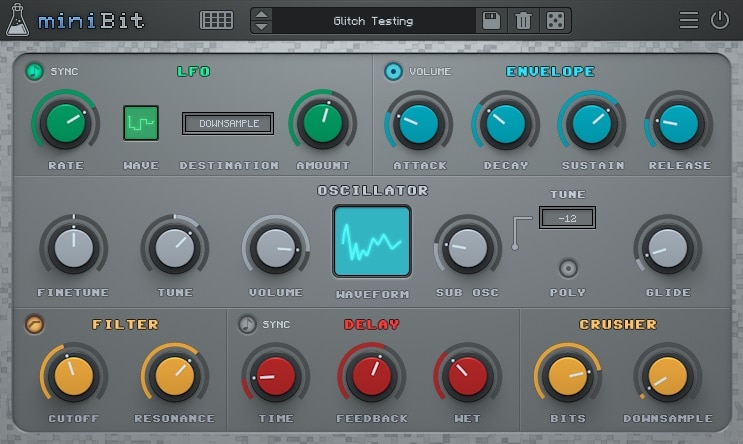
Developed by AudioThing, miniBit is perfect for creating something that will probably suit a game soundtrack or nostalgia fodder. Although it makes a simple sound, it features extensive configuration options, allowing you to tweak your sample’s Delay, LFO, and Oscillation.
Featuring 128 presets and a preset randomizer, this plugin allows you to skip configuration steps and enjoy the sound it offers.
Key Features:
- Oscillator
The miniBit features an excellent oscillator that offers up to 18 different waveforms for you to use. Each waveform produces some aliasing, so you will notice that distinct retro sound every time you use the plugin. The Oscillator also features a sub-oscillator.
- Delay
miniBit features an integrated delay effect on the interface. Choose the delay rate, tweak the volume of the feedback, and sync it with the tempo of your song. After you’ve tweaked those configurations, finalize it by adjusting the wet knob.
- Custom Waveforms
The custom editor allows you to draw waveforms. The editor features 32 steps, and you can save new shapes for later use.
- Step Sequencer
The plugin features an 8-step sequencer. You can modulate parameters from the pitch and volume controls to custom waveforms and downsampling.
Compatibility:
miniBit is available on Windows 7 or higher and macOS 10.7 or higher, both 64-bit only. It comes in VST2/3, AU, and AAX formats.
Summary:
When you try it out, you will see that it features various controls, ranging from simple crusher knobs to more complex effects such as the oscillator controls. The oscillator controls feature a well-thought-out system with simple knobs and a waveform display, allowing you to set the exact values for your mix.
Goodhertz Lossy (Low Bit Rate)
More Info & Price (Trial Available)
Goodhertz Lossy simulates the reduction of audio bitrate in file formats such as MP3.
If you miss the sound your old Nokia or blackberry made when you’ve played songs in your childhood, try using the Goodhertz Lossy. Use the built-in features to recreate the sound by altering the Packet Loss of your sample, allowing you to destroy your sound, although in a fun way.
Choose from a set of presets and try out settings such as 32kb sound, 64kb sound, Detroit factory, and Bad video streaming. I also like it for film or game sound designs when a scene involves internet calls.

Key Features:
- Packet Loss Configuration
The Packet loss option offers you a great way to “destroy” your sample to recreate the low-quality sound. Use the loss speed slider for changing the speed of the data compression.
- List Of Unique Presets
Try using built-in presets such as Digital Garbage, Singing glasses, 32kb, and 64kb sound. They are designed to recreate the sound of pirated music or internet streams.
- Dry/Lossy slider
After choosing your desired sound, you might want to tweak it additionally; the Dry/Lossy slider should help you finalize the job. Choose the exact percentage of the processed sound, and find a balance between the new era and nostalgia.
Compatibility:
Lossy is available for Windows 7 or higher and macOS 10.9 or higher, both 64-bit only. It comes in VST2/3, AU, and AAX formats.
Summary:
The way it perfectly captures that sound of the early 2000s while keeping the settings to a bare minimum is great for such a low price. The added advanced controls such as Auto Gain, Weighting, Verb Decay, and Gate Threshold are going to make your mix sound even more unique. You can read the online manual for further information on how you can use the plugin.
Conclusion
For more detailed work on your samples, I recommend using the Krush Pro, and BITPUNK. These plugins offer you the best controls for altering each section of your audio signal.
You can use the Klevgrander Degrader for a middle ground, stable, and reliable plugin. But if you are looking for amazing retro recreations, check out the Decimort 2, and the unique HomeCorrupter by Igorski.
The Crush Pack, developed by Native Instruments, contains three separate plugins that offer a different experience. And finally, the miniBit provides something different—a retro video game sound effect. We hope that these plugins will help you create some truly unique tracks.

The Integraudio Editorial Team consists of experienced music producers, audio engineers, and plugin enthusiasts dedicated to providing in-depth reviews and guides for music production software.