

A great vocal chain isn’t about stacking as many expensive plugins as possible. I’ve had much better results thinking about what the vocal actually needs at each stage: clean up the recording, fix what needs fixing, control the dynamics, shape the tone, and only then start adding character.
That’s the approach I’m taking with this list, as these are the top vocal VSTs in my arsenal. Rather than filling it with ten variations of the same compressor or EQ, I picked plugins that handle different parts of a real vocal workflow, from noise removal and pitch correction to dynamic EQ, compression, enhancement, and harmonies.
Some are tools I’d happily use on almost every vocal; others make more sense when a particular recording calls for them.
There’s no single “perfect” vocal chain, of course. But these are top vocal plugins I think are genuinely worth knowing, and more importantly, I’ll look at where each one actually makes sense in the chain.
10 Top Vocal Chain Plugins
Three-Body Technology Cenozoix Compressor
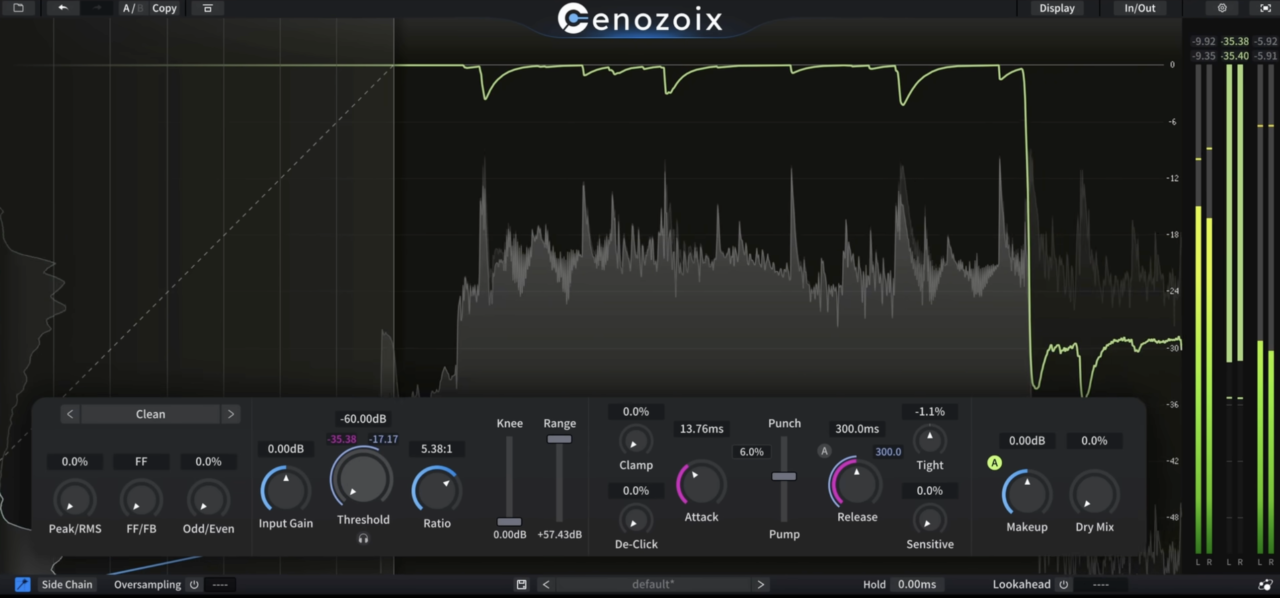
Cenozoix is the kind of compressor that makes me pay attention instead of working on autopilot.
I usually know roughly where I want my attack, release, and threshold, but this one gives me enough control that I often end up shaping the behavior more deliberately. On vocals, that’s useful when I want to catch peaks without ironing out the movement and personality of the performance.
It is definitely deeper than a basic vocal compressor, and I wouldn’t call it the easiest option for beginners. But once I know what I’m trying to fix, the extra control feels purposeful rather than excessive.
- Compression Models
Cenozoix gives me multiple compression styles instead of forcing every vocal through the same character. I like auditioning the models before making major parameter changes because sometimes the right behavior gets me closer faster than endlessly tweaking attack and release.
- Attack & Release Shaping
This is where the plugin really earns its depth. I can fine-tune how the compressor reacts to consonants, transients, and sustained notes instead of relying on broad fast-or-slow settings. That makes it easier to keep articulation intact while still getting the vocal under control.
- Sidechain Filtering
I use the sidechain section whenever plosives or heavy low-mid notes are triggering too much gain reduction. Shaping what the detector hears helps the compression follow the performance more naturally instead of overreacting to one frequency area.
- Anti-Distortion Processing
Fast compression can get edgy, especially with aggressive release settings. Cenozoix includes anti-distortion processing that helps keep those situations cleaner, which I found especially useful on brighter vocals.
For me, Cenozoix is the compressor I reach for when a simpler tool gets me close, but I still want more control over the final behavior.
Three-Body Technology Cenozoix Compressor is available in VST2, VST3, AU, and AAX formats for macOS and Windows.
Waves Clarity Vx
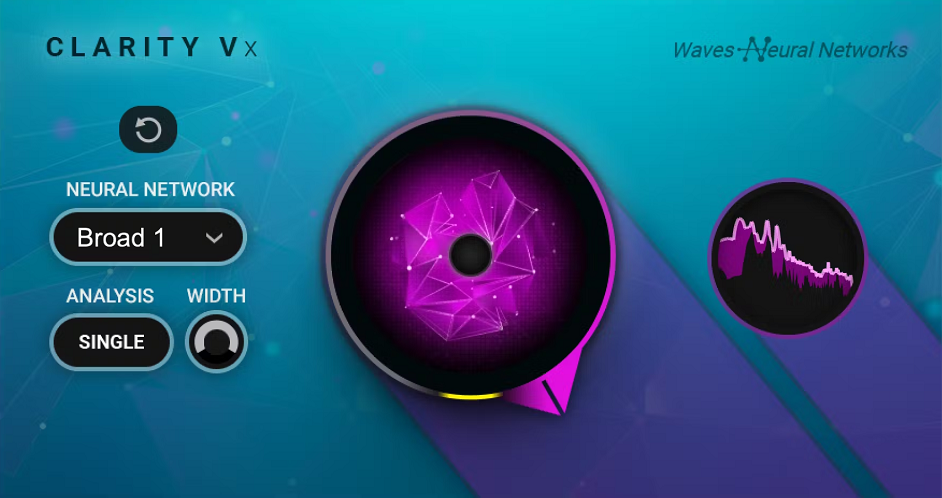
Noise removal is one of those jobs I want to finish before I start thinking creatively about a vocal. If there’s room noise, hum, or background chatter hiding under the performance, compression and saturation usually make me notice it even more.
Waves Clarity Vx has become one of my favorite ways to deal with that problem because it requires very little setup.
Instead of behaving like a conventional gate, Clarity Vx uses a neural network trained to distinguish the human voice from surrounding noise. That makes it particularly useful when the unwanted sound overlaps with the vocal itself, where simply adjusting a threshold isn’t enough.
- Neural Voice Separation
This is the feature that makes Clarity Vx different for me. I’ve used it on recordings where air conditioning, room ambience, or inconsistent background noise would have been annoying to edit manually, and it can pull the vocal forward surprisingly quickly.
I still prefer using it conservatively. Removing every trace of the room can make a vocal feel unnaturally isolated, so I normally clean until the distraction disappears and then stop.
- One-Knob Control
The main workflow revolves around a single large reduction control, making it easy to hear exactly how far I’m pushing the processing. You can also bring some of the original ambience back rather than committing to completely sterile separation.
That simplicity is probably my favorite thing about Clarity Vx. I don’t need another complicated editing stage before I’ve even started mixing.
- Real-Time Processing
Clarity Vx works especially well as the first cleanup stage in my chain. Once the unwanted background is under control, I can move into tuning, EQ, and compression knowing those processors aren’t going to exaggerate noise I should have dealt with earlier.
Waves Clarity Vx is available in VST3, AU, and AAX formats for macOS and Windows.
Brainworx bx_2098 EQ
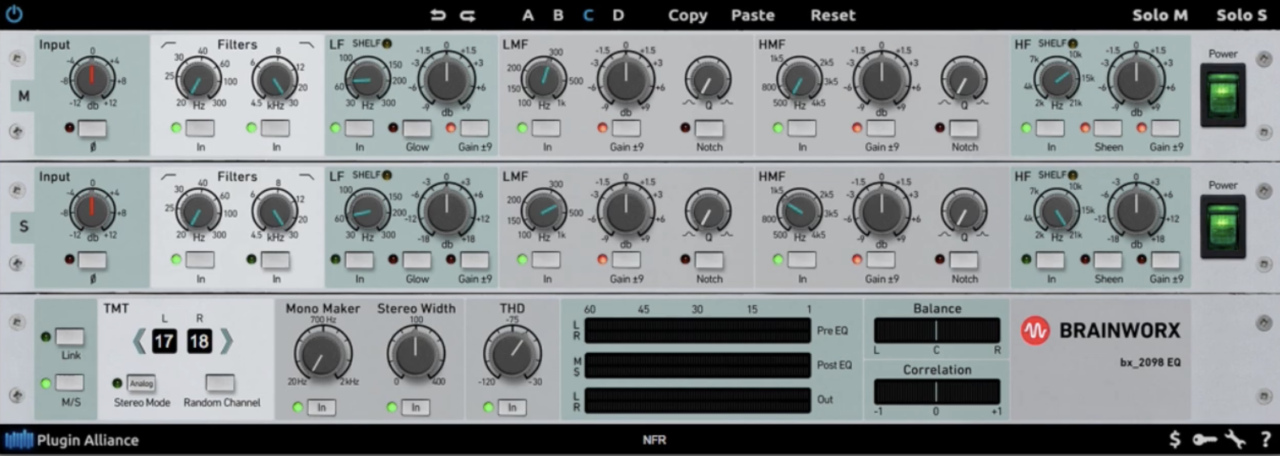
By the time I reach for Brainworx bx_2098 EQ, I’m usually done fixing problems.
The harsh frequencies are under control, the low-end mess is gone, and now I want the vocal to feel a little more finished. That distinction matters because bx_2098 isn’t the EQ I’d choose for microscopic surgery. I like it much more for broad moves that add weight, presence, or air without making me obsess over individual frequencies.
Its design follows the character of a classic British 80-series style channel EQ, so the curves naturally encourage wider, more musical adjustments rather than razor-thin cuts and boosts.
- Musical EQ Curves
This is probably the main reason I’d put bx_2098 later in a vocal chain. I can push the upper frequencies for more openness or add some presence without immediately getting that overly sculpted digital-EQ feeling.
I also like it on thinner voices, where a small low-mid lift can give the vocal more body without simply making it louder. The plugin works best for me when the adjustments stay subtle.
- TMT Channel Modeling
Brainworx includes its Tolerance Modeling Technology, which recreates small component differences between individual console channels.
On a single lead vocal, that can be a fairly subtle detail. Where I find it more interesting is with doubles and backing vocals. Assigning slightly different channel variations gives stacked parts a little separation rather than making every layer feel perfectly identical.
- Additive Tone Shaping
I treat bx_2098 primarily as an additive EQ. A gentle lift around the presence range can help a vocal push through a crowded arrangement, while a broad high-frequency boost can add air without turning the whole process into surgery.
For me, this is less about correcting a vocal and more about giving an already-good vocal its final shape.
Brainworx bx_2098 EQ is available in VST2, VST3, AU, AAX Native, AAX DSP, and AAX AudioSuite formats for macOS and Windows.
Waves Harmony

I usually prefer recording real doubles and harmonies whenever possible, but there are plenty of sessions where that simply isn’t practical.
Waves Harmony is one of those plugins I keep around for exactly those moments. Feed it a lead vocal and it can generate up to 8 additional harmony voices, which is enough to turn a fairly lonely chorus into something much bigger without organizing another recording session.
The trick is resisting the temptation to make everything perfect. When I first started experimenting with harmonizers, perfectly aligned voices almost always sounded artificial. Waves gives you enough control to deliberately loosen things up, and that is where I think the plugin becomes genuinely useful.
- Eight Harmony Voices
Each generated voice can have its own pitch, formant, timing, and pan settings. I rarely use all eight at once, but having that headroom is great for building wider chorus stacks or creating quieter supporting voices around the main performance.
- Humanization Controls
This is probably the section I spend the most time with. Small differences in timing and pitch help stop the harmonies from behaving like perfectly duplicated copies. I prefer keeping the changes subtle, just enough that the stack starts feeling like several performances rather than one vocal multiplied across the stereo field.
- Formant Shaping
Independent formant control lets me change the apparent character of each harmony without simply pitching the entire voice up or down. Used carefully, lower harmonies can feel darker and larger while higher parts can become lighter without turning cartoonish.
- MIDI & Scale Control
Harmony voices can follow a selected scale or be controlled through MIDI. I especially like the MIDI option because I can actually play the harmony movement from a keyboard instead of hoping an automatic algorithm chooses the voicing I had in mind.
Waves Harmony is available in VST3, AU, and AAX formats for macOS and Windows.
Shadow Hills OptoMax
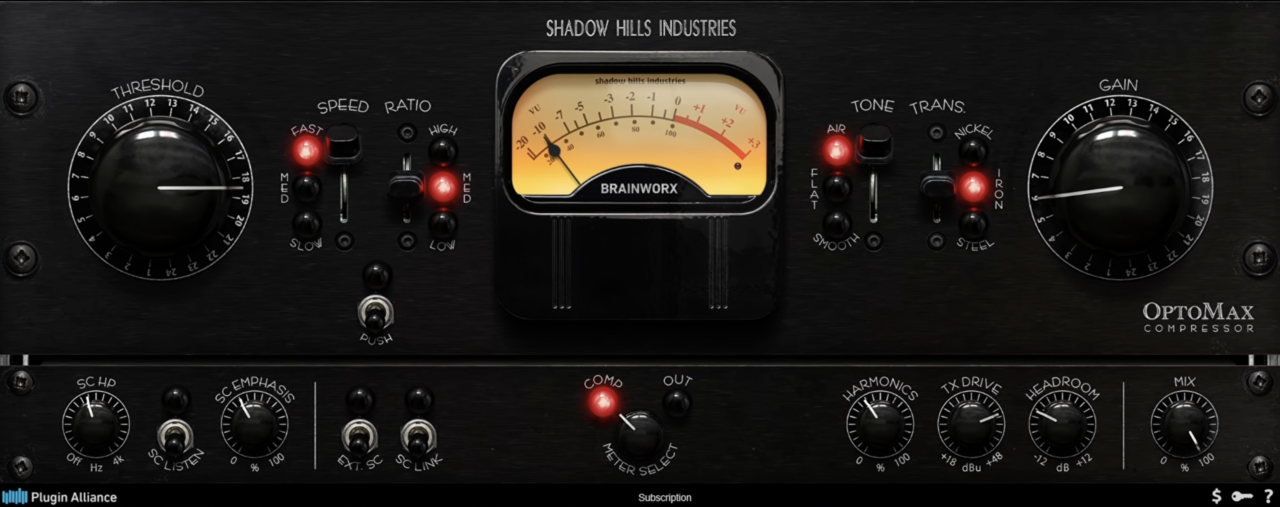
Some vocals don’t need to sound compressed, they just need to behave better. That’s where I like Shadow Hills OptoMax. Instead of grabbing the performance by the throat, it smooths out level changes in a slower, more forgiving way that suits vocals especially well.
OptoMax takes the optical compression section of the Shadow Hills Mastering Compressor and develops it into a dedicated processor. The response is program-dependent, so I don’t feel like I’m constantly fighting attack and release settings.
- 4 Optical Flavours
The most interesting feature for me is the choice between 4 optical attenuator models. They don’t simply change the amount of compression; they alter the way it reacts and the character it adds.
I tend to audition them with a few decibels of gain reduction and listen for which one follows the singer most naturally. Some are better for gentle leveling, while others give the vocal a thicker, more obviously vintage pull.
- Program-Dependent Compression
I especially like OptoMax as the first compressor in a two-stage vocal setup. I can use it to smooth the body of the performance, then let a faster compressor later in the chain catch anything that still jumps out.
That approach usually sounds more relaxed to me than asking one compressor to do all the work.
- Sidechain Filtering
The built-in sidechain high-pass filter is simple but important. Plosives and heavy low frequencies can trigger far more compression than the rest of a phrase, so filtering them out of the detector helps OptoMax respond to the vocal itself rather than being dragged around by its low end.
For smooth, natural vocal leveling, OptoMax is one of the easier compressors here for me to trust.
Shadow Hills OptoMax is available in VST2, VST3, AU, AAX Native, and AAX DSP formats for macOS and Windows.
Brainworx bx_crispytuner
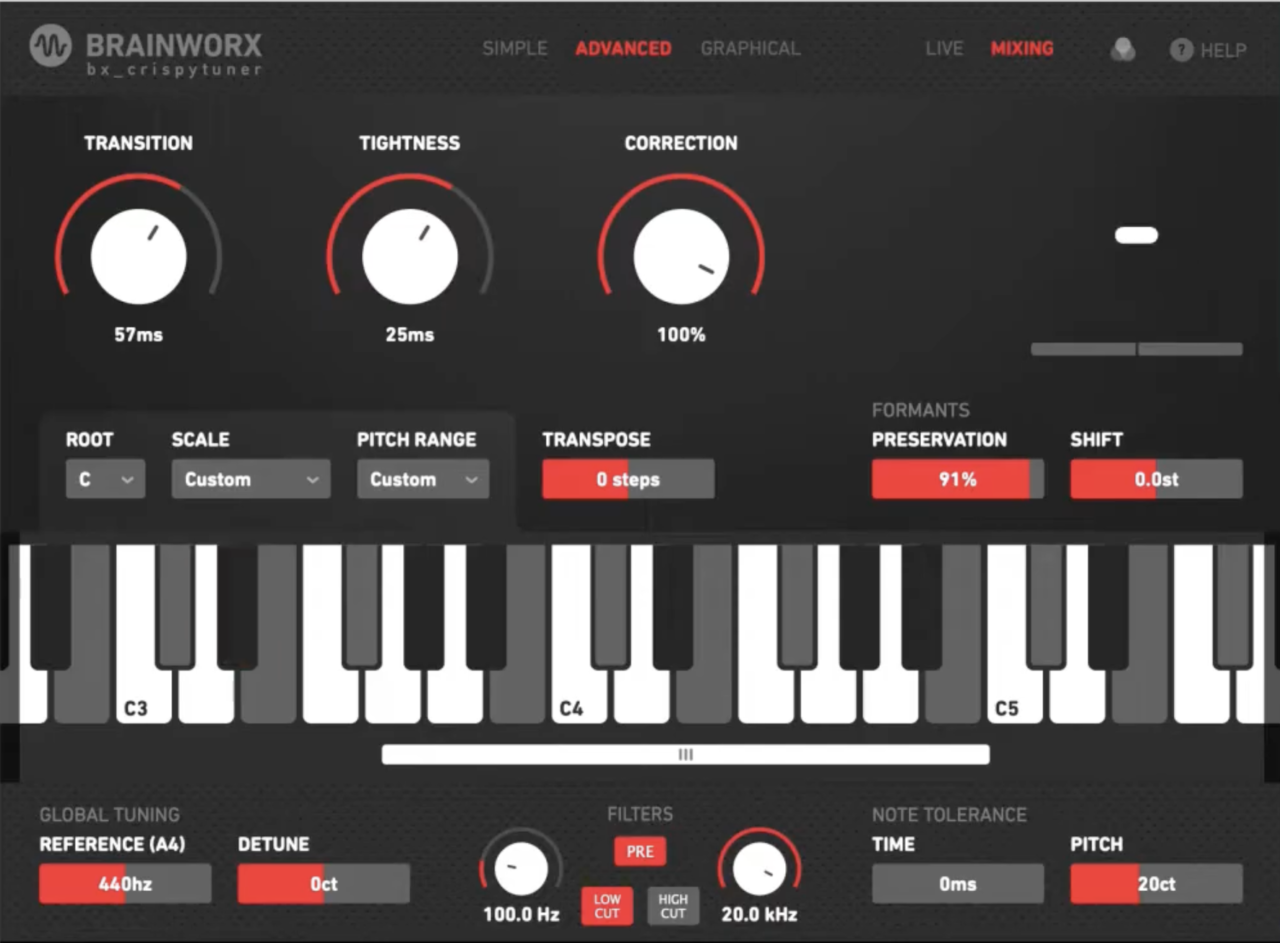
Pitch correction is one of those tools I barely notice when it is done well, and that is usually the goal. Brainworx bx_crispytuner gives me both sides of that job: quick automatic correction when a performance only needs tightening, and much deeper editing when one phrase needs individual attention.
I especially like having both approaches inside the same plugin because I don’t always know how much work a vocal will need until I start listening closely.
- Real-Time Mode
For straightforward correction, the real-time engine lets me choose the song’s key and scale and then control how firmly the vocal is pulled toward the correct notes. It is light enough for tracking, which also makes it useful when a singer wants to hear pitch correction while recording.
I tend to keep it fairly relaxed unless I’m deliberately going for that obvious modern hard-tuned effect.
- Graphical Mode
When automatic tuning isn’t precise enough, Graphical Mode lets me work directly with captured pitch information and edit individual passages by hand.
This is the part I reach for when a vocal is already strong but one transition or sustained note keeps bothering me. Instead of forcing the whole performance through more aggressive correction, I can fix that specific moment and leave everything else alone.
- Crispy Mode
The feature that gives the plugin its name is Crispy Mode, which creates an additional hard-tuned vocal layer underneath the original. I wouldn’t use it for transparent correction, but for pop or hip-hop hooks it can add that deliberately synthetic edge without requiring another vocal track.
- Low-Latency Processing
Being able to run the real-time correction while recording is a practical advantage I value more than another page of advanced settings. For me, bx_crispytuner works because it can stay almost invisible when I need subtle repair, but still gives me enough control to turn pitch correction into part of the production when the song calls for it.
Brainworx bx_crispytuner is available in VST2, VST3, AU, and AAX Native formats for macOS and Windows.
Waves F6 Floating-Band Dynamic EQ

There are vocal problems I don’t want to EQ away permanently. A singer might get harsh on three words, develop a little boxiness on certain notes, or suddenly throw out more sibilance in the chorus.
That’s exactly where I like Waves F6. Instead of cutting a frequency for the entire performance, I can tell it to react only when that area actually becomes a problem.
For vocals, I find that much more natural than piling up static cuts and slowly removing all the character I liked in the recording to begin with.
- 6 Floating Bands
F6 gives you 6 fully adjustable bands, each with its own threshold, attack, and release controls.
I’ll often find an aggressive upper-mid frequency, set a fairly narrow band around it, and let F6 pull it down only on the louder phrases. The quieter lines keep their original presence instead of sounding unnecessarily softened.
- Dynamic EQ
This is really the reason I keep F6 around. The processing only kicks in once the selected frequency crosses its threshold, so it feels more like targeted problem solving than conventional EQ.
It works especially well when the problem changes with the singer’s intensity rather than remaining constant throughout the recording.
- De-Essing
F6 also doubles nicely as a de-esser. I can place a band around roughly 5–8 kHz, adjust the threshold until it catches the sharp consonants, and then choose exactly how wide and deep I want the reduction to be.
- Mid/Side Processing
Each band can work independently on the mid or side signal. I find this particularly handy with wide vocal stacks, where I might want to tame the lead in the center without taking the brightness out of the doubles surrounding it.
Waves F6 Floating-Band Dynamic EQ is available in VST3, AU, and AAX formats for macOS and Windows.
Brainworx bx_Enhancer
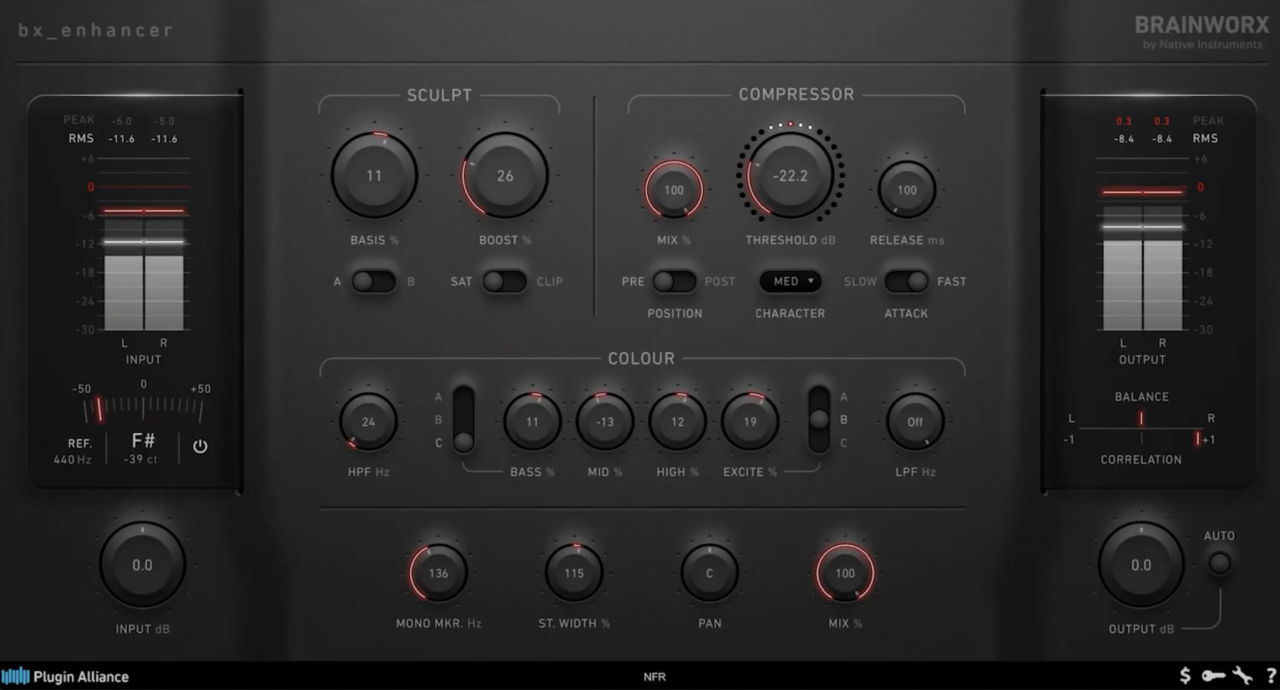
There’s a point in some vocal mixes where EQ stops helping. I can keep adding presence, but eventually I’m just making the vocal brighter and bringing the harsh frequencies back with it.
Brainworx bx_Enhancer is more interesting to me at that stage because it creates additional harmonic content rather than simply boosting what is already there.
I usually reach for it after the corrective work is finished and the vocal already sounds balanced. At that point, I’m not trying to repair anything. I just want the singer to feel a little closer to the listener without pushing the fader another few dB.
- Harmonic Enhancement
The basic idea is simple: bx_Enhancer adds harmonics that make the vocal appear more present and forward. I found that particularly useful in dense arrangements where the vocal technically had enough level but still seemed to disappear behind guitars, synths, or a busy drum mix.
It’s very easy to overdo, though. My favorite settings were usually the ones where I barely noticed the processing until I bypassed it.
- Separate Drive Paths
One of the more useful parts of the design is the ability to focus the added character toward the upper-midrange while keeping the lower frequencies cleaner.
That makes a lot of sense on vocals. I can introduce some extra bite and definition where intelligibility lives without simultaneously thickening the low mids, which is usually the last thing I want after spending time cleaning that area up.
- Presence Without EQ
This is ultimately why bx_Enhancer earns a place in my vocal chain. If another presence boost starts making the vocal sharp, I’d rather try a little harmonic enhancement than keep forcing the EQ.
I treat it as a finishing tool rather than a corrective processor. A small amount can make the vocal feel more immediate; too much quickly becomes obvious. For me, the sweet spot is when I miss it after bypassing it, but don’t consciously hear an “enhancer” while it’s on.
Brainworx bx_Enhancer is available in VST2, VST3, AU, AAX Native, and AAX AudioSuite formats for macOS and Windows.
Three-Body Technology Kirchhoff-EQ

I usually reach for Kirchhoff-EQ when a vocal needs more than a couple of broad tonal adjustments.
It gives me enough precision to hunt down a stubborn resonance or muddy low-mid buildup, but I can stay in the same plugin when I want to make wider, more musical moves afterward.
That versatility is the reason I like it in a vocal chain. I don’t have to decide upfront whether I need a surgical digital EQ or something with more analogue character.
- 32 EQ Bands
With up to 32 bands, Kirchhoff gives me far more room than I’d realistically need on a single vocal, but I appreciate never feeling restricted. It also includes modeled filter curves inspired by classic analogue EQ designs, so I can move from narrow corrective cuts to broader shelves without changing plugins.
On vocals, I’m usually using only a handful of bands to clear rumble, control boxiness, and tame any frequencies that jump forward on particular notes.
- Dynamic EQ
Any band can also become level-dependent, which is probably the feature I use most after the basic EQ itself. Rather than permanently cutting an upper-mid frequency because it gets harsh occasionally, I can have that band react only when the problem appears.
It also means Kirchhoff can handle de-essing and resonance control without forcing me to add another processor immediately afterward.
- Analogue Filter Models
The analogue-style curves give Kirchhoff another personality beyond surgical cleanup. I like being able to finish the corrective work and then use a broader shelf to reshape the vocal without opening a second EQ.
- High-Precision Processing
Kirchhoff uses a high-precision internal processing engine designed to keep phase distortion low even with more substantial EQ moves.
It’s admittedly more EQ than many vocals require, but that’s also its appeal for me. When a recording turns complicated, Kirchhoff rarely leaves me wishing I had reached for something deeper.
Three-Body Technology Kirchhoff-EQ is available in VST2, VST3, AU, and AAX Native formats for macOS and Windows.
Brainworx bx_pulsar
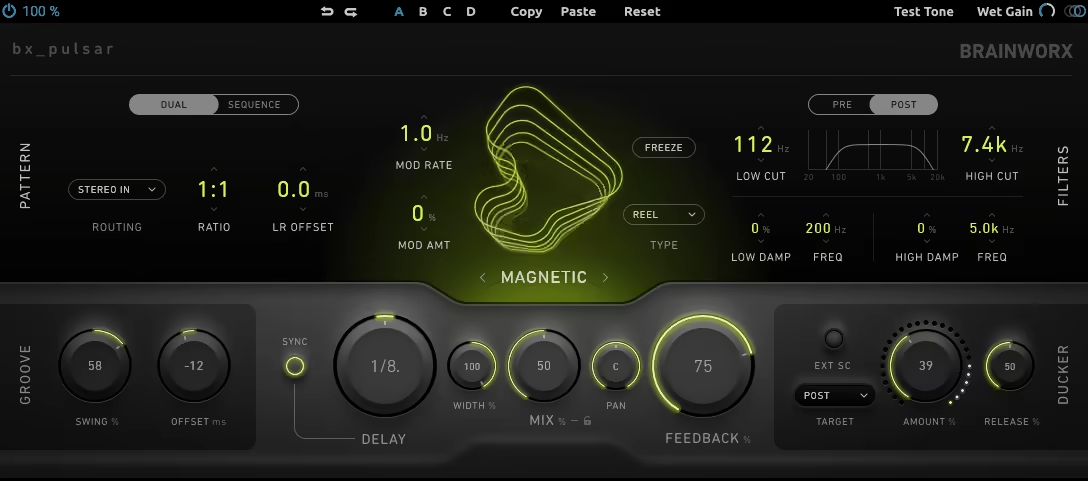
I usually prefer delay over a big reverb when I want to give a lead vocal space without pushing it farther back in the mix. That is where Brainworx bx_pulsar fits nicely for me.
I can keep the vocal clear and upfront, then use the repeats to fill the empty spaces around phrases instead of covering everything in ambience.
It can handle straightforward vocal delays, but the part I enjoy is how easily the repeats can become less perfect as they fade. Filtering and modulation inside the feedback path let the echoes gradually change character, which helps them separate from the dry vocal rather than competing with the next line.
- Feedback Modulation
The modulation controls are what stop bx_pulsar from feeling like another basic delay. I like adding just enough movement that each repeat feels slightly less stable than the one before it.
It works particularly well when I want a vocal delay to add atmosphere without turning into an obvious special effect.
- Feedback Filtering
Being able to shape the frequencies inside the repeats is just as important. I normally remove some low end and soften the top so each echo sits farther behind the original vocal.
That makes quarter-note and eighth-note delays much easier to fit into a busy mix because they occupy their own space instead of duplicating the full vocal spectrum.
- Send Processing
I almost always use bx_pulsar on an aux send rather than directly on the vocal track. That gives me independent control over the wet signal and lets me automate the delay into specific words or gaps between phrases.
For me, bx_pulsar earns its place here because it can create depth while still letting the vocal stay right at the front of the record.
Brainworx bx_pulsar is available in VST2, VST3, AU, AAX Native, and AAX AudioSuite formats for macOS and Windows.
Last Words
Building a great vocal chain is less about owning every processor and more about knowing what the recording actually needs. Some vocals might need cleanup, tuning, multiple stages of compression, and extra enhancement, while a strong recording may only need a little EQ and space.
These 10 plugins cover very different parts of that process, so I wouldn’t expect anyone to use all of them at once. Start with the vocal itself, fix the problems you can actually hear, and then use the rest of the chain to bring out the character that was already there.

Berk is a multi-instrumentalist musician from Istanbul, Turkey. He has been playing guitar, handpan, and percussion for over ten years, developing a sound that blends melodic sensitivity with rhythmic depth.
He began his musical journey as a teenager, learning guitar and performing in several bands. In 2016, he discovered the handpan, an instrument that immediately resonated with him on a deeper level and gradually became central to his artistic identity.
Since then, he has performed in streets, festivals, bars, and concert venues across different countries, connecting with diverse audiences through both intimate and large-scale performances.
Alongside his live work, Berk is deeply involved in studio production. He works from his home studio, where he composes, records, and produces his own music. His studio serves as a creative space for layering handpan, guitar, and percussion with modern production techniques, allowing him to shape fully realized, atmospheric compositions from start to finish.
His music explores a wide range of genres and textures, combining organic acoustic instruments with detailed studio production to create immersive and expressive soundscapes.