

This article is a detailed review of the Music Production DAW FL Studio 24 and discusses if it is still worth it in 2025.
FL Studio continues to evolve with new features like advanced AI mastering, enhanced plugins, Python scripting, and improved workflow tools. But with so many DAWs on the market, is FL Studio 24 still worth the investment? In this review, we’ll dive into the new updates, tools, and user experience to help you decide if it fits your production needs this year.
FL Studio GUI (Graphical User Interface) and Workflow
One aspect in which FL Studio still remains unbeatable is its user interface and easy workflow. The layout is designed to be intuitive, allowing both beginners and seasoned producers to navigate effortlessly through the various features. The drag-and-drop functionality makes arranging samples, loops, and instruments seamless, while the modular design allows users to organize their workspace according to personal preferences.
The workflow of FL Studio is essentially divided into 4 main windows: Playlist, Channel Rack, Mixer Window, and Piano Roll. 2 more windows that are extremely useful and very often used are the sampler and Edison (audio editor). Let’s understand each of these in more detail.
Playlist
The Playlist is where you arrange your entire project, placing patterns, audio clips, and automation. It allows for easy drag-and-drop arranging, and the layout is completely non-linear, giving users maximum flexibility to compose and arrange their music.
Recent updates have added new features like Make a Unique Clone and Send as an Audio Clip, which streamline common tasks such as duplicating sections or converting instrument tracks into audio for further editing.
FL Studio has made some really cool updates to the playlist window.
- Accessible Fades and Gain Controls
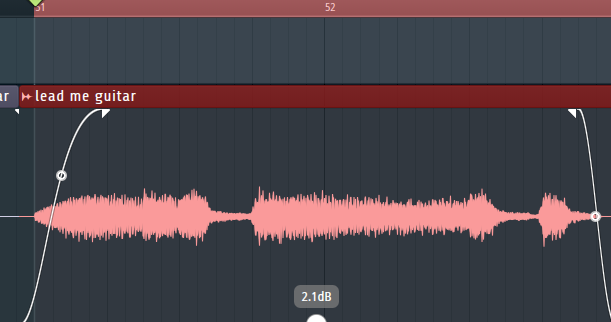
Firstly, I am happy that FL Studio finally added good fade-in/out controls, along with individual gain changes in each clip, which are directly accessible through the playlist window, unlike before, where we had to go to the sampler to adjust gain, which again, had a limited ceiling of +6dB.
- Stems separation
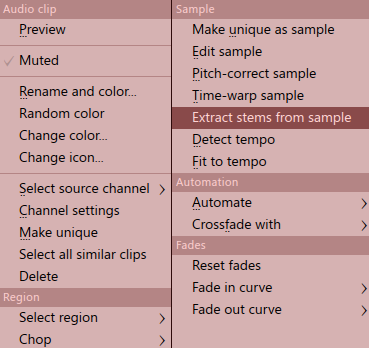
Next, you can split an audio file into separate instrument stems within the playlist.

There are more new changes that we will discuss in the ‘What’s new in FL Studio 24’ section.
Other Key Features:
- Non-linear arrangement: Flexible arrangement of patterns, audio clips, and automation.
- Make a Unique Clone: Easily duplicate clips while creating unique instances.
- Send as an Audio Clip: Convert instrument tracks into audio with one click.
- Automation editing: Enhanced control over automation curves and events.
Channel Rack
The Channel Rack is the central hub for managing instruments, plugins, and patterns. It’s where you program drums, manage samples and control virtual instruments. Each channel is represented visually, making it easy to see and tweak different elements of your track. The Channel Rack’s step sequencer is particularly useful for creating rhythmic patterns, and it syncs seamlessly with other windows like the Playlist and Mixer.

Key Features:
- Step Sequencer: Intuitive tool for creating rhythmic patterns and programming drums.
- Drag-and-drop functionality: Simplified organization of instruments and effects.
- Pattern management: Easily switch between different patterns within your project.
Mixer Window
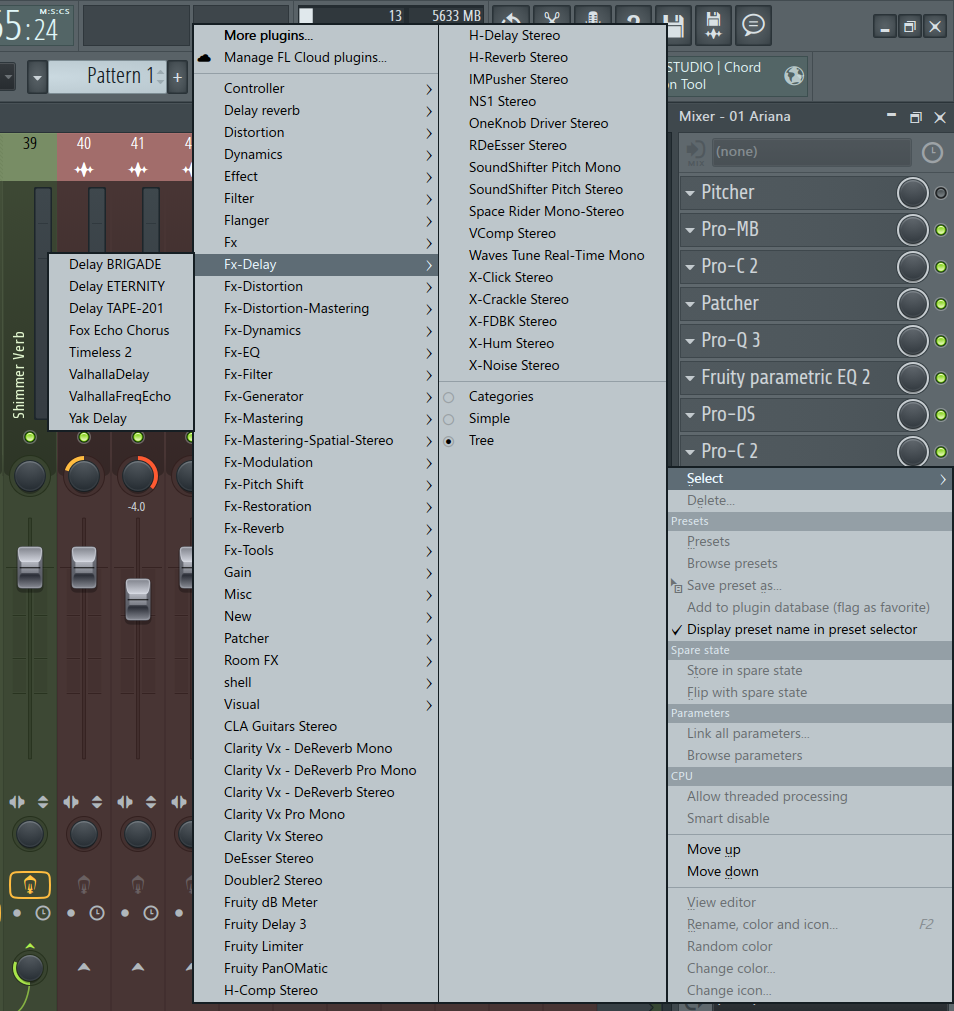
The Mixer Window is where all your sounds are processed and mixed. It’s highly customizable, allowing for routing flexibility, adding effects, and controlling volume and panning with precision. In FL Studio 24, new plugin effects like Low Lifter and Spreader offer even more creative possibilities for mixing. At the same time, features like Parametric EQ 2 with de-cramped filters provide professional-level sound shaping without unwanted phase shifts or latency.

Key Features:
- Advanced routing: Flexible routing options for processing and mixing sounds.
- Plugin support: Includes new plugins like Low Lifter and Spreader for more creative mixing.
- PDC (Plugin Delay Compensation): Automatically corrects latency introduced by certain plugins, ensuring perfect timing and synchronization.
- Group and Submix Channels: Organize complex mixes by grouping related tracks for easier control and processing.
- Real-Time Peak and RMS Meters: Visualize your track’s loudness and dynamics in real-time, helping with proper balancing
- Sidechain Routing: Easily set up sidechain compression and other dynamic processing through the Mixer’s flexible routing system.
Piano Roll
The Piano Roll is widely considered one of the best in the industry. It’s where you compose melodies, chords, and basslines with ease. The note repeat feature in FL Studio 24 adds creative stuttering effects, while the ability to use Python scripting allows advanced users to automate and extend the functionality of the Piano Roll. Whether you’re creating complex chord progressions or fine-tuning note placements, the Piano Roll is an indispensable tool.
The new updates in FL Studio introduce various parameters like aftertouch, repeat, and fine pitch, for which you can record and set the MIDI information.

Key Features:
- Note Repeat: Create non-destructive stuttering effects for notes and beats.
- Advanced editing tools: Fine-tune note placement, velocity, and pitch
- Ghost Notes: Visualize notes from other patterns in the background to help with layering harmonies or complex arrangements.
- Scale Highlighting: Easily identify which notes fit within a selected musical scale, helping with melody and chord creation.
- Quantization: Snap notes to the grid for perfect timing, with customizable grid divisions and swing settings.
- Arpeggiator: Automatically generate arpeggiated sequences from chords with adjustable speed, direction, and note length.
- Strum Tool: Apply a strumming effect to chords, adding natural variation to timing and velocity.
- Chop Tool: Slice long notes into smaller segments with customizable spacing, ideal for creating rhythmic effects.
- Randomizer: Randomly vary note pitch, velocity, and timing for a more humanized, less robotic feel.
- Slide Notes: Add slide effects between notes for seamless pitch transitions, especially for synth leads and basses.
There’s also the all-new chord progression tool that we will discuss in the next section.
Sampler
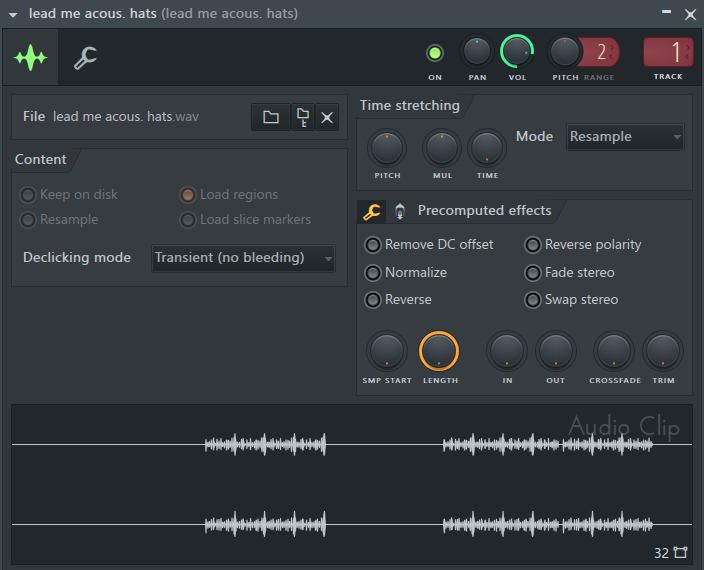
The Sampler in FL Studio is the go-to tool for triggering samples, loops, or one-shots. It’s easy to use and highly flexible, allowing you to quickly manipulate audio samples through features like pitch shifting, time stretching, and filtering. For beatmakers and sound designers, the Sampler is an essential tool for shaping unique sounds.
Key Features:
- Pitch shifting and time stretching: Easily manipulate samples for creative control.
- One-shot triggering: Quick and efficient sampling for beats, loops, and sound design.
- Filter and modulation: Apply effects directly to samples for instant sound shaping.
Edison (Audio Editor)
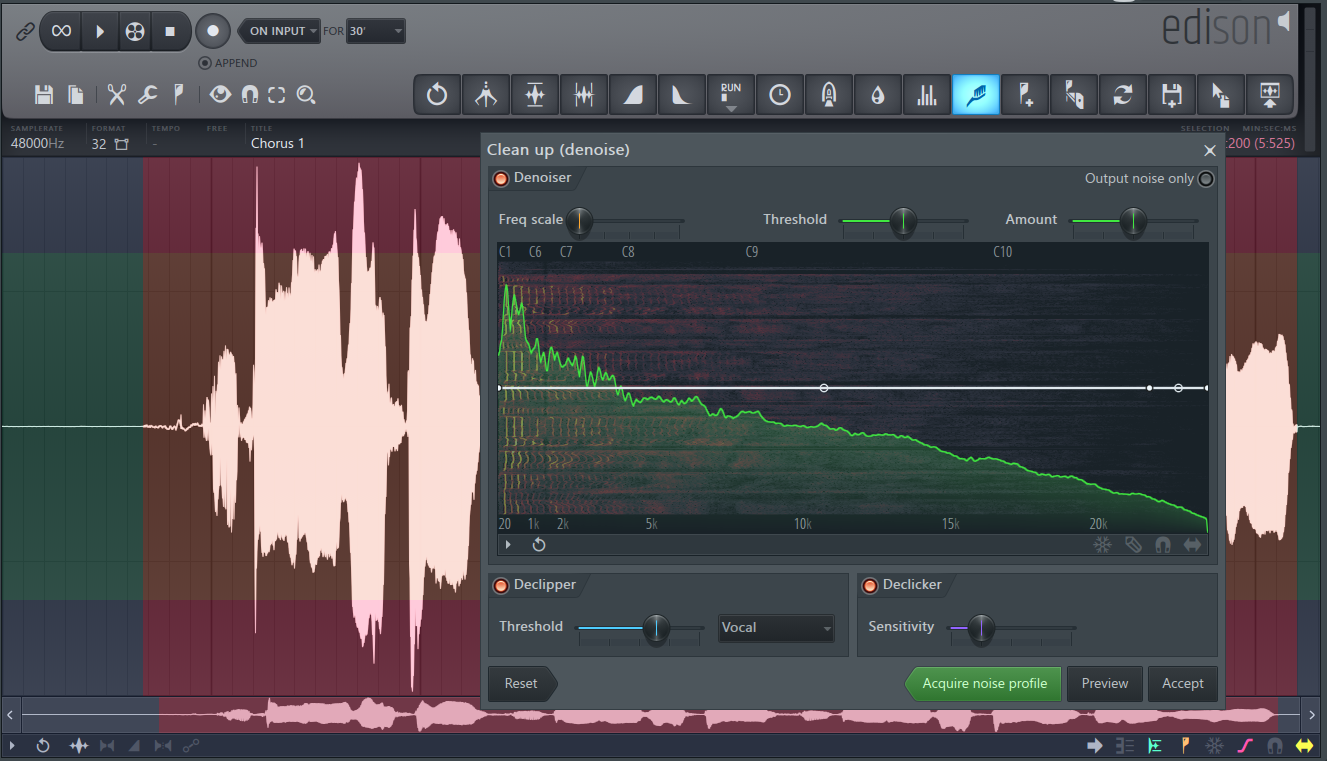
Edison is FL Studio’s powerful audio editor, allowing detailed waveform manipulation, including recording, editing, and processing audio. With FL Studio 24, Edison now includes AI-powered features like the Declipper and AI Vocal Isolation, which make it easier than ever to clean up clipped audio and separate vocals from instrumentals. This makes Edison indispensable for tasks like sound design, restoration, and precise audio editing.

Key Features:
- Real-Time Recording: Record audio directly into Edison for live sound capture, ideal for vocals, instruments, or any external sound source.
- Advanced Looping Tools: Create seamless loops with features like zero-crossing detection and auto-loop smoothing to eliminate clicks and pops.
- Noise Reduction: Remove background noise from recordings using noise profile analysis and customizable noise gates.
- Time Stretching and Pitch Shifting: Alter the duration or pitch of audio files without affecting quality with high-precision algorithms.
- Reverse and Invert: Reverse audio clips or invert their phase, which is useful for creative sound manipulation or fixing phase issues.
- Click Removal: Automatically detect and remove clicks and pops from audio recordings, ensuring clean and professional results.
- Spectral Analysis: Visualize your audio in a frequency spectrum display, offering detailed insight into its frequency content.
- Region Markers: Add markers to specific audio regions for easier navigation and editing, which is especially useful for long recordings.
What’s New in FL Studio 2024?
FL Studio 2024 brings an exciting suite of new features designed to enhance the creative process for music producers of all levels. From AI-powered tools to workflow optimizations, this update is packed with innovations that make producing music smoother and more fun. Here’s a detailed look at what’s new in this latest version.
FL Cloud Pro
FL Cloud is a set of integrated tools and services that streamline your music production process directly in FL Studio. With the release of FL Studio 2024, FL Cloud Pro introduces more powerful features for users.
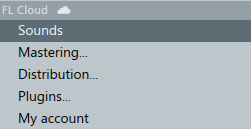
- AI Mastering
AI-driven mastering tools that tailor the final sound based on your chosen genre. You can select the platform for which you’re mastering, like Spotify, Apple Music, YouTube, etc.
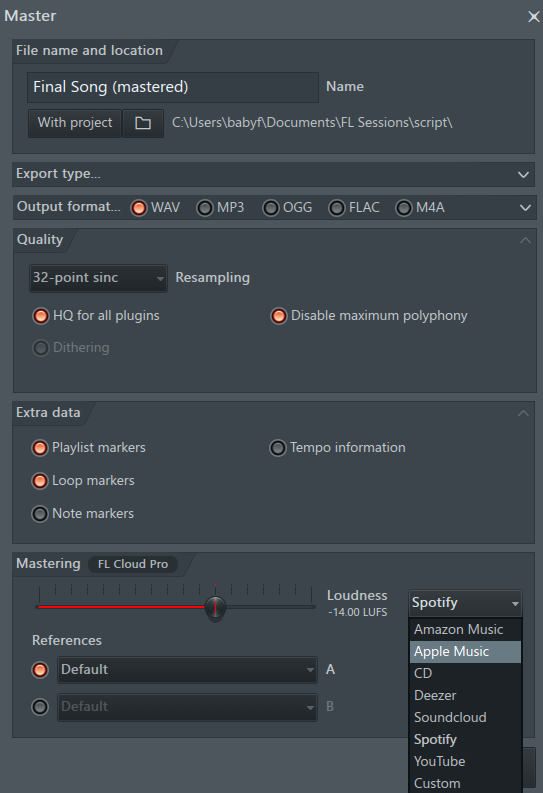
Additionally, you can also select the genre.
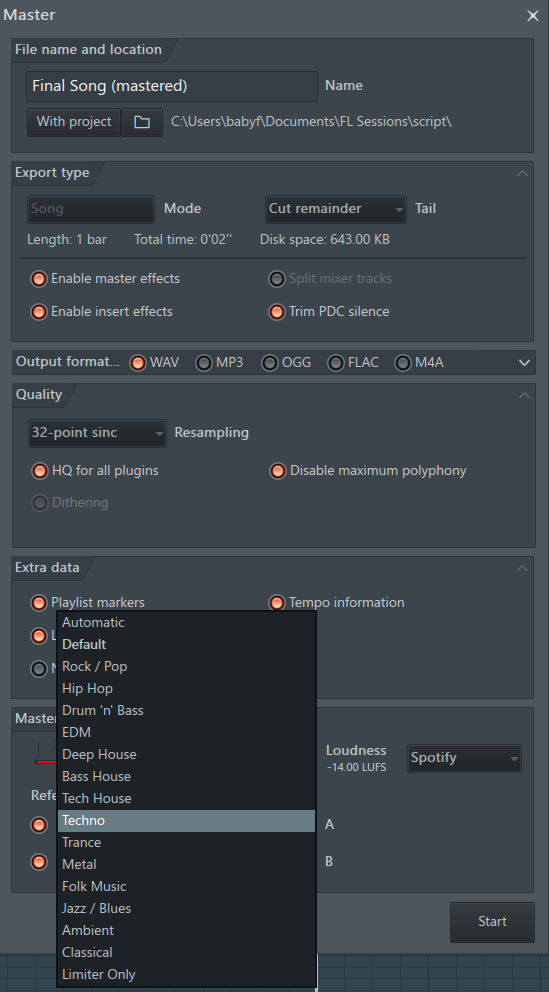
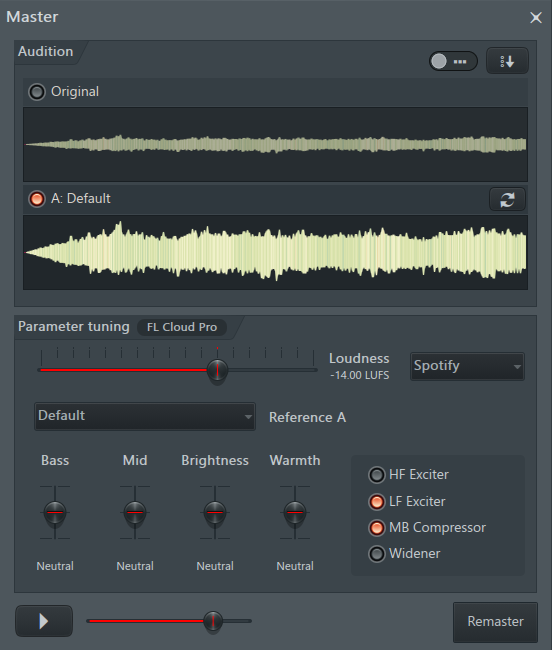
Customize various parameters like dynamics and stereo width. You can tailor your master as per your preferences.
- Free Plugins
Access a growing library of high-quality plugins and effects. Even with a free tier, you can enjoy many tools, but subscribing to FL Cloud Pro unlocks more advanced instruments and effects.
- Subscriptions with a 30-day free trial
FL Studio users can try out FL Cloud Pro for 30 days without any commitment. No need to input payment details in advance, so you can explore its features risk-free.

- Music Distribution
FL Studio 2024 has taken another step forward by integrating music distribution services within FL Cloud. This feature allows producers to seamlessly release their tracks to major streaming platforms like Spotify, Apple Music, YouTube, and more without needing third-party services directly from FL Studio.
Chord Progression Tool
The new Chord Progression Tool is a game-changer for producers struggling to create compelling chord sequences. It generates chord progressions based on your existing notes or allows you to start from scratch. You can choose from various presets or tweak the generated progressions to fit your song’s mood. Whether you’re after simple, popular chord patterns or more complex jazzy vibes, this tool will make the process more intuitive.
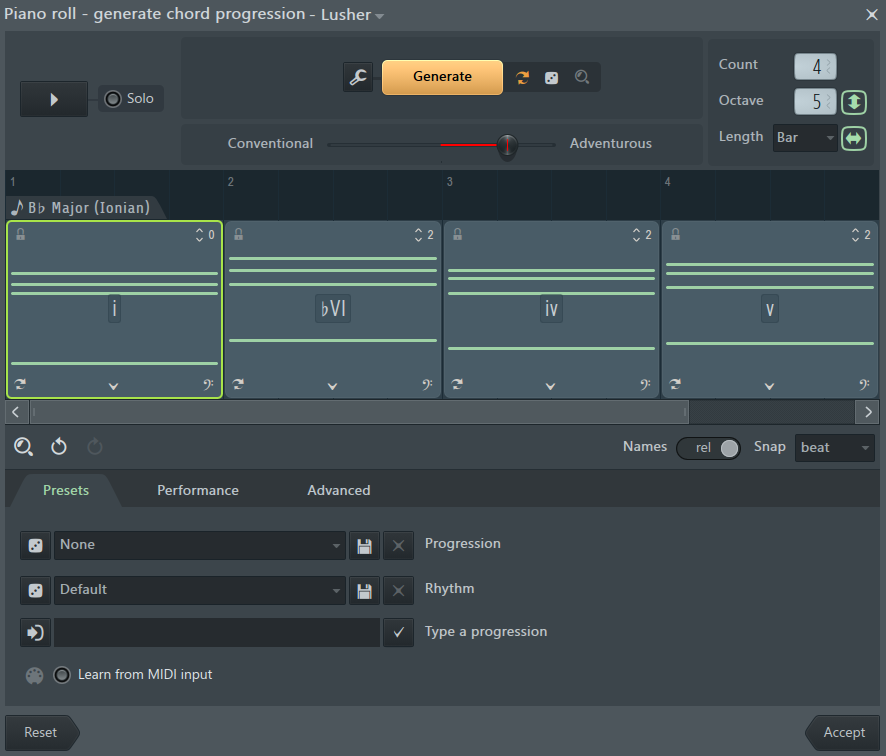
It allows you to adjust the following parameters:
- Octave in which the chords are played
- Length of each chord
- Conventional/Adventurous Slider that lets you select whether you want more generic chord progressions or more novel
- Emotion of the chords
- The rhythm of the chords
- Performance factors like note repeats, morphing, articulation, etc.
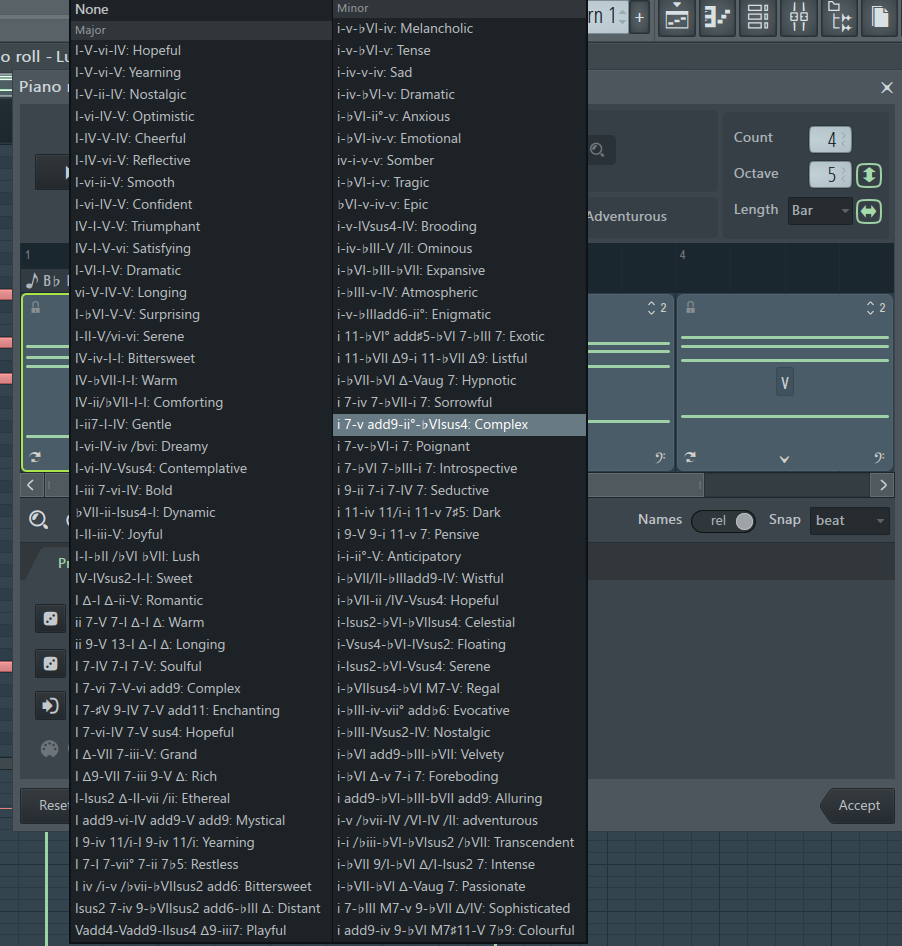
Piano Roll
The Piano Roll has always been a vital part of FL Studio, and in 2024, it gets even better with these features:
- Repeater
Add instant stuttering and repeating effects to your notes with the new non-destructive repeat tool. It’s available both in the Piano Roll and Step Sequencer, making beat creation even easier.

- Python Scripting
For advanced users, Python scripting has been introduced to further customize and automate workflows within the Piano Roll. By writing Python scripts, producers can automate repetitive processes like parameter changes, batch-edit audio files, or randomize musical elements, significantly speeding up workflows. The scripting feature is particularly powerful in customizing the Piano Roll and interacting with various DAW elements.
With built-in support, pre-made example scripts, and comprehensive API documentation, users can easily get started and build their own scripts, tailoring FL Studio to their specific needs for greater efficiency and creativity.
New Plugins and Instruments
FL Studio 2024 offers a range of new plugins and instruments that provide unique sounds and powerful audio effects:
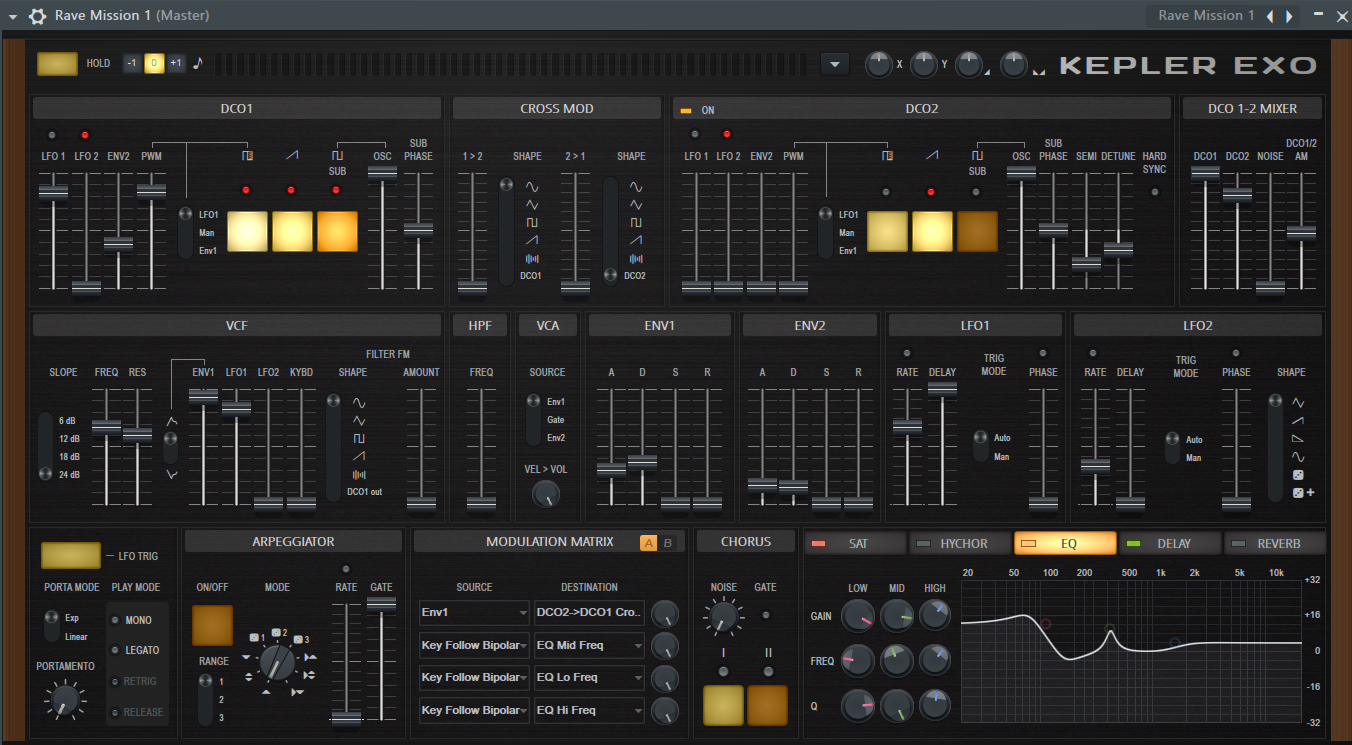
- KEPLER Exo
Inspired by the legendary JUNO-6 and JUPITER-8 synthesizers, this new synth combines vintage sounds with modern capabilities like a second DCO, advanced modulation, and built-in effects. It’s perfect for producing retro-inspired tracks like synth-wave and cyberpunk.
- Low Lifter
This tool enhances perceived bass in tracks, even on systems that can’t reproduce deep bass frequencies, like laptop speakers. By adding harmonics, it creates a fuller bass presence without altering the original audio signal.

- Spreader
This stereo enhancement plugin expands the stereo image of your audio without affecting its mono compatibility. It also includes a low-frequency bypass to ensure the bass remains centered and punchy.

New Edison Features
Edison, the audio editor in FL Studio, gets significant upgrades in this version:
- Declipper AI Models
Two new AI-driven declipper models help recover audio from severe clipping, ensuring that previously unusable recordings can be easily salvaged.
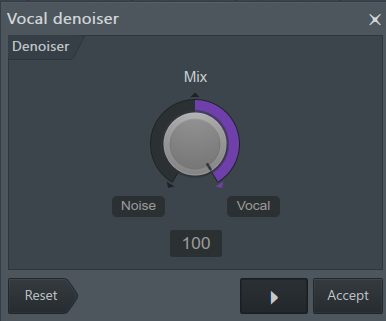
- AI Vocal Isolation
This tool separates vocals from background music, making it perfect for remixing or enhancing vocal clarity in a mix.
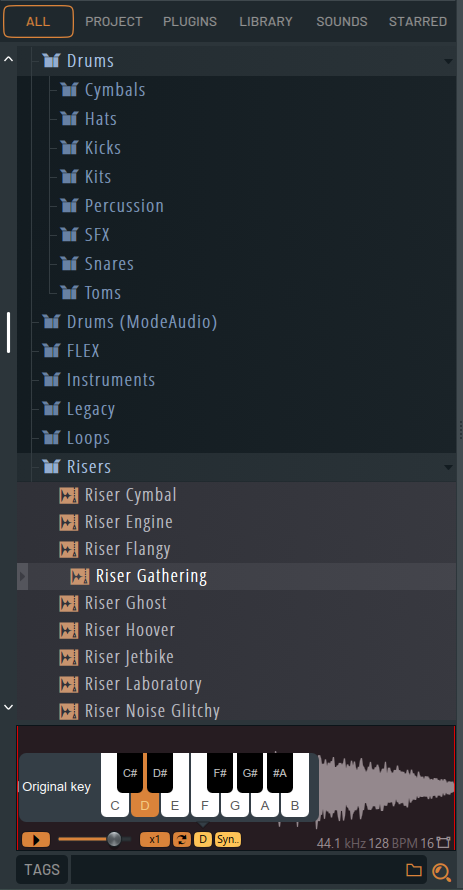
(Finally!!!) Browser (Time & Key Synced Preview)
The Browser in FL Studio now features a long-awaited update: time and key-synced previews. When browsing samples, you can hear them automatically adjusted to match your project’s tempo and key, streamlining the workflow for auditioning sounds. This feature saves significant time, especially for producers who use multiple samples and loops in their tracks.
Parametric EQ 2: De-cramped Filters
The Parametric EQ 2 has received an update introducing de-cramped filters, which provide higher-quality sound without the phase shift or latency introduced by previous oversampling techniques. This change produces more accurate audio shaping, crucial for precise mixing and mastering.

CLAP Compatibility
FL Studio 2024 embraces the new CLAP (CLever Audio Plug-in) format, which is an open-source alternative to the proprietary VST and AU standards. CLAP promises better performance, faster processing, and enhanced MIDI support. You can now use a growing ecosystem of CLAP-compatible plugins for an even wider range of production tools.
Playlist Updates
FL Studio’s Playlist has always been a powerful tool for arranging tracks, and the 2024 update adds several workflow enhancements.
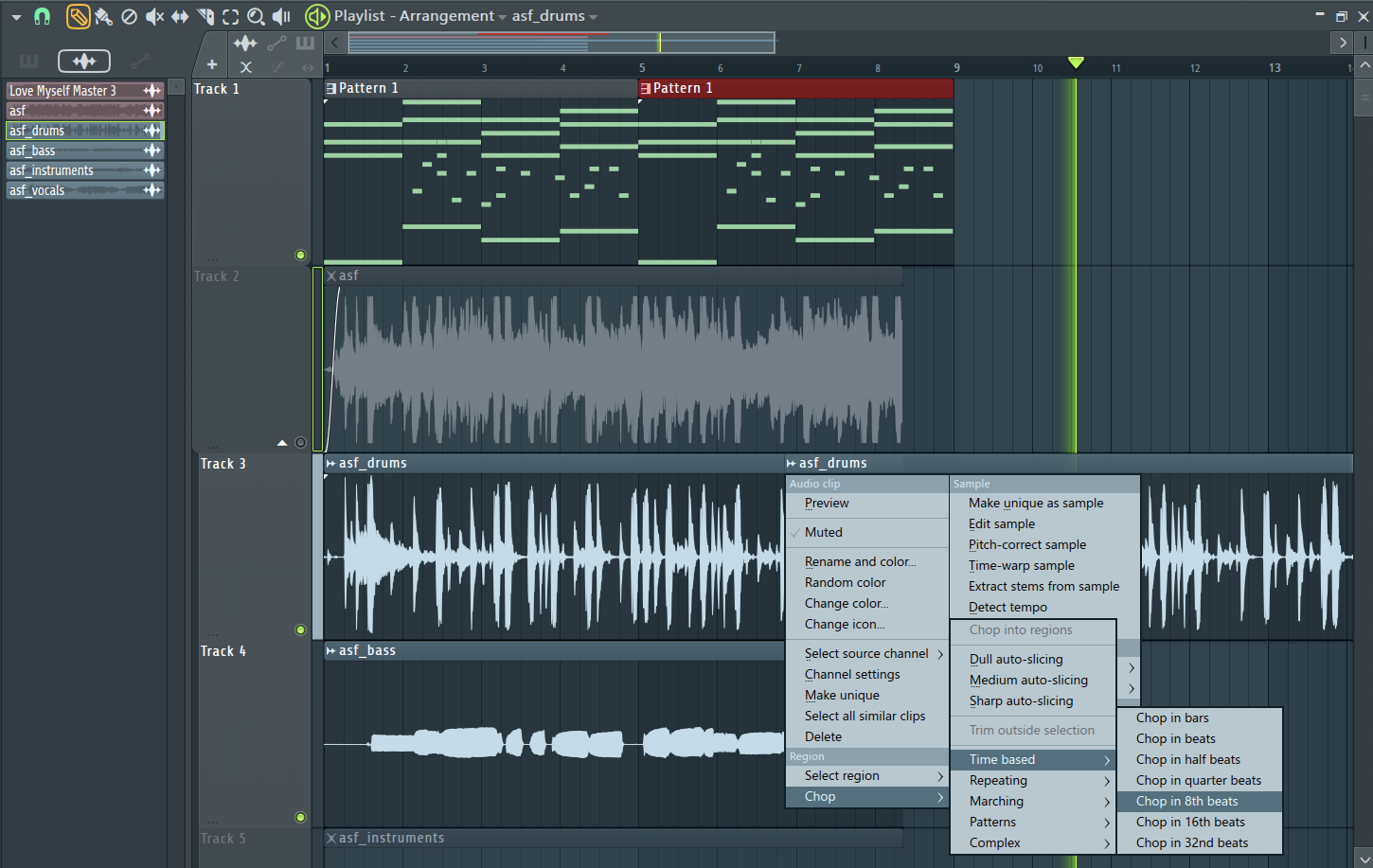
- Make a Unique Clone: Quickly create unique instances of clips without altering the original, speeding up creative variations.
- Send as an Audio Clip: Easily convert instrument tracks into audio clips for streamlined manipulation and mixing.
- Automation Editing: Enhanced controls for automation allow for easier and more precise editing.
- Samples & Instruments Separation: New tools for separating samples from instruments make it easier to organize complex projects.
- Nudging Customizations: You can now customize the way clips are nudged, offering more control when adjusting timings.
FL Studio 2024 brings a host of new features and improvements that significantly enhance both creative and technical workflows. Whether you’re mastering with AI, using the chord progression tool for fresh ideas, or diving deep into sound design with the latest plugins, this update empowers producers to make music more efficiently and creatively than ever before.
FL Studio 24 (2024) Price Analysis
| Edition | Cost (USD) | Main Features | Who It’s For |
| Fruity Edition | 99 | Basic features, Piano Roll, Step Sequencer, limited automation | Beginners and beatmakers needing basic tools |
| Producer Edition | 179 | Full audio recording & editing, advanced automation, plugin support | Intermediate producers, recording artists |
| Signature Bundle | 269 | Producer Edition + additional plugins (Sytrus, Maximus, etc.) | Advanced producers looking for extra plugins |
| All Plugins Bundle | 499 | All features and plugins, including third-party plugin compatibility | Professional producers and sound designers needing full access |
Conclusion
There’s no doubt that no plugin can come close to FL Studio in terms of ease of use, sampling capabilities, and MIDI editing. Even in 2024, with so many new advancements in different DAWs, like the AI drummer and bass player in Logic Pro, FL Studio remains one of the smoothest music production software.
Its new stem separation capabilities and mastering and AI vocal isolation features make it a great and advanced tool for 2024. While I appreciate the new synths and plugins, I feel that the soundbank and effects were never a problem in the DAW. However, the limitations of 125 mixer tracks and the lack of separate bus and group channels still remain, which makes it less useful for mixing-mastering. I hope FL Studio improves on that.
What’s great about this DAW is that it’s evolving with each new update. Each new version brings along some major changes that make it better. So, is FL Studio still worth it in 2024? For music production purposes, absolutely! It’s the best DAW for sampling, MIDI editing, audio editing, composing, writing, and producing songs. It lets you be creative and gives you flexibility to explore your art.
For mixing, mastering, and film sound design and scoring, there are better DAWs like Pro Tools, Studio One, and Logic Pro in the market.

The Integraudio Editorial Team consists of experienced music producers, audio engineers, and plugin enthusiasts dedicated to providing in-depth reviews and guides for music production software.