
When it comes to music production, there are an unlimited number of tools that will help us complete the assigned task. In the same way that instruments are necessary to make music, plugins are essential to working on the audio and getting the most out of our sound.
Although there are many free plugins today, and even some that offer excellent features, if we want to improve the quality of our productions and bring them closer to a professional result, we need quality plugins. There is only one way to achieve this, and that is to invest in licenses that allow us to use these tools unlimitedly.
Considering that many times these licenses are not cheap, it is advisable to invest our money consciously, knowing that what we are buying is a tool that will be really useful for us. To help you meet that goal, I put together this list of what, in my opinion, are some of the best plugins you can buy for less than $50.
10 Best VST Plugins Under $50
1. Stepic Devicemeister (Sequencer)
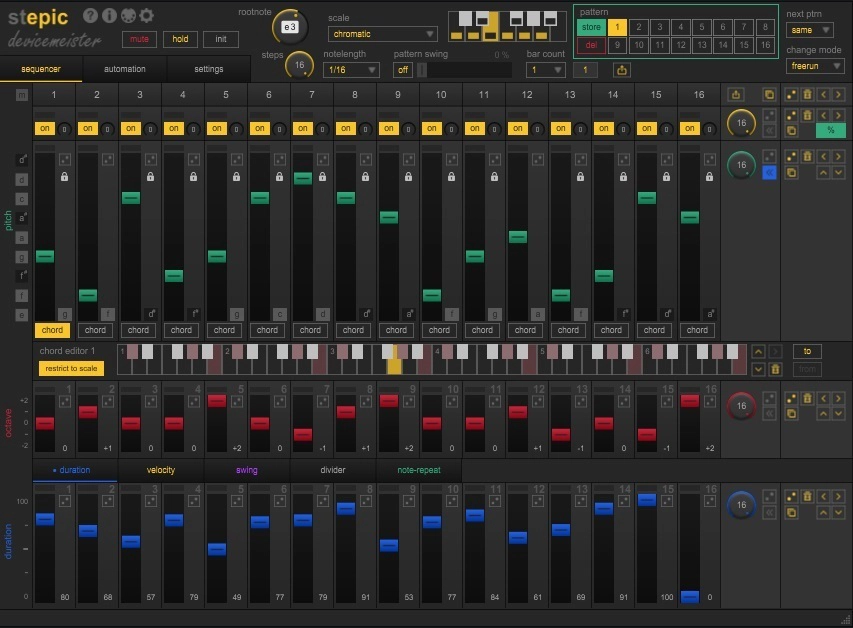
Devicemeister Stepic is a sophisticated, versatile sequencer and modulator for creating interesting movements and patterns in your songs.
Its advanced sequencing and modulation capabilities make it an indispensable tool for creating intricate, pulsating rhythms and soundscapes typical of the techno genre. With its user-friendly interface and compatibility with various DAWs, Devicemeister Stepic is the go-to plugin for professional and amateur techno producers.
Key Features
- 16 Step Sequencer:
This plugin can generate up to 16 individually configurable steps, which you will find in the sequencer section. We can adjust values such as pitch, octave, duration, velocity, swing, divider, and note-repeat in each step, which we identify with their assigned colors. I recommend experimenting with the swing option, which can add a lot of expressiveness to the sequence we are creating. When we choose the root note, the Stepic selects all the notes within that scale to form chords and harmonies.
- 8 Modulation Sequencers:
In the Automation section, you will find eight sequencers you can configure independently, so the number of configuration possibilities is unlimited. Within each modulation channel, you can adjust the length and even copy and paste sequences using the Clipboard function found to the left of each channel. It is also possible to assign a MIDI control to each sequencer to be edited from a controller.
- Random Step Play:
The Stepic has more than 200 randomization options, which means that new harmonies can be generated constantly. Although this sequencer has a general randomize button in each modulation, you can also find them in each step and each adjustable parameter, making the sequencer constantly changing.
- MIDI Play and Drag & Drop MIDI Export
MIDI Play transforms Stepic into a versatile arpeggiator instrument, letting you input expressive MIDI notes for arpeggio creation. The Drag & Drop MIDI Export feature simplifies the integration of Stepic’s arpeggios into DAWs, streamlining the workflow for arpeggio-focused music production.
Compatibility
Stepic requires Microsoft Windows 7 or later (32/64 bit). Apple macOS 10.9 Mavericks or later (Apple Silicon, Intel x64). Hardware requirements according to host/DAW application. VST3 or Audio Units supported by host/DAW application. Supported hosts for MIDI CC modulation.
2. Valhalla VintageVerb
The VintageVerb is a reverb plugin developed by Valhalla a few years ago and is inspired by the classic reverbs of the 70’s and 80’s.
If something makes it a powerful tool, it is its versatility in adapting to different scenarios and needs. It has many presets and three modes that you can choose to modify its operation and appearance. This plugin costs $49.
Key Features
- Three Modes Reverb:
This plugin includes three different modes: 1970, 1980, and Now. The 1970 mode is a typical vintage reverb with a certain limit in the treble and greater emphasis on mid and low frequencies. The 1980 mode, on the other hand, has full bandwidth and a brighter type of reverb. The Now mode is the most digital and clear, and the interface changes to white when we choose it.
- 22 Presets:
VintageVerb has 22 digital reverbs, including Concert Hall, Bright Hall, Plate, Room, Chamber, Random Space, Chorus Space, Ambience, and Sanctuary options. It can fit almost any situation, and its configuration capacity is extensive. I recommend using Room mode to work on vocals.
- Adjustable Parameters:
Its interface is traditional, and in the first section, you will see a central Decay knob, along with other Mix and Predelay knobs, with which we will control the delay times and duration. Then follows the Damping section, where we can define the attenuation frequency. You’ll also find four sections of Shape, Diffusion, Modulation, and an EQ, taking the possibilities even further. Something that I find very useful about this plugin is that in any parameter we have the mouse arrow, the VintageVerb will provide us with information at the bottom of the interface.
Compatibility
This plugin requires Windows 7/8/10Plugin formats: 64-bit VST2.4/VST3/AAX. Mac: 10.9/10.10/10.11, macOS 10.12/10.13/10.14/10.15, Big Sur, Monterey, Ventura, Sonoma. Mac processors: Intel/M1/M2/M3. Plugin Formats: 64-bit VST2.4/VST3/AAX/AU.
3. Bleass Vox
Bleass Vox is a powerful voice processor with many tools specially designed to optimize your vocals.
This plugin includes an intuitive interface and five processing sections. It is one of the best options for vocal editing in this price range, around $35.
Key Features
- Vox Section:
In the center of the interface, we will see two central knobs: Pitch and Formant. The Pitch modifies the voice naturally, and you can make slight adjustments without sounding artificial. We can run this parameter in Transpose or Flatten mode. On the other hand, the Formant makes it much more evident and can be very useful for generating effects and deforming the voice.
- Tune/Vibrato Section:
On the left, you will find the Tune module, an efficient autotune in which you can choose the tonal scale, the correction mode, and the speed of the effect. Along with the Tune module, you will see the Vibrato module, with which you can add some texture to your vocal track.
- Unison/Output Section:
With the Unison module, located to the right of the plugin, you can add up to ten copies of the processed voice and generate effects by varying the detuning percentage and the stereo width. Next to Unison, you will see the Output module, which, in addition to controlling the gain, has a Dry/Wet parameter. In this section, you will also see the Real-Time option, which, when activated, will optimize Vox’s performance to lower latency.
Compatibility
This plugin supports Windows 8 and later VST3 (64-bit) AAX. macOS 10.9 and later (64-bit only) (including macOS 11 Big Sur and M1 processors). VST3 (64-bit).
4. Initial Audio MasterSuite
The Master Suite is a mastering plugin created by Initial Audio. It can be a valuable post-production tool that saves time.
This plugin is optimized to give your mixes a professional character and achieve a good workflow. It can be used both in general mixes and in vocals and instruments. The Master Suite costs around $30.
Key Features
- THD and Loudness Parameters:
In the center of its interface is the Loudness Knob, with which the Master Suite will regulate the decibels using a compression algorithm, in which it will increase the volume and limit distortion. With the THD parameter, you will add harmonic distortion to the mix for a bigger sound. Next to this parameter is an Analog Button, which will give a more vintage touch to your mix.
- LUFS Meter:
At the top of the interface, you can always see its integrated LUFS Meter, which turns green when we are within the optimal values and red when we exceed them. I find this very useful, as it gives you a clear reference of the volume used in the music industry and most applications without running a second tool. On the right side, you will see the Ceiling parameter, which functions as a general limiter.
- Compressor/EQ/Stereo Image:
At the bottom, we will find the Compressor section, where you can make slight adjustments using its Soften knob that will define the compression curve and a Mix knob to regulate it. It also has a three-band EQ section and a Stereo Image section. In the latter, you can select which frequencies of the mix you want to keep in mono and which ones you want to expand in the stereo spectrum.
Compatibility
This plugin requires Windows: AAX, VST3, VST2 Plugin, Mac: AAX, Audio Unit, VST3, VST2 (Apple Silicon supported).
5. Softube Bad Speaker
Bad Speaker is a distortion-based Lo-fi speaker with a vintage appearance and is developed by Softube.
This distortion can be used on basses, guitars, vocals, or even full mixes. If used as a filter, it can add dirt and spice in an analog style to your mix and generate interesting results. This plugin from Softube costs around $19.
Key Features
- Three Speaker Modes:
The Portable Radio Mode emulates an old, battered speaker that will add pure distortion in a very natural way. This can be very useful to recreate the sound of the 50s or 60s. The Cassette Deck mode is inspired by 80s music and with present lows and sharp mids. On the other hand, the Hi-Fi Speaker mode offers a very clear sound; with it, we can add room or distortion in a controlled way. All modes are applied from the general distortion slider.
- Tone/Width/Mix Parameters:
Moving the Tone slider down will emphasize the low frequencies, and moving it up will emphasize the high frequencies. We can also affect the panning of the mix with the Width slider and add wet from the Mix parameter. On the right, you will find an Output Volume.
- Simple UI:
The Bad Speaker has a simple, practical layout and just the right amount of parameters. It includes 12 presets, some designed for basses, guitars, transistor radios, and keyboards. You can also edit and save your own presets.
Compatibility
This plugin requires macOS Monterey 12, Ventura 13, Sonoma 14, Windows 10 (64-bit), and Windows 11. It also requires AU, VST, VST3, and/or AAX compatible DAW host software.
6.W.A. Production Outlaw
The Outlaw is a dynamic processor developed by W.A. Production that can balance voices and instruments live and in the studio. This plugin naturally compesates the volume changes of each track in real time, making it suitable for live sessions. It costs about $35.
Key Features
- Main Section:
The Outlaw has four main optimization parameters: Mix, Target, Gate, and Gain. In Target, you will adjust the number of output decibels you want, and in Mix, the intensity of the effect. With the Gate parameter, you will choose the values at which the Outlaw gain will not be activated. Finally, the Gain parameter works as a Master Control. You can activate and deactivate the effect by clicking on the OUTLAW logo to compare results.
- Display Meters:
The visual display meters located to the right of the interface clearly show how this tool performs. The left and right RMS output are plotted in blue, and the center shows how much you are adjusting the gain in purple. The interface is resizable, which is very practical for live monitoring.
Advanced Settings:
In the second section, which you will access by pressing the arrow at the bottom of the interface, you can adjust parameters such as high-pass and low-pass filters, transients, and RMS speed. Adjusting the corresponding filter makes it easier, for example, to work on a drum without attenuating the high hats and kicks. It also includes Attack, Release, and Direction parameters to smooth out tails and peaks.
Compatibility
Outlaw Supports Windows 8 and later (32 / 64 bit). MacOS 10.13 and later. AAX – ProTools 11 or higher.
7. UAD Galaxy Tape Echo
The Galaxy Tape Echo is a Universal Audio plugin inspired by Roland’s tape delay/spring reverb system hardware from the 1970s.
It is a well-designed tool that emulates vintage analog sounds with warm echoes and can generate spatial environments. It’s suitable for use in any situation where you need to add color to vocals, instruments, or mixes, and it costs $29.
Key Features
- Head Selector:
This is where the interesting thing begins since this plugin has three echo heads that we can combine in different ways by turning the main selector. Each Head has its own delay times: short delay (Head 1), intermediate delay (Head 2), and long delay (Head 3), and also its own display to monitor the values. Additionally, with the selector, you can choose between the options of echo only, echo and reverb, or reverb only.
- Echo Adjustment:
Next to the Head Selector, in the central part, you will find six knobs with which you will control the parameters of Echo Rate, Treble, Echo Pan, Feedback, Rate, and Echo Volume. In the same way, next to the echo section, you will see the reverb section, in which you can control two parameters: Reverb Pan and Reverb Volume. Although the reverb in this plugin does not have as many options as the echo, it is remarkable, and if you don’t know where to start, the Galaxy has more than 50 presets you can try.
- VU Meter and Classic UI:
The vintage interface of this plugin makes it simple and comfortable. It includes a VU Meter in its upper right part that works in conjunction with the input’s Peak Level Lamp and is very useful. By controlling the Output Level knob, you will prevent peaks from occurring manually. It also includes a Tempo Sync and Wet Solo switch, allowing you to hear only the processing you add in isolation for more detailed tracking. I would say that it is a complete tool.
Compatibility
This plugin requires macOS 10.15 Catalina, 11 Big Sur, 12 Monterey, 13 Ventura. Windows 10 or Windows 11 (64-bit only Editions). Intel, AMD, or Apple silicon processor.
8. FAW SubLab
SubLab is a synthesizer designed by Future Audio Workshop and is aimed at creating 808-style sub-basses and sampling, among other functions.
It includes an extensive library of kicks from famous drum machines, modular systems, and several bass packs. If you are looking to create rhythmic bases in line with current commercial music (trap, hip hop, r&b, etc.), I would say that this is an excellent option. You can get it for $40.
Key Features
- Sound Section:
Within the Sound Section on the left, you will find the Synth, Sampler, and X-Sub channels, which you will start creating with. In the Sampler channel, you can choose between rhythm machines such as Roland TR808, Vermona, and JoMox, among others, or even import your own samples. In the Synth channel, you can choose the waveshape and adjust the filter envelope (attack, decay, sustain, release). In the X-Sub channel, you will see an EQ that goes from 30 Hz to 260 Hz, and you can adjust the lows and harmonics. At the bottom of the Sound section, you will find a mixer to adjust the level of each channel.
- Master Section:
In the master section to the right of the interface, you can view the behavior of each channel differentiated by their assigned colors. Here, you can adjust the limiter and make the signal wider or stay centered. Below the display, you will find distortion and compression units that can be turned on and off individually. The distortion unit has options like Grunge, Tube, and Darkdrive, which can add much texture. The compressor features an auto Sidechain Button and Mix amount controls for parallel compression.
- Library and Presets:
In addition to all the configuration options, SubLab includes 250 high-quality kicks and a long list of presets, among which you can find some of the sounds used in large productions by recognized genre artists. The interface is easy to understand and benefits the workflow.
Compatibility
SubLab is compatible with macOS 10.11 and higher (Intel / M1 Apple Silicon supported). Windows 8 and higher (Windows 11 supported). Available as VST2, VST3, AU, AAX.
9. Brainworx SPL De-Verb Plus
The SPL D-Verb is a simple but effective envelope shaper developed by Brainworx. It can eliminate ambient reverb and noise and polish vocal and instrument tracks.
I recommend this plugin for recovering audio, recording podcasts, or eliminating headroom from tracks recorded in inappropriate conditions. SPL D-Verb Plus costs around $35.
Key Features
- Simple UI:
In its interface, we will see two central knobs, a Limiter button, a Gain Reduction led, a Dry/Wet mix parameter, four memory banks, and Copy, Paste, Undo, and Redo options; that’s it. The reducer knob is adjusted until you find the sweet spot that will eliminate unwanted reverb and sustain. We will know how much signal is being cut with the GR meter. Once we improve the take, you can start increasing the gain knob to compensate for the reduction.
- Versatility:
This plugin can be used in many situations to achieve good results. You can re-edit reverb takes you weren’t happy with as an audio recovery and clean up the effect entirely. In the same way, you can clean drum tracks, voice tracks, or guitar tracks and start processing from scratch. Its four banks (ABCD) allow you to save different settings, compare results, and optimize performance.
Compatibility
This plugin supports AAX DSP, AAX Native, AU, AAX AudioSuite, VST2, VST3. MacOS 14 down to macOS 11. Windows 11 down to Windows 10.
10. KS Lofi Keys
The Lofi Keys is a virtual instrument created by Karanyi Sounds. It can help you create cool lofi beats and ambient music.
This vst instrument includes classic electric pianos, modern synthesizers, modulations, tape noise, overdrives, filters and effects. All in a comfortable interface. Its price is around $45.
Key Features
- Sound Section:
In the Sound section, you will find two sound layers that you can combine or deactivate, and you can choose between 40 different piano, electric piano, and synthesizer sounds. Each layer has its own Tone, Fine, and Octave parameters. Just below the layers, you will find a knob with which you can add VHS, Tape, and Vinyl noises to the signal, and two modulation controls, which will provide that Lofi vibe.
- Effect Units:
In the effects section, we will find a chorus, an exciter, and a reverb, each of them with their own bypasses, adjustable parameters, and presets that will be displayed by clicking at the top. It also includes Dry/Wet knobs for each effect.
- Random Controls:
The Lofi Keys includes a Random Mode at the bottom of the instrument. You can experiment with this mode, which I recommend since you can create new textures. If you press the sound button, the instruments will change randomly. The same will happen with the effect buttons.
Compatibility
Lofi Keys requires Mac OS X 10.11 or higher is recommended. Windows 7 or higher, 4 GB of RAM, 8 GB is recommended, 2 GHz CPU with at least 4 cores. 64 bit DAW.
Bonus: 60$ plugin
iZOTOPE Ozone 11 Elements
Image: Native Instruments
The Ozone 11 Elements is an AI-powered processing mastering tool created by iZOTOPE that can help you improve your mixes quickly and intuitively.
Ozone 11 Elements takes care of doing most of the work, and you will only take care of the final details. It is very useful for beatmakers who manage a large workflow or want to speed up their productions. It is for $49, but sometimes, you can get it on sale for a lower price.
Key Features
- Master Assistant:
Assign the Ozone Elements to your effects channel, and it will begin analyzing your song and learning what adjustments need to be made. On the left side of the interface, you will see the presets available for each genre. Choose the one that best suits your music, and the Master Assistant will analyze a broad base of songs and create the appropriate profile. This process lasts around fifteen seconds.
- Loudness/Tonal Balance:
In its interface, we will also find a blue Tonal Balance knob, which works like an EQ; by moving it down, we will emphasize the low frequencies, and by moving it up, we will emphasize the high frequencies. The Loudness knob, red, works as a limiter and will help us control the peaks that will appear on the display. It also has an Output Level option that you can set to Full Scale or Streaming.
- Assistive Vocal Balance:
This version of the Ozone 11 Elements incorporates an Assistive Vocal Balance, which works great. You simply have to slide the Vocal Balance parameter to the right, and the volume of the voice will increase within the mix in real time using its AI. The same will happen if we slide it to the left: the voice will be attenuated, and we can make the necessary adjustments.
Compatibility
Ozone 11 Elements requires macOS Monterey (12.6.x) – macOS Ventura (13.5) (Apple silicon Macs supported natively). Windows 10 — Windows 11. Plugin Formats: AAX, AU, VST3 (All plugin formats are 64-bit only) Note: VST2 format is no longer supported.
Conclusion
Before purchasing any new plugin, do a little research to learn about its tools and check that it can be helpful to you. The information is there; if we take the time to access it, we will invest our money wisely.
This list should serve as a reference, and while it is based on my personal experience, you may discover something you didn’t know was available and within your reach. A good option is to pay attention to the benefits and promotions launched by plugin shop sites, where, from time to time, you can find valuable plugins for very good prices. Thanks for your time!

The Integraudio Editorial Team consists of experienced music producers, audio engineers, and plugin enthusiasts dedicated to providing in-depth reviews and guides for music production software.