

The availability of free plugins makes our day and age the perfect time for being creative, and this article covers the top 12 best free EQ plugins for you in 2025.
From essential parametric EQs to dynamic and analog-style emulations, equalizers are more crucial than ever in music production. They allow you to shape the tone of your audio or make precise adjustments, like cutting out hums or noise.
EQs work by adjusting the volume of specific frequencies using different “shapes” called filters, which you can learn more about in this article. While many paid EQ plugins specialize in dynamic or spectral equalization, the freeware market offers equally impressive options.
This article compiles the top 10 free EQ plugins you can download and use today.
Top 12 Free EQ Plugins 2025
1. Analog Obsession & BPB – Rare Program Equalizer

With a simple, vintage, clean interface, the Rare Program Equalizer stays true to its original inspiration while incorporating subtle improvements.
Rather than deviating from the classic design, it enhances it meaningfully. Combining the best of both analog and digital worlds, Rare boasts notable features like efficient CPU usage and improved DSP.
The plugin offers two EQ bands that can be configured for specific frequencies. Its design is heavily inspired by the legendary Pultec EQ, a renowned hardware equalizer celebrated for its exceptional sound quality.
What sets Rare apart from Analog Obsession’s other passive EQs is its inclusion of a gain selector, which transforms it into an active equalizer.
The pre- or post-gain selector function enables users to saturate to unity gain, enhancing the EQ’s tonal character for a richer, more musical sound. This feature ensures a transparent sound without altering the harmonic balance of the frequency spectrum, making it an invaluable tool for mixing and mastering.
Additionally, Rare provides harmonic saturation to the signal, delivering depth and versatility without any limitations.
The plugin includes 4x oversampling, which can be easily activated by clicking the “Analog Obsession” logo. When enabled, the logo turns red, indicating that oversampling is active.
2. Fuse Audio Labs RS-W2395C

With a vintage aesthetic inspired by the W2395c, the RS-W2395c from Fuse Audio Labs delivers a tone that closely mirrors the original hardware.
This plugin is simple yet highly effective, featuring the signature touch of a Baxandall EQ to ensure top-tier sound quality. Developed in collaboration with the creator of the original W2395c, it’s completely free, making it a must-try for any audio enthusiast.
As the W2395c is a hardware EQ, having such a faithful software emulation is incredibly convenient for achieving its iconic tone. The RS-W2395c replicates the unique frequency response typical of Baxandall EQs. Its design creates a subtle interaction between the bands, and when combined with its versatile controls, the resulting tone is nothing short of impressive.
Despite its simplicity, the plugin offers remarkable versatility with its three main selectors and four primary controls alongside switches. Fuse Audio Labs expanded on the original design by adding an extra section, broadening the EQ’s possibilities.
On the right panel, you’ll find input and drive gain controls. The drive control allows for analog-style saturation, enhancing your tone with warmth and character. Whether you’re working on vocals, drums, cymbals, guitars, or synths, this plugin consistently delivers outstanding results, elevating the quality of any track you apply it to.
3. AudioThing Blindfold EQ

True to its name, the AudioThing Blindfold EQ strips away all visual indicators, offering no information about the frequencies or gain adjustments you make.
It features two shelving filters and two peak filters, each with an adjustable Q-factor, delivering a refreshing alternative to the abundance of visually driven plugins available today.
Blindfold EQ emphasizes using your ears, which is the way mixing is meant to be done. Unlike other plugins, it removes the crutch of visual feedback, encouraging you to rely solely on auditory judgment. AudioThing’s plugin challenges you to trust and refine your ears. While it may seem daunting at first, it ultimately aids in sharpening your mixing skills.
For added depth, the Analog button on the interface introduces a tube-like saturation effect. If your recordings sound thin or lack richness, enabling this feature and tweaking the low or high shelf gain can inject warmth and fullness into the sound through harmonic saturation.
Additionally, Blindfold EQ includes a soft clipper that keeps your audio levels controlled while adding a touch of character. When paired with the analog saturator, it enhances the sound, offering both precision and personality.
4. Kiive Audio Warmy EP1A Tube EQ

This plugin delivers a warm, smooth sound with a touch of sparkling high frequencies, making it ideal for enhancing instruments and vocals.
The Warmy EP1A EQ is a digital recreation of the legendary Pultec EQP-1a vintage equalizer, renowned among mixing engineers as a go-to tool for adding rich low-end depth or a shimmering high-end polish.
This plugin faithfully emulates the original hardware’s internal components, including the subtle saturation introduced by its inductor and output transformers.
If your recorded vocals feel lifeless or dull, try boosting the high frequencies above 8 kHz using this EQ. It consistently delivers cleaner and brighter vocals without any harshness. Similarly, it shines on mixed busses, enhancing clarity or providing a thicker low-end foundation.
The Mix knob, which controls the amount of tube emulation applied by the EQ, is another standout feature. By increasing the Mix value with the EQ in its default settings, you can add analog-style warmth and character to your audio—a highly desirable quality for those who appreciate vintage emulations.
The plugin includes separate Boost and Cut knobs: the Boost applies a shelf filter, while the Cut uses a peak filter. The interaction between these two creates an ultra-smooth, natural tone that avoids unwanted resonances and ensures a musical quality.
A single Bandwidth Q-factor knob adjusts the width of both the low and high filters simultaneously. While this might seem limiting, it’s perfectly suited for broad, natural curves often preferred for shaping tonal balance.
The Warmy EP1A offers up to 16x oversampling for mastering-grade precision, ensuring transparent anti-aliasing. The tube saturation can add character to the low end, and the Mix knob provides full control over its intensity, making this plugin a versatile choice for mixing and mastering alike.
5. ProduceRNB AMP LEQS

ProduceRNB’s AMP is a versatile equalizer with a built-in limiter designed to enhance electronic drums.
With a focus on saturation, clipping, and adding punch to drum elements, AMP streamlines your workflow by eliminating the need for multiple effect plugins. Its built-in stereo width control is particularly useful for keeping elements like kicks centered while adjusting the stereo content of other drum sounds.
AMP combines four powerful tools into one: an EQ, a limiter, a saturator, and a stereo imager. Its user-friendly interface includes a frequency analyzer for visualizing audio in real-time, making it an all-in-one solution for drum tone adjustment.
The EQ section offers unlimited bands, each configurable as one of five filter types: low-pass, high-pass, low-shelf, high-shelf, or peak. Adding or modifying bands is as simple as right-clicking on the frequency analyzer and selecting your desired filter type.
The limiter doubles as a soft clipper, featuring input gain, threshold, and timing controls. It’s perfect for taming rogue transients on your drum bus, ensuring a polished mix without compromising dynamics.
The saturator is designed to introduce high-end harmonics, giving your sound added brightness and character. When pushed harder, it functions as a waveshaper for symmetric saturation. It’s particularly effective on low-end elements like bass and kicks, adding bite and clarity.
AMP excels as an intuitive and effective drum-shaping tool, especially for genres like EDM, trap, and hip-hop. While it’s optimized for drums, it also performs admirably on other instruments, making it a versatile and valuable plugin.
6. Ignite Amps PTEq-X

The PTEq-X takes the classic analog EQ concept to a whole new level.
If you’re familiar with the versatility and smooth character of the Pultec EQP-1a hardware equalizer, Ignite Amps has upped the game by integrating three Pultec-style EQ units into a single plugin. This powerhouse includes a tube-based midrange equalizer and an analog-style cut-off filter section, making it a must-try for vintage EQ enthusiasts.
The plugin’s design combines the refined filters of the original Pultec units with added flexibility for precise midrange control and frequency cutting. Each section can be easily toggled on or off with the ‘In’ switch, allowing seamless customization.
At the top of the interface, you’ll find the MQ5 midrange EQ, inspired by another iconic Pultec unit. This section includes two Peak (boost) controls and one Dip (cut) control, each equipped with a frequency selector and gain knob. It’s perfect for shaping instrument tones or removing muddy frequencies, offering many tonal options.
Next, the middle section replicates the EQP-1a equalizer, preserving the hardware’s classic controls. A notable addition is the Tube toggle switch with a drop-down menu offering four transformer stage options. While the differences are subtle, it adds a layer of authenticity to the plugin’s emulation.
The bottom section houses two gentle but effective cut-off filters for trimming low and high frequencies. While their slopes are more suited for cleaning up individual tracks than mastering, they work exceptionally well for removing unwanted frequencies without harshness.
PTEq-X is an all-in-one EQ solution, combining vintage-inspired tone-shaping with modern flexibility. Whether you’re sculpting individual tracks or adding warmth to a mix, this plugin delivers professional results with ease.
7. Acustica Audio Coffee ‘The PUn’
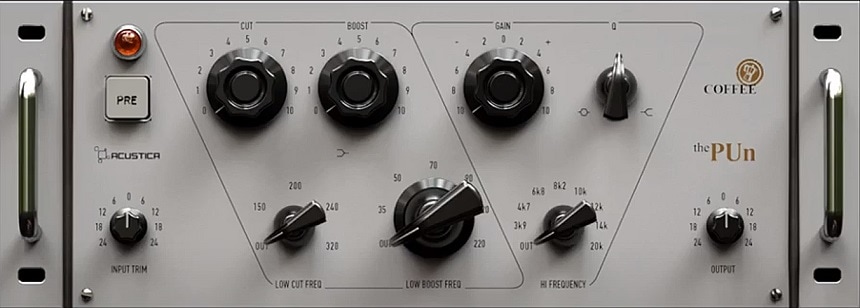
The PUn EQ offers a fresh take on the classic Pultec-inspired design, combining familiar functionality with a sleek, modern interface.
Acustica has crafted this plugin to stand out by focusing on an aggressive tonal character, making it an excellent choice if you’re after bold, colorful sound shaping. It also features a ‘Pre’ button that activates the preamp section of the EQ, adding analog warmth and saturation similar to IK Multimedia’s version of this unit.
Unlike many Pultec-style EQs, the PUn places greater emphasis on low frequencies rather than highs. This is evident in the separate frequency selector knobs for the low cut and low boost filters, making it ideal for enhancing kicks and bass instruments with added character and weight.
The high-frequency filter includes a unique peak-to-shelf Q-factor transition. When set to a mid-point, the filter produces a resonant, shelf-like effect without sounding harsh or piercing. This design is particularly useful for adding shimmer and presence without introducing unpleasant artifacts.
The ‘Pre’ button is a standout feature, allowing you to use the plugin solely for its preamp saturation. By adjusting the Input Trim, you can drive the preamp harder to generate more harmonics, which is ideal for adding warmth and depth. For best results, consider placing the PUn at the beginning of your effects chain to shape the tone before applying further processing.
The plugin’s low cut and boost controls combine beautifully to thicken snares, vocals, and bass guitars while avoiding muddiness. For instance, cutting around 248 Hz while boosting the low-end shelf creates a well-balanced, full-bodied sound.
Complementary to other Pultec-inspired EQs that focus on high frequencies, the PUn excels in low-end enhancement. Using it in tandem with a high-frequency-focused EQ provides a comprehensive tonal palette, allowing you to add depth and clarity to your mixes.
8. TDR Nova Parallel Dynamic Equalizer

If you could pick just one EQ from this list, Nova would be the clear choice.
You’ve probably already come across Nova—it’s practically a staple in the world of dynamic and parametric EQing. This plugin offers four fully dynamic EQ bands, each capable of functioning as a peak or shelf filter. Alongside these, it includes two cut-off filters and a Wide Band function, which adds a unique dimension to its versatility.
What sets Nova apart is its sleek interface, efficient processing, and adaptability. It comes with plenty of presets to help you hit the ground running. Whether you’re sculpting the tone of vocals, synths, or guitars or addressing specific frequencies in mastering, this plugin excels across the board.
Nova’s dynamic EQ bands can be used to great effect, with each band featuring peak and shelf filter modes. You can solo individual bands for detailed listening and enable the dynamic feature by lowering the Threshold knob. Interestingly, the Ratio parameter supports both compression and expansion, with negative values turning the band into an expander. If dynamic EQing isn’t needed for a specific band, you can simply disable it using the Threshold button.
This plugin also includes high-pass and low-pass filters, with adjustable slopes ranging from 6 to 72 dB per octave. These filters are particularly useful for mastering tasks. Furthermore, the Wide Band function spans the frequency range between the high-pass and low-pass filters, allowing Nova to act as a compressor when used on its own.
Nova features seven processing modes, including Mono, Stereo, Sum, Diff, Left, Right, and Dual Mono. These modes offer unparalleled flexibility for a variety of tasks. For instance, Sum and Diff correspond to Mid and Side processing, while Dual Mono processes each stereo channel independently. Additionally, the plugin supports external side-chain input for its dynamic bands, making it an excellent choice for tasks like creating spectral pockets for kick and bass elements.
Its fully resizable interface includes a real-time frequency spectrum display that can analyze input, output, or side-chain signals. The graphical display allows precise control over each band’s frequency, Q-factor, and gain, making the plugin incredibly intuitive to use.
Nova’s combination of quality and functionality makes it one of the best free dynamic EQ plugins available. In fact, it’s so capable that it rivals many paid options. If you want to take things further, you can explore the Gentleman Edition, which adds two extra bands and advanced features. However, the free version is an essential tool for any producer looking for a reliable dynamic EQ.
9. 2nd Sense Audio 2S

The 2S EQ features nine bands in total: two cut-off filters, two shelves, and five peak filters.
Each band can be toggled on or off using the Switch checkmark located at the bottom of the respective band. The gain range for the filters spans from -15 dB to +15 dB, providing ample flexibility for most applications.
The interface is organized with rows representing controls and columns corresponding to bands. However, once you start adjusting the bands, it can become tricky to identify which column matches which node in the graphical display, making the layout slightly unintuitive.
The high-pass and low-pass filters offer adjustable slopes from the 1st to the 8th order, equivalent to 6 dB to 48 dB per octave. These values are highly practical, even for mastering purposes. The frequency range for these filters is broad, from 20 Hz to 20 kHz, allowing for precise control over your sound.
The graphical section is another strong point of this plugin. Each of the nine bands is represented by a white node, which can be easily moved using your mouse. However, the Q-factor cannot be adjusted directly from this section, which might limit some workflows.
The frequency spectrum displays the left and right channels separately, offering valuable visual feedback. While it lacks an adjustable slope and only shows linear values, you can turn the spectrum off entirely. This minor limitation shouldn’t be an issue since audio decisions are best made with your ears.
If you’re looking for a dependable parametric EQ for everyday use, this plugin is an excellent option. It may not have the most visually striking GUI, but it excels in performance with low CPU usage and no latency. It’s perfect for precise, transparent adjustments and is a great addition to any producer’s toolkit.
10. Analog Obsession MASBAX

MASBAX is a straightforward three-band EQ with stereo and mid/side functionalities.
The layout is intuitive, with gain knobs at the top and filter selection knobs beneath them. The controls are duplicated on either side of the interface, allowing for left/right or mid/side editing. This design makes it ideal for mix buses or mastering applications.
A central knob lets you switch between L/R and M/S modes. L/R mode enables individual adjustments for the left and right channels of a stereo signal, while M/S mode focuses on the mid and side signals. For those who prefer not to work with independent controls, the Link mode below couples the two sides for unified adjustments.
The Mid band offers two Q-factor behaviors: boosting creates a broad curve while cutting results in a narrow band. This makes it effective for removing low-end mud, though it’s not suited for surgical EQ tasks like targeting resonances in a snare or woodwind instrument, where a more precise plugin would be necessary.
MASBAX supports Windows 7 or higher (32-bit and 64-bit) and macOS 10 or higher (64-bit). It is available in VST 2/3 and AU formats.
As the second plugin in this list with mid/side capabilities after Nova, MASBAX is a simpler alternative when Nova feels overly complex. It avoids coloration, delivering a transparent sound ideal for mastering.
For example, you can use the mid/side mode to reduce low frequencies in the side channel (right side) and boost the highs, creating a wide and balanced stereo master.
11. Melda MEqualizer

The MEqualizer provides extensive sonic manipulation through its highly visual workflow and analog-style sound.
This plugin stands out as one of the most user-friendly and polished parametric EQs, offering six bands, built-in tube saturation, and harmonics control. It also features an integrated spectrum and sonogram, with detailed controls to adjust their behavior.
To simplify EQ work, the plugin includes a feature called “Areas,” which labels different sections of the frequency spectrum with instrument names. You can create custom Areas and save them for future use. In addition, it offers a wide range of presets to help you get started. For general parametric equalization, MEqualizer ranks among the best, even compared to paid alternatives.
Each of the six bands can be set to one of seven filter types, including low/high shelves, low-pass/high-pass, single-pole low-pass/high-pass, band-pass, and notch filters. The low-pass/high-pass filters are notable for their steep slopes, reaching up to 60 dB per octave, while the single-pole filters offer a more natural 6 dB per octave slope.
A helpful feature allows you to listen to the band you’re adjusting, making it easier to fine-tune frequencies without risking ear fatigue. Simply grab a node in the graph to hear the range of frequencies being affected, and disable this feature if you prefer not to use it.
The plugin also includes integrated tube saturation, controlled via a knob at the top of the interface. Increasing the knob adds drive to the preamp, giving your audio a grittier, warmer sound. Tube saturation can be enabled for each band, boosting or cutting the harmonics generated by the selected frequency. You can adjust the semitones over which the harmonics occur and control how many harmonics to generate, with options for odd and even harmonics. This feature works wonderfully on synth pads, and automating the frequency knob can produce interesting filter effects.
Overall, this plugin excels in many areas. With its detailed, resizable interface, exceptional efficiency, and unique features, it is a great option if you’re looking for a refined spectrum view, creative filters, and an optional saturation stage.
Do note that to install the EQ, you will need to download the entire free plugin package, although installation is optional.
12. lkjb QRange

QRange is highly regarded for its detailed processing, particularly in mastering scenarios.
This plugin is an IIR linear phase mastering EQ offering extensive stereo control and flexibility. It features 12 bands, each of which can function as a peak, shelf, or cut-off filter. The cut-off filters have slopes ranging from 12 dB per octave to 48 dB per octave.
The user interface is fully resizable, and the graphical view allows complete control, making the plugin feel both comprehensive and user-friendly compared to many others. We also appreciate its frequency spectrum, which can be set to display either the pre or post-EQ spectrum and adjusted for scale.
Each band in QRange can be set to process either the left/right channel or the mid/side signal, enhancing its suitability for mastering. For example, you can easily reduce low frequencies in the side signal while boosting the highs, resulting in a wide, balanced master and avoiding undesirable correlations.
The Match button in the top-right corner analyzes the short-term LUFS of the input and output, adjusting the gain accordingly. To use this feature, play your audio and press the Match button during a busier section. Note that this function only works when audio is playing.
The plugin supports a high-quality linear phase mode, which is ideal for mastering, and a latency-free mode for live use. Since it’s a linear phase EQ, it does require a moderate amount of CPU, so we recommend limiting its use to one instance per project.
QRange stands out as one of the most complete EQs available in the freeware market. Its robust stereo processing capabilities make it a highly efficient and convenient tool for mastering and bus EQing. Additionally, the option to sort the bands by frequency helps streamline your workflow and make it more predictable.
Other Great Free EQs
1. Manda Audio 7Q

We included this plugin in our roundup of the best graphic EQs, and it remains a standout even among other freeware EQ options.
The 7Q was developed by the creators of the popular MT Power Drum Kit 2 free software instrument. It features seven bands and two cut-off filters for added sound control. Unlike most graphic EQs, the 7Q is designed to deliver a transparent, clean sound. It’s also lightweight, so running multiple instances should not be an issue.
Each band offers a gain range of ±10 dB by default. If you need more range, simply activate the 2X switch at the bottom of each band to extend the gain to 20 dB. Interestingly, the 2X multiplier can be applied to individual bands rather than all bands simultaneously, which is a rare and useful feature.
The plugin lets you adjust both channels at once or modify only the left or right channel independently. However, you cannot adjust the left and right channels separately within a single instance—two instances are required to make individual adjustments.
If you’re a fan of graphic EQs, this plugin is a great place to start. While it may not cover every scenario, we recommend keeping it in your toolbox. For quick, broad adjustments where graphic EQs excel, the 7Q is an excellent option.
2. DDMF Colour EQ

ColourEQ is one of the more unique EQs, offering “super parametric” features that set it apart from traditional options.
This plugin utilizes custom fourth-order (24 dB/oct) IIR filters and features five bands. The shapes these bands create cannot be replicated by standard filters, making ColourEQ particularly noteworthy. Additionally, its low CPU usage makes it suitable for a wide range of applications.
By adjusting the fourth parameter with the drop-down menu set to Type A, you’ll find the band takes on a flat-top shape. Alternatively, selecting Type B and increasing the fourth parameter boosts the signal at the edges of the band while leaving the center untouched, creating a filter shape resembling a pair of rabbit ears.
True to its name, ColourEQ lets you customize the interface’s color using a color selector in the “Colour” menu. You can save your settings as the default or back them up. The interface is also fully resizable, making it a flexible and enjoyable plugin to use.
In addition to these unique features, the plugin includes a simple low-cut filter with a fixed 24 dB per octave slope, ideal for removing unwanted low frequencies from vocals or individual tracks. However, it’s not recommended for mastering when more specialized plugins are available.
The flat-top and “cat ears” filter shapes this plugin can create offer intriguing possibilities. You could use the flat-top shape to boost or cut an instrument’s entire frequency range (e.g., a bass line) during mastering. Automating the “cat ears” shape, on the other hand, produces a formant-like tonal shift, which can be a fun and creative tool for sound design experimentation.
3. Analog Obsession FIVER

The Fiver from Analog Obsession is a five-band EQ inspired by the Portico 5033 hardware unit.
Designed by Rupert Neve, the original hardware is known for its smooth sound and ease of use. Analog Obsession’s Fiver aims to replicate both the look and sound of this iconic unit, offering a sound that’s almost transparent yet rich and musical. It’s especially beneficial for vocals and mix buses.
By clicking on the Analog Obsession label at the bottom of the interface, you can activate 4x oversampling, which is great for mastering. Keep in mind, though, that turning on this feature will increase CPU usage, so for general use, we recommend keeping it off.
Faithfully modeled after the Neve design, Fiver delivers a distinct and slightly aggressive sound. To enhance its character, turn up the dB DRV knob to drive the preamp harder. At higher settings, it works particularly well for punchy drums and vocals.
While the plugin’s continuously variable bandwidth parameters allow for surgical EQ adjustments, it truly shines as a character-driven tool for adding color to your audio, even when the EQ settings remain at their default values.
Additionally, you can bypass each mid-band individually, while the shelf filters share a common bypass button.
4. SmackLabs SL84
This plugin is also a Neve-style EQ, emulating one of the classic British consoles from the 1980s.
The vintage gear from the ’80s is renowned for its bold, distinctive sound, and the SL84 captures this essence using impulse response (IR) technology to replicate the original hardware module’s exact frequency response. If you examine the plugin’s frequency curve, you’ll notice a unique dip of around 1 dB in the middle of the spectrum.
The IR of the original hardware imparts a characteristic frequency response, even when the plugin is bypassed, subtly affecting the sound simply by being inserted on a track. This means that just adding the plugin can bring noticeable color and depth to your audio.
The plugin features three bands, each with a frequency selector and gain knob. To avoid confusion, note that the high-shelf band is on the left while the low-shelf band is on the right. It also includes low-cut and high-cut filters with gentle slopes, which are ideal for rolling off unwanted frequencies without sounding harsh.
If you enjoy colored, vintage tones, this plugin provides a distinct character to work with. However, if you’re after a more transparent sound, you may want to look elsewhere. As always, we recommend trying it out—you might find that you love its unique vibe.
Conclusion
In conclusion, we recommend downloading and exploring one plugin from each distinct type of EQ. For example, TDR Nova stands out as our choice for a dynamic EQ, and we highly suggest considering it. If you’re looking for a Pultec emulation, you have three great options—choose one or get all three to create a versatile setup.
For a general parametric EQ, the MEqualizer is our top pick. If it feels too complex, try the 2S EQ or DDMF Colour EQ, with the latter also serving as an excellent tool for sound design. For mastering purposes, we recommend QRange, though MASBAX and Fiver are also worth considering.
We hope this article has helped you discover valuable free EQ plugins and provided insights into their applications. And as the Blindfold EQ philosophy advises, always trust your ears above all else.

The Integraudio Editorial Team consists of experienced music producers, audio engineers, and plugin enthusiasts dedicated to providing in-depth reviews and guides for music production software.