

So here we are again with the newsletter!
This month is the first in a series of monthly articles by Jack Cockrell on How to Produce Music in different specific Genres starting with HYPERPOP check it out HERE:
Producing A Hyperpop Beat by Jack Cockrell
We also published the following articles
This is my monthy roundup of the most interesting new plugins released in March 2026.
Instead of listing everything that came out, I focused on the releases that look the most relevant across major flagship launches, mix and tone tools, character pieces, and a few free new plugins that are already getting attention. Let’s get into it!
Flagship Releases
Some of the biggest names made some of the biggest moves this month, with major launches aimed at producers who want new headline tools from established brands.
I’ll start with the Tonal Balance Control 3, from one of my favorite brands iZotope. This baby feels like one of those releases that instantly makes sense in a flagship roundup because it tackles a problem almost every mixer runs into: knowing whether a track is actually sitting in the right zone compared to professional releases.
What stands out to me here is that iZotope is no longer framing it as just a static reference meter. With the new audio capture workflow, you can build targets from Spotify, YouTube, Apple Music, or offline audio, which makes the whole idea far more practical for modern sessions.
Another big part of the appeal is how much deeper the analysis goes now. Beyond tonal balance, Version 3 adds meters for vocal balance, dynamics, stereo width, and low-end crest factor, so it looks more like a broader mix translation tool than a simple spectrum guide. I also like that it connects directly with Ozone and Neutron, since that makes the plugin feel more like part of a larger ecosystem instead of a standalone meter.
The addition of a built-in hybrid EQ is a smart touch too, especially for quick adjustments without breaking the flow. For anyone who wants more visual confidence while mixing or mastering, this looks like one of the most substantial utility releases of the month.
Tonal Balance Control 3 comes in VST3, AU, and AAX formats for macOS and Windows users.
Grainferno immediately stands out as the flashy synth release in this lineup because it takes granular synthesis and pushes it in a more playable, modern direction.
It is not just about turning samples into ambient textures, as Baby Audio is also leaning into the idea of using grains fast enough to enter the audio range, which lets the plugin behave more like a synth voice while still carrying the character of the original sample. That gives it a much bigger identity than a typical experimental texture box.
I also think the dual-source grain engine is a huge part of the appeal. Being able to pull grains from two independent files and morph between them in real time opens up a lot of creative ground for producers who want movement, contrast, and evolving tones from ordinary material. That could be especially interesting for turning loops, vocals, or even full stems into something far less predictable.
What makes it feel even more promising is that Baby Audio says all of this is paired with an intuitive drag-and-drop modulation system, which suggests the synth is aiming for depth without becoming intimidating. As a first introduction, this looks like one of the most exciting sound design instruments released this month.
Grainferno comes in VST, VST3, AU, and AAX formats for macOS and Windows users.
Some drum plugins ask you to build a chain. DB-30 Drum Butter goes the other way and tries to make the whole process quicker, more playful, and a lot less fussy. That alone gives it a strong place in a flagship roundup, because fast drum shaping is something almost everyone wants.
Instead of leaning on one effect, XLN Audio built this around 6 modules that you can freely reorder: Boom Shack, Shift, Space, Compress, Saturate, and More. That opens the door to everything from light enhancement to much more obvious drum transformation, depending on how far you want to push it.
The smartest idea here might be the magnitude slider, since it gives the plugin a macro-style way of scaling the overall impact. With parameter lock, more surgical controls, and 260 presets, it looks designed for producers who want immediate results but still like having a few extra ways to steer the outcome.
This is the kind of release that makes sense right away. When the goal is better drums without a slow, overbuilt workflow in FL Studio, Logic, Ableton, or any DAW, DB-30 looks like a very practical answer.
DB-30 Drum Butter comes in VST3, AU, and AAX formats for macOS and Windows users.
Purchase here and support Integraudio (bundle available)
A lot of iPad music apps still feel like companions to the “real” version on desktop. Scaler 3 for iPad seems to be aiming much higher than that, which is exactly why it feels notable.
Rather than shrinking the idea down, Scaler Music appears to have brought over the broader Scaler 3 experience in a form that still feels serious.
There is a lot going on under the hood here beyond simple chord suggestions. Chord discovery, harmony exploration, and the ability to build fuller musical ideas give it a wider role in the writing process, especially for producers who want theory tools to stay involved after the first spark.
The deeper part of the appeal is the workflow. With AUv3 support, both host and plugin use, plus a full arranger, mixer, and AUv3 hosting, this starts to look less like a theory utility and more like a compact composition environment. So you can use this in tablets like in Garageband, as well as classic DAWs like FL Studio, Ableton, Logic, or whatever DAW you prefer.
That is what gives the release some weight. For anyone making music on iPad, this looks less like a side app and more like a proper Scaler experience in a more flexible setup.
Scaler 3 for iPad is available as an AUv3-compatible iPad app, while the desktop version comes in VST, VST3, AU, AAX, and standalone formats for macOS and Windows users.
- Mastering The Mix Reference 3
More info and price
Referencing plugins usually help with comparison. Reference 3 seems more interested in interpretation, which makes this update more ambitious than a simple visual checker.
The whole pitch here is guidance: not just showing the gap between your track and a pro mix, but helping you understand how to close it.
That shift shows up in the new smart features. Smart Reference Tracks can pull the closest matches from your own library, while auto-looping locks onto the loudest section so comparisons happen faster and make more sense.
The analysis side also looks far more developed now. Mix Descriptors, Match %, and Master Scope turn things like tonal balance, stereo width, dynamics, and loudness into something more readable, with extra warnings for issues like phase trouble and over-compression.
Then there is the coaching layer. Mix Instructor explains changes in plain language, and Mix Balance suggests gain moves for vocals, drums, bass, and music, which could make the plugin especially useful for people who want clearer direction while mixing.
Reference 3 comes in VST3, AU, and AAX formats for macOS and Windows users.
Instead of chasing flashy processing, Sonible pure:level focuses on keeping a signal stable and usable without sanding off all the natural movement.
Sonible combines intelligent leveling with level riding, which gives the plugin a more musical role than a simple peak tamer or static gain utility. The aim seems pretty straightforward: keep vocals, dialogue, and instruments in a controlled range so they sit more comfortably in the mix from the start.
The clever touch is the group feature. Being able to link multiple instances to a shared target level sounds genuinely handy for backing vocals, layered guitars, or multi-track recordings, especially when you want the parts to behave like one element without losing their individual shape.
It is a small idea with a very practical payoff. In a busy session, a plugin like this could save time early and quietly make the rest of the balance process easier.
pure:level comes in VST, VST3, AU, and AAX formats for macOS and Windows users.
Boutique Color & Character
These are the more distinctive releases, built for producers who want texture, personality, and sounds that leave a stronger fingerprint on a track. So, these VSTs come from highly respected developers known for unique “character” sounds.
Ruby 3 looks like the kind of release that fits this category immediately because it is all about character rather than utility. What stands out to me is that Acustica is aiming at the sound of the D.W. Fearn VT-5, which gives the plugin a very specific high-end analog identity from the start.
A big part of the appeal is the way it combines passive EQ behavior with tube amplification through Acustica’s newer NOVA approach. That suggests a smoother and more harmonically rich kind of shaping, which is exactly what many people want from a boutique-style EQ.
I also like that Ruby 3 is not being positioned as a narrow mastering-only tool. With features like Auto Gain, Delta, Mid/Side, and built-in EQ visualization, it seems flexible enough for tracks, buses, and finishing work.
For this kind of roundup, Ruby 3 makes sense because it feels less like a clean corrective EQ and more like a tone piece with pedigree. If someone is drawn to classy tube color and more refined musical shaping, this one looks very easy to notice.
Ruby 3 comes in VST3, AU, and AAX formats for macOS and Windows users.
Groovemate Latigo stands out because it is clearly built to bring movement and human feel into a beat without making percussion programming feel like a separate production job. UJAM is like a mix-ready Latin percussion rig, so the focus seems to be on fast musical results rather than deep technical setup.
The instrument covers congas, shakers, tambourines, claves, claps, and more, which gives it a broad enough palette to add detail without crowding the arrangement. I also like that the grooves come from Nate Williams, because that gives the release a stronger performance angle than a generic loop-based percussion tool.
For this kind of roundup, Latigo makes sense because it looks like a quick way to add organic lift and rhythmic sparkle to both electronic and acoustic productions. If someone wants percussion that feels lively and polished without a lot of extra work, this one looks very easy to slot into a session.
Groovemate Latigo comes in VST, VST3, AU, and AAX formats for macOS and Windows users.
More info and price (bundles and discounts available)
Bloom Ensemble Strings feels interesting because it is not trying to be a traditional orchestral workstation. It seems that it is aimed at producers who want cinematic strings with a modern, genre-friendly workflow, not just a formal scoring tool.
The sound set looks broad in a very useful way, covering rhythmic pizzicatos, abstract textures, intimate layers, and full ensemble stacks. That makes it feel suited to everything from subtle background emotion to bigger melodic and cinematic moments.
I loved the framing here. The references to artists like Floating Points, Sigur Rós, and Jack Antonoff suggest that this instrument is meant to sit comfortably in contemporary production as much as in soundtrack-style writing.
For a boutique category, this one works because it seems focused on expression, atmosphere, and immediacy rather than dry orchestral realism alone. If someone wants strings that feel alive and easy to shape into a track, this looks like a very appealing release.
Bloom Ensemble Strings comes in VST, VST3, AU, and AAX formats for macOS and Windows users.
More info and price (bundles and discounts available)
Bismuth is the kind of plugin that seems less interested in correction and more interested in transformation. Feed it something plain, and the goal is no longer to polish the source but to refract it into something brighter, stranger, and more musical.
At the center of it is a simple but strong idea: resonant filters tuned to chords and scales. That turns ordinary audio into harmonic material, pulling out tones and overtones that can feel more like texture design or melodic reshaping than standard effects processing.
The Virtual Riot collaboration gives the whole thing a sharper identity as well. There is a modern electronic sound-design mindset behind it, which suits a plugin meant to generate shimmer, motion, and colorful harmonic bloom rather than subtle enhancement.
It also helps that Bismuth is not locked into one setup. Running as both a standalone plugin and inside the BEAM multi-effects engine makes it easier to imagine in different workflows, especially for producers chasing more adventurous textures.
Bismuth comes in VST3, AU, and AAX formats for macOS and Windows users.
MHB Red got my eye because it is not just another vintage-style compressor with a familiar name attached. What catches my attention is that it is based on Michael H. Brauer’s rare Fairchild 666, which gives it a more unusual pedigree than the endless stream of 660 and 670-inspired releases.
That matters because the 666 was a different kind of Fairchild design, blending tube amplification with solid-state control circuitry. The result seems aimed at a tone that sits somewhere between compressor and saturator, which is exactly the kind of character-heavy behavior that fits this section.
Kazrog also seems to have made the plugin easier to fit into a modern workflow. Features like THD control, sidechain filters, stereo link, wet/dry mix, and Analog Entropy make it sound like a vintage concept with more current-day flexibility.
MHB Red looks less like a clean utility and more like a distinct color box with real mix heritage behind it. If someone wants compression with personality, this looks like a very strong entry.
MHB Red comes in VST, VST3, AU, AAX, and LV2 formats for macOS, Windows, and Linux users.
OneShot2 feels interesting because it is not trying to be just another drum sampler with a larger library. What stands out to me is the new Motion engine, which shifts the focus from one-shot playback into evolving rhythmic gestures like cymbal swells, shaker patterns, foley movement, and other time-based textures.
That gives the instrument a much wider role than a standard drum tool. Instead of only triggering hits, it seems built for adding motion and shape, which makes the whole concept feel more creative and a bit more open-ended.
I was surprised by how much content Klevgrand packed into it. With 310+ presets, 780+ slots, and 20,000+ samples, plus a free iPhone-to-macOS Motion controller app, it looks like a pretty ambitious expansion of the original idea.
For this category, OneShot2 makes sense because it seems to bring a lot of personality to percussion design rather than just realism alone. If someone wants drums and rhythmic textures with more movement and expression, this one looks especially appealing.
OneShot2 comes in VST3, AU, and AAX formats for macOS and Windows users.
Some mix tools are built to sweeten. Spectral Agent is built to make room. Its whole job is to spot frequency clashes between tracks and quietly push things apart so the important part stays in focus.
The interesting part is the scale of it. You can place up to 64 instances across a session, and they share data automatically, which turns the plugin into more of a project-wide unmasking system than a single-track dynamic EQ.
Underneath that, the feature set is pretty thoughtful. Weighted priority handling, adaptive notch behavior, and a dedicated bass slot suggest that the plugin is trying to stay useful in dense arrangements without becoming harsh or obvious.
There is also a practical side to the design that I like. The visual feedback looks clear, the routing idea is smart, and the low-CPU approach makes sense for larger sessions where masking problems tend to pile up.
Spectral Agent is available in VST3 format for Windows users.
Tone shapers & Mix Enhancers
This section is all about new plugins built to tighten, polish, balance, and improve a mix without getting in the way of the workflow.
Yellow is aimed at the part of mixing where clean control is not enough and a little tube behavior can make things sit together more naturally. Rather than chasing obvious vintage nostalgia, Acustica seems to be focusing on depth, cohesion, and analog-style movement inside a modern hybrid design.
The interesting part is the NOVA preamp, which combines Acustica’s Volterra-based approach with neural modeling. In simpler terms, Yellow is built to respond to signal level in a more lifelike way, so the compression and saturation shift with the input instead of feeling fixed or flat.
There is also a nice sense of purpose in how it is framed. With three tube processors, Delta, Mid/Side listening modes, and a clear focus on mix bus and mastering use, this looks less like a character plugin for chaos and more like one for polish.
For this section, Yellow works because it sits right between color and control. It looks like the kind of processor people will reach for when a mix needs warmth, glue, and a little more weight.
Yellow comes in VST3, AU, and AAX formats for macOS and Windows users.
Relooper is for those moments when a loop is technically fine but creatively dead. Instead of asking you to chop, rearrange, and rebuild everything by hand, it turns that whole stage into a faster, more playful process.
At the center is a real-time groove engine that grabs incoming audio and reshuffles it on the fly. Playback speed, direction, and position can all change in motion, which gives the plugin a much more fluid identity than a typical loop tool.
Then it starts branching out. 64 patterns across styles like Syncopate, Stutter, Reverse, and Remix, 64 morphable profiles, 64 effects, and 120 modulation modes make it sound less like a one-trick remixer and more like a compact rhythmic idea machine.
The bigger appeal here is momentum. Relooper seems built for producers who want variation fast, especially when a part needs movement, surprise, or a fresh groove before the rest of the mix even begins.
Relooper comes in VST, VST3, AU, and AAX formats for macOS and Windows users.
Filtering usually sits in the background as a shaping tool. BLEASS Peaks pulls it to the front and treats it more like performance.
The MIDI control is the big twist here, because each incoming note can trigger its own resonant filter voice, turning the effect into something you can actually play.
That gives the plugin a very different energy from a normal filter. Instead of sweeping one cutoff around, Peaks builds multiple resonant peaks and notches from a fundamental pitch, with up to eight simultaneous voices moving across the spectrum.
There is plenty to animate as well. The resonance layout, width, and distribution can all be shaped, then pushed further with LFOs, envelopes, macros, and MIDI control, plus extra processing like distortion, compression, bitcrush, and delay.
This is not the sort of release that belongs in a utility lane. It is for producers who want filtering to add motion, melody, and weirdness in one shot.
BLEASS Peaks comes in VST3, AU, and AAX formats for macOS and Windows users.
Model 350 Tube Preamp goes after one sound and leans into it: the input stage of the Ampex 350, a piece of hardware with a long reputation for thick, musical tube tone.
That narrower focus is part of the appeal. Instead of presenting itself as a full channel strip or all-purpose saturator, it looks more like a color box meant to add drive, weight, and vintage-style texture without a complicated interface getting in the way.
Iconic Instruments also gave it a few smart modern touches. The built-in high-pass and low-pass filters let you decide which part of the signal actually gets colored, while the Mix control makes parallel blending easy inside the plugin itself.
There is also room to push it further than the original hardware would normally allow. With more available input distortion through the Record Level control, this seems suited to both gentle tube warmth and more obvious harmonic grit.
Model 350 Tube Preamp comes in VST3, AU, and AAX formats for macOS and Windows users.
dxSplit attacks dialogue cleanup from a much more surgical angle than most post tools.
The idea of automatically separating a recording into Voice, Reverb, and Noise is the star here, which feels much more flexible than treating the whole signal with one broad process.
That structure could make a big difference in real post workflows. Instead of only reducing room tone or pushing a denoise algorithm harder, users can adjust each layer separately and shape the result with dedicated faders and EQ controls.
I believe that makes the plugin easier to understand at a practical level. The promise here is not just restoration, but more precise control over dryness, ambience, and clarity in film, TV, and dialogue editing work.
For this category, dxSplit makes sense because it feels specialized, modern, and quite bold in concept. It looks like the kind of tool that could become very attractive for engineers who want more control over difficult dialogue without a needlessly complicated workflow.
dxSplit comes in VST3, AU, and AAX formats for macOS and Windows users.
Free Plugins
Not everything worth downloading costs money, and these free releases look strong enough to earn real space in a working setup.

Icky Bass is weird in the right way: A Fender Rhodes Piano Bass already has its own identity, but running it through Jack White’s Knife Drop fuzz pedal pushes it somewhere dirtier, twitchier, and much less polite.
That is really the charm here. This is not the kind of bass instrument that tries to cover every style or disappear into the track. It seems built for producers who want the part itself to bring some grime, movement, and attitude before the mix even starts.
There is more to shape than just the core fuzz tone, too. The added controls and extra effects like autowah, chorus, phaser, and reverb suggest a small instrument with a lot of personality packed into it.
And honestly, the fact that it is free only makes it easier to like. Free plugins often aim for broad usefulness, while this one goes in a stranger direction and ends up sounding more memorable because of it.
Icky Bass is available in a dedicated plugin in VST, VST3, AU, and AAX formats for macOS and Windows users.
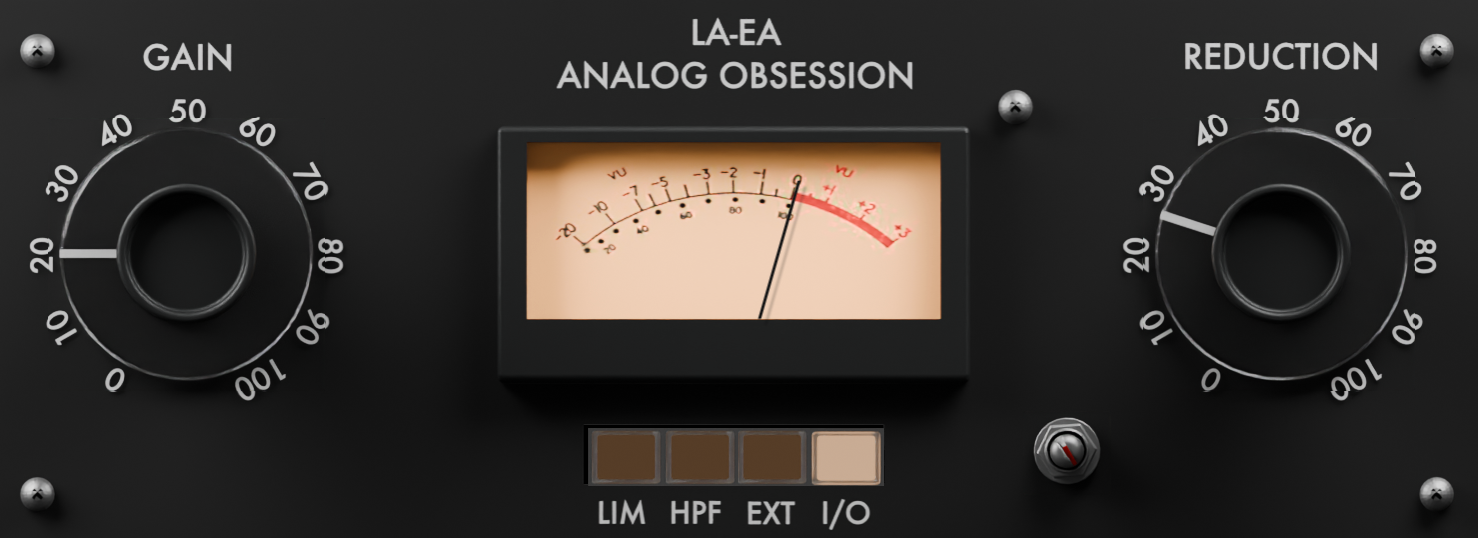
There are some freeware developers who barely need an introduction anymore, and Analog Obsession is firmly in that group. LAEA looks especially appealing because it goes after the UREI LA-3A, a compressor with a very different attitude from the softer, slower LA-2A style so many plugins keep revisiting.
That matters because the LA-3A has long been associated with a firmer, more forward sound. It is the kind of compression people often reach for when they want drums, guitars, or punchier vocals to stay controlled without losing edge.
The plugin itself keeps that hardware simplicity intact. You get Gain and Reduction as the main controls, plus a few practical extras like Limiter mode, sidechain HPF, external sidechain, and a resizable interface.
I also think the timing helps this release. Free LA-2A-inspired plugins are everywhere, but a free LA-3A-style compressor feels a bit rarer, which makes LAEA easier to get excited about.
LAEA comes in AU, VST3, and AAX formats for macOS and Windows users.
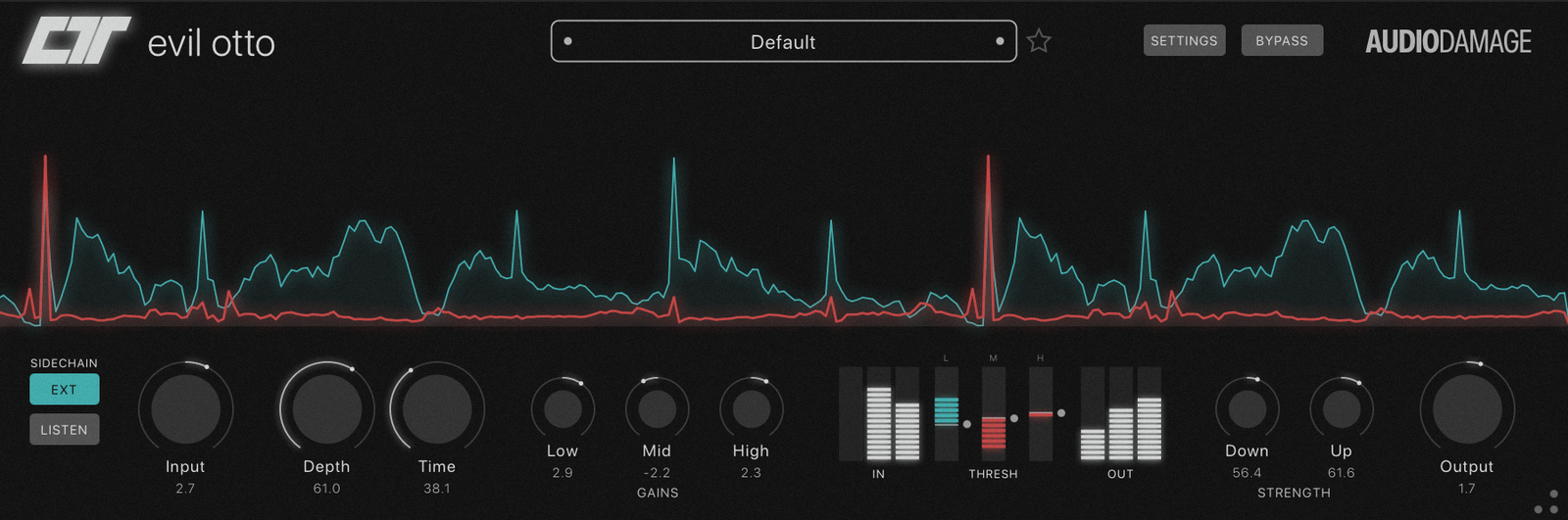
Some free plugins are nice little bonuses. Evil Otto feels more like a real event, mostly because Audio Damage stepping into OTT territory is instantly interesting for anyone making electronic music.
The concept is familiar, but the execution looks nicely thought through. This is a three-band OTT-style compressor with separate upward and downward compression in each band, so it is built for that dense, exaggerated, hyper-present sound that can make synths, drums, and effects leap out of the speakers.
What I like here is that it does not seem locked into one preset-style result. With per-band threshold and level controls, external sidechain, sidechain listen, and flexible gain staging, Evil Otto looks more adjustable than the quick-and-dirty OTT clones people usually grab.
And since the desktop version is free, it immediately becomes one of those new plugins a lot of producers will probably download just to see how far they can push it.
Evil Otto comes in VST3, AU, AAX, LV2, and CLAP formats for macOS, Windows, and Linux users.
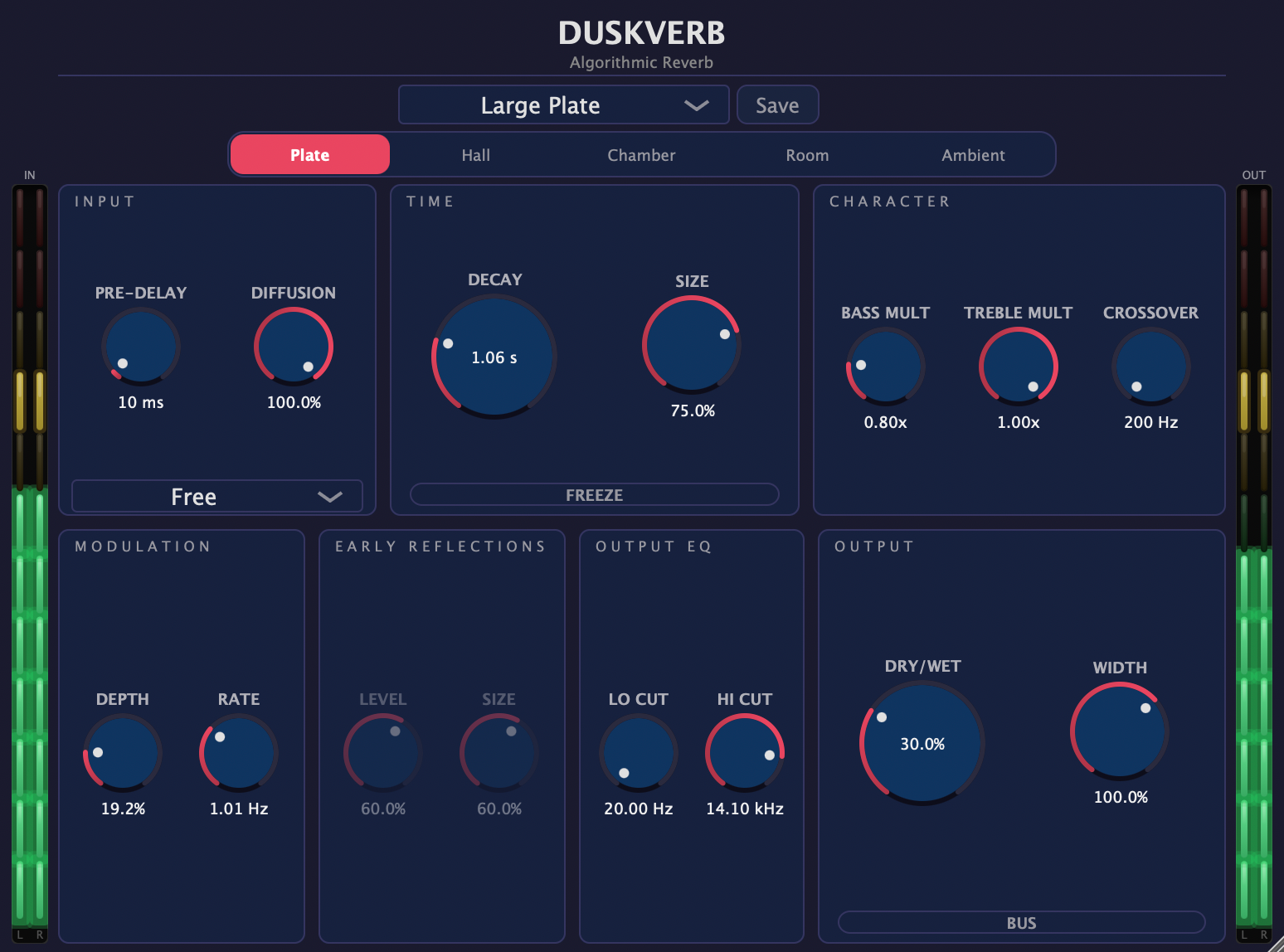
DuskVerb has the kind of launch story that could make people skeptical, but the plugin itself sounds more interesting than that label suggests. A free algorithmic reverb with this much depth is already worth a closer look, and the feature set reads more like a serious DSP project than a throwaway freebie.
Under the hood, DuskVerb uses a 16-channel feedback delay network with Dattorro-inspired diffusion, which gives it more range than a basic “one-size-fits-all” reverb. The five algorithms help too, especially since the plugin seems comfortable moving from smaller spaces into long, atmospheric tails.
There is plenty to shape once the reverb is running. Decay, Pre-Delay, Size, Diffusion, Bass/Treble Multiply, Width, filters, Bus Mode, and Freeze give it enough control for both bread-and-butter mixing and more ambient sound design.
For a free release, that is a strong combination. Clean interface, solid flexibility, and a more ambitious design than most no-cost reverbs make DuskVerb very easy to recommend.
DuskVerb comes in VST3, AU, and LV2 formats for macOS, Windows, and Linux users.
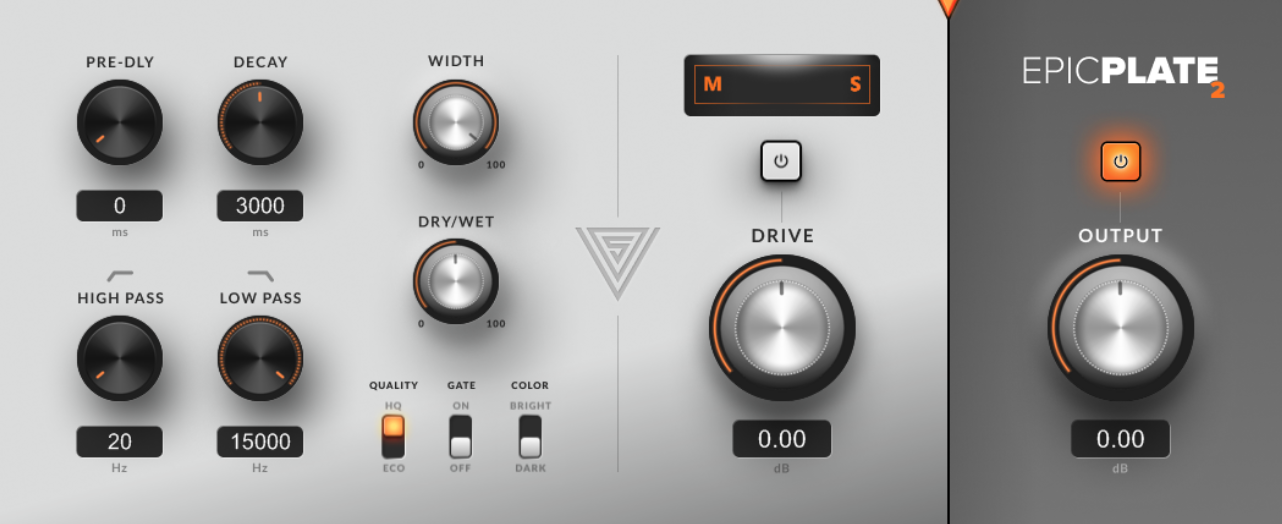
epicPLATE mkII lands in a space that never really goes out of style either: plate reverb, with all the density, sheen, and familiar vocal-friendly character that comes with it.
This update matters because it is not just a quiet refresh. The move to mkII brings a cleaner user experience, VST3 support, and higher-quality processing, which is exactly the kind of modernization long-time freeware favorites often need.
Plate reverbs have a very particular role in production. They do not usually try to mimic realistic rooms, and that is part of the charm. The quicker build-up and recognizable tone make them useful for vocals, drums, and delay-heavy textures where a more polished reverb shape can sit beautifully.
For a free plugin, this one has pedigree on its side. If someone wants a classic reverb flavor from a developer with a loyal following, epicPLATE mkII looks like a very safe bet for DAWs like FL Studio and Ableton.
epicPLATE mkII is available in VST and VST3 formats for Windows users.
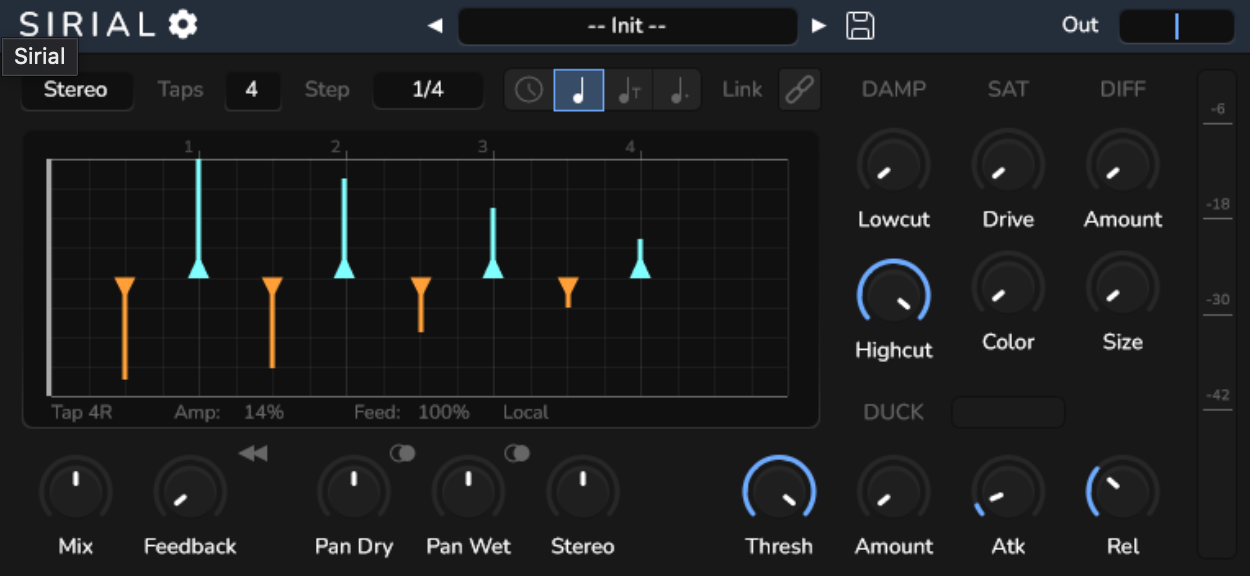
Sirial goes after a very specific kind of delay job: rhythm first, echoes second. Instead of giving you a few fixed repeats and calling it a day, it is built to let each tap behave differently, which makes the plugin much more interesting for patterns, motion, and syncopation.
The clever part is the structure. Sirial uses serial delay lines rather than a standard multi-tap setup, so each repeat can carry its own amplitude and feedback while still keeping some of the more natural decay and tone you would expect from a traditional delay.
That makes the plugin easier to imagine in real production work. A tool like this is not only for obvious delay throws, but also for grooves, bouncing rhythmic textures, and more intricate movement that can make static parts feel alive.
And since it is free and open source, it becomes even more appealing. For producers who enjoy shaping delays into part of the arrangement rather than leaving them in the background, Sirial looks like a very strong free release.
Sirial comes in VST3, AU, and LV2 formats for macOS, Windows, and Linux users.
Last Words
What I like about this batch of new plugins in March 2026 is that it does not lean in just one direction. There are big-brand releases chasing better workflow, smaller tools focused on one job, and a handful of free plugins that look far more serious than “free” usually suggests.
Not every new release deserves space, but these are the ones that seem worth keeping on the radar. Either in FL Studio, Logic, Ableton or ProTools, these new plugins might enrich your workflow. Some look practical, some look strange, and a few could easily end up being the kind of plugins people keep mentioning months from now.

Berk is a multi-instrumentalist musician from Istanbul, Turkey. He has been playing guitar, handpan, and percussion for over ten years, developing a sound that blends melodic sensitivity with rhythmic depth.
He began his musical journey as a teenager, learning guitar and performing in several bands. In 2016, he discovered the handpan, an instrument that immediately resonated with him on a deeper level and gradually became central to his artistic identity.
Since then, he has performed in streets, festivals, bars, and concert venues across different countries, connecting with diverse audiences through both intimate and large-scale performances.
Alongside his live work, Berk is deeply involved in studio production. He works from his home studio, where he composes, records, and produces his own music. His studio serves as a creative space for layering handpan, guitar, and percussion with modern production techniques, allowing him to shape fully realized, atmospheric compositions from start to finish.
His music explores a wide range of genres and textures, combining organic acoustic instruments with detailed studio production to create immersive and expressive soundscapes.