
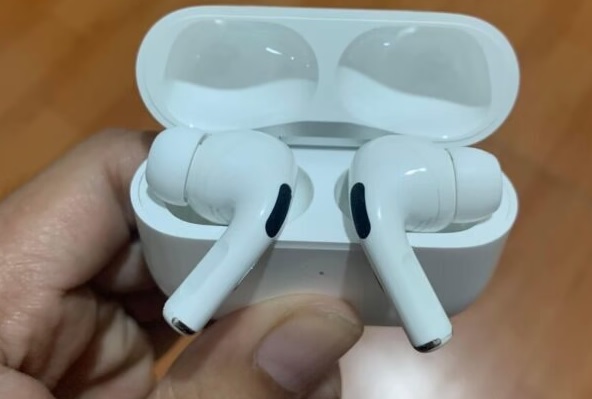
AirPods are Apple’s popular wireless earbuds that connect to your devices via Bluetooth.
They offer features such as noise cancellation, voice control, and hands-free access to Siri, all in a compact, secure design. With a charging case that provides multiple charges and a tap-based control system, AirPods are a convenient and stylish choice for a premium audio experience.
If you’re a fan of AirPods, you may have faced a situation where either the left or the right earbud stopped working. This can be a frustrating experience, but don’t worry; some simple solutions can help you get your AirPods back up and running in no time.
Why is only one of my AirPods working?
- AirPods get wet or dusty during use.
Dust and debris can accumulate in the speaker grille of your AirPods, which can cause sound issues. And usually, the level of dirt on the device on both sides of the headset will be uneven, leading to your AirPods being damaged first on one side, resulting in inaudibility, or the signals are also timid.
To clean your AirPods, disconnect your AirPods from any device they are connected to. Then, Wipe the outside of your AirPods and the charging case with a dry, lint-free cloth. If there is any dirt or debris in the speaker grille, use a dry cotton swab to gently clean it. Do not insert the cotton swab too deep into the grille.
For stubborn dirt or stains, you can dampen a cotton swab with a small amount of rubbing alcohol and use it to clean the grille. Remember do not use water, solvents, or abrasive materials to clean your AirPods or the charging case. Finally, allow your AirPods to air dry completely before using them.
You can refer to how to clean AirPods in more detail here!
- AirPods have an incorrect installation error during connection to a transmitter.
During use, we accidentally have incorrect settings on signaling devices such as iPhones and iPad. Now, users often mistakenly think that AirPods have a problem, but that’s not the case. We can easily reset these settings from signal generators.
- Error in the software of Airpods.
Over time using AirPods will encounter software errors. These damages can be easily remedied by resetting them. If your AirPods have not experienced errors or injury, such as loss of sound on one side, users should also regularly reset them.
It also helps your AirPods have smoother connections during use and can completely overcome the AirPods error that only one side can be heard if it is due to software influences.
- Signal error on iPhone, iPad.
Sometimes connecting to AirPods regularly with devices such as iPhones and iPad will also lead to software problems at the iPhone and iPad signal generator… At this point, we often confuse the AirPods with malfunctions.
Take your time repairing your AirPods immediately, and try connecting to another AirPods device; if they also experience the same problem, your iPhone or iPad is likely having trouble, not the Airpods. Usually, we can fix it by turning off the power and restarting these devices.
- Charge your AirPods.
Each side of the AirPods headset will have a separate battery life, the AirPods error that only works on one side may stem from the reason that 1 of the 2 headsets is about or running out of battery, causing it to be turned off. So you need to check if AirPods are charged, in 3 ways:
First way: Check AirPods battery on iPhone screen

Make sure your iPhone has Bluetooth turned on, then open the lid of the AirPods charging case and bring it close to your iPhone. Now on the phone screen will display a connection option, click Connect to AirPods. Once the connection is complete, the battery status of the headset and the charging case will be displayed on the iPhone screen as a percentage.
Second way: Check AirPods Battery on iPhone Home Screen Widget.
On iOS 14 or later, you can use the Battery widget (widget) to see your AirPods battery percentage. Just long press on Homescreen > Click + sign > Find Battery > Add widget > Tap Done.
Now, you can completely determine the battery of AirPods at all times when applying this method without accessing anywhere.
Third way: Check AirPods battery when not connected to any device.
If you don’t connect your AirPods to your iPhone, you can still check the relative battery life based on the headset’s light color. You can check through the status light on the AirPods charging case. The status light will be on the front of the case for the wireless charging case, and in between the 2 earbuds inside the case for the wired charging case.
When you put the headset inside and open the charging box cover, the light will show the battery status of the headset, and vice versa when you open the charging case cover without the headset, the light will show the battery status of the charging case. The status light will show up in two colors:
Green LED: The battery of the AirPods or the charging case is more than 50%.
Yellow LED: The battery of the AirPods or the charging case is less than 50%.

If it is true that the AirPods have run out of battery, you need to immediately charge it. If the problem persists, you can only hear the sound on one side of the AirPods, try the next method!
- Disconnect and reconnect AirPods to iPhone.
One cause that is considered the main factor causing errors on AirPods is a poor Bluetooth connection. In this case, simply disconnect and reconnect the AirPods to the device. Disconnect quickly in 2 ways:
First way: Turn off Bluetooth on iPhone, wait a bit, and then open it again > Connect to AirPods again.
Second way: You can access Settings > Bluetooth > tap “i” icon > Select Disconnect > Proceed to reconnect with AirPods.
- Adjust the Stereo Balance on your iPhone.
You may not know this, on Apple devices like iPhone, iPad, MacBook there is a stereo equalizer setting. You can customize the sound left or right. Thus, if the AirPods headset can only hear one side, it is most likely because you have accidentally adjusted this mode. The steps to fix this problem are as follows:
Step 1: Go to Settings > select Accessibility > Audio/Visual.
Step 2: In the Balance bar, ensure it is balanced at a level between L and R. This affects the volume balance on both sides of the headset. If it deviates, one side will have a louder volume than the other.

- Reset Your AirPods.
First, try listening to a piece of music on your device with a different set of headphones. If you see that the other headset still only plays sound on one side, it is very likely that your device is faulty. So, resetting your AirPods can help resolve any software issues causing the problem. Here are the steps to reset AirPods:
Step 1: Go to Settings > Bluetooth > Click on the “i” icon > Select Forget device > Click Forget device again to confirm.
Step 2: Proceed to place both AirPods in your charging case. Close the lid, wait 30 seconds and then open it.
Step 3: Hold down the settings button (behind AirPods) for a few seconds until the white LED flashes > Reconnect to iPhone by close and open the AirPods cover.
- Contact Apple Support or Take it to a reputable repair center.
In case you have tried all of the above and one side of the AirPods still cannot work, you should bring your AirPods to a reputable service center to be checked and repaired. Also, it’s best to contact Apple Support for further assistance. They may be able to diagnose the issue and offer a solution.
Why did my Left or Right AirPod that stopped working?
One side of the headset is damaged, resulting in an affected music experience. There are many different causes of broken headphones, and you need to determine the cause to come up with a way to fix the headset that cannot hear on one side. Among them, the main causes commonly encountered include:
- The headset is not compatible with the device.
Check if your headset is compatible with your device and phone operating system. For example, if you use an iPhone, the device must run at least iOS 7 to support Bluetooth Smart Ready. If you’re using Android, make sure it’s running at least on Android 4.3.
- AirPod hardware is damaged.
Physical impacts on AirPods are also the leading causes of AirPods errors that can only be heard on one side. Accidental substantial impacts during use can break the internal connections of Airpods.
Do not try to repair or affect your AirPods; take them to professional repair centers. They will advise and fix them most professionally.
How do I fix one AirPod that’s not working with my Android phone?
If you’re an AirPods user who just switched to an Android smartphone, you noticed that one of your AirPods isn’t operating properly. This might be annoying, but there are numerous measures you can take to resolve the problem. If one of your AirPods isn’t working with your Android device, try these steps:
- Check the battery life of your AirPod by checking the battery status in the charging case or on the connected device.
- Ensure both AirPods are in their charging case and the lid is closed properly.
- Clean the AirPod and ensure no debris blocking the speaker mesh.
- Try resetting your AirPods: put both AirPods back in the charging case, hold down the button on the back until the light flashes white, then keep the lid open and wait for the light to turn off.
- Check if the AirPods are connected to another device and disconnect them.
- Turn off Bluetooth on your Android device, then turn it back on.
- Connect your AirPods to your Android device again.
If you need help with these steps, you may need to contact Apple support for further assistance.
Why is my left AirPod not working when talking on my phone?
Your left AirPods not working when talking on the phone can also be due to the same reasons above. Some possible causes include the following:
- The battery is low on the left AirPod, and it may not work correctly.
- Connection problems. If the AirPods are not connecting properly to your phone, they may not work.
- Dirty or clogged AirPod. Dirt, earwax, or other debris can block the speaker grille of the AirPod and cause audio issues.
- Software issues. If there is a problem with the software on your phone or AirPods, it can cause the left AirPod not to work.
Does Apple replace a single AirPod if it breaks?
Yes, Apple will repair your broken AirPods headphones as long as they are still under warranty and you utilize them by the instructions. You have two warranty options if your Apple device fails to function correctly. The first is Apple’s standard one-year limited warranty.
Please remember that the standard AppleCare warranty only covers defective hardware and quality problems. You can still use the One-Year guarantee if you purchased the items from a third-party vendor as long as the issue is due to hardware flaws or craft. The firm can fix the goods for free, replace the damaged headphones with new ones, or refund your money.
Conclusion
In conclusion, if your AirPods have stopped working, don’t panic. Try the above steps, and you can fix the issue without needing to replace them. And, as always, make sure to follow the proper care and maintenance guidelines to ensure the longevity of your AirPods.

Integraudio is a audio-focused blog that explores everything from VST plugins and studio hardware to practical guides, tips, and tutorials on Spotify, AirPods, podcasting, Discord, and beyond.