
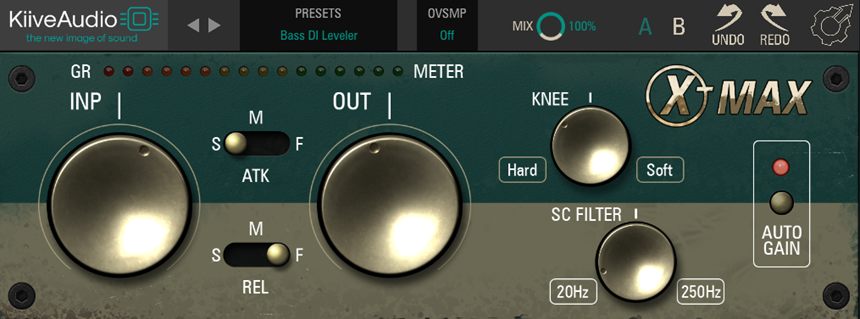


Kiive Audio XTMax is primarily a compressor for drums to add more edginess and punch to them. Like any compressor, it has an attack, release, knee, input, output gain parameter, and a sidechain filter. A toggle button on each parameter lets you set the attack and release to three modes: Slow, Fast, and Medium speed.
Similarly, you get knobs for output and input gain with values ranging between +10 and -10 dB. The two knobs have an inverse relationship, so when you turn up the input gain, the output level reduces. On the other hand, the Output gain knob doesn’t link with the input gain, and you can set it freely.
A meter to monitor the gain reduction also shows you how hot (red) the signal is. Moving on, you can set the knee knob between Hard (-10) and Soft (+10) values. The sidechain high-pass filter goes between 20 and 250 Hz and allows you to prevent low frequencies from getting compressed. It’s a great feature, as low frequencies may cause unwanted artifacts in the higher frequencies when compressed. And they might require a different dynamic treatment.
Further, you also get an Auto Gain switch, which weirdly didn’t work on the version I installed. I haven’t verified if that is the case for all copies of the plugin. Finally, you get a mix knob (between 0 and 100%) for the wet/dry mix, an A/B functionality for comparing two different settings of the compressor, oversampling up to 16x, and Undo/Redo buttons.
Now, let’s talk about the tone and application of the plugin. I used this plugin on drums and electric guitars. I wouldn’t say that my first impression when I applied XTMax on a kick drum with the default settings was particularly good. But that’s to be expected. After a little tweaking around to achieve the flavor I wanted for the kick, I loved what I heard so much that I ended up saving a preset for it! It made the kick brighter and punchier and added a slight top end to it. Please note that if used incorrectly, there’s a risk of your kick getting too thin with this plugin.
Tip: Set the Attack parameter to the Fast setting when applying the plugin on the kick, or else your kick may lose its weight and fundamental energy.
Then I tried using it on the entire drum bus, and I liked the overall flavor and thump it added. The drums sounded more exciting. XTMax made the claps and snare sound crisper and added a great mid-frequency character.
Applying XTMax to electric guitars introduced a notable enhancement, making them sound fuller and crisper, amplifying their presence within the mix. However, the low-end treatment of the electric guitars didn’t align with what I desired. Thankfully, the plugin’s sidechain high-pass filter came in handy. Utilizing this feature, I effectively bypassed the lower frequencies from being heavily compressed.
This selective treatment ensured that the electric guitars’ low end remained intact while benefiting from the plugin’s other tonal improvements.
My feedback to Kiive Audio would be to make the toggle switches more intuitive and work with a click. Instead, you must drag them from one setting to the next. And, of course, as I mentioned above, the Auto Gain switch wasn’t working for me.
As the developer of XTMax says: “Make your drums explode with this renowned, gritty compressor, and make use of its three release modes to add edge and punch to any mix.” The plugin lives up to its promise and is great for making your drums more exciting. It adds edge and grittiness while ensuring these characteristics are well-controlled and don’t go overboard.
Overall, XTMax has a great personality but also preserves the fundamental tonality of your sounds when used in the right proportion and with the right settings. Hence, the tonal quality is a perfect match for genres like metal, punk, hip-hop, trap, and EDM, but you can also use it for other genres requiring subtler dynamic effects.
Also, the 16x oversampling capability of the XTMax plugin is quite impressive. So, compress away without fear; XTMax can effectively avoid any possible anti-aliasing caused by saturated compression.
Regarding compatibility, XTMax is versatile, supporting Mac systems with 64-bit architecture, including M1 native optimization for VST3, AU, and AAX formats. It operates on Mac OS X 10.7 and above (recommended 10.14+). For Windows users, it’s available in 64-bit for VST3 and AAX, compatible with Windows 7 and onwards.
Lastly, the plugin demands modest minimum system specs: a 1 GHz Intel Dual Core Processor (or AMD equivalent), 4 GB RAM, and a screen resolution of 1024 x 768 or higher.
Check out the Kiive Audio XTMax manual here.

The Integraudio Editorial Team consists of experienced music producers, audio engineers, and plugin enthusiasts dedicated to providing in-depth reviews and guides for music production software.