
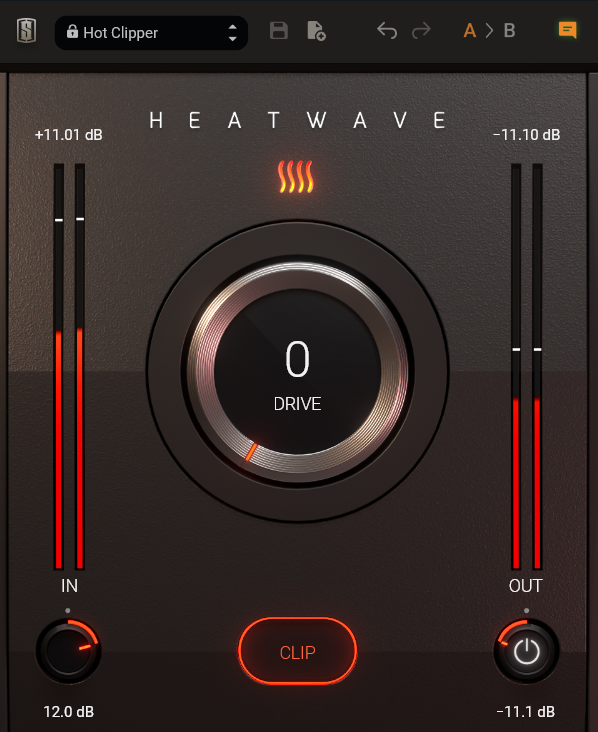

Slate Digital has a notable reputation for manufacturing some of the most innovative and premium plugins. The company has launched a free saturator and clipper in a single plugin called ‘Heatwave.’
With just a single knob, you can add more aggressiveness, fierceness, and character to your sounds. From enhancing the sharpness of your drums to making your instruments bigger and brighter, this plugin brings out the best in your sounds.
The saturation seems to be working primarily on the mid and high-mid-frequency sounds. Hence, the plugin does its magic on sounds with fundamentals in the low and low mid-frequency range. For example, it sounds great on synth bass, bass guitar, 8o8s, and almost all bass sounds, making them grittier and punchier.
I would also use it on snare, toms, and percussions. Similarly, it could really enhance your horns section, vocals, and synths, with fundamentals lying in the 200-800 Hz frequency range.
The plugin’s algorithm beautifully enhances the harmonics, making things clearer so they can cut through more.
The Heatwave interface is streamlined yet inspiring, featuring a solitary control to “add heat” to the sound effortlessly. All the enchantment happens behind the scenes, eliminating the need for technical know-how to adeptly utilize the plugin.
Through a sophisticated combination of transient shaping, saturation, compression, and EQ, Heatwave not only preserves but can even accentuate transients.
Tip: Use the plugin controls subtly for a more musical saturation.
Now, let’s talk about its controls. The main control is the ‘Drive’ knob which controls the amount of saturation. You can also control the input and output gain and an output switch that bypasses the plugin. Next, you get the ‘Clip’ button, which, when engaged, proves beneficial in managing unruly transients or crafting a more forceful or distorted auditory output.
For more controlled transients and dynamic processing, you must use it in combination with a compressor. Kiiv Auio XTMax is a gritty and aggressive compressor that I had the chance to review. You can try this plugin, too.
Lastly, Heatwave gives you access to an ‘A/B’ button to monitor and compare different settings.
Tip: Use the ‘Input’ and ‘Drive’ knobs in combination to tailor the final texture of your distortion.
Now, coming to the application side of things. If you aim to enhance the punchiness of your drums, my recommendation is to focus on the ‘Input’ and ‘Clip’ controls within the plugin. Specifically, activate the ‘Clip’ mode and gradually elevate the input level until the desired sound is achieved.
It’s essential to keep an eye on the ‘Output’ knob as well, ensuring that you match the gain appropriately to avoid being misled by loudness variations. If you’re looking to infuse more color or character into the sound, feel free to experiment with the ‘Drive’ knob.
When working with melodic sounds, activating the ‘Drive’ knob and enriching the harmonics should prove ample. Nevertheless, exercise caution with saturation effects, as it’s easy to overdo it. Stay mindful of striking the right balance to avoid excess saturation.
Another aspect I liked about the plugin is its gentle and subtle low-end and low-mid. That is especially helpful with male or baritone vocals, providing a clear and scorching tone. The plugin also comes with eight factory presets that give you a good starting point.
To conclude, Heatwave is an easy-to-use, quick, and free harmonic processor that adds clarity and more presence to your sounds. Available in 64-bit VST2, VST3, AAX, and AU plugin formats, this Slate Digital plugin is compatible with macOS 10.15 or later (macOS 11 or later rec.) and Windows 10/11 operating systems and requires Intel/Apple Silicon/AMD Processor, with a minimum of 4GB of RAM.
Download the Slate Digital Heatwave here

The Integraudio Editorial Team consists of experienced music producers, audio engineers, and plugin enthusiasts dedicated to providing in-depth reviews and guides for music production software.