

The quick-paced digital world expects rapid access to information and entertainment, so delays and loading problems can be annoying.
Slow loading speeds seen when attempting to access Apple Music are one such incident that baffles Apple consumers. Millions of music lovers worldwide rely on Apple Music as a significant participant in the music streaming sector.
This article investigates the causes of Apple Music’s sluggish loading times and considers potential remedies to restore customers’ smooth listening experience.
Here are the 8 reasons why Apple Music takes so long to load:
- 1. Network Congestion
- 2. Server Overload
- 3. Device Performance
- 4. iCloud Library Of Music
- 5. App Updates and Bugs
- 6. Cache and Storage Issues
- 7. Content Synchronization
- 8. Third-Party Integrations
How To Fix it
Here are some solutions to Apple Music taking so long to load:
1. Reducing Needless Network Queries
Apple Music may invest in enhancing its server architecture and data pipelines to alleviate network congestion concerns. Advanced load-balancing strategies and the use of Content Delivery Networks (CDNs) in critical areas can efficiently disperse traffic and lessen the effects of congestion during peak hours.
Additionally, in places with low network coverage, improving the app’s data collection procedure and reducing needless network queries can assist in reducing loading delays.
2. Use Cloud-Based Infrastructure
Apple Music should regularly increase the size of its server capacity to handle the sheer volume of user requests. Dynamic scaling and cloud-based infrastructure can enable servers to dynamically alter their resource allocation based on user traffic, guaranteeing smoother service during peak periods.
Additionally, we can decrease processing overhead and accelerate consumer response times by enhancing server-side algorithms and caching systems.

3. Shift On the Latest Device
Apple Music might apply performance optimization strategies to enhance the app’s performance on older or less powerful devices. It can entail removing resource-intensive animations and images, improving code efficiency, and allowing users to choose the visual complexity of the program.
Users with various device characteristics can enjoy quicker loading times and more streamlined music streaming by making the app more straightforward and effective.
4. Speed Up Your Internet Connection
You can do several things to speed up the loading time of Apple Music and reduce the effect of the iCloud Music Library on the loading process. The first thing users can do to improve their music library is to get rid of copies and organize their tracks well. It reduces iCloud data sharing, speeding up syncing.
The second thing users can do is speed up their internet connection. If their connection is faster, data will move between their devices and the iCloud computers faster. You can do it using a more stable WiFi network or moving to a more excellent bandwidth plan from your service provider.

5. Report Bug to Apple Support
To lessen the introduction of problems or incompatibilities, Apple Music should do extensive testing and quality assurance checks before releasing app updates. Putting in place an effective feedback and bug report system can help find and fix any unforeseen problems as soon as possible.
Bug fixes and regular maintenance will be applied promptly, improving the user experience and speeding up loading times. Additionally, the developers should prioritize bug repairs in upcoming releases to address any residual problems and guarantee seamless operation for all users.
Apple Music can spot new issues and proactively fix them to maintain a high level of service by constantly tracking the app’s functionality and user input. Additionally, keeping a committed eye on bug fixes and quality enhancements may guarantee the app’s reliability and effectiveness over time.
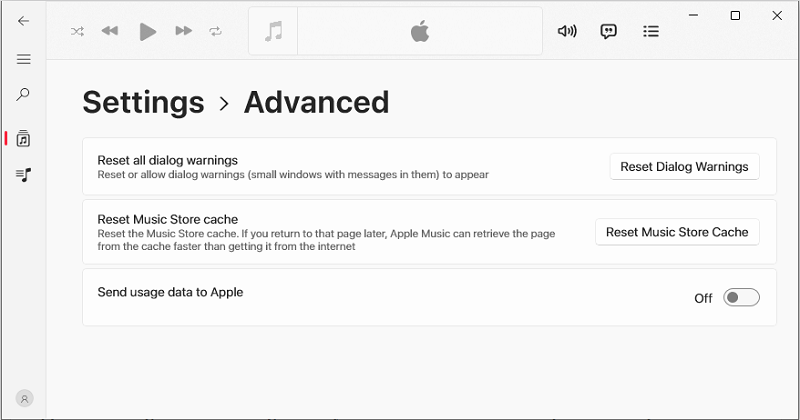
6. Remove Cache
By implementing good cache management, Apple Music can balance quicker download times with efficient storage use. Intelligent cache eviction procedures can eliminate extraneous data and ensure that cached content remains available. Users may also tailor their app experience based on their storage choices by giving them control over the cache settings.
Apple Music periodically minimizes cache utilization by deleting material that is no longer relevant or isn’t used as often, keeping the cache current and practical. Algorithms prioritizing crucial data can do this by automatically removing non-critical data when storage capacity runs low.
7. Update Background Synchronization Features
Apple Music might include background synchronization features that prioritize important updates first to increase the effectiveness of content synchronization. The software may send just the changes made to the user’s library using differential syncing techniques, which shortens sync times.
Configuring a customer’s devices to sync even when not in use or connected to WiFi can improve their overall experience. Configuring a customer’s devices to sync even when not in use or connected to WiFi can improve their overall experience.
8. Regular Upgrades
Apple Music should constantly work with other developers to optimize synergies and improve interaction between the app and other services. Regular upgrades and partner interaction can resolve compatibility issues quickly for users of connected devices or services.
Apple Music can remain ahead of evolving technologies and offer its broad user base a smoother and more feature-rich music streaming experience by building strong ties with outside developers.
Conclusion
Given the requirement for rapid responses in the digital age, Apple Music’s large customer base could also find the lengthy loading times annoying. Several track listeners depend on Apple Music, a known music streaming service, for their listening pleasure.
Some reasons for these loading delays include network traffic jams, server overload, performance restrictions at the tool, app updates and bugs, cache and storage issues, and app updates.
Apple Music may utilize many tactics to deal with such problems. Utilizing content delivery networks and optimizing server configuration can reduce network congestion. Dynamic adaptability and a cloud-based infrastructure can handle numerous user requests more successfully.
In addition, ongoing and reliable user experiences depend on active, good enhancements and risky software fixes. Continuous app upgrades and collaboration with outside developers will ensure flawless compatibility with various services.

Integraudio is a audio-focused blog that explores everything from VST plugins and studio hardware to practical guides, tips, and tutorials on Spotify, AirPods, podcasting, Discord, and beyond.