
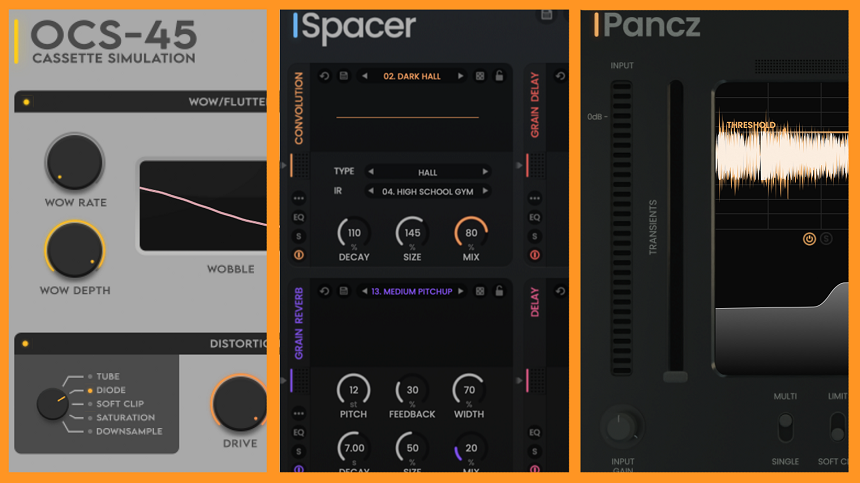
Spectral Plugins has just announced that it is ceasing operations and making three of its premium plugins available for free.
I always hate to see a good plugin company go out of business for whatever reason. Spectral Plugins has been putting some good plugins into the music production scene. Still, after a few years of struggling to have a bigger space in the music industry, last week, they made “the difficult decision to cease operations.”
While I am sad to see them leave business, there is some good news. The company decided to make three of its premium plugins—Spacer, Pancz, and OCS-46—worth more than $200 in total—free for download and use.
Spectral Spacer

The Spectral Saver, my top pick among these three plugins, stands out for its unique blend of power and versatility. It’s a multi-effects plugin that brings together delay, reverb, and modulation in a way that’s truly one-of-a-kind.
Spacer offers a unique combination of two delay modules, including algorithmic and granular, three reverb modules, including algorithmic, convolution, and granular, and a final module to add modulation effects like chorus saturation and stereo width.
I love how beautiful and spacy mixes come out with this plugin. As the company says, it is meant for “dreamlike overtones, shifting soundscapes or contemporary ambiances.”
The Spectral Saver plugin is a treasure trove of versatility, offering a myriad of sounds in one package. Each module comes with its own unique set of parameters, and the ability to combine and reorder the six modules allows for endless experimentation and creativity. I think it is this versatility that sets the Spectral Saver apart, promising a unique and exciting journey of sound exploration.
Personally, I would say it is best to put the Convolution Reverb in the first place. Then, I tried the Grain Delay in the second place and Algorithmic Reverb in the third. These three were enough for me to create long-lasting, wide, and spacy tones for guitar, handpan, and piano. I also used the Chorus-Utilities module in the last place to boost some frequencies.
But if you want even more, you can use the Grain Reverb in fourth place and the Alghorhytmic Delay in fifth. I found this order works pretty well, but feel free to experiment with different orders and the randomize button, which creates random orders and presets.
In my opinion, the modules also work pretty well on their own. The Grain Reverb sounds especially good, but I would recommend going with the presets, as they are quite accurate and sound great.
The Spectral Saver’s interface is designed with user-friendliness in mind. It strikes the perfect balance, offering just the right amount of parameters for each module. This ensures you have enough control without feeling overwhelmed. I also like that each module comes with its own EQ to shape your sound.
You can use this plugin with any hardware or software instrument thanks to its general and modular versatility. I tried them with different instruments, and I could find a cool effect with some experimentation.
Spectral Spacer comes in AU, VST, and VST3 formats for Mac and Windows.
Download Spectral Spacer here.
Pancz

The second plugin, Pancz, is a pretty cool multi-band transient shaper and clipper that allows you to control the dynamics of your sound, making your kick and snare as impactful as possible.
I think this is a pretty interesting plugin. It offers a complete set of dynamic processing tools and gives you control over a combination of transient shaping, saturation, compression, and equalization.
What I find cool and exciting about it is its great user interface. It shows your audio’s impact visually and allows you to shape it. The graphic has a threshold bar and three band points, which you can enable, disable, solo, or do whatever you want. You can control each band with the transient and tail sliders on the sides.
The transient slide acts as the attack, and the tail slide acts as decay. Increasing the transient will give your sound more punch. With the multi-band mode, you can divide the sound into low, mid, and high bands to adjust the hi-hat, kick, and snare separately.
The plugin offers plenty of control with a multi-single mode switch, soft clip-limiter switch, New York City compression, mix, presence, and air knobs.
I used the limiter to get a quick pumping sound, while the soft clip sounded good on my drum loop. But I had to push it hard to make a difference.
The NYC parallel compressor controls the threshold and ratio and is pretty powerful. I turned the knob just a little bit, and it made a huge difference, squashing the sound. But, I recommend a more-equipped compressor for this task.
Presence and Air knobs are for specific frequency boosts. Presence controls the 4-6kHz range and Air, 10kHz range. When I turned on the knobs, there was a good spark on the cymbals.
I think Pancz is a great drum plugin. It is a valuable tool for controlling the dynamics of your drum parts separately. I appreciate its enhancing impact on kick and snare. When you clip the low end of the drums, you end up with a low-mid mud, making the kick drum sound less pleasant. But this plugin directly targets the initial punch and transient, making it sound more snappy.
Spectral PancZ is available in AU, VST, and VST3 formats for Mac and Windows.
Check out the PancZ manual here.
OCS-45

OCS-46 stands out as a uniquely comprehensive tape cassette lo-fi saturation and coloration plugin. It offers a range of cool noise and distortion modes, catering specifically to the tastes of lo-fi and vintage sound enthusiasts.
Whether you’re aiming for a sound reminiscent of a cassette deck or a 4-track, OCS-45 is your versatile tool. It achieves that authentic sound with its Wow and Flutter, Noise, Distortion, and Dropout controls and offers four distinct types of cassette modes.
So, I will start with the Wow and Flutter controls, which are typical for any cassette recording. They control the pitch and tonal fluctuations. The next parameter is the Noise, which emulates the Noise you often have in cassette recordings. There are four different noise modes with some nuances.
One feature that really resonated with me is the D/O switch. It’s a small detail, but it creates random dropouts in the noise signal, adding a touch of realism and character to the sound. I found myself transported back to the days when I was captivated by the unique charm of damaged tape recordings.
However, my favorite setting in OCS-45 is the Distortion Module. I remember my 4-Tracks player sounded quite distorted when it was too hot. This plugin successfully emulates that, and there are five different distortion types to choose from.
As the name suggests, the Tube mode simulates tube amps. The Diode mode is the most aggressive one, with a highly distorted sound. The Soft Clip makes the sound warm and pleasant by rounding up the waveform’s endings. The Saturation mode emphasizes the harmonics. Finally, the Downsample offers a bright ringing tone by reducing the sample rate.
Finally, four different cassette types provide different quality sounds. The first is the cheapest quality with the most degraded sound, while the fourth has the highest quality.
I am not a big fan of this plugin as I am not that into cassette-type mixes or the Boards Of Canada kind of sound. But, for people who want to create that type of mix, I think this is a pretty valuable plugin to have in your arsenal.
Spectral OCS-45 can be downloaded in AU, VST, and VST3 formats for Mac and Windows.
Check out the OCS-45 manual here.

Berk is a multi-instrumentalist musician from Istanbul, Turkey. He has been playing guitar, handpan, and percussion for over ten years, developing a sound that blends melodic sensitivity with rhythmic depth.
He began his musical journey as a teenager, learning guitar and performing in several bands. In 2016, he discovered the handpan, an instrument that immediately resonated with him on a deeper level and gradually became central to his artistic identity.
Since then, he has performed in streets, festivals, bars, and concert venues across different countries, connecting with diverse audiences through both intimate and large-scale performances.
Alongside his live work, Berk is deeply involved in studio production. He works from his home studio, where he composes, records, and produces his own music. His studio serves as a creative space for layering handpan, guitar, and percussion with modern production techniques, allowing him to shape fully realized, atmospheric compositions from start to finish.
His music explores a wide range of genres and textures, combining organic acoustic instruments with detailed studio production to create immersive and expressive soundscapes.